Keyboard Problem (Ctrl and Shift keys don't work correctly)

nekov4ego

New member
Power User
Local time
2:33 AM
Messages
102
Location
Bulgaria, Europe
Hello everyone. Today my shift and ctrl keys stopped working correctly... it happened while I was playing and later when I tried to change the language using Alt + Shift. I checked if Sticky Keys and other similar options weren't turned on by accident, but they weren't.

And after some time spent in trying to fix the problem I opened the On-Screen Keyboard and noticed that when I use my Ctrl key, Shift is pressed automatically as well (it's just what On-Screen Keyboard says). The same thing happens when I press Shift, then the Ctrl key "presses itself". It so happens that all four (left and right shift, and left and right ctrl) keys are pressed at the same time, when I press just one of them.

Does everyone know where the problem could be from and how I can fix it... it's really annoying, I can't use any of the combinations like Ctrl + V, Ctrl + C, Ctrl + A, etc. The problem started while I was playing Assassin's Creed; I sometimes hear sounds like too-much-buttons-pressed while I play it, but I've never had this problem until today. I have no idea what it could be, I tried everything I know.

If it helps, the problem is still there while I chat or surf the web through Asus Express Gate, when the windows isn't running at all.

PS: Sorry if I used strange phrases or words, I am not a native English speaker.
 

My Computer

OS
Microsoft Windows 7 Ultimate x64 (Build 7601 SP1)
CPU
AMD Phenom II X2 555 @ X4 B55 (3.2Ghz, 2MB L2/6MB L3 Cache)
Motherboard
ASUS M4A785TD-V Evo
Memory
4GB (2x2GB) Corsair DDR3, 1333Mhz
Graphics Card(s)
ASUS ENGTX560, DirectCU, 1GD5
Sound Card
8-Channel HD Audio
Monitor(s) Displays
Philips 226CL2SB
Screen Resolution
1920x1080p
Hard Drives
500GB Seagate, SATA2, 7200rpm, 16MB/s
PSU
Corsair TX650 v2
Internet Speed
90mbps Fiber Optics
See if pressing both 'shift' keys at the same time, gets your keyboard operating correctly again.
 

My Computer

Computer type
PC/Desktop
Computer Manufacturer/Model Number
Bruce ... somewhere in his 40's
OS
Windows 7 Ultimate 32bit SP1
CPU
Intel(R) Core(TM)2 Quad CPU @ 2.40GHz, 2400 MHz
Motherboard
INTEL/D975XBX2
Memory
4 GB
Graphics Card(s)
ATI Radeon HD 2600 Pro
Monitor(s) Displays
Samsung SyncMaster 914v
Screen Resolution
1280 x 1024
Hard Drives
2/500GB each ... ST3500630AS ATA Device.
One is not connected
PSU
Rocketfish 700 W
Case
G.Skill Gigabyte Chassis
Keyboard
Standard PS/2 Keyboard
Mouse
Microsoft PS/2 Mouse
Internet Speed
DSL
Antivirus
Avira Internet Security
Browser
IE 11
Other Info
ATI HDMI Audio
See if pressing both 'shift' keys at the same time, gets your keyboard operating correctly again.

Nope, I read it somewhere and I tried it... still, when I press both shift keys, the ctrl keys press themselves. I can't press ONLY the shift keys together.
 

My Computer

OS
Microsoft Windows 7 Ultimate x64 (Build 7601 SP1)
CPU
AMD Phenom II X2 555 @ X4 B55 (3.2Ghz, 2MB L2/6MB L3 Cache)
Motherboard
ASUS M4A785TD-V Evo
Memory
4GB (2x2GB) Corsair DDR3, 1333Mhz
Graphics Card(s)
ASUS ENGTX560, DirectCU, 1GD5
Sound Card
8-Channel HD Audio
Monitor(s) Displays
Philips 226CL2SB
Screen Resolution
1920x1080p
Hard Drives
500GB Seagate, SATA2, 7200rpm, 16MB/s
PSU
Corsair TX650 v2
Internet Speed
90mbps Fiber Optics
Have you also tried pressing the shift key 5 times in a row or holding it down for about 8 seconds?
 

My Computer

Computer type
PC/Desktop
Computer Manufacturer/Model Number
Bruce ... somewhere in his 40's
OS
Windows 7 Ultimate 32bit SP1
CPU
Intel(R) Core(TM)2 Quad CPU @ 2.40GHz, 2400 MHz
Motherboard
INTEL/D975XBX2
Memory
4 GB
Graphics Card(s)
ATI Radeon HD 2600 Pro
Monitor(s) Displays
Samsung SyncMaster 914v
Screen Resolution
1280 x 1024
Hard Drives
2/500GB each ... ST3500630AS ATA Device.
One is not connected
PSU
Rocketfish 700 W
Case
G.Skill Gigabyte Chassis
Keyboard
Standard PS/2 Keyboard
Mouse
Microsoft PS/2 Mouse
Internet Speed
DSL
Antivirus
Avira Internet Security
Browser
IE 11
Other Info
ATI HDMI Audio
hello and welcome :)

now is the keyboard usb connected or ps2 connected? have you checked all the settings in keyboard settings to how you require them ? go to device manager and uninstall the keyboard driver pull the connection (usb or ps2) now reboot as machine is rebooting put the connection back in and wait for windows to install the drivers (make sure you are connected to the web in case windows need to access the internet for drivers) .
also have a look here for any help with common windows problems Microsoft fix it center>>
Microsoft Fix it Solution Center
 

My Computer

Computer Manufacturer/Model Number
packard bell IXTREME M5722
OS
Operating System : Windows 7 Home Premium Edition 6.01.7600 SP1 (x64)
CPU
Processor : Intel Core 2 Quad Q8300 @ 2500 MHz
Motherboard
Mainboard : Packard Bell (Acer EG43M )
Memory
Physical Memory :8GB Corsair4x 2GB 800MHz C5 DDR2
Graphics Card(s)
Video Card : XFX 6700 AMD
Monitor(s) Displays
Maestro 234DL - BenQ V2220 - BenQ VW2420H
Screen Resolution
Current Display :1920x1080p pixels at 60 Hz in HD LED
Hard Drives
Hard Disks : WDC (1000 GB)
Drive C: (Hard Disk) : 428 GB available on 491 GB
Drive D: (Hard Disk) : 426 GB available on 492 GB
SAMSUNG spinpoint HD103SJ 1000.2 GB
(X 2) KINGSTON SSD NOW V 30GB
PSU
XFX ProSeries 550W PSU
Case
PACKARD BELL IXTREME
Cooling
System Blower Current: 150mA Air Flow16CFM ;Akasa 90mm rear
Keyboard
Gigabyte Aivia K8100
Mouse
TRUST-Wireless Laser Mouse - Carbon edition MI-7770C
Internet Speed
TP-LINK > TL-WN951N / AV500 Gigabit Powerline Adapters
Browser
chrome dev
Other Info
EXTRA COOLING>(FAN CONTROLLER) PC Bay Cooler 3 x 40mm fans; Akasa AK-HD-BL Blue hard drive cooler 2 x 40 mm fan 4500 rpm 29.7 dBA
Bios> American Megatrends Inc.
Version : P01-A1
Date : 08/31/2009
Have you also tried pressing the shift key 5 times in a row or holding it down for about 8 seconds?

That would be the Sticky Keys' shortcut? It was working until today... now when I press Shift five times or hold it down for 8 seconds, it is like pressing/holding Ctrl key as well, and no shortcut appears.

@brianzion
The keyboard is PS/2 connected, and I have also tried re-installing the drivers, Solution Center wouldn't find a problem, it isn't an actual problem for the system, it is a problem for me. Windows wouldn't mind if Ctrl is stuck to Shift.

Is there a way to check if it is a hardware problem apart from trying another keyboard (which I am looking forward to; I'll try it as soon as I get the chance).
 

My Computer

OS
Microsoft Windows 7 Ultimate x64 (Build 7601 SP1)
CPU
AMD Phenom II X2 555 @ X4 B55 (3.2Ghz, 2MB L2/6MB L3 Cache)
Motherboard
ASUS M4A785TD-V Evo
Memory
4GB (2x2GB) Corsair DDR3, 1333Mhz
Graphics Card(s)
ASUS ENGTX560, DirectCU, 1GD5
Sound Card
8-Channel HD Audio
Monitor(s) Displays
Philips 226CL2SB
Screen Resolution
1920x1080p
Hard Drives
500GB Seagate, SATA2, 7200rpm, 16MB/s
PSU
Corsair TX650 v2
Internet Speed
90mbps Fiber Optics
tried this
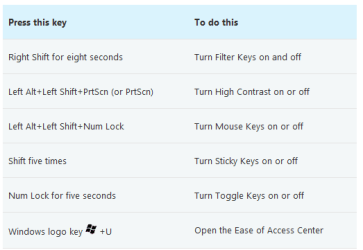
Right Shift for eight seconds to Turn Filter Keys on and off ????
 

My Computer

Computer Manufacturer/Model Number
packard bell IXTREME M5722
OS
Operating System : Windows 7 Home Premium Edition 6.01.7600 SP1 (x64)
CPU
Processor : Intel Core 2 Quad Q8300 @ 2500 MHz
Motherboard
Mainboard : Packard Bell (Acer EG43M )
Memory
Physical Memory :8GB Corsair4x 2GB 800MHz C5 DDR2
Graphics Card(s)
Video Card : XFX 6700 AMD
Monitor(s) Displays
Maestro 234DL - BenQ V2220 - BenQ VW2420H
Screen Resolution
Current Display :1920x1080p pixels at 60 Hz in HD LED
Hard Drives
Hard Disks : WDC (1000 GB)
Drive C: (Hard Disk) : 428 GB available on 491 GB
Drive D: (Hard Disk) : 426 GB available on 492 GB
SAMSUNG spinpoint HD103SJ 1000.2 GB
(X 2) KINGSTON SSD NOW V 30GB
PSU
XFX ProSeries 550W PSU
Case
PACKARD BELL IXTREME
Cooling
System Blower Current: 150mA Air Flow16CFM ;Akasa 90mm rear
Keyboard
Gigabyte Aivia K8100
Mouse
TRUST-Wireless Laser Mouse - Carbon edition MI-7770C
Internet Speed
TP-LINK > TL-WN951N / AV500 Gigabit Powerline Adapters
Browser
chrome dev
Other Info
EXTRA COOLING>(FAN CONTROLLER) PC Bay Cooler 3 x 40mm fans; Akasa AK-HD-BL Blue hard drive cooler 2 x 40 mm fan 4500 rpm 29.7 dBA
Bios> American Megatrends Inc.
Version : P01-A1
Date : 08/31/2009
does this help??
 

Attachments

  • brys keys.PNG
    brys keys.PNG
    14.2 KB · Views: 552

My Computer

Computer Manufacturer/Model Number
packard bell IXTREME M5722
OS
Operating System : Windows 7 Home Premium Edition 6.01.7600 SP1 (x64)
CPU
Processor : Intel Core 2 Quad Q8300 @ 2500 MHz
Motherboard
Mainboard : Packard Bell (Acer EG43M )
Memory
Physical Memory :8GB Corsair4x 2GB 800MHz C5 DDR2
Graphics Card(s)
Video Card : XFX 6700 AMD
Monitor(s) Displays
Maestro 234DL - BenQ V2220 - BenQ VW2420H
Screen Resolution
Current Display :1920x1080p pixels at 60 Hz in HD LED
Hard Drives
Hard Disks : WDC (1000 GB)
Drive C: (Hard Disk) : 428 GB available on 491 GB
Drive D: (Hard Disk) : 426 GB available on 492 GB
SAMSUNG spinpoint HD103SJ 1000.2 GB
(X 2) KINGSTON SSD NOW V 30GB
PSU
XFX ProSeries 550W PSU
Case
PACKARD BELL IXTREME
Cooling
System Blower Current: 150mA Air Flow16CFM ;Akasa 90mm rear
Keyboard
Gigabyte Aivia K8100
Mouse
TRUST-Wireless Laser Mouse - Carbon edition MI-7770C
Internet Speed
TP-LINK > TL-WN951N / AV500 Gigabit Powerline Adapters
Browser
chrome dev
Other Info
EXTRA COOLING>(FAN CONTROLLER) PC Bay Cooler 3 x 40mm fans; Akasa AK-HD-BL Blue hard drive cooler 2 x 40 mm fan 4500 rpm 29.7 dBA
Bios> American Megatrends Inc.
Version : P01-A1
Date : 08/31/2009
No, if I press Shift, Ctrl key is pressed and for that reason no shortcuts work. I tried all those options -- Sticky Keys, Filter keys, Mouse Keys, etc. -- but nothing fixed my problem. If there's a particular option in some of the Keys options that can somehow "lock" a key to another so that every time you press one of them, the others are pressed as well, it could be the solution.

I don't know how Express Gate works and if it's connected to the windows, but if it doesn't use windows drivers, the problem should be the keyboard itself.
 

My Computer

OS
Microsoft Windows 7 Ultimate x64 (Build 7601 SP1)
CPU
AMD Phenom II X2 555 @ X4 B55 (3.2Ghz, 2MB L2/6MB L3 Cache)
Motherboard
ASUS M4A785TD-V Evo
Memory
4GB (2x2GB) Corsair DDR3, 1333Mhz
Graphics Card(s)
ASUS ENGTX560, DirectCU, 1GD5
Sound Card
8-Channel HD Audio
Monitor(s) Displays
Philips 226CL2SB
Screen Resolution
1920x1080p
Hard Drives
500GB Seagate, SATA2, 7200rpm, 16MB/s
PSU
Corsair TX650 v2
Internet Speed
90mbps Fiber Optics
yes you may have to change the keyboard at least try a new one to see if that solves it if you use the keys for gaming( pressing the keys fast and hard) im sure the little boards underneath inside wont last long.
 

My Computer

Computer Manufacturer/Model Number
packard bell IXTREME M5722
OS
Operating System : Windows 7 Home Premium Edition 6.01.7600 SP1 (x64)
CPU
Processor : Intel Core 2 Quad Q8300 @ 2500 MHz
Motherboard
Mainboard : Packard Bell (Acer EG43M )
Memory
Physical Memory :8GB Corsair4x 2GB 800MHz C5 DDR2
Graphics Card(s)
Video Card : XFX 6700 AMD
Monitor(s) Displays
Maestro 234DL - BenQ V2220 - BenQ VW2420H
Screen Resolution
Current Display :1920x1080p pixels at 60 Hz in HD LED
Hard Drives
Hard Disks : WDC (1000 GB)
Drive C: (Hard Disk) : 428 GB available on 491 GB
Drive D: (Hard Disk) : 426 GB available on 492 GB
SAMSUNG spinpoint HD103SJ 1000.2 GB
(X 2) KINGSTON SSD NOW V 30GB
PSU
XFX ProSeries 550W PSU
Case
PACKARD BELL IXTREME
Cooling
System Blower Current: 150mA Air Flow16CFM ;Akasa 90mm rear
Keyboard
Gigabyte Aivia K8100
Mouse
TRUST-Wireless Laser Mouse - Carbon edition MI-7770C
Internet Speed
TP-LINK > TL-WN951N / AV500 Gigabit Powerline Adapters
Browser
chrome dev
Other Info
EXTRA COOLING>(FAN CONTROLLER) PC Bay Cooler 3 x 40mm fans; Akasa AK-HD-BL Blue hard drive cooler 2 x 40 mm fan 4500 rpm 29.7 dBA
Bios> American Megatrends Inc.
Version : P01-A1
Date : 08/31/2009
Thanks for all suggestions, I will try another keyboard as soon as I can. It won't be a big surprise if the one I am using is the reason I'm having problems, for it is about six years old, it is my first and only (if we don't count the laptop) keyboard. I love it, and I love the fact I haven't had any problems with it until now. I am really used to typing on it, because six years isn't a short period of time.

I will write when I fix the problem, thanks for everything... and if you think up something else, you are more than welcome.
 

My Computer

OS
Microsoft Windows 7 Ultimate x64 (Build 7601 SP1)
CPU
AMD Phenom II X2 555 @ X4 B55 (3.2Ghz, 2MB L2/6MB L3 Cache)
Motherboard
ASUS M4A785TD-V Evo
Memory
4GB (2x2GB) Corsair DDR3, 1333Mhz
Graphics Card(s)
ASUS ENGTX560, DirectCU, 1GD5
Sound Card
8-Channel HD Audio
Monitor(s) Displays
Philips 226CL2SB
Screen Resolution
1920x1080p
Hard Drives
500GB Seagate, SATA2, 7200rpm, 16MB/s
PSU
Corsair TX650 v2
Internet Speed
90mbps Fiber Optics
Have you rebooted since this key got stuck?
 

My Computer

Computer type
PC/Desktop
Computer Manufacturer/Model Number
Bruce ... somewhere in his 40's
OS
Windows 7 Ultimate 32bit SP1
CPU
Intel(R) Core(TM)2 Quad CPU @ 2.40GHz, 2400 MHz
Motherboard
INTEL/D975XBX2
Memory
4 GB
Graphics Card(s)
ATI Radeon HD 2600 Pro
Monitor(s) Displays
Samsung SyncMaster 914v
Screen Resolution
1280 x 1024
Hard Drives
2/500GB each ... ST3500630AS ATA Device.
One is not connected
PSU
Rocketfish 700 W
Case
G.Skill Gigabyte Chassis
Keyboard
Standard PS/2 Keyboard
Mouse
Microsoft PS/2 Mouse
Internet Speed
DSL
Antivirus
Avira Internet Security
Browser
IE 11
Other Info
ATI HDMI Audio
Have you rebooted since this key got stuck?

Yes, I have... after I tried re-installing the drivers. Everything is fine now, it fixed itself while playing AC2 lol. I don't know how and why it happend.

PS: How do I make the topic "solved"?
 

My Computer

OS
Microsoft Windows 7 Ultimate x64 (Build 7601 SP1)
CPU
AMD Phenom II X2 555 @ X4 B55 (3.2Ghz, 2MB L2/6MB L3 Cache)
Motherboard
ASUS M4A785TD-V Evo
Memory
4GB (2x2GB) Corsair DDR3, 1333Mhz
Graphics Card(s)
ASUS ENGTX560, DirectCU, 1GD5
Sound Card
8-Channel HD Audio
Monitor(s) Displays
Philips 226CL2SB
Screen Resolution
1920x1080p
Hard Drives
500GB Seagate, SATA2, 7200rpm, 16MB/s
PSU
Corsair TX650 v2
Internet Speed
90mbps Fiber Optics
well done ( i would still get a new keyboard now though );)
 
Last edited:

My Computer

Computer Manufacturer/Model Number
packard bell IXTREME M5722
OS
Operating System : Windows 7 Home Premium Edition 6.01.7600 SP1 (x64)
CPU
Processor : Intel Core 2 Quad Q8300 @ 2500 MHz
Motherboard
Mainboard : Packard Bell (Acer EG43M )
Memory
Physical Memory :8GB Corsair4x 2GB 800MHz C5 DDR2
Graphics Card(s)
Video Card : XFX 6700 AMD
Monitor(s) Displays
Maestro 234DL - BenQ V2220 - BenQ VW2420H
Screen Resolution
Current Display :1920x1080p pixels at 60 Hz in HD LED
Hard Drives
Hard Disks : WDC (1000 GB)
Drive C: (Hard Disk) : 428 GB available on 491 GB
Drive D: (Hard Disk) : 426 GB available on 492 GB
SAMSUNG spinpoint HD103SJ 1000.2 GB
(X 2) KINGSTON SSD NOW V 30GB
PSU
XFX ProSeries 550W PSU
Case
PACKARD BELL IXTREME
Cooling
System Blower Current: 150mA Air Flow16CFM ;Akasa 90mm rear
Keyboard
Gigabyte Aivia K8100
Mouse
TRUST-Wireless Laser Mouse - Carbon edition MI-7770C
Internet Speed
TP-LINK > TL-WN951N / AV500 Gigabit Powerline Adapters
Browser
chrome dev
Other Info
EXTRA COOLING>(FAN CONTROLLER) PC Bay Cooler 3 x 40mm fans; Akasa AK-HD-BL Blue hard drive cooler 2 x 40 mm fan 4500 rpm 29.7 dBA
Bios> American Megatrends Inc.
Version : P01-A1
Date : 08/31/2009
Have you rebooted since this key got stuck?

Yes, I have... after I tried re-installing the drivers. Everything is fine now, it fixed itself while playing AC2 lol. I don't know how and why it happend.

PS: How do I make the topic "solved"?

click the triangle at the top of page and type solved and a moderator will do the rest:D
 

My Computer

Computer Manufacturer/Model Number
packard bell IXTREME M5722
OS
Operating System : Windows 7 Home Premium Edition 6.01.7600 SP1 (x64)
CPU
Processor : Intel Core 2 Quad Q8300 @ 2500 MHz
Motherboard
Mainboard : Packard Bell (Acer EG43M )
Memory
Physical Memory :8GB Corsair4x 2GB 800MHz C5 DDR2
Graphics Card(s)
Video Card : XFX 6700 AMD
Monitor(s) Displays
Maestro 234DL - BenQ V2220 - BenQ VW2420H
Screen Resolution
Current Display :1920x1080p pixels at 60 Hz in HD LED
Hard Drives
Hard Disks : WDC (1000 GB)
Drive C: (Hard Disk) : 428 GB available on 491 GB
Drive D: (Hard Disk) : 426 GB available on 492 GB
SAMSUNG spinpoint HD103SJ 1000.2 GB
(X 2) KINGSTON SSD NOW V 30GB
PSU
XFX ProSeries 550W PSU
Case
PACKARD BELL IXTREME
Cooling
System Blower Current: 150mA Air Flow16CFM ;Akasa 90mm rear
Keyboard
Gigabyte Aivia K8100
Mouse
TRUST-Wireless Laser Mouse - Carbon edition MI-7770C
Internet Speed
TP-LINK > TL-WN951N / AV500 Gigabit Powerline Adapters
Browser
chrome dev
Other Info
EXTRA COOLING>(FAN CONTROLLER) PC Bay Cooler 3 x 40mm fans; Akasa AK-HD-BL Blue hard drive cooler 2 x 40 mm fan 4500 rpm 29.7 dBA
Bios> American Megatrends Inc.
Version : P01-A1
Date : 08/31/2009
Thanks for everything. Now I know where to ask when I have problems with my PC.
 

My Computer

OS
Microsoft Windows 7 Ultimate x64 (Build 7601 SP1)
CPU
AMD Phenom II X2 555 @ X4 B55 (3.2Ghz, 2MB L2/6MB L3 Cache)
Motherboard
ASUS M4A785TD-V Evo
Memory
4GB (2x2GB) Corsair DDR3, 1333Mhz
Graphics Card(s)
ASUS ENGTX560, DirectCU, 1GD5
Sound Card
8-Channel HD Audio
Monitor(s) Displays
Philips 226CL2SB
Screen Resolution
1920x1080p
Hard Drives
500GB Seagate, SATA2, 7200rpm, 16MB/s
PSU
Corsair TX650 v2
Internet Speed
90mbps Fiber Optics

My Computer

Computer Manufacturer/Model Number
packard bell IXTREME M5722
OS
Operating System : Windows 7 Home Premium Edition 6.01.7600 SP1 (x64)
CPU
Processor : Intel Core 2 Quad Q8300 @ 2500 MHz
Motherboard
Mainboard : Packard Bell (Acer EG43M )
Memory
Physical Memory :8GB Corsair4x 2GB 800MHz C5 DDR2
Graphics Card(s)
Video Card : XFX 6700 AMD
Monitor(s) Displays
Maestro 234DL - BenQ V2220 - BenQ VW2420H
Screen Resolution
Current Display :1920x1080p pixels at 60 Hz in HD LED
Hard Drives
Hard Disks : WDC (1000 GB)
Drive C: (Hard Disk) : 428 GB available on 491 GB
Drive D: (Hard Disk) : 426 GB available on 492 GB
SAMSUNG spinpoint HD103SJ 1000.2 GB
(X 2) KINGSTON SSD NOW V 30GB
PSU
XFX ProSeries 550W PSU
Case
PACKARD BELL IXTREME
Cooling
System Blower Current: 150mA Air Flow16CFM ;Akasa 90mm rear
Keyboard
Gigabyte Aivia K8100
Mouse
TRUST-Wireless Laser Mouse - Carbon edition MI-7770C
Internet Speed
TP-LINK > TL-WN951N / AV500 Gigabit Powerline Adapters
Browser
chrome dev
Other Info
EXTRA COOLING>(FAN CONTROLLER) PC Bay Cooler 3 x 40mm fans; Akasa AK-HD-BL Blue hard drive cooler 2 x 40 mm fan 4500 rpm 29.7 dBA
Bios> American Megatrends Inc.
Version : P01-A1
Date : 08/31/2009
I have exactly the same problem...
The difference...i bought a new keyboard and i have exactly the same simptoms :(
Any help besides buy another keyboard ?
 

My Computer

OS
Windows 7 Enterprise 64bits
I have exactly the same problem...
The difference...i bought a new keyboard and i have exactly the same simptoms :(
Any help besides buy another keyboard ?

sorry to hear you have problems explain whats happening and what board you have :)
 

My Computer

Computer Manufacturer/Model Number
packard bell IXTREME M5722
OS
Operating System : Windows 7 Home Premium Edition 6.01.7600 SP1 (x64)
CPU
Processor : Intel Core 2 Quad Q8300 @ 2500 MHz
Motherboard
Mainboard : Packard Bell (Acer EG43M )
Memory
Physical Memory :8GB Corsair4x 2GB 800MHz C5 DDR2
Graphics Card(s)
Video Card : XFX 6700 AMD
Monitor(s) Displays
Maestro 234DL - BenQ V2220 - BenQ VW2420H
Screen Resolution
Current Display :1920x1080p pixels at 60 Hz in HD LED
Hard Drives
Hard Disks : WDC (1000 GB)
Drive C: (Hard Disk) : 428 GB available on 491 GB
Drive D: (Hard Disk) : 426 GB available on 492 GB
SAMSUNG spinpoint HD103SJ 1000.2 GB
(X 2) KINGSTON SSD NOW V 30GB
PSU
XFX ProSeries 550W PSU
Case
PACKARD BELL IXTREME
Cooling
System Blower Current: 150mA Air Flow16CFM ;Akasa 90mm rear
Keyboard
Gigabyte Aivia K8100
Mouse
TRUST-Wireless Laser Mouse - Carbon edition MI-7770C
Internet Speed
TP-LINK > TL-WN951N / AV500 Gigabit Powerline Adapters
Browser
chrome dev
Other Info
EXTRA COOLING>(FAN CONTROLLER) PC Bay Cooler 3 x 40mm fans; Akasa AK-HD-BL Blue hard drive cooler 2 x 40 mm fan 4500 rpm 29.7 dBA
Bios> American Megatrends Inc.
Version : P01-A1
Date : 08/31/2009
Hello everyone. Today my shift and ctrl keys stopped working correctly... it happened while I was playing and later when I tried to change the language using Alt + Shift. I checked if Sticky Keys and other similar options weren't turned on by accident, but they weren't.

And after some time spent in trying to fix the problem I opened the On-Screen Keyboard and noticed that when I use my Ctrl key, Shift is pressed automatically as well (it's just what On-Screen Keyboard says). The same thing happens when I press Shift, then the Ctrl key "presses itself". It so happens that all four (left and right shift, and left and right ctrl) keys are pressed at the same time, when I press just one of them.

Does everyone know where the problem could be from and how I can fix it... it's really annoying, I can't use any of the combinations like Ctrl + V, Ctrl + C, Ctrl + A, etc. The problem started while I was playing Assassin's Creed; I sometimes hear sounds like too-much-buttons-pressed while I play it, but I've never had this problem until today. I have no idea what it could be, I tried everything I know.

If it helps, the problem is still there while I chat or surf the web through Asus Express Gate, when the windows isn't running at all.

PS: Sorry if I used strange phrases or words, I am not a native English speaker.

Ok, I found this topic by google-search and I have the same problem and unable to fix it.
I don't know how it started, I do not play any online-games but it happened nevertheless.
I am using a Toshiba-laptop and I really don't know a thing about computers.
I'm just about to throw the bloody thing through the window out of frustration.
Apparently the solution from what I understood is replacing the keyboard, but since it's a laptop, I don't think that's possible right?
Or should I reboot? How does that work? Won't I lose everything? I've never done that before and I'm scared I will lose everything.
I'm absolutely desperate to fix this problem and to know how I can prevent it in the future.
 

My Computer

Computer Manufacturer/Model Number
toshiba laptop
OS
MX-DIF
Back
Top