Keyboard problem

iksyaj

New member
Member
Local time
6:29 PM
Messages
47
Hi,
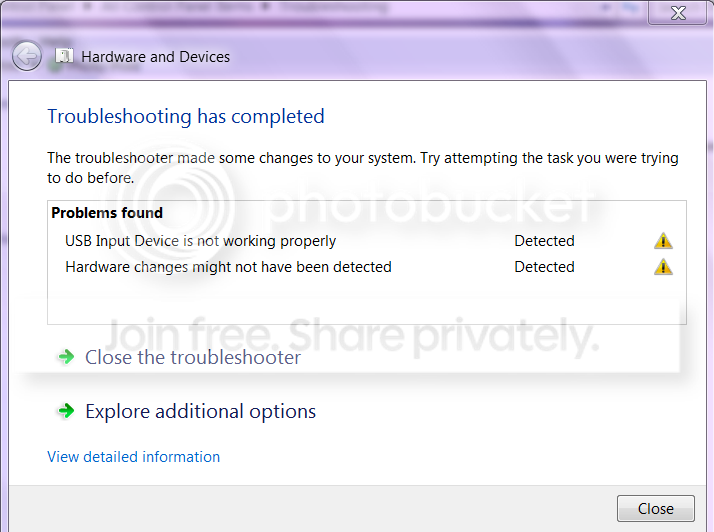
I'm having problem with my keyboard, almost everytime I open my computer the problem on my keyboard appears. But not all the time.
When I troubleshoot, the problem is detected, but I need to reconnect my keyboard then run troubleshoot again. The troubleshoot will fix the problem by reinstalling the driver.

I don't know why it keeps having error when I turn off my computer.

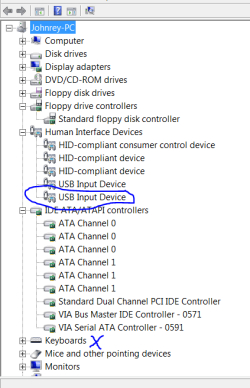
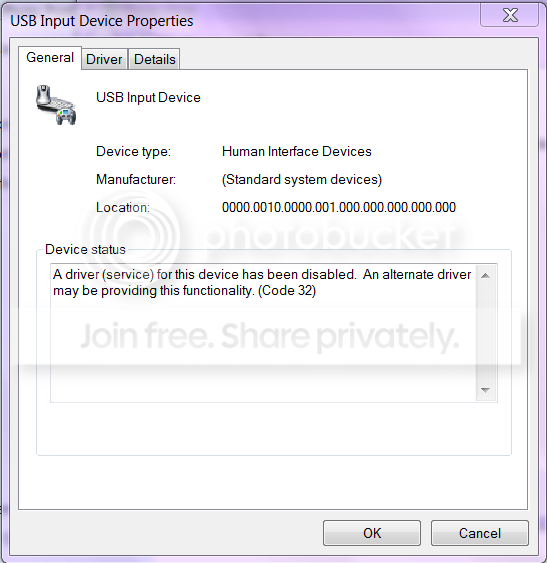
Here are the samples of error that occured.
Capture.png


Captur.png
 

My Computer

Computer Manufacturer/Model Number
Toshiba Satellite L850-A937
OS
Windows 7 Home Premium 64-bit
CPU
Intel(R) Core(TM) i5-3210M CPU @ 2.50Ghz
Memory
6GB DDR3 (800Mhz)
Graphics Card(s)
AMD Radeon HD 7670M
Sound Card
Realtek High Definition Audio
Please fill out your system specs, so that we at least know what kind of computer this is. Laptop, or desktop? What kind of keyboard?
 

My Computer

Computer type
PC/Desktop
Computer Manufacturer/Model Number
Mellon Labs (custom build)
OS
Win 7 Pro x64/Win 10 Pro x64 dual boot
CPU
AMD FX 8350 Vishera @ 4200
Motherboard
ASUS M5A97 R2.0
Memory
16 GB Mushkin Blackline DDR3-2400 @ 1866 (9-10-10-10-31)
Graphics Card(s)
XFX Radeon R9 280 Double D Black Edition
Sound Card
Realtek HD Audio on MB. Sounds great.
Monitor(s) Displays
Acer 24", Acer 22"
Screen Resolution
3840 x 1080
Hard Drives
1 x Mushkin Chronos 120 GB SSD (Win 10)
1 x Samsung 850 EVO 250 GB SSD (Win 7)
1 x WD 1TB SATA Blue
1 x WD 1TB SATA Green
PSU
Corsair TX-750
Case
CoolerMaster HAF 912+
Cooling
Coolermaster Seidon 240M Liquid AIO. 6 case fans
Keyboard
Logitech G710+
Mouse
Logitech G500s
Internet Speed
Much better since I got fiber, but still way overpriced.
Antivirus
MSE, Malware Bytes for scanning
Browser
Firefox
Other Info
Corsair VOID USB headphones.

A Mellon Labs X-1 - LCD Smartie driven system status display.

Brought to you by the letter E
Sorry :)
Desktop
mobo: Asus p5vd2-mx

Samsung Pleomax KU-0512

btw, when the keyboard is not working properly, the shortcut buttons on the side of my keyboard is working like calculator, my documents, my computer..
 

My Computer

Computer Manufacturer/Model Number
Toshiba Satellite L850-A937
OS
Windows 7 Home Premium 64-bit
CPU
Intel(R) Core(TM) i5-3210M CPU @ 2.50Ghz
Memory
6GB DDR3 (800Mhz)
Graphics Card(s)
AMD Radeon HD 7670M
Sound Card
Realtek High Definition Audio
have you tried a different keyboard, or tried the keyboard on another computer?
 

My Computer

Computer Manufacturer/Model Number
HP dv6519tx
OS
Windows 7 Ultimate x64
CPU
1.80 GHz Intel Core 2 Duo processor T7100
Memory
3 gig ddr2
Graphics Card(s)
NVIDIA GeForce 8400M GS
Sound Card
Realtek High Definition Audio
Monitor(s) Displays
15.4” WXGA High Definition BrightView Widescreen
Screen Resolution
1280 x 800
Hard Drives
Hitachi 320 GB (5400 rpm)
PSU
90 W AC Power Adapter
Cooling
Kitchen plate under the lappy
Keyboard
101 key compatible
Mouse
Touch Pad with On/Off button and dedicated vertical Scroll
Internet Speed
Three Wireless internet prepaid using E160G USB dongle
Actually the keyboard works properly after reinstalling the driver.
The problem is when I turn off my computer, it seems that the driver got errors when it is open again, but not all the time.
well I tried a keyboard which has a serial port, it works fine.
 

My Computer

Computer Manufacturer/Model Number
Toshiba Satellite L850-A937
OS
Windows 7 Home Premium 64-bit
CPU
Intel(R) Core(TM) i5-3210M CPU @ 2.50Ghz
Memory
6GB DDR3 (800Mhz)
Graphics Card(s)
AMD Radeon HD 7670M
Sound Card
Realtek High Definition Audio
I'm still figuring out whats the problem.. I don't think the usb port on my mobo has a problem, because I can use other devices with usb port.

Or is the driver of my keyboard restore automatically when I turn off my computer? :)
Or the keyboard is not compatible? (but it works fine after reinstalling the driver via windows update) :confused:
 

My Computer

Computer Manufacturer/Model Number
Toshiba Satellite L850-A937
OS
Windows 7 Home Premium 64-bit
CPU
Intel(R) Core(TM) i5-3210M CPU @ 2.50Ghz
Memory
6GB DDR3 (800Mhz)
Graphics Card(s)
AMD Radeon HD 7670M
Sound Card
Realtek High Definition Audio
Sticky/broken key on keyboard?

Try uninstalling/deleting the usb hub the keyboard is plugged into in device manager - then reinstall
 

My Computer

Computer type
PC/Desktop
Computer Manufacturer/Model Number
D.I.Y.
OS
WIN7 Ultimate 64bit
CPU
AMD FX8150/Trinity A10-5700
Motherboard
Asus Sabertooth v.1 /Asus F2A85-M Pro
Memory
G-Skill 2400 x2 @ 1866 (both pc's)
Graphics Card(s)
Sapphire (factory OC version) AMD 7770
Sound Card
onboard
Monitor(s) Displays
T260 Samsung
Screen Resolution
1920x1080
Hard Drives
Western Digital Sata 2TB/1TB Caviar Blacks
Buffalo 1TB usb (excellent drive)
PSU
Be-Quiet 700W E-9/Be-Quiet 550W E-9(E-9 = built by FSP)
Case
Antec P183/Antec P180mini
Cooling
x2 Xigmatek SXHH7-U01 + C-Master R4-EXBB-20PK-R0 120mm Fans
Keyboard
Cherry
Mouse
MS Explorer 3.0
Other Info
LG Blu ray combo
Pioneer 207D/208 Blu ray burners
I didn't get that. :(
Uninstall the keyboard on device manager, then reinstall? (is that what you mean?) :confused:

thanks for trying to help. :D
 

My Computer

Computer Manufacturer/Model Number
Toshiba Satellite L850-A937
OS
Windows 7 Home Premium 64-bit
CPU
Intel(R) Core(TM) i5-3210M CPU @ 2.50Ghz
Memory
6GB DDR3 (800Mhz)
Graphics Card(s)
AMD Radeon HD 7670M
Sound Card
Realtek High Definition Audio
Try a different USB port. If you have another USB keyboard, try that and see if it exhibits the same behaviour.
 

My Computer

Computer type
PC/Desktop
Computer Manufacturer/Model Number
Dwarf Dwf/11/2012 r09/2013
OS
Windows 8.1 Pro RTM x64
CPU
Intel Core-i5-3570K 4-core @ 3.4GHz (Ivy Bridge) (OC 4.4GHz)
Motherboard
ASRock Z77 Extreme4-M
Memory
4 x 4GB DDR3-1600 Corsair Vengeance CMZ8GX3M2A1600C9B (16GB)
Graphics Card(s)
MSI GeForce GTX770 Gaming OC 2GB
Sound Card
Realtek High Definition on board solution (ALC 898)
Monitor(s) Displays
ViewSonic VA1912w Widescreen (VGA)
Screen Resolution
1440x900
Hard Drives
OCZ Agility 3 SSD 120GB SATA III x2 (RAID 0)
Samsung HD501LJ 500GB SATA II x2
Hitachi HDS721010CLA332 1TB SATA II
Iomega 1.5TB Ext USB 2.0
WD 2.0TB Ext USB 3.0
PSU
XFX Pro Series 850W Semi-Modular
Case
Gigabyte IF233
Cooling
1 x 120mm Front Inlet 1 x 120mm Rear Exhaust
Keyboard
Microsoft Comfort Curve Keyboard 3000 (USB)
Mouse
Microsoft Comfort Mouse 3000 for Business (USB)
Internet Speed
NetGear DG834Gv3 ADSL Modem/Router (Ethernet) ~4.0 Mb/s (O2)
Antivirus
Avast! 8.0.1497
Browser
IE 11
Other Info
Optical Drive: HL-DT-ST BD-RE BH10LS30 SATA Bluray
Lexmark S305 Printer/Scanner/Copier (USB)
WEI Score: 8.1/8.1/8.5/8.5/8.25
Asus Eee PC 1011PX Netbook (Windows 7 x86 Starter)
I've tried different usb port. I even used the extension usb port in front of the cpu. It's still the same. There will be a time that the problem appears.

Btw, I tried uninstalling the Keyboard on device manager. When I reconnect the keyboard, no installation happens but the keyboard works properly, I checked the device manager if there is errors but no errors.
:confused: I'm really confused on whats the problem.

edit: I have no other usb keyboard. sorry.
 

My Computer

Computer Manufacturer/Model Number
Toshiba Satellite L850-A937
OS
Windows 7 Home Premium 64-bit
CPU
Intel(R) Core(TM) i5-3210M CPU @ 2.50Ghz
Memory
6GB DDR3 (800Mhz)
Graphics Card(s)
AMD Radeon HD 7670M
Sound Card
Realtek High Definition Audio
Switch off USB2 setting in the Bios menu > reboot
Then switch on again > reboot

In fact make sure usb settings haven't reset somehow in the bios - some can actually turn off certain usb keyboards? on default! I have seen an Asus A7N8X-E do this!
Test


If that doesn't work - try pulling out the Electric lead from your PSU for 2 Minutes.

Then plug back into electricity/switch back on

You must remove the lead completely from either the wall (for two minutes) or the PSU socket - it resets USB chip on motherboard.
 

My Computer

Computer type
PC/Desktop
Computer Manufacturer/Model Number
D.I.Y.
OS
WIN7 Ultimate 64bit
CPU
AMD FX8150/Trinity A10-5700
Motherboard
Asus Sabertooth v.1 /Asus F2A85-M Pro
Memory
G-Skill 2400 x2 @ 1866 (both pc's)
Graphics Card(s)
Sapphire (factory OC version) AMD 7770
Sound Card
onboard
Monitor(s) Displays
T260 Samsung
Screen Resolution
1920x1080
Hard Drives
Western Digital Sata 2TB/1TB Caviar Blacks
Buffalo 1TB usb (excellent drive)
PSU
Be-Quiet 700W E-9/Be-Quiet 550W E-9(E-9 = built by FSP)
Case
Antec P183/Antec P180mini
Cooling
x2 Xigmatek SXHH7-U01 + C-Master R4-EXBB-20PK-R0 120mm Fans
Keyboard
Cherry
Mouse
MS Explorer 3.0
Other Info
LG Blu ray combo
Pioneer 207D/208 Blu ray burners
I didn't get that. :(
Uninstall the keyboard on device manager, then reinstall? (is that what you mean?) :confused:

thanks for trying to help. :D

Scroll right to the bottom of "device manager" click on
> "Universal Serial Bus Controllers"

Hub a lovely time! :p

Tell me how many 'controllers' you have in there please & is "standard enhanced pci-usb host controller" in there?
 

My Computer

Computer type
PC/Desktop
Computer Manufacturer/Model Number
D.I.Y.
OS
WIN7 Ultimate 64bit
CPU
AMD FX8150/Trinity A10-5700
Motherboard
Asus Sabertooth v.1 /Asus F2A85-M Pro
Memory
G-Skill 2400 x2 @ 1866 (both pc's)
Graphics Card(s)
Sapphire (factory OC version) AMD 7770
Sound Card
onboard
Monitor(s) Displays
T260 Samsung
Screen Resolution
1920x1080
Hard Drives
Western Digital Sata 2TB/1TB Caviar Blacks
Buffalo 1TB usb (excellent drive)
PSU
Be-Quiet 700W E-9/Be-Quiet 550W E-9(E-9 = built by FSP)
Case
Antec P183/Antec P180mini
Cooling
x2 Xigmatek SXHH7-U01 + C-Master R4-EXBB-20PK-R0 120mm Fans
Keyboard
Cherry
Mouse
MS Explorer 3.0
Other Info
LG Blu ray combo
Pioneer 207D/208 Blu ray burners
oopps, I was about to lose hope on fixing this problem. thanks for helping.
I should give this a try. :)
I'll upload my device manager later.
 

My Computer

Computer Manufacturer/Model Number
Toshiba Satellite L850-A937
OS
Windows 7 Home Premium 64-bit
CPU
Intel(R) Core(TM) i5-3210M CPU @ 2.50Ghz
Memory
6GB DDR3 (800Mhz)
Graphics Card(s)
AMD Radeon HD 7670M
Sound Card
Realtek High Definition Audio
Here is my device manager.
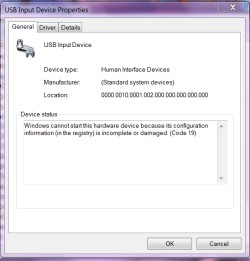
If the keyboard doesn't working well, theres a error sign on the USB input device and the Keyboard on the device manager is not there.

device manager 1.PNG

device manager 2.PNG
 

My Computer

Computer Manufacturer/Model Number
Toshiba Satellite L850-A937
OS
Windows 7 Home Premium 64-bit
CPU
Intel(R) Core(TM) i5-3210M CPU @ 2.50Ghz
Memory
6GB DDR3 (800Mhz)
Graphics Card(s)
AMD Radeon HD 7670M
Sound Card
Realtek High Definition Audio
I saw USB Legacy support, it has a description and (keyboard and mouse support?) :)

btw, I cannot tell if it works or not, because I already reinstall the driver, the keyboard will work fine even if I reboot. ^_^
 

My Computer

Computer Manufacturer/Model Number
Toshiba Satellite L850-A937
OS
Windows 7 Home Premium 64-bit
CPU
Intel(R) Core(TM) i5-3210M CPU @ 2.50Ghz
Memory
6GB DDR3 (800Mhz)
Graphics Card(s)
AMD Radeon HD 7670M
Sound Card
Realtek High Definition Audio
Thanks for posting back that you are up and running!

Hopefully resetting the USB chip allowed the keyboard to be seen properly again and the driver to load properly!
 

My Computer

Computer type
PC/Desktop
Computer Manufacturer/Model Number
D.I.Y.
OS
WIN7 Ultimate 64bit
CPU
AMD FX8150/Trinity A10-5700
Motherboard
Asus Sabertooth v.1 /Asus F2A85-M Pro
Memory
G-Skill 2400 x2 @ 1866 (both pc's)
Graphics Card(s)
Sapphire (factory OC version) AMD 7770
Sound Card
onboard
Monitor(s) Displays
T260 Samsung
Screen Resolution
1920x1080
Hard Drives
Western Digital Sata 2TB/1TB Caviar Blacks
Buffalo 1TB usb (excellent drive)
PSU
Be-Quiet 700W E-9/Be-Quiet 550W E-9(E-9 = built by FSP)
Case
Antec P183/Antec P180mini
Cooling
x2 Xigmatek SXHH7-U01 + C-Master R4-EXBB-20PK-R0 120mm Fans
Keyboard
Cherry
Mouse
MS Explorer 3.0
Other Info
LG Blu ray combo
Pioneer 207D/208 Blu ray burners
I'm the one who should be thanking you for helping.:D
I hope so it will work properly.
 

My Computer

Computer Manufacturer/Model Number
Toshiba Satellite L850-A937
OS
Windows 7 Home Premium 64-bit
CPU
Intel(R) Core(TM) i5-3210M CPU @ 2.50Ghz
Memory
6GB DDR3 (800Mhz)
Graphics Card(s)
AMD Radeon HD 7670M
Sound Card
Realtek High Definition Audio
sad to say, it's still the same. :(
but when I check the problem, I've read about some damage/conflict in the registry.. something like that.
sorry I forgot to have a picture.
 

My Computer

Computer Manufacturer/Model Number
Toshiba Satellite L850-A937
OS
Windows 7 Home Premium 64-bit
CPU
Intel(R) Core(TM) i5-3210M CPU @ 2.50Ghz
Memory
6GB DDR3 (800Mhz)
Graphics Card(s)
AMD Radeon HD 7670M
Sound Card
Realtek High Definition Audio
Here's an additional info about this issue that might help to determine the problem. ^_^

Cap.PNG
 

My Computer

Computer Manufacturer/Model Number
Toshiba Satellite L850-A937
OS
Windows 7 Home Premium 64-bit
CPU
Intel(R) Core(TM) i5-3210M CPU @ 2.50Ghz
Memory
6GB DDR3 (800Mhz)
Graphics Card(s)
AMD Radeon HD 7670M
Sound Card
Realtek High Definition Audio
Just saw your new post in user CP!
Taken off an MS Tech-support site try this >

Unplug ALL USB devices.
Open Device Manager.
View, Show Hidden Devices.
Uninstall all devices under USB Controllers.
Uninstall all devices under Storage Volumes.
Say no to any reboot prompts until you are finished.
Also, if a Storage Volume doesn't uninstall, ignore it and move to the next one.
If you have a yellow ? with unknown devices, uninstall all of the entries there as well.

When this is done, reboot TWICE.

Reconnect the USB devices and see if they're recognized properly.

If that fails try a different usb keyboard!
 

My Computer

Computer type
PC/Desktop
Computer Manufacturer/Model Number
D.I.Y.
OS
WIN7 Ultimate 64bit
CPU
AMD FX8150/Trinity A10-5700
Motherboard
Asus Sabertooth v.1 /Asus F2A85-M Pro
Memory
G-Skill 2400 x2 @ 1866 (both pc's)
Graphics Card(s)
Sapphire (factory OC version) AMD 7770
Sound Card
onboard
Monitor(s) Displays
T260 Samsung
Screen Resolution
1920x1080
Hard Drives
Western Digital Sata 2TB/1TB Caviar Blacks
Buffalo 1TB usb (excellent drive)
PSU
Be-Quiet 700W E-9/Be-Quiet 550W E-9(E-9 = built by FSP)
Case
Antec P183/Antec P180mini
Cooling
x2 Xigmatek SXHH7-U01 + C-Master R4-EXBB-20PK-R0 120mm Fans
Keyboard
Cherry
Mouse
MS Explorer 3.0
Other Info
LG Blu ray combo
Pioneer 207D/208 Blu ray burners
Back
Top