Keyboard SHIFT Key acting strange

coolcrazykid

New member
Local time
10:32 PM
Messages
3
Hello, I've been here once before because I installed Windows 7 on my Dell Latitude D810 Laptop and the souns stopped completely but I figured it out :D now the final problem I have now is when even I wanna put a dollar sign or a question mark or anything of that kind....which sucks cause some of my passwords for different sites use those keys.....Doesn't work.

Basically I press shift and before I can even press a numaric key this pops up-

y]t when I press The left one and

vxcz when I press The right one...

So can anyone please help me.

and usally you guys ask me for my specs well which ones and where can i find them.
I would put a question mark but sadly....:(
 

My Computer

Computer Manufacturer/Model Number
Dell
OS
Windows 7 Ultimate 32-bit
CPU
Intel Rentium M Processor 1.86GHz
Memory
2.00 GB of RAM
Sound Card
Need Help.
Monitor(s) Displays
Laptop Screen...
Hard Drives
Internal Hard Drives....
over here in the uk the @ key and " are reversed from the US keyboards im guessing your problem is similar

to fix:
Control Panel>Change keyboards or other input methods>Change Keyboards>select the right region as appropriate
 

My Computer

Computer type
PC/Desktop
Computer Manufacturer/Model Number
Medion Erazer (note to self: insert model number) - with custom additions
OS
Windows 10 Pro x64
CPU
Intel Core i5 7400 @ 3.00GHz
Motherboard
OEM supllied with PC
Memory
8GB 2133Mhz DDR4 (OEM supplied)
Graphics Card(s)
Gygabyte Windforce GTX 1050Ti (Factory Overclocked)
Sound Card
Realtek
Monitor(s) Displays
Acer Al1980 + HKC
Screen Resolution
1360*768(HKC) / 1280*1024(Acer)
Hard Drives
1TB Toshiba
1TB WD Caviar Green
120GB Samsung Evo 840
PSU
OEM supplied (no power rating on case)
Case
OEM Supplied
Cooling
Stock
Keyboard
Logitech Wireless
Mouse
Logitect Wireless
Internet Speed
40Mb/s Down 10Mb/s Up
Antivirus
Defender
Browser
Firefox
As far as I can find out your specs (along with the ones you've already stated) look a bit like this;

sound card: SIGMATEL STAC 975X AC97
modem: Conexant D110,MDC,1.5,v.92
lan: Broadcom 57XX Gigabit Integrated Controller
wlan: Dell Wireless 1470 Dual-Band WLAN miniPCI Card or Intel PRO/Wireless 2200 802.11b/g WLAN miniPCI Card
vga: ATI MobilityRadeon X300/x600

;)
 

My Computer

Computer type
PC/Desktop
Computer Manufacturer/Model Number
Self Built
OS
Windows 7 Ultimate 64bit
CPU
AMD Phenom Quad core 9950 black edition
Motherboard
Gigabyte
Memory
16Gb
Graphics Card(s)
2x XFX Radeon 5850
Sound Card
PCI Express X-Fi Titanium / Logitech G35
Monitor(s) Displays
2x HP 2410i
Screen Resolution
1920x1080
Hard Drives
2x 500Gb Seagate
1x 300Gb Seagate
1x 1Tb Seagate
2x 1Tb Hitatchi
PSU
Jean Tech Storm 700W
Case
Cooler Master COSMOS S
Cooling
Akasa Evo Blue Pro
Keyboard
Logitech G15
Mouse
Mad Catz M.M.O. 7
Internet Speed
12mb
Well those are more than less what my specs are

And no I went to the Region and Languages and English US is selected and in the advanced tab press CAPS LOCK key is selected so its not those... It was just working like 2 seconds ago when I hit the num lock but then it stopped again....
 

My Computer

Computer Manufacturer/Model Number
Dell
OS
Windows 7 Ultimate 32-bit
CPU
Intel Rentium M Processor 1.86GHz
Memory
2.00 GB of RAM
Sound Card
Need Help.
Monitor(s) Displays
Laptop Screen...
Hard Drives
Internal Hard Drives....
have you eliminated keyboard failure? try swapping it for a different keyboard, see if that helps
 

My Computer

Computer type
PC/Desktop
Computer Manufacturer/Model Number
Medion Erazer (note to self: insert model number) - with custom additions
OS
Windows 10 Pro x64
CPU
Intel Core i5 7400 @ 3.00GHz
Motherboard
OEM supllied with PC
Memory
8GB 2133Mhz DDR4 (OEM supplied)
Graphics Card(s)
Gygabyte Windforce GTX 1050Ti (Factory Overclocked)
Sound Card
Realtek
Monitor(s) Displays
Acer Al1980 + HKC
Screen Resolution
1360*768(HKC) / 1280*1024(Acer)
Hard Drives
1TB Toshiba
1TB WD Caviar Green
120GB Samsung Evo 840
PSU
OEM supplied (no power rating on case)
Case
OEM Supplied
Cooling
Stock
Keyboard
Logitech Wireless
Mouse
Logitect Wireless
Internet Speed
40Mb/s Down 10Mb/s Up
Antivirus
Defender
Browser
Firefox
If you can't readily swap the keyboard, try reinstalling some dell drivers, namely those that are associated with the keyboard?

Also try taking out the keyboard and reconnecting it. Maybe the controller is loose? A reseating of the keyboard cable is one thing to try at least.
 

My Computer

OS
Windows 7 Professional x64
CPU
AMD Phenom II X4 965 Black Edition 3.4GHz stock
Motherboard
ASUS M4A79XTD EVO
Memory
G.SKILL Ripjaws 4GB (2 x 2GB) DDR3 1600
Graphics Card(s)
EVGA GTX 260 core 216
Sound Card
Onboard
Monitor(s) Displays
Samsung 260HD TOC
Screen Resolution
1900x1200
Hard Drives
Western Digital Raptor WD740
Western Digital 6400AAKS
PSU
OCZ ModXStream Pro OCZ600MXSP 600W
Case
COOLER MASTER Storm Scout
Cooling
Scythe Ninja-Mini
Keyboard
Logitech Illuminated Keyboard
Mouse
Logitech G500
Stab in the dark here, but was nothing dropped / spilt on your keyboard ? I don't know if you've realised but if you look at the keys in question
y]t when I press The left one and

vxcz when I press The right one...

both groups of keys are situated in the same areas on the keyboard. I would also recommend trying to get your hands on another keyboard just to test.
 

My Computer

Computer type
PC/Desktop
Computer Manufacturer/Model Number
Self Built
OS
Windows 7 Ultimate 64bit
CPU
AMD Phenom Quad core 9950 black edition
Motherboard
Gigabyte
Memory
16Gb
Graphics Card(s)
2x XFX Radeon 5850
Sound Card
PCI Express X-Fi Titanium / Logitech G35
Monitor(s) Displays
2x HP 2410i
Screen Resolution
1920x1080
Hard Drives
2x 500Gb Seagate
1x 300Gb Seagate
1x 1Tb Seagate
2x 1Tb Hitatchi
PSU
Jean Tech Storm 700W
Case
Cooler Master COSMOS S
Cooling
Akasa Evo Blue Pro
Keyboard
Logitech G15
Mouse
Mad Catz M.M.O. 7
Internet Speed
12mb
maybe the topic is a bit cold now, but ill still give it a go.

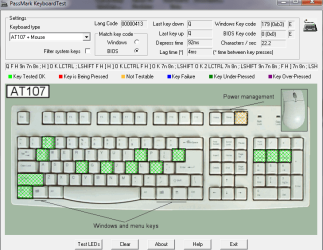
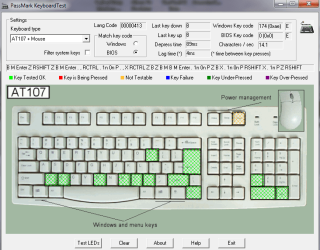
exactly the same problem, only a bit stranger. both my shift keys dont work either, it gives random keys like

± ±
mb01,x
mbp01
mbmbz
mb,.
mbmbzP

this happens after pressing the right shift for like 10 times, but pressing the left shift starts up winamp, believe it or not.

just a note, this happend only after installing windows 7, ruling out hardware failure, and has nothing to do with the language settings.

hope some news has come recently,
 

My Computer

OS
windows 7
Hmm, I had something almost similar happen. A G15 kb, if you pressed ANY key, it would cause windows to stop receiving any more keystrokes till a reboot. (Even with two kbs attached)

Replacing with an exact same G15 the problem went away and moving the G15 to another machine caused the same problem (Both W7).

So what was happening was, the KB was sending something strange and causing the driver to go nuts. We replaced the KB and it stopped. So it seems like it was probably KB failure in that case BUT there is also something er... finicky either with the HID device driver or possibly the G15 software that actually made the problem worse than "normal".

So maybe the KB itself or any added software if it was a gaming kb that has added maco capabilities etc...
 

My Computer

Computer Manufacturer/Model Number
Scratch built
OS
Windows 7 x64 Ultimate
CPU
i7 960
Motherboard
Asus P6X58D
Memory
12 Gig Corsair Dominator
Graphics Card(s)
Nvidia 480
Sound Card
Maudio Delta 44 + breakout box
Monitor(s) Displays
Dell UltraSharp U2410 24in and Samsung 21 dual monitors
Screen Resolution
1920x1200 and 1280x1024
Hard Drives
Primary: Intel X-25M G2 160G SSD
Secondary: Segate baracuda 1.0 TB
HDs in AHCI mode.
PSU
Corasair TX850
Case
Cooler Master HAF
Cooling
Corsair H50
Keyboard
Logitech G15 + N52 game pad
Mouse
Logitech MX518
Internet Speed
15kbs down 4.5kbps up
Other Info
WEI 7.6
CPU & RAM 7.6
Graphics 7.9
Hard disk 7.7
attached two screenshots of what happens when pressing the left and right shift key, for like 15 times. seems like totally random keys to me, though a set of keys repeat after a 5 or 6 times.

ive used this keyboard for a while and it never showed problems, at first a reboot solved the problem even, but now ive rebooted like 5 times and its still there.
 

Attachments

  • LEFT SHIFT KEY.png
    LEFT SHIFT KEY.png
    84.6 KB · Views: 175
  • right SHIFT KEY.png
    right SHIFT KEY.png
    86.3 KB · Views: 71

My Computer

OS
windows 7
Ok, different keyboard: Everything works fine! Guess it just is as simple as a trashed keyboard. Though if anyone cares to speculate as to how this could happen? be my guest!
 

My Computer

OS
windows 7
Back
Top