Keyboard Temporarily Switches Off after Turning on Desk Lights? O_O

thedarkzodiac

New member
Local time
9:55 PM
Messages
19
Hello.

Um. I Don't really know what to say about this, as it seems a bit strange :eek: here goes

I have a computer desk that has an overhead storage cabinet, and underneath this cabinet is a fluorescent light bar that I can switch on.

It looks like this
241380i_27.jpeg


These days, everytime I switch this light on (OR switch off) (I use a Razer BlackWidow Ultimate keyboard with LED on), the keyboard lights are gone and I hear the sound of a disconnected device in Windows 7. The keyboard is completely disconnected for 5-6 seconds. :shock: :shock:

Sometimes the mouse too, the pointer wont move, but it is VERY rare. (only once it happened)

Err..maybe it's a power supply issue? I've had my desktop for nearly 2 years without a problem then this started happening around 4 weeks ago.

Behind my desk, are TWO electrical sockets on the wall, the first one is for an extension cable that connects the CPU, monitor, Printer, etc., while the second one is just for that Fluorescent bar.

What's going on? :D

Please ask me anything you need to help you too, I'll try to answer it the best I can.
 

My Computer My Computer

At a glance

Windows 7 Home Premium x64Intel i7 870 2.93 Ghz8 GBGigabyte Nvidia GTX 570
Computer type
PC/Desktop
Computer Manufacturer/Model Number
Custom
OS
Windows 7 Home Premium x64
CPU
Intel i7 870 2.93 Ghz
Memory
8 GB
Graphics Card(s)
Gigabyte Nvidia GTX 570
Hard Drives
2TB Toshiba HDD
1.5TB Hitachi HDD
Antivirus
Avast Free! Antivirus
Browser
Google Chrome
What I would try first is a surge protector for the PC, monitor and printer. Their should be one anyway in my opinion.

Your keyboard is wired so I don't think it's a RF from the light.

You could also try another light and see if it still happens. A faulty light could cause a surge in current.

Having a qualified person check the wall outlet.
 

My Computer My Computer

At a glance

Windows 10 Pro. 64/ version 1709 Windows 7 Pr...Intel i7-6800K @ 4.3Corsair Platinum 16 gig @2400EVGA GTX 1070 OC
Computer type
PC/Desktop
Computer Manufacturer/Model Number
Home made Desktop
OS
Windows 10 Pro. 64/ version 1709 Windows 7 Pro/64
CPU
Intel i7-6800K @ 4.3
Motherboard
ASUS X-99 Deluxe II
Memory
Corsair Platinum 16 gig @2400
Graphics Card(s)
EVGA GTX 1070 OC
Monitor(s) Displays
Asus 27" LED LCD/VE278Q
Screen Resolution
1920-1080 or 1280-720 HDMI
Hard Drives
INTEL SSD 730-240 Gb Sata 3.0/
PSU
EVGA Platium 1200W
Case
Phanteks Luxe Tempered Glass 8 fans/ one radiator
Cooling
XSPC/ Water Cooled CPU
Keyboard
Das 4 Professional
Mouse
Logitech M705/MX Anywhere 2-S
Internet Speed
100 mbits
Antivirus
Microsoft Security Essentials/ Malwarebytes Premium 3.0/ SAS
Browser
I.E. 11 default/Firefox/ ISP Time Warner Cable/Spectrum
Other Info
LG BluRay Burner/
Sound system-KLipsch-THX/
Icy Dock ssd Hot Swap bays.
Thank you very much
 

My Computer My Computer

At a glance

Windows 7 Home Premium x64Intel i7 870 2.93 Ghz8 GBGigabyte Nvidia GTX 570
Computer type
PC/Desktop
Computer Manufacturer/Model Number
Custom
OS
Windows 7 Home Premium x64
CPU
Intel i7 870 2.93 Ghz
Memory
8 GB
Graphics Card(s)
Gigabyte Nvidia GTX 570
Hard Drives
2TB Toshiba HDD
1.5TB Hitachi HDD
Antivirus
Avast Free! Antivirus
Browser
Google Chrome
Your welcome.
Let us know what you do to fix the problem.
 

My Computer My Computer

At a glance

Windows 10 Pro. 64/ version 1709 Windows 7 Pr...Intel i7-6800K @ 4.3Corsair Platinum 16 gig @2400EVGA GTX 1070 OC
Computer type
PC/Desktop
Computer Manufacturer/Model Number
Home made Desktop
OS
Windows 10 Pro. 64/ version 1709 Windows 7 Pro/64
CPU
Intel i7-6800K @ 4.3
Motherboard
ASUS X-99 Deluxe II
Memory
Corsair Platinum 16 gig @2400
Graphics Card(s)
EVGA GTX 1070 OC
Monitor(s) Displays
Asus 27" LED LCD/VE278Q
Screen Resolution
1920-1080 or 1280-720 HDMI
Hard Drives
INTEL SSD 730-240 Gb Sata 3.0/
PSU
EVGA Platium 1200W
Case
Phanteks Luxe Tempered Glass 8 fans/ one radiator
Cooling
XSPC/ Water Cooled CPU
Keyboard
Das 4 Professional
Mouse
Logitech M705/MX Anywhere 2-S
Internet Speed
100 mbits
Antivirus
Microsoft Security Essentials/ Malwarebytes Premium 3.0/ SAS
Browser
I.E. 11 default/Firefox/ ISP Time Warner Cable/Spectrum
Other Info
LG BluRay Burner/
Sound system-KLipsch-THX/
Icy Dock ssd Hot Swap bays.
I don't have a spare light with me right now, and an electrician wouldn't be available for about a week or so.

Just asking though, Could it be a Power supply issue for my computer?
 

My Computer My Computer

At a glance

Windows 7 Home Premium x64Intel i7 870 2.93 Ghz8 GBGigabyte Nvidia GTX 570
Computer type
PC/Desktop
Computer Manufacturer/Model Number
Custom
OS
Windows 7 Home Premium x64
CPU
Intel i7 870 2.93 Ghz
Memory
8 GB
Graphics Card(s)
Gigabyte Nvidia GTX 570
Hard Drives
2TB Toshiba HDD
1.5TB Hitachi HDD
Antivirus
Avast Free! Antivirus
Browser
Google Chrome
No. That doesn't mean your power supply is good or bad. Surly their is someone or place you can borrow a light for a few minutes.
Do you turn the light on and off at the light itself or a wall switch.

Your picture does not show the light.
 

My Computer My Computer

At a glance

Windows 10 Pro. 64/ version 1709 Windows 7 Pr...Intel i7-6800K @ 4.3Corsair Platinum 16 gig @2400EVGA GTX 1070 OC
Computer type
PC/Desktop
Computer Manufacturer/Model Number
Home made Desktop
OS
Windows 10 Pro. 64/ version 1709 Windows 7 Pro/64
CPU
Intel i7-6800K @ 4.3
Motherboard
ASUS X-99 Deluxe II
Memory
Corsair Platinum 16 gig @2400
Graphics Card(s)
EVGA GTX 1070 OC
Monitor(s) Displays
Asus 27" LED LCD/VE278Q
Screen Resolution
1920-1080 or 1280-720 HDMI
Hard Drives
INTEL SSD 730-240 Gb Sata 3.0/
PSU
EVGA Platium 1200W
Case
Phanteks Luxe Tempered Glass 8 fans/ one radiator
Cooling
XSPC/ Water Cooled CPU
Keyboard
Das 4 Professional
Mouse
Logitech M705/MX Anywhere 2-S
Internet Speed
100 mbits
Antivirus
Microsoft Security Essentials/ Malwarebytes Premium 3.0/ SAS
Browser
I.E. 11 default/Firefox/ ISP Time Warner Cable/Spectrum
Other Info
LG BluRay Burner/
Sound system-KLipsch-THX/
Icy Dock ssd Hot Swap bays.
Perhaps you could try using an extension lead from a power outlet in another room & plugging your fluorescent light into that. This may work until you can get the light repaired or replaced.
Also you could turn on the light before turning on your computer.
 

My Computer My Computer

At a glance

Windows 7 Home Premium 64 bit sp1Intel i5 3570 3.4Ghz Ivy Bridge SKT 1155 quad...G-Skill Rip Jaws 16Gb (8x2) DDR3 -1600 PC3 12...Gigabyte NVIDIA GT610 1Gb DDR3 810/1200 PCI-E...
Computer type
PC/Desktop
Computer Manufacturer/Model Number
Self built using existing case
OS
Windows 7 Home Premium 64 bit sp1
CPU
Intel i5 3570 3.4Ghz Ivy Bridge SKT 1155 quad core
Motherboard
Gigabyte Z77-HD3 SKT 1155 2xSata 3, 4x USB 3.0
Memory
G-Skill Rip Jaws 16Gb (8x2) DDR3 -1600 PC3 12800 CL 10 red
Graphics Card(s)
Gigabyte NVIDIA GT610 1Gb DDR3 810/1200 PCI-E 2.0 Silent
Sound Card
NVIDIA High Definition & Realtech High Definition Audio
Monitor(s) Displays
2 x Philips 226V4L 16:9 aspect ratio
Screen Resolution
1920 x 1080 HD
Hard Drives
Samsung 840 Pro 256gb SSD, SATA 3.
Hitachi Touro Portable 1tb, USB 3.0 HDD used for image b/ups.
PSU
Corsair VS450
Case
Codeng
Cooling
PSU fan & CPU fan
Keyboard
Logitech
Mouse
Logitech Wireless trackball M570
Internet Speed
Wireless 3G. 3mg down & 550kb up.
Antivirus
Bitdefender Internet Security 2020
Browser
Opera (Current Version) & Firefox
Other Info
MS Office 2013 Pro. Davis weather station software. MGE Nova 600 avr UPS.
Hello,

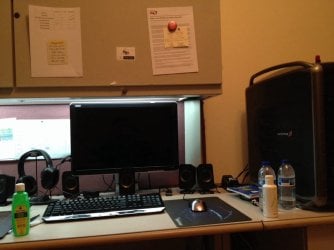
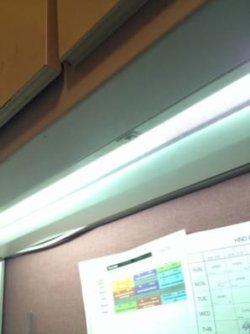
The picture above isn't my desk, I was just showing how it looks like. I've attached a pic of it now, you should be able to see the light bar.

The thing is, this hasn't happened for two years since I got the PC, there were no additions of major electronics (like another new PC) in my room or the others.
 

Attachments

  • ImageUploadedBySeven Forums1383149108.421264.jpg
    ImageUploadedBySeven Forums1383149108.421264.jpg
    73.7 KB · Views: 0
  • ImageUploadedBySeven Forums1383149258.585411.jpg
    ImageUploadedBySeven Forums1383149258.585411.jpg
    64.3 KB · Views: 0
  • ImageUploadedBySeven Forums1383149308.262588.jpg
    ImageUploadedBySeven Forums1383149308.262588.jpg
    12.3 KB · Views: 10

My Computer My Computer

At a glance

Windows 7 Home Premium x64Intel i7 870 2.93 Ghz8 GBGigabyte Nvidia GTX 570
Computer type
PC/Desktop
Computer Manufacturer/Model Number
Custom
OS
Windows 7 Home Premium x64
CPU
Intel i7 870 2.93 Ghz
Memory
8 GB
Graphics Card(s)
Gigabyte Nvidia GTX 570
Hard Drives
2TB Toshiba HDD
1.5TB Hitachi HDD
Antivirus
Avast Free! Antivirus
Browser
Google Chrome
I've got a similar problem. When the weather is cool and dry, I generate a lot of static electricity. Discharging myself ot a nearby ground can cause the bedoop alarm signifying a USB device has been disconnected. Sometimes, just touching my computer case, even though I don't feel or hear the discharge, or even just walking by the computer will trigger the bedoop. If I'm watching the monitor when I get a bedoop, I get a quick popup verifying a USB device has disconnected and reconnected. Fortunately, I've yet to have any functionality impaired.

My SWAG (Scientific Wild A** Guess) is the ESD (ElectroStatic Discharge) creates a brief electromagnetic pulse, basically RFI, that is triggering the reaction in my computer.

Since the only time you are getting the problem only when you switch on the light and it's started recently, my SWAG (again) is that the switch is wearing out and you are getting some arcing when the contacts close. You might want to try temporarily replacing the switch with something you have knocking about to see if that clears up the problem.

Another possibility (still in the SWAG realm), if the light is fluorescent, is a failing ballast or starter or even a bad lamp.
 

My Computer My Computer

At a glance

Win 7 Ultimate 64 bitIntel i7-3930KKingston HyperX Genesis 32GB Kit (8x4GB Modul...MSI R7850 Twin Frozr 2GD5/OC Radeon HD 7850 2...
Computer type
PC/Desktop
Computer Manufacturer/Model Number
Custom Build
OS
Win 7 Ultimate 64 bit
CPU
Intel i7-3930K
Motherboard
ASUS P9X79 WS
Memory
Kingston HyperX Genesis 32GB Kit (8x4GB Modules) 1600MHz DDR
Graphics Card(s)
MSI R7850 Twin Frozr 2GD5/OC Radeon HD 7850 2GB 256-bit GDDR
Sound Card
Asus Xonar Essence STX
Monitor(s) Displays
3x Asus VG248QE 24", Vizio 32" TV
Screen Resolution
1920 x 1080, ?
Hard Drives
Samsung 128GB 840 Pro SSD (1),
Samsung 4TB 850 EVO SSDs (4)
Samsung 4TB 850 EVO SSDs (16) external backup drives used in 2.5" hot swap bays in the computer.
PSU
Corsair HX750w
Case
Antec Two Hundred v2 (modified)
Cooling
Cooler Master GeminII S524 120mm (fan replaced with a 140mm)
Keyboard
Logitech G510s
Mouse
Logitech M525 (two in use)
Internet Speed
=< 32Mbps down, 8Mbps up
Antivirus
AVAST!, MBAM, SAS, Spybot S&D (all but MBAM free) Glary Util
Browser
IE11
Other Info
LSI 9211-8i HBA card (8 SATA III ports), 2.5" & 3.5" Hot Swap Bays, HooToo HT-CR001 PCI-E to USB 3.0 Internal Hub + 6 Slot Card Reader, and LG Model CH12LS28 BD-ROM Optical Drive. Also, ScanSnap S1500 ADF duplexing scanner, Canon 9000F flat bed scanner, Corsair SP2500 2.1 speakers, Samsung CLP 415nw laser color printer, Cyberpower PP2200SW UPS
Back
Top