Keyboard too slow - can't type double E quickly

hucker

New member
Member
Local time
11:00 PM
Messages
73
Using a Microsoft Wireless Keyboard 3000 v2.0.

Every time I type a double E, I only get a single one, unless I pause between each keypress. Other letters don't seem to do it (I suppose I might type double Es faster?). Those of you with a background in electronics will know about "debouncing" - ignoring two very close together signals from a switch as it mechanically "bounces" off the contacts. I'm thinking maybe the setting is too long for this keyboard?
 

My Computer

Computer Manufacturer/Model Number
Home made
OS
Windows 7 Ultimate x64
CPU
i7 940 2.9 GHz @ 3.45 GHz
Motherboard
Gigabyte GA-X58A-UD3R
Memory
24GB
Graphics Card(s)
Radeon HD 6790
Sound Card
Realtek HD onboard
Monitor(s) Displays
2 x 20" 4x3 aspect (I hate widescreen)
Hard Drives
2 x 1TB Western Digital Caviar Black (mirrored)
PSU
1 kW
Case
EZCool NA705B
Cooling
Stock CPU fan, plus 3 120mm and 2 80mm case fans
Internet Speed
2 Mbit
Control Panel> Keyboard> Character repeat, you have two settings; Repeat delay and Repeat rate.
Changing Repeat delay to >>Short should correct this.
 

My Computer

Computer Manufacturer/Model Number
Home Made
OS
Windows 7 Home Premium x64
CPU
Intel 2500k @4.5ghz 66deg max P95/IBT
Motherboard
Gigabyte Z68A-D3-B3
Memory
8 Gigs Patriot Viper 2 Extreme @1600
Graphics Card(s)
EVGA GTX 580 3 GIG 35degrees idle
Sound Card
Nvidia HD audio via HDMI to 7.1 Receiver
Monitor(s) Displays
32" Olevia hdtv
Screen Resolution
1080p
Hard Drives
64gig SSD(OS/Apps)
250gig (Files and Dox)
1tb (imaging and backup)
PSU
Corsair vx550w
Case
Thermaltake V3 black
Cooling
CM 212+(push n pull) 4 case fans
Keyboard
Logitech wireless Combo, G13
Mouse
G300
Internet Speed
40mps
Other Info
Two others up and running; C2D E5200/MSI G41M-P26/Corsair XMS3 8gb/GTS 250 1gb and C2D E8200/xFx 750sli/8gb Corsair Dominator/2x EVGA 550ti
Working on; i2600 Build...
HP DV6
@Work I use a Lenovo 5536B8U + Lenovo U300s
That didn't help, and I'm not sure why it would. That's just a setting controlling how long Windows waits before it repeats ITSELF. My problem is my OWN repeating. I press the key twice quickly, but only one letter appears. If I try to type the word "sleep", I get "slep".
 

My Computer

Computer Manufacturer/Model Number
Home made
OS
Windows 7 Ultimate x64
CPU
i7 940 2.9 GHz @ 3.45 GHz
Motherboard
Gigabyte GA-X58A-UD3R
Memory
24GB
Graphics Card(s)
Radeon HD 6790
Sound Card
Realtek HD onboard
Monitor(s) Displays
2 x 20" 4x3 aspect (I hate widescreen)
Hard Drives
2 x 1TB Western Digital Caviar Black (mirrored)
PSU
1 kW
Case
EZCool NA705B
Cooling
Stock CPU fan, plus 3 120mm and 2 80mm case fans
Internet Speed
2 Mbit
Have you checked to see whether the E key is sticking?

Failing, try to slow down your typing speed slightly.

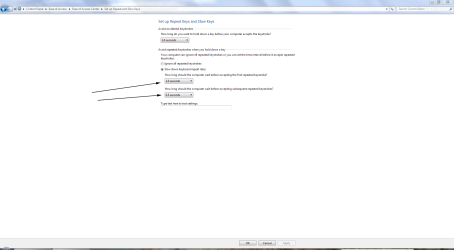
Also, before dismissing James's suggestions, I thought they were quite relevant as the settings have a direct bearing on how repeated key strokes work.

key.PNG
 

My Computer

Computer Manufacturer/Model Number
HP Pavilion Elite 495UK
OS
Windows 7 Ultimate SP1 64-Bit
CPU
Intel Core i7 870 @ 2.93GHz
Motherboard
MSI 2A9C (CPU1)
Memory
8Gb Dual-Channel DDR3 @ 664MHz
Graphics Card(s)
nVidia GeForce GTX 460 1024MB dedicated RAM
Sound Card
Realtek HD Audio
Monitor(s) Displays
HP2310i
Screen Resolution
1920 x 1080
Hard Drives
1x1954GB Hitachi HDS22020ALA 330 (RAID), 1x1954GB Hitachi External for backup and storage
PSU
460W
Case
HP Elite
Cooling
Air cooled
Keyboard
Logitech K750 solar-powered keyboard
Mouse
Logitech Wireless M180 mouse
Internet Speed
2Mb
Other Info
Pure Avanti Flow Internet Radio with iPod Dock, 64Gb iPod, HP USB Speakers, Sony MDR-V500 Headphones, Sony Vaio F-Series Laptop
Do you have "stick keys" or "filter keys" enabled?
Control Panel>Ease Of Access>Make the keyboard easier to use
 

My Computer

Computer Manufacturer/Model Number
Home Made
OS
Windows 7 Home Premium x64
CPU
Intel 2500k @4.5ghz 66deg max P95/IBT
Motherboard
Gigabyte Z68A-D3-B3
Memory
8 Gigs Patriot Viper 2 Extreme @1600
Graphics Card(s)
EVGA GTX 580 3 GIG 35degrees idle
Sound Card
Nvidia HD audio via HDMI to 7.1 Receiver
Monitor(s) Displays
32" Olevia hdtv
Screen Resolution
1080p
Hard Drives
64gig SSD(OS/Apps)
250gig (Files and Dox)
1tb (imaging and backup)
PSU
Corsair vx550w
Case
Thermaltake V3 black
Cooling
CM 212+(push n pull) 4 case fans
Keyboard
Logitech wireless Combo, G13
Mouse
G300
Internet Speed
40mps
Other Info
Two others up and running; C2D E5200/MSI G41M-P26/Corsair XMS3 8gb/GTS 250 1gb and C2D E8200/xFx 750sli/8gb Corsair Dominator/2x EVGA 550ti
Working on; i2600 Build...
HP DV6
@Work I use a Lenovo 5536B8U + Lenovo U300s
James - no I haven't got any of the ease of access things ticked.

Seavixen - where did you get that screenshot? I cannot find that subsection in the control panel. The "avoid repeated keystrokes" might be the problem, although I cannot make any key other than E do it wrong, and I would have thought Windows would treat all letters the same.
 

My Computer

Computer Manufacturer/Model Number
Home made
OS
Windows 7 Ultimate x64
CPU
i7 940 2.9 GHz @ 3.45 GHz
Motherboard
Gigabyte GA-X58A-UD3R
Memory
24GB
Graphics Card(s)
Radeon HD 6790
Sound Card
Realtek HD onboard
Monitor(s) Displays
2 x 20" 4x3 aspect (I hate widescreen)
Hard Drives
2 x 1TB Western Digital Caviar Black (mirrored)
PSU
1 kW
Case
EZCool NA705B
Cooling
Stock CPU fan, plus 3 120mm and 2 80mm case fans
Internet Speed
2 Mbit
"tick" Filter Keys and go into "Set up Filter Keys", you will find what you are looking for there.
 

My Computer

Computer Manufacturer/Model Number
Home Made
OS
Windows 7 Home Premium x64
CPU
Intel 2500k @4.5ghz 66deg max P95/IBT
Motherboard
Gigabyte Z68A-D3-B3
Memory
8 Gigs Patriot Viper 2 Extreme @1600
Graphics Card(s)
EVGA GTX 580 3 GIG 35degrees idle
Sound Card
Nvidia HD audio via HDMI to 7.1 Receiver
Monitor(s) Displays
32" Olevia hdtv
Screen Resolution
1080p
Hard Drives
64gig SSD(OS/Apps)
250gig (Files and Dox)
1tb (imaging and backup)
PSU
Corsair vx550w
Case
Thermaltake V3 black
Cooling
CM 212+(push n pull) 4 case fans
Keyboard
Logitech wireless Combo, G13
Mouse
G300
Internet Speed
40mps
Other Info
Two others up and running; C2D E5200/MSI G41M-P26/Corsair XMS3 8gb/GTS 250 1gb and C2D E8200/xFx 750sli/8gb Corsair Dominator/2x EVGA 550ti
Working on; i2600 Build...
HP DV6
@Work I use a Lenovo 5536B8U + Lenovo U300s
Hmmmmm I can make all the other keys not work properly by changing things in there, but I don't think that's what's stopping the E working right (as all those settings are off). It must be the circuitry in the keyboard that's dodgy. Strange it's only the E though, I would have thought one chip would control all of them.
 

My Computer

Computer Manufacturer/Model Number
Home made
OS
Windows 7 Ultimate x64
CPU
i7 940 2.9 GHz @ 3.45 GHz
Motherboard
Gigabyte GA-X58A-UD3R
Memory
24GB
Graphics Card(s)
Radeon HD 6790
Sound Card
Realtek HD onboard
Monitor(s) Displays
2 x 20" 4x3 aspect (I hate widescreen)
Hard Drives
2 x 1TB Western Digital Caviar Black (mirrored)
PSU
1 kW
Case
EZCool NA705B
Cooling
Stock CPU fan, plus 3 120mm and 2 80mm case fans
Internet Speed
2 Mbit
Have you tried a different keyboard? Or are you extremely partial to that one? :D
 

My Computer

Computer Manufacturer/Model Number
Home Made
OS
Windows 7 Home Premium x64
CPU
Intel 2500k @4.5ghz 66deg max P95/IBT
Motherboard
Gigabyte Z68A-D3-B3
Memory
8 Gigs Patriot Viper 2 Extreme @1600
Graphics Card(s)
EVGA GTX 580 3 GIG 35degrees idle
Sound Card
Nvidia HD audio via HDMI to 7.1 Receiver
Monitor(s) Displays
32" Olevia hdtv
Screen Resolution
1080p
Hard Drives
64gig SSD(OS/Apps)
250gig (Files and Dox)
1tb (imaging and backup)
PSU
Corsair vx550w
Case
Thermaltake V3 black
Cooling
CM 212+(push n pull) 4 case fans
Keyboard
Logitech wireless Combo, G13
Mouse
G300
Internet Speed
40mps
Other Info
Two others up and running; C2D E5200/MSI G41M-P26/Corsair XMS3 8gb/GTS 250 1gb and C2D E8200/xFx 750sli/8gb Corsair Dominator/2x EVGA 550ti
Working on; i2600 Build...
HP DV6
@Work I use a Lenovo 5536B8U + Lenovo U300s
DOH! I didn't think of that. The problem only exists on this keyboard. And this is the nice wireless one, I don't want to use that £2.99 one :-/
 

My Computer

Computer Manufacturer/Model Number
Home made
OS
Windows 7 Ultimate x64
CPU
i7 940 2.9 GHz @ 3.45 GHz
Motherboard
Gigabyte GA-X58A-UD3R
Memory
24GB
Graphics Card(s)
Radeon HD 6790
Sound Card
Realtek HD onboard
Monitor(s) Displays
2 x 20" 4x3 aspect (I hate widescreen)
Hard Drives
2 x 1TB Western Digital Caviar Black (mirrored)
PSU
1 kW
Case
EZCool NA705B
Cooling
Stock CPU fan, plus 3 120mm and 2 80mm case fans
Internet Speed
2 Mbit
Sooo, problem solved? Seems like the simplest solution is easy to overlook sometimes.
 

My Computer

Computer Manufacturer/Model Number
Home Made
OS
Windows 7 Home Premium x64
CPU
Intel 2500k @4.5ghz 66deg max P95/IBT
Motherboard
Gigabyte Z68A-D3-B3
Memory
8 Gigs Patriot Viper 2 Extreme @1600
Graphics Card(s)
EVGA GTX 580 3 GIG 35degrees idle
Sound Card
Nvidia HD audio via HDMI to 7.1 Receiver
Monitor(s) Displays
32" Olevia hdtv
Screen Resolution
1080p
Hard Drives
64gig SSD(OS/Apps)
250gig (Files and Dox)
1tb (imaging and backup)
PSU
Corsair vx550w
Case
Thermaltake V3 black
Cooling
CM 212+(push n pull) 4 case fans
Keyboard
Logitech wireless Combo, G13
Mouse
G300
Internet Speed
40mps
Other Info
Two others up and running; C2D E5200/MSI G41M-P26/Corsair XMS3 8gb/GTS 250 1gb and C2D E8200/xFx 750sli/8gb Corsair Dominator/2x EVGA 550ti
Working on; i2600 Build...
HP DV6
@Work I use a Lenovo 5536B8U + Lenovo U300s
Yes I always start with the most complicated way to fix something :-)

Not really solved, I want THIS keyboard to work. Please tell me how to dismantle it and repair!
 

My Computer

Computer Manufacturer/Model Number
Home made
OS
Windows 7 Ultimate x64
CPU
i7 940 2.9 GHz @ 3.45 GHz
Motherboard
Gigabyte GA-X58A-UD3R
Memory
24GB
Graphics Card(s)
Radeon HD 6790
Sound Card
Realtek HD onboard
Monitor(s) Displays
2 x 20" 4x3 aspect (I hate widescreen)
Hard Drives
2 x 1TB Western Digital Caviar Black (mirrored)
PSU
1 kW
Case
EZCool NA705B
Cooling
Stock CPU fan, plus 3 120mm and 2 80mm case fans
Internet Speed
2 Mbit
Sorry hucker, I can't help you there. I wouldn't even know where to start....
 

My Computer

Computer Manufacturer/Model Number
Home Made
OS
Windows 7 Home Premium x64
CPU
Intel 2500k @4.5ghz 66deg max P95/IBT
Motherboard
Gigabyte Z68A-D3-B3
Memory
8 Gigs Patriot Viper 2 Extreme @1600
Graphics Card(s)
EVGA GTX 580 3 GIG 35degrees idle
Sound Card
Nvidia HD audio via HDMI to 7.1 Receiver
Monitor(s) Displays
32" Olevia hdtv
Screen Resolution
1080p
Hard Drives
64gig SSD(OS/Apps)
250gig (Files and Dox)
1tb (imaging and backup)
PSU
Corsair vx550w
Case
Thermaltake V3 black
Cooling
CM 212+(push n pull) 4 case fans
Keyboard
Logitech wireless Combo, G13
Mouse
G300
Internet Speed
40mps
Other Info
Two others up and running; C2D E5200/MSI G41M-P26/Corsair XMS3 8gb/GTS 250 1gb and C2D E8200/xFx 750sli/8gb Corsair Dominator/2x EVGA 550ti
Working on; i2600 Build...
HP DV6
@Work I use a Lenovo 5536B8U + Lenovo U300s
Step one, take out all the screws.
Step two, find a torch and scuttle about on the floor looking for the ones you dropped, and the springs that flew out when you opened it.
Step three, break an important piece of plastic trying to get into a bit of the keyboard that just won't come apart.
Step four, try and fail to use superglue to stick it back together.
Step five, buy a new keyboard.
 

My Computer

Computer Manufacturer/Model Number
Home made
OS
Windows 7 Ultimate x64
CPU
i7 940 2.9 GHz @ 3.45 GHz
Motherboard
Gigabyte GA-X58A-UD3R
Memory
24GB
Graphics Card(s)
Radeon HD 6790
Sound Card
Realtek HD onboard
Monitor(s) Displays
2 x 20" 4x3 aspect (I hate widescreen)
Hard Drives
2 x 1TB Western Digital Caviar Black (mirrored)
PSU
1 kW
Case
EZCool NA705B
Cooling
Stock CPU fan, plus 3 120mm and 2 80mm case fans
Internet Speed
2 Mbit

My Computer

Computer Manufacturer/Model Number
Home Made
OS
Windows 7 Home Premium x64
CPU
Intel 2500k @4.5ghz 66deg max P95/IBT
Motherboard
Gigabyte Z68A-D3-B3
Memory
8 Gigs Patriot Viper 2 Extreme @1600
Graphics Card(s)
EVGA GTX 580 3 GIG 35degrees idle
Sound Card
Nvidia HD audio via HDMI to 7.1 Receiver
Monitor(s) Displays
32" Olevia hdtv
Screen Resolution
1080p
Hard Drives
64gig SSD(OS/Apps)
250gig (Files and Dox)
1tb (imaging and backup)
PSU
Corsair vx550w
Case
Thermaltake V3 black
Cooling
CM 212+(push n pull) 4 case fans
Keyboard
Logitech wireless Combo, G13
Mouse
G300
Internet Speed
40mps
Other Info
Two others up and running; C2D E5200/MSI G41M-P26/Corsair XMS3 8gb/GTS 250 1gb and C2D E8200/xFx 750sli/8gb Corsair Dominator/2x EVGA 550ti
Working on; i2600 Build...
HP DV6
@Work I use a Lenovo 5536B8U + Lenovo U300s
James - no I haven't got any of the ease of access things ticked.

Seavixen - where did you get that screenshot? I cannot find that subsection in the control panel. The "avoid repeated keystrokes" might be the problem, although I cannot make any key other than E do it wrong, and I would have thought Windows would treat all letters the same.

Control Panel>Ease of Access>Ease of Access Center>Set Up Repeat and Slow Keys.
 

My Computer

Computer Manufacturer/Model Number
HP Pavilion Elite 495UK
OS
Windows 7 Ultimate SP1 64-Bit
CPU
Intel Core i7 870 @ 2.93GHz
Motherboard
MSI 2A9C (CPU1)
Memory
8Gb Dual-Channel DDR3 @ 664MHz
Graphics Card(s)
nVidia GeForce GTX 460 1024MB dedicated RAM
Sound Card
Realtek HD Audio
Monitor(s) Displays
HP2310i
Screen Resolution
1920 x 1080
Hard Drives
1x1954GB Hitachi HDS22020ALA 330 (RAID), 1x1954GB Hitachi External for backup and storage
PSU
460W
Case
HP Elite
Cooling
Air cooled
Keyboard
Logitech K750 solar-powered keyboard
Mouse
Logitech Wireless M180 mouse
Internet Speed
2Mb
Other Info
Pure Avanti Flow Internet Radio with iPod Dock, 64Gb iPod, HP USB Speakers, Sony MDR-V500 Headphones, Sony Vaio F-Series Laptop
Back
Top