
Keyboard will not work pre-windows

darkelite

New member
Local time
6:35 AM
Messages
14
Hello all,

I am having difficult problems with my keyboard and pre-windows. I am unable to get into the BIOS using my Coolmaster Quickfire TK Mechanical keyboard. My motherboard is MSI MS-7522 (x58a-gd65). I already went into my bios using a wireless usb keyboard and changed the setting of Peripheral USB and enabled it. Also I also disabled quick boot up. This is becoming a problem now since I am experiencing problems with BSOD.... If anyone can help that would be great. Thanks!
 

My Computer

Computer type
PC/Desktop
OS
Windows 7 Home Premium 64 Bit SP 1
CPU
Intel Core i7 980
Memory
24576MB RAM
Graphics Card(s)
AMD Radeon HD 6950
Antivirus
AVG 2013
Is the keyboard plugged directly into the mother board?
I know when I plug my keyboard into my PCI usb hub I can't get into bios because the card drivers don't load until windows boots.
 

My Computer

Computer type
PC/Desktop
Computer Manufacturer/Model Number
Custom Build
OS
Windows 7 Professional x64 Sp1
CPU
Intel Core i5 650 @ 3.2Ghz
Motherboard
Dell 33FF6 Motherboard
Memory
10GB
Graphics Card(s)
ASUS GTX 650Ti
Sound Card
Nvidia
Monitor(s) Displays
2 Monitors
Screen Resolution
1920 x 1080
Hard Drives
2 1TB 7200RPM
PSU
Thermaltake 600w
Keyboard
Logitech G110
Internet Speed
75Mbs
Yes the USB is directly plugged into the Motherboard and I have also tried plugging it into my USB 3.0 slot in the front of my PC. Both doesn't work. I have also tried using a PS2 connector and it doesn't even read my keyboard at all.
 

My Computer

Computer type
PC/Desktop
OS
Windows 7 Home Premium 64 Bit SP 1
CPU
Intel Core i7 980
Memory
24576MB RAM
Graphics Card(s)
AMD Radeon HD 6950
Antivirus
AVG 2013
Have you also tried it in a USB 2.0 port? Should be 4 of them on the back of your pc
 

My Computer

OS
Windows 7 Professional 64bit
CPU
AMD Athlon II X3 440
Motherboard
ASUS M4A77TD
Memory
12.0 GB Dual-Channel DDR3 @ 669MHz
Graphics Card(s)
AMD Radeon HD 6850
Sound Card
AMD High Definition Audio Device
Monitor(s) Displays
Dell 317FP, Generic PnP Monitor
Screen Resolution
1920x1080
Hard Drives
112GB OCZ OCZ-AGIL ITY3 SATA Disk Device (SSD)
932GB Western Digital WDC WD10 01FALS-00E3A0 SATA Disk Device (SATA)
466GB Western Digital WDC WD50 01AALS-00L3B2 SATA Disk Device (SATA)
Case
ANTEC 300 ILLUSION
Cooling
CoolerMaster Hyper 212 plus
Other Info
I have two 4GB Corsair XMS3 modules and two 2GB Corsair XMS3 modules.
Hello all,

I am having difficult problems with my keyboard and pre-windows. I am unable to get into the BIOS using my Coolmaster Quickfire TK Mechanical keyboard. My motherboard is MSI MS-7522 (x58a-gd65). I already went into my bios using a wireless usb keyboard and changed the setting of Peripheral USB and enabled it. Also I also disabled quick boot up. This is becoming a problem now since I am experiencing problems with BSOD.... If anyone can help that would be great. Thanks!

Hi darkelite,

Using the wireless mouse kindly enter the BIOS and make sure NUM lock is enabled on start. Then connect the USB keyboard and check if the keyboard gets the NUM lock light before boot.

Also, if possible check a different USB keyboard on the system to isolate the issue. You should also load the BIOS defaults and check again.

Keep us posted with the results so we can advise you further.
 

My Computer

Computer type
PC/Desktop
OS
Winndows 7 32 bit
Have you also tried it in a USB 2.0 port? Should be 4 of them on the back of your pc

I have tried every single usb port on the computer including all the usb 3.0 connections.

To SandeepP:
NUM lock has been enabled from the start. There is light that comes from the keyboard when it boots up but none of the buttons will work until the system is at windows. I will load the BIOS default and update you about that.

Thank you all for the replies and the information to help solve my problem.
 

My Computer

Computer type
PC/Desktop
OS
Windows 7 Home Premium 64 Bit SP 1
CPU
Intel Core i7 980
Memory
24576MB RAM
Graphics Card(s)
AMD Radeon HD 6950
Antivirus
AVG 2013
Have you also tried it in a USB 2.0 port? Should be 4 of them on the back of your pc

I have tried every single usb port on the computer including all the usb 3.0 connections.

To SandeepP:
NUM lock has been enabled from the start. There is light that comes from the keyboard when it boots up but none of the buttons will work until the system is at windows. I will load the BIOS default and update you about that.

Thank you all for the replies and the information to help solve my problem.

Hi darkelite,

Please try the steps at your convenience and let us know if you require further assistance. If you have any further queries, please feel free to contact us.
 

My Computer

Computer type
PC/Desktop
OS
Winndows 7 32 bit
Hello all,

So far nothing has worked :( I am still having problems getting my keyboard to connect during pre-windows. Any other suggestions?
 

My Computer

Computer type
PC/Desktop
OS
Windows 7 Home Premium 64 Bit SP 1
CPU
Intel Core i7 980
Memory
24576MB RAM
Graphics Card(s)
AMD Radeon HD 6950
Antivirus
AVG 2013
Hello all,

So far nothing has worked :( I am still having problems getting my keyboard to connect during pre-windows. Any other suggestions?

Hi darkelite,

Thanks for your reply. Have you checked a different USB keyboard on the system and if yes what are the result of the same?

Also, if possible remove the CMOS battery of the system and then put it back again and then boot the system. Check if it helps in resolving the issue.

Please perform these steps and let us know the results, so we can advise you further.
 

My Computer

Computer type
PC/Desktop
OS
Winndows 7 32 bit
Darklite I just answered a fairly similar query and I went looking for a driver for the Coolermaster Gaming keyboard in that thread - but couldn't find any so have you tried contacting Coolermaster for an answer or driver?

I might suggest too you disable the AVG and then try again.

You could also try updating the drivers for the motherboard MSI Global ? Motherboard - X58 Pro-E 64

But first try http://www.sevenforums.com/tutorials/1538-sfc-scannow-command-system-file-checker.html then
http://www.sevenforums.com/tutorials/433-disk-check.html

also

http://www.superantispyware.com/

http://www.malwarebytes.org/products/malwarebytes_free/

http://www.bleepingcomputer.com/download/adwcleaner/
download from bleeping computer

Try the TDSS Killer from this list Free Malware Removal Tools
 

My Computer

Computer type
PC/Desktop
Computer Manufacturer/Model Number
Own build (new) Desk1 / Asus ROG Win 7 / Desk2 1st build
OS
Desk1 7 Home Prem / Desk2 10 Pro / Main lap Asus ROG 10 Pro 2 laptop Toshiba 7 Pro Asus P2520 7 & 10
CPU
Desk1 i5 3750K / Laptop i7 GTX 860M / Desk2 i5 2500
Motherboard
Desk1 Asus P877-V / Desk2 Gigabyte H67 UD3H / Laptop ?
Memory
Desk1 8GB (1866) / Desk2 16GB (1333) / Laptop 8Gb DDR3
Graphics Card(s)
Desk 1& 2NVidia GTX 650 & Laptops on board Intel
Sound Card
Desk 1 & 2 -XONAR DG Realtek High Def audio Laptop
Monitor(s) Displays
Desk 1 Benq HD 2450 / Desk2 Philips 24" / Laptop 17.5"
Screen Resolution
1920x1080 D1 & D2 & Laptop 1
Hard Drives
Desk1 Samsung 120GB 830 SSD
Asus ROG 256GB 850 Pro SSD
Desk2 Samsung 840 256 SSD
Toshiba 120GB EVO
PSU
Desk 1 Corsair HX 1050/ Laptop ? / Desk 2 Corsair HX 650
Case
Desk 1 Cooler HAF XM ? Toshiba laptop / Desk2 Coolermaster
Cooling
Fans on all Desk1 -2 Desk2 - all Coolermasters 5 Laptop ?
Keyboard
Desk 1 MS Sidewinder X6 Desk 2 MS Sidewinder X 4
Mouse
Desk 1&2 - Gigabyte MS 900 gamer - laptop - Logitec wireless
Internet Speed
ADSL2+
Other Info
One other Desktop (tester) and spare Toshba laptop both with SSD's
Running Kaspersky 2016 ISS on all machines config'd identically
Logitec audio stereo systems on each machine (x3)
Canon MG5250MFC
Router/modem TP-Link running WPA2SK
Have you also tried it in a USB 2.0 port? Should be 4 of them on the back of your pc

I have tried every single usb port on the computer including all the usb 3.0 connections.

To SandeepP:
NUM lock has been enabled from the start. There is light that comes from the keyboard when it boots up but none of the buttons will work until the system is at windows. I will load the BIOS default and update you about that.

Thank you all for the replies and the information to help solve my problem.

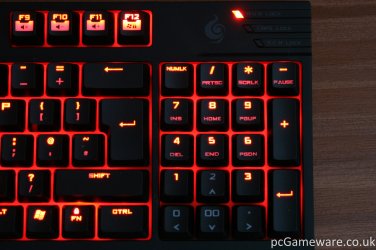
Is this your keyboard ? Turn Off num lock before pressing delete key !
 

Attachments

  • CM-Storm-Quickfire-TK-Illuminated-Keypad.jpg
    CM-Storm-Quickfire-TK-Illuminated-Keypad.jpg
    462.7 KB · Views: 3

My Computer

Computer type
PC/Desktop
Computer Manufacturer/Model Number
Custom build
OS
Windows 7 Ultimate x64
CPU
Intel Core i3-2120 3,30 GHz
Motherboard
Asus P8Z68-V
Memory
Apacer 4GB
Graphics Card(s)
Nvidia GeForce GTX 275
Hard Drives
SanDisk Extreme SDSSDX-120G-G25 2.5" - 120GB
WD 3200AAKS - 320GB
Seagate ST3400832AS - 400GB
Samsung HM16HJI - 160GB
Browser
Google Chrome
Hello, ICit2lol
I actually uninstalled my AVG since then and there still has been problems. The motherboard drivers are all up to date. I will give the system check and driver check a try and will post about it. Thank you.

Hello UNS,
That is almost the exact same keyboard I have. Just a tad bit different. I will try that but I doubt it will do anything. The keyboard itself is unresponsive pre-windows. None of the buttons work. Thank you.
 

My Computer

Computer type
PC/Desktop
OS
Windows 7 Home Premium 64 Bit SP 1
CPU
Intel Core i7 980
Memory
24576MB RAM
Graphics Card(s)
AMD Radeon HD 6950
Antivirus
AVG 2013
Just out od curiosity Darklite how old is the motherboard??

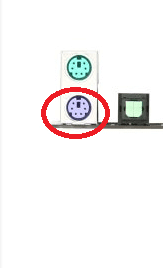
The PS2 keyboard too I find it odd it didn't work I see the mobo has two connections for PS2 - no offence but you did use the right colour one eh? see pic
 

Attachments

  • PS2.PNG
    PS2.PNG
    4.3 KB · Views: 7

My Computer

Computer type
PC/Desktop
Computer Manufacturer/Model Number
Own build (new) Desk1 / Asus ROG Win 7 / Desk2 1st build
OS
Desk1 7 Home Prem / Desk2 10 Pro / Main lap Asus ROG 10 Pro 2 laptop Toshiba 7 Pro Asus P2520 7 & 10
CPU
Desk1 i5 3750K / Laptop i7 GTX 860M / Desk2 i5 2500
Motherboard
Desk1 Asus P877-V / Desk2 Gigabyte H67 UD3H / Laptop ?
Memory
Desk1 8GB (1866) / Desk2 16GB (1333) / Laptop 8Gb DDR3
Graphics Card(s)
Desk 1& 2NVidia GTX 650 & Laptops on board Intel
Sound Card
Desk 1 & 2 -XONAR DG Realtek High Def audio Laptop
Monitor(s) Displays
Desk 1 Benq HD 2450 / Desk2 Philips 24" / Laptop 17.5"
Screen Resolution
1920x1080 D1 & D2 & Laptop 1
Hard Drives
Desk1 Samsung 120GB 830 SSD
Asus ROG 256GB 850 Pro SSD
Desk2 Samsung 840 256 SSD
Toshiba 120GB EVO
PSU
Desk 1 Corsair HX 1050/ Laptop ? / Desk 2 Corsair HX 650
Case
Desk 1 Cooler HAF XM ? Toshiba laptop / Desk2 Coolermaster
Cooling
Fans on all Desk1 -2 Desk2 - all Coolermasters 5 Laptop ?
Keyboard
Desk 1 MS Sidewinder X6 Desk 2 MS Sidewinder X 4
Mouse
Desk 1&2 - Gigabyte MS 900 gamer - laptop - Logitec wireless
Internet Speed
ADSL2+
Other Info
One other Desktop (tester) and spare Toshba laptop both with SSD's
Running Kaspersky 2016 ISS on all machines config'd identically
Logitec audio stereo systems on each machine (x3)
Canon MG5250MFC
Router/modem TP-Link running WPA2SK
Hello, ICit2lol
I actually uninstalled my AVG since then and there still has been problems. The motherboard drivers are all up to date. I will give the system check and driver check a try and will post about it. Thank you.

Hello UNS,
That is almost the exact same keyboard I have. Just a tad bit different. I will try that but I doubt it will do anything. The keyboard itself is unresponsive pre-windows. None of the buttons work. Thank you.

Hi darkelite,

Kindly perform the steps suggested by ICit2lol and let us know the results. As the issue began after removing AVG then you should try installing the same or you could perform a system restore following the link below:

http://www.sevenforums.com/tutorials/700-system-restore.html

Keep us posted with the results so we can advise you further.
 

My Computer

Computer type
PC/Desktop
OS
Winndows 7 32 bit
Back
Top