
Keychanger.exe-System Error

mori uk

New member
Local time
8:01 AM
Messages
7
Hi everyone
I made my first PC, everything seems to be fine exept I get enclosed error message on start up,can anybody please help me get rid of this message?
my PC details
Windows7 Ultimate Service pack 1
motherboard: IC4 1T-A
Processor: Pentium(R) Dual-core CPU E5700 @3.00 GHZ
Installed memory(RAM) 4.00 GB
 

Attachments
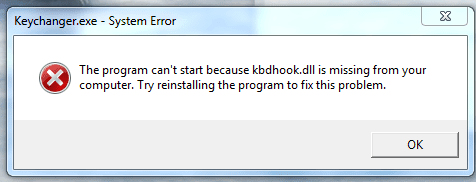
  • keychanger.exe-system error.PNG
    keychanger.exe-system error.PNG
    10.1 KB · Views: 17

My Computer

Computer Manufacturer/Model Number
sony vio VPCEB36GX
OS
windows 7 professional x64
CPU
Intel(R)Core(TM) i5 CPU
Memory
4.00 GB (3.67 GB usable)
Sound Card
Intel(R) Display Audio Realtek High Definition Audio
Monitor(s) Displays
Generic PnP Monitor
Hard Drives
WDC WD5000BEVT-26A0RT0
Try reinstalling the driver for your keyboard...
 

My Computer

Computer type
Laptop
Computer Manufacturer/Model Number
HP 17-ak0xx, dv7 3173nr
OS
Win7 Home Premium x64 W10Pro&Home
CPU
A12 9720p 4+8 TurionII M520
Motherboard
HP 3839
Memory
6GB 8GB
Graphics Card(s)
R7
Monitor(s) Displays
24" sa550
Screen Resolution
1600x900 1920x1080
Mouse
Logitechx2
Internet Speed
120Mb/s down 12up
Hi DMHolt57 and thank you for a prompt reply, the problem is when I purchased the keyboard there was no driver with it, you just plug it into a USB port.
 

My Computer

Computer Manufacturer/Model Number
sony vio VPCEB36GX
OS
windows 7 professional x64
CPU
Intel(R)Core(TM) i5 CPU
Memory
4.00 GB (3.67 GB usable)
Sound Card
Intel(R) Display Audio Realtek High Definition Audio
Monitor(s) Displays
Generic PnP Monitor
Hard Drives
WDC WD5000BEVT-26A0RT0
Go to the manufacturer's website and see if they have drivers for it.
 

My Computer

OS
XP / Win7 x64 Pro
CPU
Intel Quad-Core Q9450 @ 3.2GHz
Motherboard
Asus P5-E
Memory
2x2GB GSkill DDR2
Graphics Card(s)
NVIDIA GeForce 8600 GTS (EVGA)
Monitor(s) Displays
Dell 2408WFP
Screen Resolution
1920x1200
This isn't driver-related IMHO - the .dll is part of an application called KeyChanger. (It appears to be a legitimate app, not malware.)

Try downloading a new copy of KeyChanger here and then install it. Then immediately uninstall it (no need to run it). That should get rid of the kbdhook issue.
 

My Computer

Computer type
PC/Desktop
Computer Manufacturer/Model Number
Custom-built
OS
Windows 7 Professional SP1 32-bit
CPU
Intel Core 2 Duo E6600 2.4GHz
Motherboard
Asus PL5D2
Memory
4GB DDR2-667 (4x1GB in dual-channel config)
Graphics Card(s)
nVidia GeForce 9800 GT
Sound Card
Creative X-Fi XtremeMusic
Monitor(s) Displays
Acer P236H
Screen Resolution
1920x1200 (DVI)
Hard Drives
OCZ SSD Vertex Plus 60GB SATA (Firmware 3.55), 64MB cache
Hitachi HD321KJ SATA, 320GB, 7200rpm, 16MB cache
PSU
Antec TruePower 2.0
Case
Cooler Master Centurion
Cooling
Too many fans
Keyboard
Standard
Mouse
Microsoft wireless optical mouse
Internet Speed
AT&T U-verse (18mbit/sec)
Antivirus
Microsoft Security Essentials
Browser
Firefox
Other Info
Other devices:
Compaq CQ-60 laptop
Google Nexus 7 (2012) tablet
Nvidia SHIELD tablet (US/LTE)
Hardkernel ODROID-XU single-board computer (Samsung Exynos 5420)
Hi and many thanks for your assistance, I did exactly each of you suggested, unfortunately the message still appears every-time I start the machine, the system works superbly and I have never experienced any problem, I just need a way to make that message invisible, is there any way to do this?
 

My Computer

Computer Manufacturer/Model Number
sony vio VPCEB36GX
OS
windows 7 professional x64
CPU
Intel(R)Core(TM) i5 CPU
Memory
4.00 GB (3.67 GB usable)
Sound Card
Intel(R) Display Audio Realtek High Definition Audio
Monitor(s) Displays
Generic PnP Monitor
Hard Drives
WDC WD5000BEVT-26A0RT0
Back
Top