Solved Keys don't repeat when held down unless FilterKeys is ON

Tukkun

New member
Local time
4:09 AM
Messages
3
So I have this strange problem, where I have to turn FilterKeys ON to have keys repeat when I hold them down. Otherwise, only one character appears when I hold down a key, and only one character is deleted when I hold down the backspace key.

I've tried searching all over the Internet for my problem, but everyone else suggests turning FilterKeys OFF instead - my problem seems to be the exact opposite.

I've tried checking the Control Panel and everything seems to be fine.

So is there anything I can edit in the registry or some files I can edit to resolve this problem? In the meantime I've tried editing the FilterKeys options in the registry to speed it up, but it still feels a bit annoying and it doesn't work until I have entered my password.

I don't have any restore points (for some reason they aren't automatically created) or anything that I can use to revert my computer to its original state.

I'm also worried about why this problem suddenly happens, and if anything else in my computer is affected. I've downloaded several files yesterday (though I deleted them all), so I guess it might be a virus problem? I've tried scanning with TrendMicro Housecall and my computer appears to be "clean"... Also there aren't any strange processes in the Task Manager. Might my computer be at risk? Are there any other good (and free) virus scan programs you would recommend?


EDIT: Oh, I would like to state that OSK works perfectly fine. It's just my normal keyboard that refuses to repeat without FilterKeys.
 
Last edited:

My Computer My Computer

At a glance

Windows 7 Ultimate 32bit
Computer type
PC/Desktop
OS
Windows 7 Ultimate 32bit
Hello Tukkun and welcome to Seven Forums.

You might be able to change the registry here:

HKEY_CURRENT_USER\Control Panel\Accessibility\Keyboard Response

AutoRepeatRate: a value of 15 equals 64 characters per second on my keyboard. A value of 30 equals 32 characters/sec but any values in between don't translate properly.
AutoRepeatDelay: should be at least 300, but a higher setting (400-500-1000) may work better for your particular typing style.
BounceTime, DelayBeforeAcceptance: I leave them at 0. Your mileage may vary.
Flags: is 35 if enabled but will cause FilterKeys icon in the system tray. 34 will disable this.

You could try playing around with these settings to see if they make a difference for you. Any registry changes will probably require rebooting for them to take effect.

   Warning
Before making any registry changes it's advisable to make a System Restore Point or save and export a copy of the registry "just in case". Improperly changing the registry could brick your computer.
 

My Computer My Computer

At a glance

Win 7 Pro 64-bitIntel i5 2.4 Ghz8GB DDR3Intel HD 3000
Computer type
Laptop
Computer Manufacturer/Model Number
Sony Vaio VPCEB47GM Laptop
OS
Win 7 Pro 64-bit
CPU
Intel i5 2.4 Ghz
Memory
8GB DDR3
Graphics Card(s)
Intel HD 3000
Sound Card
IDT High Definition
Monitor(s) Displays
15.6 WGXA Anti-Glare LED
Screen Resolution
1280x800
Hard Drives
640Gb 7200rpm
Antivirus
MSE
Browser
Opera (primary) with IE9 backup
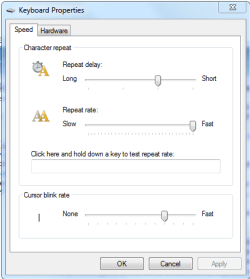
Also try going to Control Panel\All Control Panel Items\Keyboard and adjusting these sliders.
Welcome to Seven Forums too. :)
Kybrd.PNG
 

My Computer My Computer

At a glance

Windows 7 Ultimate X64 SP1Intel i5-2550K, Differing ~4.4-4.8GHz No buil...16GB G.Skill Sniper 1866MHz @ 2133MHz 2x8GBASUS GTX650TIB-DC2OC-2GD5, (650TI Boost)
Computer type
PC/Desktop
Computer Manufacturer/Model Number
Home Built Desktop By DataTech
OS
Windows 7 Ultimate X64 SP1
CPU
Intel i5-2550K, Differing ~4.4-4.8GHz No built in GPU
Motherboard
ASUS P8Z68-V PRO/GEN3
Memory
16GB G.Skill Sniper 1866MHz @ 2133MHz 2x8GB
Graphics Card(s)
ASUS GTX650TIB-DC2OC-2GD5, (650TI Boost)
Sound Card
Onboard Realtek 5-1
Monitor(s) Displays
Samsung P2570HD
Screen Resolution
1920x1080
Hard Drives
Samsung 840 Pro 256GB SSD for OS, 500GB Seagate Constellation (Enterprise drive) for Data
PSU
Corsair HX650W
Case
Inwin Dragon Rider
Cooling
Hyper 212 EVO w/two Noctua fans, push-pull, @1300 RPM
Keyboard
E-Z Eyes, bright yellow keys with large characters
Mouse
steelseries SENSEI Laser Pro Gaming
Internet Speed
48-51Mbs Mbs down, 11 Mbs up Xfinity Cable
Antivirus
Norton Internet Security 2013
Browser
IE 10, Opera, Pale Moon if needed
Other Info
4 case fans, LG BluRay-RE, ASUS DVD-RW, Mr. Fusion power supply, 1.21 gigawatts.
Hello Tukkun and welcome to Seven Forums.

You might be able to change the registry here:

HKEY_CURRENT_USER\Control Panel\Accessibility\Keyboard Response

AutoRepeatRate: a value of 15 equals 64 characters per second on my keyboard. A value of 30 equals 32 characters/sec but any values in between don't translate properly.
AutoRepeatDelay: should be at least 300, but a higher setting (400-500-1000) may work better for your particular typing style.
BounceTime, DelayBeforeAcceptance: I leave them at 0. Your mileage may vary.
Flags: is 35 if enabled but will cause FilterKeys icon in the system tray. 34 will disable this.

You could try playing around with these settings to see if they make a difference for you. Any registry changes will probably require rebooting for them to take effect.

   Warning
Before making any registry changes it's advisable to make a System Restore Point or save and export a copy of the registry "just in case". Improperly changing the registry could brick your computer.

I've already done that, thanks. Though the problem still remains, keys don't repeat properly unless FilterKeys is on, and they don't repeat until I've entered my password. I used to have FilterKeys off and still have keys repeat normally.

I'm mostly worried that this might be a side effect of a keylogger. Maybe the keylogger makes it so I can't repeat keys so it can tell which keys I press more easily? I only have one winlogon.exe. I've also scanned my computer with Spybot (free version), MalwareBytes (pro trial) and Trend Micro Housecall, all of them told me that my computer was "clean". Are there any other (free, because I have no money) virus scan programs I should be using, or should I probably stop worrying about this? Is there anything else I can do?

I've also tried downloading RegScanner, a program that looks for recent registry modifications, but didn't find anything relevant. So I guess it's not a registry problem :\ I can't find any suspicious files in my computer either.


Also try going to Control Panel\All Control Panel Items\Keyboard and adjusting these sliders.
Welcome to Seven Forums too. :)
View attachment 284094

Those sliders have literally no effect for me.
 
Last edited:

My Computer My Computer

At a glance

Windows 7 Ultimate 32bit
Computer type
PC/Desktop
OS
Windows 7 Ultimate 32bit
Simple suggestion, might sound stupid but give it a try.

Have you tried a different keyboard?
 

My Computer My Computer

At a glance

Windows 10 ProAMD Ryzen 5 2400G Processor with Radeon RX Ve...G.SKILL Ripjaws V Series 16GB (2 x 8GB) 288-P...2047MB NVIDIA GeForce GTX 1060 6GB (EVGA)
Computer type
PC/Desktop
Computer Manufacturer/Model Number
Custom Built
OS
Windows 10 Pro
CPU
AMD Ryzen 5 2400G Processor with Radeon RX Vega 11 Graphics
Motherboard
ASRock X470 Master SLI/AC AM4 AMD Promontory X470 SATA 6Gb/s
Memory
G.SKILL Ripjaws V Series 16GB (2 x 8GB) 288-Pin DDR4 SDRAM D
Graphics Card(s)
2047MB NVIDIA GeForce GTX 1060 6GB (EVGA)
Sound Card
Motherboard Built in
Monitor(s) Displays
Acer R240HY bidx 23.8-Inch IPS HDMI DVI VGA (1920 x 1080) Wi
Screen Resolution
1920 x 1080
Hard Drives
1TB Sandisk SSD PLUS (Main drive)
500 GB Seagate 7200 RPM (Games)
500 GB Western Digital 7200 RPM (Virtual Machines)
PSU
CORSAIR TX Series TX650M 650W 80+ Gold Modular Power Supply
Case
CORSAIR CARBIDE SPEC-02 Mid-Tower Gaming Case, Red LED Fan
Cooling
220mm, two 120mm, and four 60mm fans
Keyboard
Wired Dell keyboard
Mouse
Wireless Logitech mouse
Internet Speed
250mb down, 30mb up
Antivirus
Panda Cloud Antivirus
Browser
Chrome-ish x64
Other Info
Your awesome for reading this.

My Computer My Computer

At a glance

Windows 7 Ultimate 32bit
Computer type
PC/Desktop
OS
Windows 7 Ultimate 32bit

My Computer My Computer

At a glance

Win 7 Pro 64-bitIntel i5 2.4 Ghz8GB DDR3Intel HD 3000
Computer type
Laptop
Computer Manufacturer/Model Number
Sony Vaio VPCEB47GM Laptop
OS
Win 7 Pro 64-bit
CPU
Intel i5 2.4 Ghz
Memory
8GB DDR3
Graphics Card(s)
Intel HD 3000
Sound Card
IDT High Definition
Monitor(s) Displays
15.6 WGXA Anti-Glare LED
Screen Resolution
1280x800
Hard Drives
640Gb 7200rpm
Antivirus
MSE
Browser
Opera (primary) with IE9 backup
Great!

Simple suggestion, might sound stupid but give it a try.

Have you tried a different keyboard?

... lol, it worked. Thanks!

Glad you got it working! :)
First time anyone says they have any problem at all with their keyboard That is my first suggestion.
Weird things happen sometimes with keyboards that cause unexplained weirdness.
 

My Computer My Computer

At a glance

Windows 10 ProAMD Ryzen 5 2400G Processor with Radeon RX Ve...G.SKILL Ripjaws V Series 16GB (2 x 8GB) 288-P...2047MB NVIDIA GeForce GTX 1060 6GB (EVGA)
Computer type
PC/Desktop
Computer Manufacturer/Model Number
Custom Built
OS
Windows 10 Pro
CPU
AMD Ryzen 5 2400G Processor with Radeon RX Vega 11 Graphics
Motherboard
ASRock X470 Master SLI/AC AM4 AMD Promontory X470 SATA 6Gb/s
Memory
G.SKILL Ripjaws V Series 16GB (2 x 8GB) 288-Pin DDR4 SDRAM D
Graphics Card(s)
2047MB NVIDIA GeForce GTX 1060 6GB (EVGA)
Sound Card
Motherboard Built in
Monitor(s) Displays
Acer R240HY bidx 23.8-Inch IPS HDMI DVI VGA (1920 x 1080) Wi
Screen Resolution
1920 x 1080
Hard Drives
1TB Sandisk SSD PLUS (Main drive)
500 GB Seagate 7200 RPM (Games)
500 GB Western Digital 7200 RPM (Virtual Machines)
PSU
CORSAIR TX Series TX650M 650W 80+ Gold Modular Power Supply
Case
CORSAIR CARBIDE SPEC-02 Mid-Tower Gaming Case, Red LED Fan
Cooling
220mm, two 120mm, and four 60mm fans
Keyboard
Wired Dell keyboard
Mouse
Wireless Logitech mouse
Internet Speed
250mb down, 30mb up
Antivirus
Panda Cloud Antivirus
Browser
Chrome-ish x64
Other Info
Your awesome for reading this.
Cool solution, sometime we "think too hard" about a problem. :D
 

My Computer My Computer

At a glance

Windows 7 Ultimate X64 SP1Intel i5-2550K, Differing ~4.4-4.8GHz No buil...16GB G.Skill Sniper 1866MHz @ 2133MHz 2x8GBASUS GTX650TIB-DC2OC-2GD5, (650TI Boost)
Computer type
PC/Desktop
Computer Manufacturer/Model Number
Home Built Desktop By DataTech
OS
Windows 7 Ultimate X64 SP1
CPU
Intel i5-2550K, Differing ~4.4-4.8GHz No built in GPU
Motherboard
ASUS P8Z68-V PRO/GEN3
Memory
16GB G.Skill Sniper 1866MHz @ 2133MHz 2x8GB
Graphics Card(s)
ASUS GTX650TIB-DC2OC-2GD5, (650TI Boost)
Sound Card
Onboard Realtek 5-1
Monitor(s) Displays
Samsung P2570HD
Screen Resolution
1920x1080
Hard Drives
Samsung 840 Pro 256GB SSD for OS, 500GB Seagate Constellation (Enterprise drive) for Data
PSU
Corsair HX650W
Case
Inwin Dragon Rider
Cooling
Hyper 212 EVO w/two Noctua fans, push-pull, @1300 RPM
Keyboard
E-Z Eyes, bright yellow keys with large characters
Mouse
steelseries SENSEI Laser Pro Gaming
Internet Speed
48-51Mbs Mbs down, 11 Mbs up Xfinity Cable
Antivirus
Norton Internet Security 2013
Browser
IE 10, Opera, Pale Moon if needed
Other Info
4 case fans, LG BluRay-RE, ASUS DVD-RW, Mr. Fusion power supply, 1.21 gigawatts.
I do it all the time

Cool solution, sometime we "think too hard" about a problem. :D

I have a Boss that has been teaching me as I was always the one to over think the issue.
Recently I have been training more and learning that some things really are simple. Try simple first.
Like they keep telling me, K.I.S.S. Keep it simple stupid.

lol.

:roflmao:
 

My Computer My Computer

At a glance

Windows 10 ProAMD Ryzen 5 2400G Processor with Radeon RX Ve...G.SKILL Ripjaws V Series 16GB (2 x 8GB) 288-P...2047MB NVIDIA GeForce GTX 1060 6GB (EVGA)
Computer type
PC/Desktop
Computer Manufacturer/Model Number
Custom Built
OS
Windows 10 Pro
CPU
AMD Ryzen 5 2400G Processor with Radeon RX Vega 11 Graphics
Motherboard
ASRock X470 Master SLI/AC AM4 AMD Promontory X470 SATA 6Gb/s
Memory
G.SKILL Ripjaws V Series 16GB (2 x 8GB) 288-Pin DDR4 SDRAM D
Graphics Card(s)
2047MB NVIDIA GeForce GTX 1060 6GB (EVGA)
Sound Card
Motherboard Built in
Monitor(s) Displays
Acer R240HY bidx 23.8-Inch IPS HDMI DVI VGA (1920 x 1080) Wi
Screen Resolution
1920 x 1080
Hard Drives
1TB Sandisk SSD PLUS (Main drive)
500 GB Seagate 7200 RPM (Games)
500 GB Western Digital 7200 RPM (Virtual Machines)
PSU
CORSAIR TX Series TX650M 650W 80+ Gold Modular Power Supply
Case
CORSAIR CARBIDE SPEC-02 Mid-Tower Gaming Case, Red LED Fan
Cooling
220mm, two 120mm, and four 60mm fans
Keyboard
Wired Dell keyboard
Mouse
Wireless Logitech mouse
Internet Speed
250mb down, 30mb up
Antivirus
Panda Cloud Antivirus
Browser
Chrome-ish x64
Other Info
Your awesome for reading this.

My Computer My Computer

At a glance

Windows 7 Ultimate X64 SP1Intel i5-2550K, Differing ~4.4-4.8GHz No buil...16GB G.Skill Sniper 1866MHz @ 2133MHz 2x8GBASUS GTX650TIB-DC2OC-2GD5, (650TI Boost)
Computer type
PC/Desktop
Computer Manufacturer/Model Number
Home Built Desktop By DataTech
OS
Windows 7 Ultimate X64 SP1
CPU
Intel i5-2550K, Differing ~4.4-4.8GHz No built in GPU
Motherboard
ASUS P8Z68-V PRO/GEN3
Memory
16GB G.Skill Sniper 1866MHz @ 2133MHz 2x8GB
Graphics Card(s)
ASUS GTX650TIB-DC2OC-2GD5, (650TI Boost)
Sound Card
Onboard Realtek 5-1
Monitor(s) Displays
Samsung P2570HD
Screen Resolution
1920x1080
Hard Drives
Samsung 840 Pro 256GB SSD for OS, 500GB Seagate Constellation (Enterprise drive) for Data
PSU
Corsair HX650W
Case
Inwin Dragon Rider
Cooling
Hyper 212 EVO w/two Noctua fans, push-pull, @1300 RPM
Keyboard
E-Z Eyes, bright yellow keys with large characters
Mouse
steelseries SENSEI Laser Pro Gaming
Internet Speed
48-51Mbs Mbs down, 11 Mbs up Xfinity Cable
Antivirus
Norton Internet Security 2013
Browser
IE 10, Opera, Pale Moon if needed
Other Info
4 case fans, LG BluRay-RE, ASUS DVD-RW, Mr. Fusion power supply, 1.21 gigawatts.
Back
Top