Keystroke Assignment in SetPoint Issue.

szino

New member
Local time
2:01 AM
Messages
5
Location
Poland
Hello,
I gotta problem with keystroke assignment in SetPoint on 5.33.14 driver. My mouse is MX518 and the problem is, when I try to make my 4th button to be for example "j" it is in Windows but when I launch WoW my 4th button does not work. I have read much in inet about it but never found a solution. Please help :)
 

My Computer

OS
Win 7 Ult x64
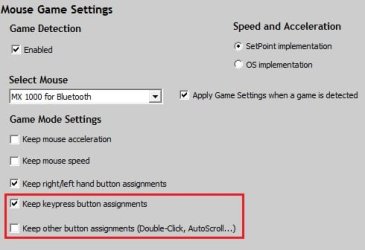
I have an earlier version of Setpoint but it has a tab for "Mouse Game Settings". Check yours for similar settings as displayed in my attached image. If that doesn't help then I don't know.
 

Attachments

  • SetpointMGS.jpg
    SetpointMGS.jpg
    17.7 KB · Views: 9

My Computer

Computer Manufacturer/Model Number
Self built
OS
Windows 7 Ultimate x64
CPU
Intel Pentium Dual Core E5200 2.5GHz (3.77GHz OC)
Motherboard
Asus P5Q-E
Memory
Corsair 4GB DDR2 (4x1GB CM2X1024-6400C4)
Graphics Card(s)
Palit GeForce GTS 250 (1024MB)
Sound Card
On Board (ADI AD2000B 8ch HD)
Monitor(s) Displays
Samsung 32in LCD TV
Screen Resolution
1360x768
Hard Drives
2 x 1TB Samsung 103SJ (Raid0)
2 x External 500GB Samsung 502IJ (NexStar 3 HD Enclosures)
PSU
550W Antec Neo HE 550
Case
Antec P180
Cooling
Xigmatex Red Scorpion CPU Cooler. 3x120mm Fans
Keyboard
Logitech MX5000 Laser (Combo)
Mouse
Logitech MX5000 Laser (Combo)
Internet Speed
ADSL2+ (avg 10 Mbps Down, 0.80 Mbps up)
Other Info
Gigabyte GN-WP01GS 54g Wireless Lan Card
I have tried various sets of those u showed but still it does not work, not even in Team Speak 3 or any other application still works in Chrome for example jjj - this tripple "j" I've made with 4th button mouse :F
 

My Computer

OS
Win 7 Ult x64
Back
Top