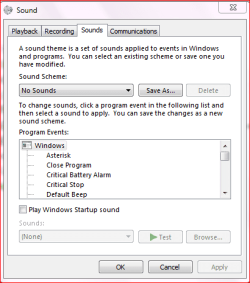
Kill the damn system beep

nerotic

New member
Local time
7:08 AM
Messages
8
I've tried everything I read which includes:

1) Changing sound profiles for my theme to none.
2) Stopping and disabling Beep in UnPnP in the device manager
3) I even went as far as uninstalling the driver for system beep.

It's not really a system beep it's more like a one off piano hit. It happens whenever I try to use something that involves audio such as Skype but doesn't get set off when playing back music through Foobar, web videos, or any movies/tv shows locally.

Anyone have any ideas? I've scoured the forums but can't find the solution.
 

My Computer

OS
Win7 64bit
CPU
Quad Core 2.33
Motherboard
Asus P5Q_E
Memory
2x2GB HyperX 1066
Graphics Card(s)
Nvidia 9500GT 1GB
Monitor(s) Displays
Dell 200FP
Hard Drives
WDC 640gb
Seagate Barracuda 250gb
Welcome to SevenForums.

Control Panel | Sounds

soundscheme.PNG
 

My Computer

Computer Manufacturer/Model Number
Toshiba Satellite S875D-S7239 laptop
OS
MS Windows 7 Ultimate SP1 64-bit
CPU
AMD A10-4600M
Motherboard
AMD Pumori (Socket FT1)
Memory
6.00 GB Dual-Channel DDR3 @ 798MHz (11-11-12-28)
Graphics Card(s)
AMD Radeon HD 7660G
Sound Card
High Definition Audio Device
Monitor(s) Displays
Generic PnP Monitor (1600x900@60Hz)
Screen Resolution
1600x900@60Hz
Hard Drives
SSD 119GB Corsair CSSD-V128GB2 ATA Device
Keyboard
Standard PS/2 Keyboard
Mouse
HP Wireless Optical Mobile Mouse Model FHA-3410
Internet Speed
What the local pub, local coffee shop offers.
Other Info
Optical Drive:MATSHITA BD-CMB UJ160B ATA Device


Also have an Asus ha1002xp netbook with Win 7 Ultimate installed.
Thanks for the response.

However I've listed the things that I've tried and the 1st one was this control panel which didn't work.
 

My Computer

OS
Win7 64bit
CPU
Quad Core 2.33
Motherboard
Asus P5Q_E
Memory
2x2GB HyperX 1066
Graphics Card(s)
Nvidia 9500GT 1GB
Monitor(s) Displays
Dell 200FP
Hard Drives
WDC 640gb
Seagate Barracuda 250gb
Which tells me that your annoying beeps are coming from programs you have installed and not from Microsoft software.

Suggest you check the "options" choice on the offending programs.
 

My Computer

Computer Manufacturer/Model Number
Toshiba Satellite S875D-S7239 laptop
OS
MS Windows 7 Ultimate SP1 64-bit
CPU
AMD A10-4600M
Motherboard
AMD Pumori (Socket FT1)
Memory
6.00 GB Dual-Channel DDR3 @ 798MHz (11-11-12-28)
Graphics Card(s)
AMD Radeon HD 7660G
Sound Card
High Definition Audio Device
Monitor(s) Displays
Generic PnP Monitor (1600x900@60Hz)
Screen Resolution
1600x900@60Hz
Hard Drives
SSD 119GB Corsair CSSD-V128GB2 ATA Device
Keyboard
Standard PS/2 Keyboard
Mouse
HP Wireless Optical Mobile Mouse Model FHA-3410
Internet Speed
What the local pub, local coffee shop offers.
Other Info
Optical Drive:MATSHITA BD-CMB UJ160B ATA Device


Also have an Asus ha1002xp netbook with Win 7 Ultimate installed.
Thanks for the response.

However I've listed the things that I've tried and the 1st one was this control panel which didn't work.

As mentioend by the previous poster, many programs install their own audio samples and use them for notifications, connections, errors...etc.

Ap
 

My Computer

Computer Manufacturer/Model Number
Assembled in my workshop
OS
Windows 7 Home Premium
CPU
Intel Core 2 Duo @ 3.00gHz
Motherboard
Gigabyte GA-P35-S3G
Memory
4 GB
Graphics Card(s)
ATI Radeon HD 2600 XT
Sound Card
RME 24/96 Card, Realtek Internal Audio PreSonus FireStudio
Monitor(s) Displays
Acer 1917 (x2)
Screen Resolution
1280 x 1024 on both monitors
Hard Drives
Three 250GB Seagate SATA Barracuda 7200rpm
PSU
Rosewill 500-watt
Case
Rosewill mid-tower
Cooling
Noctua NH-U9B (CPU), PwrSupply fan + single large case Fan
Keyboard
Macally w/2/USB ports.
Mouse
Trackman Wheel
Other Info
Event 20/20 bas studio monitors, Yamaha sub.
Rackmount Korg/Roland/Yamaha synthesizers,
Cubase MIDI/audio recording. Sony Soundforge audio/mastering software. CD Architect Mastering. RME & Presonus audio interfaces.
I had thought of that but they all (Skype, Voipwise, Jing) use the exact same sound. Any idea how I can find out where the sound file itself might be stored so I can delete it considering it seems to be a shared resource?
 

My Computer

OS
Win7 64bit
CPU
Quad Core 2.33
Motherboard
Asus P5Q_E
Memory
2x2GB HyperX 1066
Graphics Card(s)
Nvidia 9500GT 1GB
Monitor(s) Displays
Dell 200FP
Hard Drives
WDC 640gb
Seagate Barracuda 250gb
Back
Top