Kind of 'transparent' program-windows, shows whatever behind them

ggh78

New member
Member
Local time
6:59 AM
Messages
30
Hi everyone,

SevenForums has quite many categories, and my issue probably could have been placed in another subforum as well. Sorry if this wasn't the right one.

I'm experiencing a strange problem, where on certain programs, I can see whatever there is behind them. I've mainly had this with Chrome, it could also have happened with regular windows, not sure of that (kind of stuff that happens while you're working w/o paying attention to special details at that time). The behind content pops in in parts - an icon on the desktop (and it's barrier surrounding it), part of a background programs ...

For example, I can sometimes see Foobar2000's (audio playback software) current playing song's like, or the visualizations running at the top - in the middle of an internet website. Funny isn't it ?

I cannot interact with those popping parts though (those 'behind' the active window).


Anyone experienced this problem as well ? I'd really like to hear suggestions as to how to solve it... It's cool actually, but could be quite bothersome when you're running something critical.


Thank you !
 

My Computer My Computer

At a glance

Windows 7 (Pro) 64bit
Computer type
PC/Desktop
Computer Manufacturer/Model Number
Asus
OS
Windows 7 (Pro) 64bit
Hard Drives
SSD 128GB
Antivirus
NOD32

My Computer My Computer

At a glance

Vista 64 bit and 32 bit (SP2)Intel(R) Core(TM)2 Duo Processor T9400 (2.53 GHz4GB DDR2 System Memory (2 Dimm)512 MB NVIDIA GeForce 9600M GT
Computer Manufacturer/Model Number
HP Pavillion dv5t (generation 1)
OS
Vista 64 bit and 32 bit (SP2)
CPU
Intel(R) Core(TM)2 Duo Processor T9400 (2.53 GHz
Memory
4GB DDR2 System Memory (2 Dimm)
Graphics Card(s)
512 MB NVIDIA GeForce 9600M GT
Monitor(s) Displays
15.4" diagonal WSXGA+ High-Definition HP BrightView Widescre
Screen Resolution
1680 x 1050
Hard Drives
320GB 5400RPM SATA Hard Drive with HP ProtectSmart Hard Drive Protection
Keyboard
Built-in HP
Mouse
Built in - Synaptics TouchPad V6.5 on PS/2 Port
Internet Speed
Max
Other Info
~ Intel Next-Gen Wireless-N Mini-card w/Bluetooth ~ Blu-Ray ROM DVD+/-R/RW ~ Integ. HDTV Hybrid Tuner ~ 12 Cell Battery ~ MS Office (Home Premium) 2007 ~
Thank you.

Now I know my Windows 7 is a home basic version. :geek:
That means I have no Aero Peek (the check-box is just grey, not available). I don't have the transparency feature as well.

Does anybody have other ideas ?
 

My Computer My Computer

At a glance

Windows 7 (Pro) 64bit
Computer type
PC/Desktop
Computer Manufacturer/Model Number
Asus
OS
Windows 7 (Pro) 64bit
Hard Drives
SSD 128GB
Antivirus
NOD32
There's some 3rd party apps available that may work for you. They're primarily designed to turn transparency on, but they may also have a way to turn it off as well. You can take a look and see.

Aero - Enable in Unsupported Editions of Windows 7
(The Starter and Home Basic editions of Windows 7 do not include Aero.)
Turn On Windows 7 Aero with an Incompatible Graphics Card
Download First Beta of AeroVG Se7en Theme for Windows 7 - Tweaking with Vishal

You might also want to check with Microsoft tech support:
Microsoft Support
 

My Computer My Computer

At a glance

Vista 64 bit and 32 bit (SP2)Intel(R) Core(TM)2 Duo Processor T9400 (2.53 GHz4GB DDR2 System Memory (2 Dimm)512 MB NVIDIA GeForce 9600M GT
Computer Manufacturer/Model Number
HP Pavillion dv5t (generation 1)
OS
Vista 64 bit and 32 bit (SP2)
CPU
Intel(R) Core(TM)2 Duo Processor T9400 (2.53 GHz
Memory
4GB DDR2 System Memory (2 Dimm)
Graphics Card(s)
512 MB NVIDIA GeForce 9600M GT
Monitor(s) Displays
15.4" diagonal WSXGA+ High-Definition HP BrightView Widescre
Screen Resolution
1680 x 1050
Hard Drives
320GB 5400RPM SATA Hard Drive with HP ProtectSmart Hard Drive Protection
Keyboard
Built-in HP
Mouse
Built in - Synaptics TouchPad V6.5 on PS/2 Port
Internet Speed
Max
Other Info
~ Intel Next-Gen Wireless-N Mini-card w/Bluetooth ~ Blu-Ray ROM DVD+/-R/RW ~ Integ. HDTV Hybrid Tuner ~ 12 Cell Battery ~ MS Office (Home Premium) 2007 ~
Thanks, Imperfect1. When solving my issue requires changes in the registry (hacks or whatever) to be done, I prefer to leave it this way. I just haven't go the strength to go through critical problems in case these occur.

Aero Peek is disabled (grey, not checked) for this matter. Do you think changing this setting back and forth might actually help ?
 

My Computer My Computer

At a glance

Windows 7 (Pro) 64bit
Computer type
PC/Desktop
Computer Manufacturer/Model Number
Asus
OS
Windows 7 (Pro) 64bit
Hard Drives
SSD 128GB
Antivirus
NOD32
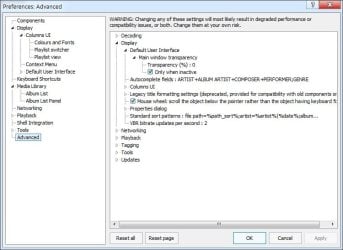
Maybe transparency is turned on in foobar itself.

To turn it off, open the foobar Preferences dialog (File->Preferences).

In the treelist on the left, select 'Advanced'.

In the treelist on the right, expand 'Display', then 'Default user interface', then 'Main Window Transparency'.

The default setting for transparency is 0% (no transparency).


foobarss.jpg

Hope this helps.
 

My Computer My Computer

At a glance

Windows 7 Ultimate 32bits2GHz Intel T5800 dual core3 GBATI Radeon HD3650
Computer Manufacturer/Model Number
Toshiba P300-1EI
OS
Windows 7 Ultimate 32bits
CPU
2GHz Intel T5800 dual core
Memory
3 GB
Graphics Card(s)
ATI Radeon HD3650
Sound Card
Yamaha MW10C USB mix board
Hard Drives
250 MB Seagate Momentus XT internal
1 GB 2.5" Samsung HN-M101MBB internal
1GB 3.5" Hitachi external
^^^ Thanks, I tried that. It had been set on 0%, and there's a check-box for "Only when inactive". I unchecked it to be sure it's set to 0% at any case.

I'll be glad to hear more opinions, and will report here if I still encounter the problem.
 

My Computer My Computer

At a glance

Windows 7 (Pro) 64bit
Computer type
PC/Desktop
Computer Manufacturer/Model Number
Asus
OS
Windows 7 (Pro) 64bit
Hard Drives
SSD 128GB
Antivirus
NOD32
Problem isn't solved yet unfortunately ...
 

My Computer My Computer

At a glance

Windows 7 (Pro) 64bit
Computer type
PC/Desktop
Computer Manufacturer/Model Number
Asus
OS
Windows 7 (Pro) 64bit
Hard Drives
SSD 128GB
Antivirus
NOD32
Back
Top