Kindly Need Help On This Issue - Refer To Image

ajibyusof06

New member
Local time
6:58 PM
Messages
2
Hello Sir.

I like you thought about the issue that i am having and i have no idea about it. I have done some google search for it but havent found the correct solution. please kindly help me on this. your help is much appreciated. please refer to the images attached for the issue. Thank you in advance.


Attachments

My Computer My Computer

OS
Window 7 Home Premium 64 Bit
Hello, ajibyusof06, and welcome to the Seven Forums.

I am afraid that I cannot figure out what your problem is just by looking at the images. Could you please clarify what your troubles are? Thanks.
 

My Computer My Computer

Computer Manufacturer/Model Number
Lenovo ThinkPad W520 (4270CT)
OS
Windows 7 Professional x64
CPU
Intel Core i7-2720QM
Memory
4GB (2 x 2GB)
Graphics Card(s)
NVIDIA Quadro 2000M (with Optimus)
Hard Drives
500 GB @ 7200 RPM
I think it is because, although he has no moving option on the scroll bar(s), he still cannot see the bottom of his window??
 

My Computer My Computer

Computer Manufacturer/Model Number
Three desktops and one laptop with good specs..
OS
Vista and now 7 in 32 and 64 bit.
Hello BriceH,

My issue is i am not able to see the bottom rest of the contents. I tried to move the cursor to the below base line or bottom right corner and tried to drag it but still i am not able to see the bottom rest of the page content. same goes with adobe acrobat and ms word.
 

My Computer My Computer

OS
Window 7 Home Premium 64 Bit
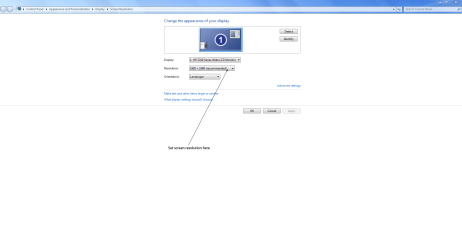
Check screen resolution, reduce if too big for screen.
 

My Computer My Computer

Computer Manufacturer/Model Number
Home build.
OS
Vista Ultimate 32 bit, Win 7 Pro 32 bit, Win 7 Pro 64 bit
CPU
Intel i5 CPU 750 @ 2.67 GHZ, OC 3.7 GHZ
Motherboard
Asus P7P55D
Memory
4 Gig
Graphics Card(s)
Nvidia GeForce GTS450
Monitor(s) Displays
Acer 24"
Screen Resolution
1440 x 900
Hard Drives
1000 GIG
1000 GIG
PSU
650
Case
Antec Nine Hundred Two
Internet Speed
14 MB (APPROX)
If you're not sure how to change it just right-click on your desktop and choose Screen Resolution.

Screen Resolution.PNG
 

My Computer My Computer

Computer Manufacturer/Model Number
HP Pavilion Elite 495UK
OS
Windows 7 Ultimate SP1 64-Bit
CPU
Intel Core i7 870 @ 2.93GHz
Motherboard
MSI 2A9C (CPU1)
Memory
8Gb Dual-Channel DDR3 @ 664MHz
Graphics Card(s)
nVidia GeForce GTX 460 1024MB dedicated RAM
Sound Card
Realtek HD Audio
Monitor(s) Displays
HP2310i
Screen Resolution
1920 x 1080
Hard Drives
1x1954GB Hitachi HDS22020ALA 330 (RAID), 1x1954GB Hitachi External for backup and storage
PSU
460W
Case
HP Elite
Cooling
Air cooled
Keyboard
Logitech K750 solar-powered keyboard
Mouse
Logitech Wireless M180 mouse
Internet Speed
2Mb
Other Info
Pure Avanti Flow Internet Radio with iPod Dock, 64Gb iPod, HP USB Speakers, Sony MDR-V500 Headphones, Sony Vaio F-Series Laptop
Back
Top