kingston RAM - same part # / different timings?

supernova777

New member
Member
Local time
2:55 PM
Messages
52
i bought a x2 kit of Kingston HyperX RED 8gb (2x 4gb) kingston DDR3 1600 for my older windows 7 machine
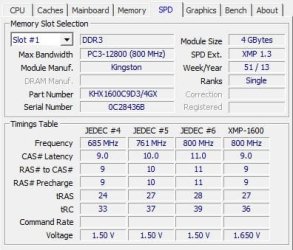
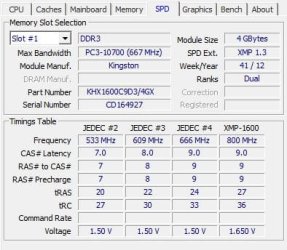
and im having huge problems trying to get them to work, they are visually identical and have the same part number but the timings shown in cpu-z are different
one set was made in week 41 of 2012 the other seems to have been made in week 51 of 2013
they have the saem exact individual part number KHX1600C9D3/4GX

can anyone offer me any tips on why the 2nd ram set seems to crash my computer???
im getting blue screens like mad on the 2nd (new) set from 2013

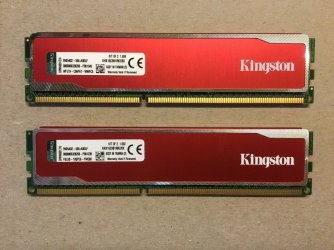
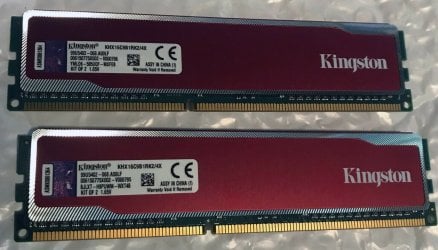
***ram images are from ebay and not of my exact ram pieces but the label designs match ie: my old ram label is purple, the new one is the same greenish color visually different

obviously my motherboard doesnt want to work with the newer set from 2013, im not sure exactly why, anytime i have them installed the system will boot + pass memory tests, but is unstable + will blue screen; is there anything i can do other than just forget using them with this motherboard?

i will be trying to test the ram in another motherboard, i have a GIGABYTE GA-P43T-ES3G i can try to test the ram in next
 

Attachments
  • my_RAM.JPG
    my_RAM.JPG
    46.1 KB · Views: 10
  • new_ram.JPG
    new_ram.JPG
    46.4 KB · Views: 10
  • motherboard.JPG
    motherboard.JPG
    34.8 KB · Views: 10
  • new_ram_image.jpg
    new_ram_image.jpg
    352.4 KB · Views: 1
  • old_ram_image.jpg
    old_ram_image.jpg
    229.2 KB · Views: 1
Last edited:

My Computer

OS
windows 7, mac os X

My Computer

Computer type
PC/Desktop
Computer Manufacturer/Model Number
medionl/Aspire 6930G/acer x55a
OS
W7 home premium 32bit/W7HP 64bit/w10 tp insider ring
CPU
E5300 dual core
Motherboard
medion MS7366
Memory
3gb
Graphics Card(s)
Nvidia Geforce 7100 Nforce 630i
Monitor(s) Displays
avixc
Internet Speed
n (isp resticted to 72)
Antivirus
mse/pands
Browser
palemoon
Other Info
Belkin Fd7050 n USB using Railink RT2870 drivers, more upto date
Kingston don't manufacture RAM chips. They buy from RAM manufactures and integrate them into a memory stick.
As they have been manufactured in different years, they may have different RAM chips.
As Roy suggested, use HWinfo.
It's a portable. Don't need to be installed. Extract and run.

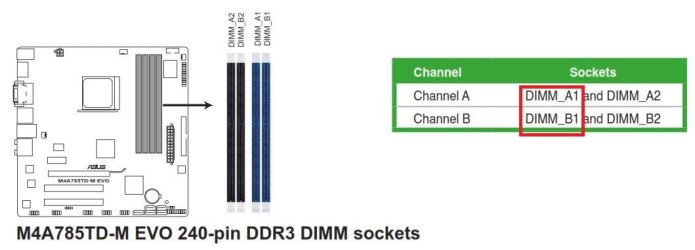
Install only the new sticks on the proper slots (A1&B1) and do a extensive memory check.
Press Windows Key + R, type “mdsched.exe” into the Run dialog that appears, and press Enter.
You’ll need to reboot your computer to perform the test. While the test is happening, you won’t be able to use your computer.

How to Test Your Computer’s RAM for Problems

After the test, install the old pair on A2&B2
 

Attachments

  • Memory.JPG
    Memory.JPG
    74.8 KB · Views: 0

My Computers

System One System Two

  • Computer type
    PC/Desktop
    Computer Manufacturer/Model Number
    custom build
    OS
    Windows 7 HP 64
    CPU
    i5 6600K - 800MHz to 4200MHz
    Motherboard
    GA-Z170-HD3P
    Memory
    4+4G GSkill DDR4 3000
    Graphics Card(s)
    IG - Intel 530
    Monitor(s) Displays
    Samsung 226BW
    Screen Resolution
    1680x1050
    Hard Drives
    (1) -1 SM951 – 128GB M.2 AHCI PCIe SSD drive for Windows 7 and Lubuntu
    (2) -1 WD SATA 3 - 1T for Data
    (3) -1 WD SATA 3 - 1T for backup
    PSU
    Thermaltake 450W TR2 gold
    Keyboard
    Old and good Chicony mechanical keyboard
    Mouse
    Logitech mX performance - 9 buttons (had to disable some)
    Internet Speed
    500Mb/s
    Browser
    Firefox 64
    Other Info
    TinyWall firewall
  • Computer type
    Laptop
    System Manufacturer/Model Number
    Asus Q550LF
    OS
    Windows 7 Pro
    CPU
    i7-4500U 800MHz to 3.0GHz
    Motherboard
    Asus Q550LF
    Memory
    (4+4)G DDR3 1600
    Graphics Card(s)
    IG intel 4400 + NVIDIA GeForce GT 745M
    Sound Card
    Realtek
    Monitor(s) Displays
    LG Display LP156WF4-SPH1
    Screen Resolution
    1920 x 1080
    Hard Drives
    BX500 120G SSD for Windows and programs +
    1T HDD for data
    Internet Speed
    500 Mb/s
    Browser
    Firefox
    Other Info
    TinyWall firewall
NOTE:
In the last 20 years, there is only one brand of RAM sticks that I've had to actually throw away. Kingston.

As was said, Kingston doesn't make ram....they buy 2nd's from the real ram makers and put them on their own boards.

90% of Kingston ram will fail a test on a $5000 Ram Tester. I've been there and done that. I used to work for a professional Ram Seller.

To get 100% Micron Ram, (the best), go to "Crucial.com" and download their Ram Test. It will tell you what you're computer requires, what you've got and what you need to max out your PC. You can even buy the ram you need right there, using a CC, and have it mailed right to your home, postage paid.
The also supply Matched Pairs, when required by the PC.

I use them all the time, even from customers' homes.
With Crucial (Micron) Ram, I've never had a failure. It's guaranteed for life.

Cheers mate!
TM :cool:
 
Last edited:

My Computer

Computer type
PC/Desktop
Computer Manufacturer/Model Number
Various
OS
Win 7 Pro, SP1, x86, Win-11/Pro/64
CPU
AMD
Motherboard
Various
Memory
8GB Crucial
Graphics Card(s)
Various
Sound Card
OnBoard
Monitor(s) Displays
Acer 21.5"
Hard Drives
Crucial SSD, 500 GB
PSU
OEM
Case
SFF Slim Line Case
Cooling
OEM
Keyboard
eMachines
Mouse
Logitech Wireless
Internet Speed
varies
Antivirus
Windows Defender/Super Anti-Spyware
Browser
Firefox
i have been installing the ram pairs either in A1 + A2, or in B1 + B2

am i supposed to be putting in A1 + B1? or A2 + B2?

even tho these ram have the exact same code it appears my earlier ram was PC3-10700 ram
and the new ram is PC3-12800... i was under the impression that my old ram was DDR3 1600
which was the reason i bought, so that i could overclock this computer using its "overclock profile"

the new ram doesnt fail any memtest diagnostic but it causes bluescreen
any reason for that? other than the motherboard just doesnt like this ram?
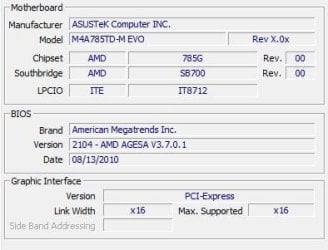
is it too new for the motherboard? (too high spec?) the motherboard was made in 2010
and the new ram was made in end of 2013, almost 2014 so a difference of 3 years probably
 

My Computer

OS
windows 7, mac os X
The so called dual channel is like a RAID 0 for memory. The data is spited in two, one part goes to channel A and the other part goes to channel B. This "doubles" the memory speed, but requires that both memory sticks have exactly the same speed and timings.

From the manual, channel A is A1 & A2 and channel B is B1 & B2
So, one matched pair must be on different channels (A1&B1) and the other pair on (A2&B2)
 

My Computers

System One System Two

  • Computer type
    PC/Desktop
    Computer Manufacturer/Model Number
    custom build
    OS
    Windows 7 HP 64
    CPU
    i5 6600K - 800MHz to 4200MHz
    Motherboard
    GA-Z170-HD3P
    Memory
    4+4G GSkill DDR4 3000
    Graphics Card(s)
    IG - Intel 530
    Monitor(s) Displays
    Samsung 226BW
    Screen Resolution
    1680x1050
    Hard Drives
    (1) -1 SM951 – 128GB M.2 AHCI PCIe SSD drive for Windows 7 and Lubuntu
    (2) -1 WD SATA 3 - 1T for Data
    (3) -1 WD SATA 3 - 1T for backup
    PSU
    Thermaltake 450W TR2 gold
    Keyboard
    Old and good Chicony mechanical keyboard
    Mouse
    Logitech mX performance - 9 buttons (had to disable some)
    Internet Speed
    500Mb/s
    Browser
    Firefox 64
    Other Info
    TinyWall firewall
  • Computer type
    Laptop
    System Manufacturer/Model Number
    Asus Q550LF
    OS
    Windows 7 Pro
    CPU
    i7-4500U 800MHz to 3.0GHz
    Motherboard
    Asus Q550LF
    Memory
    (4+4)G DDR3 1600
    Graphics Card(s)
    IG intel 4400 + NVIDIA GeForce GT 745M
    Sound Card
    Realtek
    Monitor(s) Displays
    LG Display LP156WF4-SPH1
    Screen Resolution
    1920 x 1080
    Hard Drives
    BX500 120G SSD for Windows and programs +
    1T HDD for data
    Internet Speed
    500 Mb/s
    Browser
    Firefox
    Other Info
    TinyWall firewall
ok so dual channel is always going to be faster then single channel. good to know
i know all about RAID but i guess i overlooked that

as for these new ram ithink they are just too new for this mobo or incompatible
i will try to test them on a system with 1600 FSB
 

My Computer

OS
windows 7, mac os X
as for these new ram ithink they are just too new for this mobo or incompatible
i will try to test them on a system with 1600 FSB

Did you try to put only the new memory on slot A1 & B1?
 

My Computers

System One System Two

  • Computer type
    PC/Desktop
    Computer Manufacturer/Model Number
    custom build
    OS
    Windows 7 HP 64
    CPU
    i5 6600K - 800MHz to 4200MHz
    Motherboard
    GA-Z170-HD3P
    Memory
    4+4G GSkill DDR4 3000
    Graphics Card(s)
    IG - Intel 530
    Monitor(s) Displays
    Samsung 226BW
    Screen Resolution
    1680x1050
    Hard Drives
    (1) -1 SM951 – 128GB M.2 AHCI PCIe SSD drive for Windows 7 and Lubuntu
    (2) -1 WD SATA 3 - 1T for Data
    (3) -1 WD SATA 3 - 1T for backup
    PSU
    Thermaltake 450W TR2 gold
    Keyboard
    Old and good Chicony mechanical keyboard
    Mouse
    Logitech mX performance - 9 buttons (had to disable some)
    Internet Speed
    500Mb/s
    Browser
    Firefox 64
    Other Info
    TinyWall firewall
  • Computer type
    Laptop
    System Manufacturer/Model Number
    Asus Q550LF
    OS
    Windows 7 Pro
    CPU
    i7-4500U 800MHz to 3.0GHz
    Motherboard
    Asus Q550LF
    Memory
    (4+4)G DDR3 1600
    Graphics Card(s)
    IG intel 4400 + NVIDIA GeForce GT 745M
    Sound Card
    Realtek
    Monitor(s) Displays
    LG Display LP156WF4-SPH1
    Screen Resolution
    1920 x 1080
    Hard Drives
    BX500 120G SSD for Windows and programs +
    1T HDD for data
    Internet Speed
    500 Mb/s
    Browser
    Firefox
    Other Info
    TinyWall firewall
Back
Top