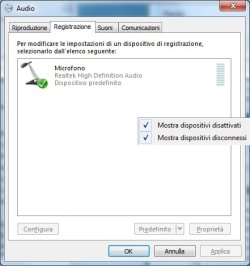
Lack of Line-in icon in record panel

tecpaca

New member
Local time
12:50 AM
Messages
5
Location
Rome, Italy
Hello all, I'm not able to record from line-in connector due lack of "Line-in" icon in the record panel (there is only the microphone).

Is there anybody that know how to enable it ?

Regards,

Paolo
 

My Computer My Computer

At a glance

Windows 7 Premium 32bit2 GB
Computer Manufacturer/Model Number
Sony VGN-TT11LN
OS
Windows 7 Premium 32bit
Memory
2 GB
Sound Card
Realtek
Go to the hardware and sound control panel, then Manage Audio Devices. The click on the recording tab

See if there is a disabled Line In feature there and enable it. (Might have to plug something into the jack to enable it or may be by hand)

If it is not listed there at all, then look into getting a better driver for the sound chip from the manufacturer directly (whatever it is, like my work machine is "RealTek")
 

My Computer My Computer

At a glance

Windows 7 x64 Ultimatei7 96012 Gig Corsair DominatorNvidia 480
Computer Manufacturer/Model Number
Scratch built
OS
Windows 7 x64 Ultimate
CPU
i7 960
Motherboard
Asus P6X58D
Memory
12 Gig Corsair Dominator
Graphics Card(s)
Nvidia 480
Sound Card
Maudio Delta 44 + breakout box
Monitor(s) Displays
Dell UltraSharp U2410 24in and Samsung 21 dual monitors
Screen Resolution
1920x1200 and 1280x1024
Hard Drives
Primary: Intel X-25M G2 160G SSD
Secondary: Segate baracuda 1.0 TB
HDs in AHCI mode.
PSU
Corasair TX850
Case
Cooler Master HAF
Cooling
Corsair H50
Keyboard
Logitech G15 + N52 game pad
Mouse
Logitech MX518
Internet Speed
15kbs down 4.5kbps up
Other Info
WEI 7.6
CPU & RAM 7.6
Graphics 7.9
Hard disk 7.7

My Computer My Computer

At a glance

Windows 8.1 Pro RTM x64Intel Core-i5-3570K 4-core @ 3.4GHz (Ivy Brid...4 x 4GB DDR3-1600 Corsair Vengeance CMZ8GX3M2...MSI GeForce GTX770 Gaming OC 2GB
Computer type
PC/Desktop
Computer Manufacturer/Model Number
Dwarf Dwf/11/2012 r09/2013
OS
Windows 8.1 Pro RTM x64
CPU
Intel Core-i5-3570K 4-core @ 3.4GHz (Ivy Bridge) (OC 4.4GHz)
Motherboard
ASRock Z77 Extreme4-M
Memory
4 x 4GB DDR3-1600 Corsair Vengeance CMZ8GX3M2A1600C9B (16GB)
Graphics Card(s)
MSI GeForce GTX770 Gaming OC 2GB
Sound Card
Realtek High Definition on board solution (ALC 898)
Monitor(s) Displays
ViewSonic VA1912w Widescreen (VGA)
Screen Resolution
1440x900
Hard Drives
OCZ Agility 3 SSD 120GB SATA III x2 (RAID 0)
Samsung HD501LJ 500GB SATA II x2
Hitachi HDS721010CLA332 1TB SATA II
Iomega 1.5TB Ext USB 2.0
WD 2.0TB Ext USB 3.0
PSU
XFX Pro Series 850W Semi-Modular
Case
Gigabyte IF233
Cooling
1 x 120mm Front Inlet 1 x 120mm Rear Exhaust
Keyboard
Microsoft Comfort Curve Keyboard 3000 (USB)
Mouse
Microsoft Comfort Mouse 3000 for Business (USB)
Internet Speed
NetGear DG834Gv3 ADSL Modem/Router (Ethernet) ~4.0 Mb/s (O2)
Antivirus
Avast! 8.0.1497
Browser
IE 11
Other Info
Optical Drive: HL-DT-ST BD-RE BH10LS30 SATA Bluray
Lexmark S305 Printer/Scanner/Copier (USB)
WEI Score: 8.1/8.1/8.5/8.5/8.25
Asus Eee PC 1011PX Netbook (Windows 7 x86 Starter)
Thanks both, but the situation is the following:

in the recording tab panel there aren't disabled icons (I set the flag on to anable hidden devices);

the driver has been up-dated.

I hope there some keys in the register to be enabled or, at least, a service that for some reason is set to be started manually.

Regards,

Paolo
 

My Computer My Computer

At a glance

Windows 7 Premium 32bit2 GB
Computer Manufacturer/Model Number
Sony VGN-TT11LN
OS
Windows 7 Premium 32bit
Memory
2 GB
Sound Card
Realtek
What sound driver are you using? Are you using the Sony supplied RealTek driver? or the generic Windows HD Audio Codec driver? If you are using the HD Audio Codec that could be the problem and in that case install the Sony supplied RealTek driver.
 

My Computer My Computer

At a glance

Windows 10 64 bitIntel i7 6700K16GB Corsair DominatorIntel CPU Graphics
Computer type
PC/Desktop
Computer Manufacturer/Model Number
My Own Build
OS
Windows 10 64 bit
CPU
Intel i7 6700K
Motherboard
ASUS ROG Maximus VIII Hero
Memory
16GB Corsair Dominator
Graphics Card(s)
Intel CPU Graphics
Sound Card
RealTek
Monitor(s) Displays
27" Dell S2719dgf
Screen Resolution
2560X1440
Hard Drives
1 TB Samsung 850 EVO SSD for Win 10 Pro
500GB Samsung 850 EVO SSD for Win 10 Insider
2 TB drive for backup
PSU
EVGA Supernova 750G2
Case
BeQuiet Silent Base 600
Cooling
Deepcool Captain 120EX
Keyboard
Microsoft Wireless 2000
Mouse
Microsoft wireless
Internet Speed
100 MB/sec (Cable)
Antivirus
Microsoft Defender and Malwarebytes
Browser
Edge/Firefox
Other Info
Cakewalk (Sonar) by BandLab and Studio One 4.1 Pro recording studio software. MOTU 896Mk3 Hybrid recording interface, Frontier Tranzport wireless control unit, Behringer X-Touch Control Surface.
Five USB connected optical drives for CD Audio production using Nero BurningROM
Hello Fireberd,

I made several tests; in the beginning, of course, there was the original Sony driver; I check for some updating on Sony Site and also on RealTek site but, after the installation, in both case the situation do not changed. At the moment there is the last version of the Sony driver.
I call also the Sony Italy customer support and the answer was that probably there is a system block to avoid people copy (in wav) the cd !!!
I can't beleive that this is true because I should be informed in advance about this approach.

As you can see in the attached image, in the recording panel there is only the microphone icon and it has been configured to show the hidden devices.


Kind regards,

Paolo
 

Attachments

  • Record Tag.jpg
    Record Tag.jpg
    23.6 KB · Views: 8

My Computer My Computer

At a glance

Windows 7 Premium 32bit2 GB
Computer Manufacturer/Model Number
Sony VGN-TT11LN
OS
Windows 7 Premium 32bit
Memory
2 GB
Sound Card
Realtek
The driver is the key to what devices you have. Go to the Device Manager and Uninstall the RealTek sound and also check the box to uninstall the driver. Then restart the PC and let Windows search and install the sound driver. It will probably install the HD Audio Codec driver (which I previously said do not use) and then see if you have or can enable devices other than the microphone.
 

My Computer My Computer

At a glance

Windows 10 64 bitIntel i7 6700K16GB Corsair DominatorIntel CPU Graphics
Computer type
PC/Desktop
Computer Manufacturer/Model Number
My Own Build
OS
Windows 10 64 bit
CPU
Intel i7 6700K
Motherboard
ASUS ROG Maximus VIII Hero
Memory
16GB Corsair Dominator
Graphics Card(s)
Intel CPU Graphics
Sound Card
RealTek
Monitor(s) Displays
27" Dell S2719dgf
Screen Resolution
2560X1440
Hard Drives
1 TB Samsung 850 EVO SSD for Win 10 Pro
500GB Samsung 850 EVO SSD for Win 10 Insider
2 TB drive for backup
PSU
EVGA Supernova 750G2
Case
BeQuiet Silent Base 600
Cooling
Deepcool Captain 120EX
Keyboard
Microsoft Wireless 2000
Mouse
Microsoft wireless
Internet Speed
100 MB/sec (Cable)
Antivirus
Microsoft Defender and Malwarebytes
Browser
Edge/Firefox
Other Info
Cakewalk (Sonar) by BandLab and Studio One 4.1 Pro recording studio software. MOTU 896Mk3 Hybrid recording interface, Frontier Tranzport wireless control unit, Behringer X-Touch Control Surface.
Five USB connected optical drives for CD Audio production using Nero BurningROM
Hello Fireberd,

I follow your suggestion but the situation do not change.

Regards,

Paolo
 

My Computer My Computer

At a glance

Windows 7 Premium 32bit2 GB
Computer Manufacturer/Model Number
Sony VGN-TT11LN
OS
Windows 7 Premium 32bit
Memory
2 GB
Sound Card
Realtek
I have no other suggestions. You have tried all the different drivers.
 

My Computer My Computer

At a glance

Windows 10 64 bitIntel i7 6700K16GB Corsair DominatorIntel CPU Graphics
Computer type
PC/Desktop
Computer Manufacturer/Model Number
My Own Build
OS
Windows 10 64 bit
CPU
Intel i7 6700K
Motherboard
ASUS ROG Maximus VIII Hero
Memory
16GB Corsair Dominator
Graphics Card(s)
Intel CPU Graphics
Sound Card
RealTek
Monitor(s) Displays
27" Dell S2719dgf
Screen Resolution
2560X1440
Hard Drives
1 TB Samsung 850 EVO SSD for Win 10 Pro
500GB Samsung 850 EVO SSD for Win 10 Insider
2 TB drive for backup
PSU
EVGA Supernova 750G2
Case
BeQuiet Silent Base 600
Cooling
Deepcool Captain 120EX
Keyboard
Microsoft Wireless 2000
Mouse
Microsoft wireless
Internet Speed
100 MB/sec (Cable)
Antivirus
Microsoft Defender and Malwarebytes
Browser
Edge/Firefox
Other Info
Cakewalk (Sonar) by BandLab and Studio One 4.1 Pro recording studio software. MOTU 896Mk3 Hybrid recording interface, Frontier Tranzport wireless control unit, Behringer X-Touch Control Surface.
Five USB connected optical drives for CD Audio production using Nero BurningROM
I can understand because it's long time I try to give solution to this problem.

Regards,

Paolo
 

My Computer My Computer

At a glance

Windows 7 Premium 32bit2 GB
Computer Manufacturer/Model Number
Sony VGN-TT11LN
OS
Windows 7 Premium 32bit
Memory
2 GB
Sound Card
Realtek
Back
Top