"lag" in online games with Windows 7

Hello fellow humans, I came across this information when I searched for Multimedia Class Scheduler, i used google translate from swedish to english so it may be weird to read :P

"I suffered a long time when I played FPS games, CS and COD that my ping was extremely unstable and jumped from the normal 30 to up to 250ms (the 8Mbit)
I blamed everything on our internet provider and they checked everything, but everything was as it should.
I started to get disturb me greatly, and came across the answer:
Press Start: Manage then "this computer" Services and Applications / Services / Multimedia Class Scheduler
right click and press properties, and then under "startup type" select Disable and click OK.
"Multimedia Class Scheduler 'you can read about in the left column if you do not know what it does.
Anyway, now is stable ping!

BUT! Now the sound does not work due to "windows audio" is dependent on the service "multimedia class scheduler".
Here is how you are doing to "windows audio" is independent and your ping still remains low and stable:

Open regedit, navigate to: HKEY_LOCAL_MACHINE / SYSTEM / CurrentControlSet / Services / Audiosrv
and in "DependOnService" delete all entries except RpcSs and then restart your computer.
I did, however, an "angry" window that said it was not possible to change the applications in the entries, but after that
I restarted the computer still worked properly.

Hope everything has been helpful"

is that a good solution?
 

My Computer My Computer

At a glance

windows 7 64bit ultimate
OS
windows 7 64bit ultimate
I think that this is probably a little more complex than I thought.

I personally believe that the problem is that Microsoft, Valve, and Realtek may all have something on their end to fix.

Is it Valve that has not yet made their games 64-bit Windows 7 compatable, or is it Microsoft, or Realtek?

I think that it's probably all 3.
 

My Computer My Computer

At a glance

Windows 7 Home Premium 64-bitIntel Core i-5 2500 @ 3.3 GHz Quad Core8.192 GB DDR3 PC3-10700 (667 MHz)Sapphire ATI HD 6870
Computer type
PC/Desktop
Computer Manufacturer/Model Number
Custom Desktop
OS
Windows 7 Home Premium 64-bit
CPU
Intel Core i-5 2500 @ 3.3 GHz Quad Core
Motherboard
Gigabyte Z68M-D2H
Memory
8.192 GB DDR3 PC3-10700 (667 MHz)
Graphics Card(s)
Sapphire ATI HD 6870
Sound Card
Integrated - Realtek HD Audio ALC889
Monitor(s) Displays
LG Flatron Wide 19" LCD
Screen Resolution
1440 x 900
Hard Drives
250 GB Samsung SSD ( for OS )
250 GB Samsung SSD ( for Games )
1500 GB Sata HDD ( for pictures and Video )
PSU
Foxxconn 600 W
Case
Foxxconn
Keyboard
Logitech USB Keyboard
Mouse
Logitech Optical Mouse
Internet Speed
25 MB/s download 2 MB/s upload Rogers Telecommunications.
Antivirus
Microsoft Security Essentials
Browser
IE and Chrome
@qberty: that's pretty much the first thing i tried. unfortunately it produced problems with the sound as a side effect. if it works for you then, great.

@ozirus: it's likely microsoft's problem. my guess is it's their new audio sub system that is throttling network activity. it occurs in many games sensitive to network issues. it also appears to occur in many computer configurations, not just ones with realtek. i suppose it could be an issue only with the 64 bit version but i doubt it.
 

My Computer My Computer

At a glance

Windows 7 x64 ProfessionalAMD Athlon 64 3800+Corsair DDR1 2GBRadeon x1800xt 256mb
OS
Windows 7 x64 Professional
CPU
AMD Athlon 64 3800+
Motherboard
Chaintech VNF4 Ultra
Memory
Corsair DDR1 2GB
Graphics Card(s)
Radeon x1800xt 256mb
Sound Card
Creative Audigy 2 ZS
@qberty: that's pretty much the first thing i tried. unfortunately it produced problems with the sound as a side effect. if it works for you then, great.

@ozirus: it's likely microsoft's problem. my guess is it's their new audio sub system that is throttling network activity. it occurs in many games sensitive to network issues. it also appears to occur in many computer configurations, not just ones with realtek. i suppose it could be an issue only with the 64 bit version but i doubt it.

Your Sound is not Realtek, correct?

So we can eliminate it as being because of a specific Sound manufacturer.
Unless, of course, they are all making the same mistakes in their drivers.

It's not only Valve and it's Source Engine.

That narrows it down to 2 possibilities:

1) Bink Video ( which most games with complex sound use )

and/or

2) Microsoft
 

My Computer My Computer

At a glance

Windows 7 Home Premium 64-bitIntel Core i-5 2500 @ 3.3 GHz Quad Core8.192 GB DDR3 PC3-10700 (667 MHz)Sapphire ATI HD 6870
Computer type
PC/Desktop
Computer Manufacturer/Model Number
Custom Desktop
OS
Windows 7 Home Premium 64-bit
CPU
Intel Core i-5 2500 @ 3.3 GHz Quad Core
Motherboard
Gigabyte Z68M-D2H
Memory
8.192 GB DDR3 PC3-10700 (667 MHz)
Graphics Card(s)
Sapphire ATI HD 6870
Sound Card
Integrated - Realtek HD Audio ALC889
Monitor(s) Displays
LG Flatron Wide 19" LCD
Screen Resolution
1440 x 900
Hard Drives
250 GB Samsung SSD ( for OS )
250 GB Samsung SSD ( for Games )
1500 GB Sata HDD ( for pictures and Video )
PSU
Foxxconn 600 W
Case
Foxxconn
Keyboard
Logitech USB Keyboard
Mouse
Logitech Optical Mouse
Internet Speed
25 MB/s download 2 MB/s upload Rogers Telecommunications.
Antivirus
Microsoft Security Essentials
Browser
IE and Chrome
i hate that microsoft dont have mail support, i wanna ask them why i cant turn off throttling.. i have turned off MMCSS and still got lagspikes but it can be another service or program that disturbs in somehow.. but i have now turned off both throttling and service to see if that helps... this is so weird

EDIT: Did not, why is this so hard to fix? does this happen only when u listening on music or is it any other factor? i do mostly listen on music when im gaming, streamin through Spotify, its not the cause! happends on wmp 12 also so microsoft have to fix this!

EDIT2: Okay i have decided to restore all changes i have done in the registry. I have heard that to restore TcpAckFrequency, u just change the value to "2". But what about TCPNoDelay?

EDIT3: sorry that i asks so much, i now know that NoDelay default value is "0".
 
Last edited:

My Computer My Computer

At a glance

windows 7 64bit ultimate
OS
windows 7 64bit ultimate
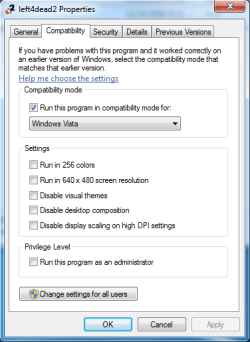
I found a solution for "Left 4 Dead",
 

Attachments

  • Compatability.png
    Compatability.png
    14.3 KB · Views: 81

My Computer My Computer

At a glance

Windows 7 Home Premium 64-bitIntel Core i-5 2500 @ 3.3 GHz Quad Core8.192 GB DDR3 PC3-10700 (667 MHz)Sapphire ATI HD 6870
Computer type
PC/Desktop
Computer Manufacturer/Model Number
Custom Desktop
OS
Windows 7 Home Premium 64-bit
CPU
Intel Core i-5 2500 @ 3.3 GHz Quad Core
Motherboard
Gigabyte Z68M-D2H
Memory
8.192 GB DDR3 PC3-10700 (667 MHz)
Graphics Card(s)
Sapphire ATI HD 6870
Sound Card
Integrated - Realtek HD Audio ALC889
Monitor(s) Displays
LG Flatron Wide 19" LCD
Screen Resolution
1440 x 900
Hard Drives
250 GB Samsung SSD ( for OS )
250 GB Samsung SSD ( for Games )
1500 GB Sata HDD ( for pictures and Video )
PSU
Foxxconn 600 W
Case
Foxxconn
Keyboard
Logitech USB Keyboard
Mouse
Logitech Optical Mouse
Internet Speed
25 MB/s download 2 MB/s upload Rogers Telecommunications.
Antivirus
Microsoft Security Essentials
Browser
IE and Chrome
Compatability Mode for: "VISTA" works better than, "VISTA SP1" and "VISTA SP2".
 

My Computer My Computer

At a glance

Windows 7 Home Premium 64-bitIntel Core i-5 2500 @ 3.3 GHz Quad Core8.192 GB DDR3 PC3-10700 (667 MHz)Sapphire ATI HD 6870
Computer type
PC/Desktop
Computer Manufacturer/Model Number
Custom Desktop
OS
Windows 7 Home Premium 64-bit
CPU
Intel Core i-5 2500 @ 3.3 GHz Quad Core
Motherboard
Gigabyte Z68M-D2H
Memory
8.192 GB DDR3 PC3-10700 (667 MHz)
Graphics Card(s)
Sapphire ATI HD 6870
Sound Card
Integrated - Realtek HD Audio ALC889
Monitor(s) Displays
LG Flatron Wide 19" LCD
Screen Resolution
1440 x 900
Hard Drives
250 GB Samsung SSD ( for OS )
250 GB Samsung SSD ( for Games )
1500 GB Sata HDD ( for pictures and Video )
PSU
Foxxconn 600 W
Case
Foxxconn
Keyboard
Logitech USB Keyboard
Mouse
Logitech Optical Mouse
Internet Speed
25 MB/s download 2 MB/s upload Rogers Telecommunications.
Antivirus
Microsoft Security Essentials
Browser
IE and Chrome
im so sick of this, why cant i turn off throttling? is there some fix to download or?
 

My Computer My Computer

At a glance

windows 7 64bit ultimate
OS
windows 7 64bit ultimate
Someone mentioned that it might be Microsoft And 64bit OS. I upgraded from a P4, winxp to a i5 and win7 and that's when all my troubles started.
I tried the throttling fix but it did not work so I "downloaded" xp64 and tried it but found the same troubles there. So in my opinion it's 64bit that's causing this. I am dreading going back to xp32 because of my extra memory I have on the mobo.

I have not as yet disabled the sound drivers but that be next before I abandon 64bit.

Btw I play rfactor
 

My Computer My Computer

At a glance

Win7 64-biti5 750Patriot Viper II 2*4G DDR3 1600nVidia GTS250 1G DDR3
OS
Win7 64-bit
CPU
i5 750
Motherboard
Asus P7P55-E Premium
Memory
Patriot Viper II 2*4G DDR3 1600
Graphics Card(s)
nVidia GTS250 1G DDR3
Sound Card
Onboard
Monitor(s) Displays
Samsung 24" LCD
Screen Resolution
1920*1080
Hard Drives
WD 1TB
PSU
650W
Case
HAF920
Cooling
Noctua 120EP
Internet Speed
ADSL2+
Other Info
rFactor, GTR2...... and X3
i have even turned off MMCSS and "throttling" but same ****ing problem persist.
 

My Computer My Computer

At a glance

windows 7 64bit ultimate
OS
windows 7 64bit ultimate

My Computer My Computer

At a glance

Windows 7 Home Premium 64-bitIntel Core i-5 2500 @ 3.3 GHz Quad Core8.192 GB DDR3 PC3-10700 (667 MHz)Sapphire ATI HD 6870
Computer type
PC/Desktop
Computer Manufacturer/Model Number
Custom Desktop
OS
Windows 7 Home Premium 64-bit
CPU
Intel Core i-5 2500 @ 3.3 GHz Quad Core
Motherboard
Gigabyte Z68M-D2H
Memory
8.192 GB DDR3 PC3-10700 (667 MHz)
Graphics Card(s)
Sapphire ATI HD 6870
Sound Card
Integrated - Realtek HD Audio ALC889
Monitor(s) Displays
LG Flatron Wide 19" LCD
Screen Resolution
1440 x 900
Hard Drives
250 GB Samsung SSD ( for OS )
250 GB Samsung SSD ( for Games )
1500 GB Sata HDD ( for pictures and Video )
PSU
Foxxconn 600 W
Case
Foxxconn
Keyboard
Logitech USB Keyboard
Mouse
Logitech Optical Mouse
Internet Speed
25 MB/s download 2 MB/s upload Rogers Telecommunications.
Antivirus
Microsoft Security Essentials
Browser
IE and Chrome
have tried that now, did Compatibility on the shortcut but didnt work either :(


after some searching i found that throttling thingy is only for receiving packages but not for the sending :O
 

My Computer My Computer

At a glance

windows 7 64bit ultimate
OS
windows 7 64bit ultimate
have tried that now, did Compatibility on the shortcut but didnt work either :(


after some searching i found that throttling thingy is only for receiving packages but not for the sending :O

Which games? Sometimes you have to find the actual .exe (for example: Program Files (x86)\Steam\steam.exe).

I wonder if it has anything to do with the DirectX, maybe Microsoft hasn't made DX11 completely compatable, somewhere.
 

My Computer My Computer

At a glance

Windows 7 Home Premium 64-bitIntel Core i-5 2500 @ 3.3 GHz Quad Core8.192 GB DDR3 PC3-10700 (667 MHz)Sapphire ATI HD 6870
Computer type
PC/Desktop
Computer Manufacturer/Model Number
Custom Desktop
OS
Windows 7 Home Premium 64-bit
CPU
Intel Core i-5 2500 @ 3.3 GHz Quad Core
Motherboard
Gigabyte Z68M-D2H
Memory
8.192 GB DDR3 PC3-10700 (667 MHz)
Graphics Card(s)
Sapphire ATI HD 6870
Sound Card
Integrated - Realtek HD Audio ALC889
Monitor(s) Displays
LG Flatron Wide 19" LCD
Screen Resolution
1440 x 900
Hard Drives
250 GB Samsung SSD ( for OS )
250 GB Samsung SSD ( for Games )
1500 GB Sata HDD ( for pictures and Video )
PSU
Foxxconn 600 W
Case
Foxxconn
Keyboard
Logitech USB Keyboard
Mouse
Logitech Optical Mouse
Internet Speed
25 MB/s download 2 MB/s upload Rogers Telecommunications.
Antivirus
Microsoft Security Essentials
Browser
IE and Chrome
it made it worse :S
 

My Computer My Computer

At a glance

windows 7 64bit ultimate
OS
windows 7 64bit ultimate
How much RAM do you have? I had 6 GB, now I only have 4 GB, and the LAG went away.

Also, my computer is alot faster.
 

My Computer My Computer

At a glance

Windows 7 Home Premium 64-bitIntel Core i-5 2500 @ 3.3 GHz Quad Core8.192 GB DDR3 PC3-10700 (667 MHz)Sapphire ATI HD 6870
Computer type
PC/Desktop
Computer Manufacturer/Model Number
Custom Desktop
OS
Windows 7 Home Premium 64-bit
CPU
Intel Core i-5 2500 @ 3.3 GHz Quad Core
Motherboard
Gigabyte Z68M-D2H
Memory
8.192 GB DDR3 PC3-10700 (667 MHz)
Graphics Card(s)
Sapphire ATI HD 6870
Sound Card
Integrated - Realtek HD Audio ALC889
Monitor(s) Displays
LG Flatron Wide 19" LCD
Screen Resolution
1440 x 900
Hard Drives
250 GB Samsung SSD ( for OS )
250 GB Samsung SSD ( for Games )
1500 GB Sata HDD ( for pictures and Video )
PSU
Foxxconn 600 W
Case
Foxxconn
Keyboard
Logitech USB Keyboard
Mouse
Logitech Optical Mouse
Internet Speed
25 MB/s download 2 MB/s upload Rogers Telecommunications.
Antivirus
Microsoft Security Essentials
Browser
IE and Chrome
i have 4gb also

EDIT: i was wondering, first time i got the computer and installed win7 64bit it said 4gb(3.19gb usable) and i searched the problem and changed something in bios so i got all 4gb usable, maybe the problem lies there? and maybe it helps if i update the bios? Also i checked the msconfig start alternative and it is on selective start :O

EDIT: No change, i give up till further
 
Last edited:

My Computer My Computer

At a glance

windows 7 64bit ultimate
OS
windows 7 64bit ultimate
Problem solved

Just registered to say THANK YOU

These 2 thigs solved my problem in all x32 games

1. in cmd : netsh interface tcp set global autotuning=disabled

2. In regedit :
Go to: HKEY_LOCAL_MACHINE\SOFTWARE\Microsoft\Windows NT\CurrentVersion\Multimedia\SystemProfile set to FFFFFFFF hex

Reboot


Specs:
Win7 x64 ultimate
MSI P35 platinum
Realtek HD sound latest drivers
ATI x1300 latest drivers
 

My Computer My Computer

At a glance

Windows 7 x64
OS
Windows 7 x64
Specs: windows 7 32-bit
ATI HD 4650 1gb
2gb ram
INTEL P4 3.0 ghz
Sound Blaster Audigy model 0570

My issue deals with erratic FPS drops when my sound card is enabled (could be either the onboard realtek or SoundBlaster, i've tried both). Yet when I disable the sound card.., my FPS awesome.. Yet any installation of sound drivers on the computer leads to staggering FPS drops..

By the way.. the game I mostly play is Counter-strike 1.6, and I got this card thinking that it would handle that old game like a charm yet my old Radeon 9200 gave more stable performance on XP than what I'm getting right now on 7.

I just can't get the audio and graphics drivers to work and maintain my high fps.

I have tried the FFFFFFFF hex trick, and disabling the service altogether.. no dice.. I feel like I'm getting close though?
 

My Computer My Computer

At a glance

windows 7 32bit2 gbGigabyte radeon HD4650 1gb
Computer Manufacturer/Model Number
HP Pavilion m800y
OS
windows 7 32bit
Motherboard
Intel 865 series
Memory
2 gb
Graphics Card(s)
Gigabyte radeon HD4650 1gb
Sound Card
Sound Blaster Audigy
Monitor(s) Displays
standard..
I just found out that anytime I am using the sound card, I was just listening to an mp3, my CPU Util goes up to 100% ??

But I can disable all sound and cpu is ok.. Am I doomed?
 

My Computer My Computer

At a glance

windows 7 32bit2 gbGigabyte radeon HD4650 1gb
Computer Manufacturer/Model Number
HP Pavilion m800y
OS
windows 7 32bit
Motherboard
Intel 865 series
Memory
2 gb
Graphics Card(s)
Gigabyte radeon HD4650 1gb
Sound Card
Sound Blaster Audigy
Monitor(s) Displays
standard..
lets hope microsoft takes care of this, if ever:(
 

My Computer My Computer

At a glance

windows 7 64bit ultimate
OS
windows 7 64bit ultimate
Back
Top