LAN but no internet

Jeenyus

New member
Local time
4:39 PM
Messages
7
Hi guys,

I'm trying to fix my girlfriends computer - just so you know our internet is working perfectly from every other computer wireless and ethernet.

She's got vista and theres a local connection but there is no actual internet. I mean you know on vista there is the world icon when you are receiving packets etc, but this is just local.

Can someone point in the right direction of where to start, it must be something to do with the adapter or the drivers maybe? I mean i don't really know where to start :)

thanks a lot.
 

My Computer

OS
Windows 7 Enterprise x64
Hello,

Click start and then run. Type in 'ipconfig /all' and see if you are been given an IP Address. Paste the results in here if you can so that we can help you further.


Dave
 

My Computer

Computer type
PC/Desktop
Computer Manufacturer/Model Number
Custom
OS
Windows 7 Ultimate x64
CPU
Intel Core i7 2600K (O/C 4.7GHz)
Motherboard
Asus ROG Maximus IV Extreme-Z - Intel Z68 Chipset
Memory
8GB Corsair Vengeance LP, DDR3, 1600Mhz
Graphics Card(s)
Nvidia GTX 460 Graphics Card
Sound Card
Onboard
Monitor(s) Displays
Dell E228WFP
Hard Drives
2 x 500GB Samsung SpinPoint Drives (1 for OS, 1 for Data and Apps)
PSU
CoolerMaster 1000W
Case
CoolerMaster HAF
Cooling
Air
Internet Speed
Fibre - 60MB Down, 30MB Up
Antivirus
ESET NOD32 Antivirus
One thing you could do to start with is:

Start > Control Panel > Network and Internet > View Network Status and Tasks > Network Adapters > Right-click "Local Area Connection" > Disable it , wait a few seconds and Enable it back again.

Let us know if that does the trick.
 

My Computer

Computer Manufacturer/Model Number
Dell / Custom
OS
Windows 7 HP / Ultimate x64
CPU
Core i5 / X4 955 BE
Motherboard
OEM / Gigabyte 880GM-USB3
Memory
4GB DDR3 1333Mhz / 8GB DDR3 1600Mhz
Graphics Card(s)
HD5470 / HD5670
Sound Card
Onboard
Monitor(s) Displays
FullHD 15" / Dell 22" WS
Screen Resolution
1920x1080 / 1680x1050
Hard Drives
320GB / 1.5TB
PSU
CM
Case
CM
Cooling
CM, Antec
Keyboard
Logitech
Mouse
Logitech
Hello,

Click start and then run. Type in 'ipconfig /all' and see if you are been given an IP Address. Paste the results in here if you can so that we can help you further.


Dave

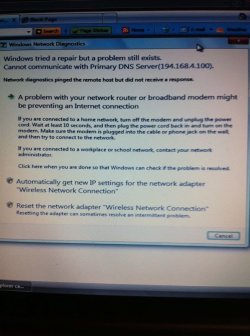
This is the problem. attached image.
 

Attachments

  • download.jpg
    download.jpg
    55.1 KB · Views: 14

My Computer

OS
Windows 7 Enterprise x64
fwiw: type msconfig /all >myipxx.txt from the command prompt will put the output
of the msconfig /all into a text file called myipxx.txt in the default directory.

Rich
 

My Computer

Computer type
Laptop
Computer Manufacturer/Model Number
Toshiba Laptop Qosimo X870
OS
Windows 7 Pro x64 SP1
CPU
Intel Core I7
Motherboard
Toshiba Qosmio
Memory
16 Gigs
Graphics Card(s)
NVIDIA GeForce GTX 670M
Monitor(s) Displays
17.7" laptop
Screen Resolution
1600 x 900
Hard Drives
256 Gig SanDisk SSD for C
256 Gig Intel SSD for D
Internet Speed
50/25 FIOS
Antivirus
Vipre (all you can eat for 10 machines)
Browser
IE and FF
Other Info
I have dos 6.22, wfwg 3.11, win98, 2000 and xp VHD's available for testing. MS's Virtual PC works great.
1. Click on Start and then Control Panel.
2. Go to Networking and sharing center and then click on Change adapter settings.
3. Right click on Local Area Connection and choose properties.
4. Highlight Internet Protocol Version 6 and click on Properties.
5. Choose Obtain DNS server address automatically and press Ok.
6. Choose Obtain IP address automatically.
7. Repeat the steps for Internet Protocol version 4 as well.
 

My Computer

Computer type
PC/Desktop
Computer Manufacturer/Model Number
Custom
OS
Windows 7 Ultimate x64
CPU
Intel Core i7 2600K (O/C 4.7GHz)
Motherboard
Asus ROG Maximus IV Extreme-Z - Intel Z68 Chipset
Memory
8GB Corsair Vengeance LP, DDR3, 1600Mhz
Graphics Card(s)
Nvidia GTX 460 Graphics Card
Sound Card
Onboard
Monitor(s) Displays
Dell E228WFP
Hard Drives
2 x 500GB Samsung SpinPoint Drives (1 for OS, 1 for Data and Apps)
PSU
CoolerMaster 1000W
Case
CoolerMaster HAF
Cooling
Air
Internet Speed
Fibre - 60MB Down, 30MB Up
Antivirus
ESET NOD32 Antivirus
Back
Top