
LAN does not have a valid IP configuration

Venths

New member
Pro User
Local time
9:42 PM
Messages
385
Location
Coimbatore/India Doha/Qatar
Solved - LAN does not have a valid IP configuration

I am not able to connect to the internet using my Windows 7 computer.

It is connected to internet via LAN. So, the router is not directly connected to this PC. The owner of my router is my neighbor.

Internet works for him very well using the same connection. Only my LAN connectivity does not work.

Here is the IPCONFIG info. Any one help me, what can i do to resolve this issue for my client PC.
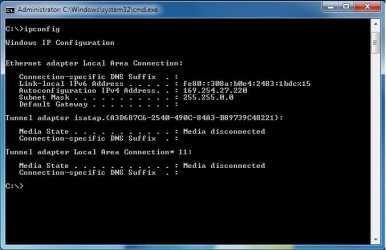
Untitled.jpg
 
Last edited:

My Computer

Computer Manufacturer/Model Number
Dell Inspiron N5010
OS
Windows 7 Ultimate x64 SP1
CPU
Intel Core i3
Memory
4 GB DDR3
Screen Resolution
1366 X 768
Hard Drives
Seagate 500 GB
Internet Speed
4 MBPS
Did you blank out the default gateway, or is it blank already?

Can you connect to the network at all?
 

My Computer

Computer Manufacturer/Model Number
Custom
OS
Windows 7 Professional x64
CPU
Intel i7 2600K OC'd @ 4620 MHz
Motherboard
Asus P8Z68-V Pro
Memory
16GB GSkill Sniper 2133 Mhz (4x4GB)
Graphics Card(s)
EVGA GeForce GTX 480 SuperClocked+
Sound Card
Realtek High Definition Audio
Monitor(s) Displays
2x Acer S273HLbmii 27"
Screen Resolution
2 x 1920x1080
Hard Drives
64GB Crucial M4 SSD

Storage: Hitachi 1TB 5400RPM, Samsung 1.5TB 5400RPM
PSU
Corsair HW Series 750w (modular)
Case
Cooler Master HAF 932 Advanced Blue Edition
Cooling
CM Hyper 212+ CPU cooler, 3x 230mm + 1x 140mm case fans
Keyboard
Logitech MK320 (wireless)
Mouse
Logitech MK320 (wireless)
Internet Speed
30 Mb/s : 2 Mb/s
I am not able to connect to the internet using my Windows 7 computer.

It is connected to internet via LAN. So, the router is not directly connected to this PC. The owner of my router is my neighbor.

Internet works for him very well using the same connection. Only my LAN connectivity does not work.

Here is the IPCONFIG info. Any one help me, what can i do to resolve this issue for my client PC.

View attachment 70980

You have no default gateway showing in your ipconfig so file sharing can't work the way you have it. I'm not sure why you aren't picking up your neighbors default gateway.

You can find out and then type in which ever default gateway your neighbor is using but you will need a special program in order to share your wireless connection with your other machines.

If you are trying to share the wireless connection from your neighbor through your machine there is a free program for that called connectify.
Connectify - Turn your Windows 7 laptop into a Wi-Fi Hotspot
 

My Computer

Computer type
PC/Desktop
Computer Manufacturer/Model Number
Home built
OS
Windows 7 Ult, Windows 8.1 Pro,
CPU
Q9650-4.275GHz, E8600 4.5GHz, E6750-3.8GHz
Motherboard
Evga 780i FTW
Memory
G.Skill PC2 9600 1200Mhz 5 5 5 15 2T
Graphics Card(s)
GTX480
Sound Card
Asus Xonar D2
Monitor(s) Displays
HannsG
Screen Resolution
1680X1050
Hard Drives
GSkill Phoenix Pro 120GB SSD
PSU
ThermalTake Toughpower 1000Watt modular
Case
ThermalTake XaserV
Cooling
Xigmatek S1283
Keyboard
Logitech G15
Mouse
Logitech G9
Internet Speed
T1
Its not Wireless. Its Wired LAN. I didnt not remove the gateway

and the Gateway and IP are automatic. Why would i need to assign?

It was working so far with the same settings.
 

My Computer

Computer Manufacturer/Model Number
Dell Inspiron N5010
OS
Windows 7 Ultimate x64 SP1
CPU
Intel Core i3
Memory
4 GB DDR3
Screen Resolution
1366 X 768
Hard Drives
Seagate 500 GB
Internet Speed
4 MBPS
* I have reset the Winsock
* Tried disabling Ipv6
* Even system restore
* Unplugged and re-connected the LAN cable in both ends.

None of the above worked. Do I have to upgrade Windows installation? or re-install?

Additional Info:

I connected the same LAN cable to my Laptop and the internet worked fine.
 
Last edited:

My Computer

Computer Manufacturer/Model Number
Dell Inspiron N5010
OS
Windows 7 Ultimate x64 SP1
CPU
Intel Core i3
Memory
4 GB DDR3
Screen Resolution
1366 X 768
Hard Drives
Seagate 500 GB
Internet Speed
4 MBPS
* I have reset the Winsock
* Tried disabling Ipv6
* Even system restore
* Unplugged and re-connected the LAN cable in both ends.

None of the above worked. Do I have to upgrade Windows installation? or re-install?

Sorry I just assumed because you were borrowing his connection that you didn't have an eithernet cable running from his house to your own.

I also assumed that when you said this> It is connected to internet via LAN. So, the router is not directly connected to this PC. The owner of my router is my neighbor.

Usually when someone is borrowing a connection from their neighbor it's wireless. I'm not sure how you can pick up the connection if you aren't connected to his router?

In any event if you are using a cable you can just have him reset the router per manufacture instructions for his router and you should be able to pick up the default gateway.
 

My Computer

Computer type
PC/Desktop
Computer Manufacturer/Model Number
Home built
OS
Windows 7 Ult, Windows 8.1 Pro,
CPU
Q9650-4.275GHz, E8600 4.5GHz, E6750-3.8GHz
Motherboard
Evga 780i FTW
Memory
G.Skill PC2 9600 1200Mhz 5 5 5 15 2T
Graphics Card(s)
GTX480
Sound Card
Asus Xonar D2
Monitor(s) Displays
HannsG
Screen Resolution
1680X1050
Hard Drives
GSkill Phoenix Pro 120GB SSD
PSU
ThermalTake Toughpower 1000Watt modular
Case
ThermalTake XaserV
Cooling
Xigmatek S1283
Keyboard
Logitech G15
Mouse
Logitech G9
Internet Speed
T1
# Oops am sorry I wasn't clear. Yeah.. I connect to the router via Cable.

# Am the only admin for this connection even if he is owning. How will I reset the router in his Laptop? And it works for him and another computer. Should I really reset the router?

# Guess its a very old router. Hard to get the manual. Any alternative solution? like re-install or upgrade my Windows copy?
 

My Computer

Computer Manufacturer/Model Number
Dell Inspiron N5010
OS
Windows 7 Ultimate x64 SP1
CPU
Intel Core i3
Memory
4 GB DDR3
Screen Resolution
1366 X 768
Hard Drives
Seagate 500 GB
Internet Speed
4 MBPS
This could be a faulty cable - have you tried another and of the correct type. If it's a cross over type and the router is old then it may not be able to auto 'adapt' for this and a standard wired cable will be needed....
 

My Computer

Computer Manufacturer/Model Number
home made
OS
windows 7 32 and 64 home premium/ultimate
CPU
3.0GHz core 2
@ Hobbit,

The same cable and connection works with my Laptop. So, I guess the cable is still good :)

Will over-write windows and see !!
 

My Computer

Computer Manufacturer/Model Number
Dell Inspiron N5010
OS
Windows 7 Ultimate x64 SP1
CPU
Intel Core i3
Memory
4 GB DDR3
Screen Resolution
1366 X 768
Hard Drives
Seagate 500 GB
Internet Speed
4 MBPS
Wot about firewall settings?
 

My Computer

Computer Manufacturer/Model Number
home made
OS
windows 7 32 and 64 home premium/ultimate
CPU
3.0GHz core 2
is the router set to dhcp?
 

My Computer

Computer Manufacturer/Model Number
home made
OS
windows 7 32 and 64 home premium/ultimate
CPU
3.0GHz core 2
How will i check that?
 

My Computer

Computer Manufacturer/Model Number
Dell Inspiron N5010
OS
Windows 7 Ultimate x64 SP1
CPU
Intel Core i3
Memory
4 GB DDR3
Screen Resolution
1366 X 768
Hard Drives
Seagate 500 GB
Internet Speed
4 MBPS
You will have to log onto the router(obviously from your neighbours hous/pc) and check that ips are dished out and not manually set - what was the ip on your laptop? was this manually set? If you just plugged in and went with the laptop then there is a setting on your PC stopping communication - usually a firewall....
 

My Computer

Computer Manufacturer/Model Number
home made
OS
windows 7 32 and 64 home premium/ultimate
CPU
3.0GHz core 2
see my first post... its automatic. Assigned by my ISP
 

My Computer

Computer Manufacturer/Model Number
Dell Inspiron N5010
OS
Windows 7 Ultimate x64 SP1
CPU
Intel Core i3
Memory
4 GB DDR3
Screen Resolution
1366 X 768
Hard Drives
Seagate 500 GB
Internet Speed
4 MBPS
I think we are missing something here. Your ISP will give your internet connection an IP. (external) but your router will give you a local IP. ( something like 192.168.1.12 for example) this is what you are missing... the 169..... address you supplied usually points to a lack of physical connection and is generated internally by your pc... if the network cable works on your lappy and you just plugged this in and it was ok then there is something else blocking the communication/functions of the network protocols. Possibly a firewall...
 

My Computer

Computer Manufacturer/Model Number
home made
OS
windows 7 32 and 64 home premium/ultimate
CPU
3.0GHz core 2
I have tried disabling the firewall too and no fix. Will re-installation fix my problem?

I will not have access to the router. As the owner is not comfortable to give me time to look at it.
 

My Computer

Computer Manufacturer/Model Number
Dell Inspiron N5010
OS
Windows 7 Ultimate x64 SP1
CPU
Intel Core i3
Memory
4 GB DDR3
Screen Resolution
1366 X 768
Hard Drives
Seagate 500 GB
Internet Speed
4 MBPS
What firewall are you using as simply disabling sometimes wont be adequate (especially if its something like endpoint etc)?
 

My Computer

Computer Manufacturer/Model Number
home made
OS
windows 7 32 and 64 home premium/ultimate
CPU
3.0GHz core 2
Oh nothing like that. Its just a PC. So I use only Windows Firewall
 

My Computer

Computer Manufacturer/Model Number
Dell Inspiron N5010
OS
Windows 7 Ultimate x64 SP1
CPU
Intel Core i3
Memory
4 GB DDR3
Screen Resolution
1366 X 768
Hard Drives
Seagate 500 GB
Internet Speed
4 MBPS
Just reading through the posts again. Can you just clarify these points;
1. your pc is connected by cable directly to a router.
2. you had a laptop connected on the same cable/connection and this worked fine.
 

My Computer

Computer Manufacturer/Model Number
home made
OS
windows 7 32 and 64 home premium/ultimate
CPU
3.0GHz core 2
Yes both of your points are right :)
 

My Computer

Computer Manufacturer/Model Number
Dell Inspiron N5010
OS
Windows 7 Ultimate x64 SP1
CPU
Intel Core i3
Memory
4 GB DDR3
Screen Resolution
1366 X 768
Hard Drives
Seagate 500 GB
Internet Speed
4 MBPS
Back
Top