Solved Lan drivers

LiPoUrR

New member
Local time
11:12 PM
Messages
41
Hello guys, i need help with lan drivers...
Last night i updated my BIOS to newest version (Asus p5kpl-am se) and when i did it, it corrupted my lan drivers, so i can't have internet on one of my PCs. I have tried to download drivers from Asus download center, but it failed, also i have tried different drivers too...
Here is screen shot
unledynv.png


I have even re installed whole windows... I am on Win 7 64 ultimate.
Thanks guys.:)

Oh and i checked in bios if LAN its disabled, but it is enabled... :)
 

My Computer

OS
Windows 7
CPU
Intel celeron 2.5 ghz
Motherboard
asus p5kpl
Memory
3 gb
Graphics Card(s)
ati radeon 4350
Sound Card
Realtek
Hello there. It will be good to Update your System Specs. But take a look at here for the driver.
Realtek
 

My Computer

Computer type
PC/Desktop
Computer Manufacturer/Model Number
Custom Build
OS
Windows 10 Pro x64
CPU
Intel Core i5 4440 @Stock
Motherboard
Gigabyte Z97 D3H
Memory
4 x 4GB HyperX Fury DDR3
Graphics Card(s)
Gigabyte GTX 1050Ti O4G
Sound Card
Integrated
Monitor(s) Displays
Dell P2417H
Screen Resolution
1920 x 1080
Hard Drives
Samsung EVO 850 120GB / Toshiba DT01ACA050 1TB 7200prm 32MB
PSU
Riotoro Onyx 750W
Case
NZXT H500 Black-Red
Cooling
Stock CPU + NZXT 120mm + 2x120mm red fans
Keyboard
Modecom Volcano Lanparty
Mouse
Asus ROG Gladius / DeepCool E-Pad Plus
Internet Speed
DOCSIS 50/3 Mbit
Browser
Google Chrome
Other Info
Asus K55VJ(i5 3210M, GT635M / 2GB, 8GB DDR3, 500GB HDD)
Hello guys, i need help with lan drivers...
Last night i updated my BIOS to newest version (Asus p5kpl-am se) and when i did it, it corrupted my lan drivers, so i can't have internet on one of my PCs. I have even re installed whole windows... I am on Win 7 64 ultimate.
Thanks guys.:)

Oh and i checked in bios if LAN its disabled, but it is enabled... :)

first question is what was the reason to update your bios? because when talking about bios if it works dont upgrade.
maybe you mistook your motherboard model (revision etc.) would be good if you write your motherboard model (including revision and model number, there is many P5KPL versions), where from you downloaded new BIOS? how did you upgraded from windows? dos? etc?
is there dual bios or other system to restore your old bios?
 

My Computer

Computer type
PC/Desktop
Computer Manufacturer/Model Number
Self Built PC
OS
Windows 7 pro 64bit. (SP1)
CPU
Intel core I5 2400
Motherboard
Gigabyte H61
Memory
8GB DDR3 Kingston
Graphics Card(s)
Gigabyte GF GTX650OC
Sound Card
Realtek HD audio
Monitor(s) Displays
LCD 20"
Screen Resolution
1600x900
Hard Drives
INTEL SSD 320 80GB +Seagate 7200.12 1TBx3
PSU
Coolermaster RX450W
Case
Coolermaster atx case
Cooling
stock cooler
Keyboard
logitech
Mouse
logitech
Internet Speed
FTTD 100mbps
My MB is P5kpl am se (as i said) I have downloaded bios from their official site, and updated with asus update tool...
I do have old bios on disk, but i can't downgrade cause its telling me that i am trying to get older version.
 

My Computer

OS
Windows 7
CPU
Intel celeron 2.5 ghz
Motherboard
asus p5kpl
Memory
3 gb
Graphics Card(s)
ati radeon 4350
Sound Card
Realtek
Did you see my post above with the link ?
 

My Computer

Computer type
PC/Desktop
Computer Manufacturer/Model Number
Custom Build
OS
Windows 10 Pro x64
CPU
Intel Core i5 4440 @Stock
Motherboard
Gigabyte Z97 D3H
Memory
4 x 4GB HyperX Fury DDR3
Graphics Card(s)
Gigabyte GTX 1050Ti O4G
Sound Card
Integrated
Monitor(s) Displays
Dell P2417H
Screen Resolution
1920 x 1080
Hard Drives
Samsung EVO 850 120GB / Toshiba DT01ACA050 1TB 7200prm 32MB
PSU
Riotoro Onyx 750W
Case
NZXT H500 Black-Red
Cooling
Stock CPU + NZXT 120mm + 2x120mm red fans
Keyboard
Modecom Volcano Lanparty
Mouse
Asus ROG Gladius / DeepCool E-Pad Plus
Internet Speed
DOCSIS 50/3 Mbit
Browser
Google Chrome
Other Info
Asus K55VJ(i5 3210M, GT635M / 2GB, 8GB DDR3, 500GB HDD)
Yes, it is not working too... I have no idea what to do anymore :(. Anyone have an idea?
 

My Computer

OS
Windows 7
CPU
Intel celeron 2.5 ghz
Motherboard
asus p5kpl
Memory
3 gb
Graphics Card(s)
ati radeon 4350
Sound Card
Realtek
My card is same as yours. Go here and found RTL8102E and download drivers for Windows Vista x64bit. I think that they should work,because there are no drivers for Windows 7 x64bit.
 

My Computer

Computer type
PC/Desktop
Computer Manufacturer/Model Number
Custom Build
OS
Windows 10 Pro x64
CPU
Intel Core i5 4440 @Stock
Motherboard
Gigabyte Z97 D3H
Memory
4 x 4GB HyperX Fury DDR3
Graphics Card(s)
Gigabyte GTX 1050Ti O4G
Sound Card
Integrated
Monitor(s) Displays
Dell P2417H
Screen Resolution
1920 x 1080
Hard Drives
Samsung EVO 850 120GB / Toshiba DT01ACA050 1TB 7200prm 32MB
PSU
Riotoro Onyx 750W
Case
NZXT H500 Black-Red
Cooling
Stock CPU + NZXT 120mm + 2x120mm red fans
Keyboard
Modecom Volcano Lanparty
Mouse
Asus ROG Gladius / DeepCool E-Pad Plus
Internet Speed
DOCSIS 50/3 Mbit
Browser
Google Chrome
Other Info
Asus K55VJ(i5 3210M, GT635M / 2GB, 8GB DDR3, 500GB HDD)
When i download it, i get some dll files... What should i do? :D
 

My Computer

OS
Windows 7
CPU
Intel celeron 2.5 ghz
Motherboard
asus p5kpl
Memory
3 gb
Graphics Card(s)
ati radeon 4350
Sound Card
Realtek
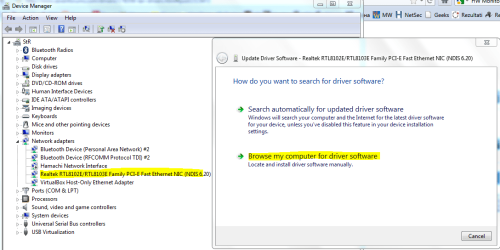
Open Device Manager. And there find your Network Card. Right Click on it and select Update Driver Software
Capture.PNG

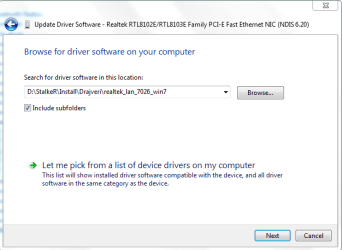
After that go to Browse My computer for Driver Software. After that locate the download files and select that folder. Just click Next and drivers will be installed.
2.PNG
 

My Computer

Computer type
PC/Desktop
Computer Manufacturer/Model Number
Custom Build
OS
Windows 10 Pro x64
CPU
Intel Core i5 4440 @Stock
Motherboard
Gigabyte Z97 D3H
Memory
4 x 4GB HyperX Fury DDR3
Graphics Card(s)
Gigabyte GTX 1050Ti O4G
Sound Card
Integrated
Monitor(s) Displays
Dell P2417H
Screen Resolution
1920 x 1080
Hard Drives
Samsung EVO 850 120GB / Toshiba DT01ACA050 1TB 7200prm 32MB
PSU
Riotoro Onyx 750W
Case
NZXT H500 Black-Red
Cooling
Stock CPU + NZXT 120mm + 2x120mm red fans
Keyboard
Modecom Volcano Lanparty
Mouse
Asus ROG Gladius / DeepCool E-Pad Plus
Internet Speed
DOCSIS 50/3 Mbit
Browser
Google Chrome
Other Info
Asus K55VJ(i5 3210M, GT635M / 2GB, 8GB DDR3, 500GB HDD)
Nope, it says that it cannot start -.-
95539721.png
 

My Computer

OS
Windows 7
CPU
Intel celeron 2.5 ghz
Motherboard
asus p5kpl
Memory
3 gb
Graphics Card(s)
ati radeon 4350
Sound Card
Realtek
I found more about Core 10 error here. It say that you may try to restart your pc. So try restarting it... :rolleyes:
 

My Computer

Computer type
PC/Desktop
Computer Manufacturer/Model Number
Custom Build
OS
Windows 10 Pro x64
CPU
Intel Core i5 4440 @Stock
Motherboard
Gigabyte Z97 D3H
Memory
4 x 4GB HyperX Fury DDR3
Graphics Card(s)
Gigabyte GTX 1050Ti O4G
Sound Card
Integrated
Monitor(s) Displays
Dell P2417H
Screen Resolution
1920 x 1080
Hard Drives
Samsung EVO 850 120GB / Toshiba DT01ACA050 1TB 7200prm 32MB
PSU
Riotoro Onyx 750W
Case
NZXT H500 Black-Red
Cooling
Stock CPU + NZXT 120mm + 2x120mm red fans
Keyboard
Modecom Volcano Lanparty
Mouse
Asus ROG Gladius / DeepCool E-Pad Plus
Internet Speed
DOCSIS 50/3 Mbit
Browser
Google Chrome
Other Info
Asus K55VJ(i5 3210M, GT635M / 2GB, 8GB DDR3, 500GB HDD)
Nope i have restarted, nothing :(
 

My Computer

OS
Windows 7
CPU
Intel celeron 2.5 ghz
Motherboard
asus p5kpl
Memory
3 gb
Graphics Card(s)
ati radeon 4350
Sound Card
Realtek
Try this....Contol Panel/Network and Sharing Center, in this window click trouble shoot to see if it will fix it. If not, it may give a clue to something else.
 

My Computer

Computer type
PC/Desktop
Computer Manufacturer/Model Number
Home Built Desktop By DataTech
OS
Windows 7 Ultimate X64 SP1
CPU
Intel i5-2550K, Differing ~4.4-4.8GHz No built in GPU
Motherboard
ASUS P8Z68-V PRO/GEN3
Memory
16GB G.Skill Sniper 1866MHz @ 2133MHz 2x8GB
Graphics Card(s)
ASUS GTX650TIB-DC2OC-2GD5, (650TI Boost)
Sound Card
Onboard Realtek 5-1
Monitor(s) Displays
Samsung P2570HD
Screen Resolution
1920x1080
Hard Drives
Samsung 840 Pro 256GB SSD for OS, 500GB Seagate Constellation (Enterprise drive) for Data
PSU
Corsair HX650W
Case
Inwin Dragon Rider
Cooling
Hyper 212 EVO w/two Noctua fans, push-pull, @1300 RPM
Keyboard
E-Z Eyes, bright yellow keys with large characters
Mouse
steelseries SENSEI Laser Pro Gaming
Internet Speed
48-51Mbs Mbs down, 11 Mbs up Xfinity Cable
Antivirus
Norton Internet Security 2013
Browser
IE 10, Opera, Pale Moon if needed
Other Info
4 case fans, LG BluRay-RE, ASUS DVD-RW, Mr. Fusion power supply, 1.21 gigawatts.
Nope that doesn't help at all.
 

My Computer

OS
Windows 7
CPU
Intel celeron 2.5 ghz
Motherboard
asus p5kpl
Memory
3 gb
Graphics Card(s)
ati radeon 4350
Sound Card
Realtek
It seems that your BIOS update messed things up. I don't think this can be fixed by updating W7 stuff. We need to get the BIOS recognition first....

Did you update BIOS to P5KPL-AM 0603 BIOS 2010.08.26 update?

Are you sure that BIOS update finished correctly?
If in doubt... retry the whole procedure form the start:
1. Bios update: ASUSTeK Computer Inc. - Motherboards- ASUS P5KPL-AM

2. after correct install of BIOS, the FIRST boot you do: do in Safe Mode and install the ASUS supplied LAN driver for this board: Realtek RTL8111/8112 LAN Driver V7.3.522.2009 for Windows 32/64bit 7.

Here (too): ASUSTeK Computer Inc. - Motherboards- ASUS P5KPL-AM

You can of-course already have downloaded that update / driver beforehand so you have it ready for that first boot.

Hth..
 

My Computer

Computer Manufacturer/Model Number
custom build
OS
Windows 7 64b Ultimate
CPU
I7-2600 3.40GHz - testing various OC levels..
Motherboard
ASUS Sabretooth
Memory
2x 4Gb DDR3/1333
Graphics Card(s)
GTX570 - testing OC levels
Sound Card
motherboard 7.1 DIG.
Monitor(s) Displays
2x Ilyama 24" E2409HDS-B1 2ms/DVI
Screen Resolution
1920 x 1080
Hard Drives
120 GB Intel Elmcrest SSD
1 TB SATAII 7200RPM/32MB
External 2TB USB3
PSU
Corsair Pro HX850W
Cooling
Coolermaster Hyper V8
Keyboard
Logitech G110
Mouse
Logitech G700
Internet Speed
25Mb
Other Info
CPU: 7,7 RAM: 7,7 GTX: 7,9 GTX 3D : 7,9 SSD 7,6
Overall 7,6 ...... now to speed up the SSD... ;)

Also use a Dell XPS M1710 on Vista 32b
Asus LT on Vista 32
3 older machines still doing fine on Linux/ubuntu but not used much anymore...
I did everything as you said... re installed bios, went in safe mode, installed drivers, but still nothing...
When i start PC lan lamp is glowing, so i think its not hardware.
 

My Computer

OS
Windows 7
CPU
Intel celeron 2.5 ghz
Motherboard
asus p5kpl
Memory
3 gb
Graphics Card(s)
ati radeon 4350
Sound Card
Realtek
I did everything as you said... re installed bios, went in safe mode, installed drivers, but still nothing...
When i start PC lan lamp is glowing, so i think its not hardware.

glowing or does it flicker (go on and off continuously)?
 

My Computer

Computer Manufacturer/Model Number
custom build
OS
Windows 7 64b Ultimate
CPU
I7-2600 3.40GHz - testing various OC levels..
Motherboard
ASUS Sabretooth
Memory
2x 4Gb DDR3/1333
Graphics Card(s)
GTX570 - testing OC levels
Sound Card
motherboard 7.1 DIG.
Monitor(s) Displays
2x Ilyama 24" E2409HDS-B1 2ms/DVI
Screen Resolution
1920 x 1080
Hard Drives
120 GB Intel Elmcrest SSD
1 TB SATAII 7200RPM/32MB
External 2TB USB3
PSU
Corsair Pro HX850W
Cooling
Coolermaster Hyper V8
Keyboard
Logitech G110
Mouse
Logitech G700
Internet Speed
25Mb
Other Info
CPU: 7,7 RAM: 7,7 GTX: 7,9 GTX 3D : 7,9 SSD 7,6
Overall 7,6 ...... now to speed up the SSD... ;)

Also use a Dell XPS M1710 on Vista 32b
Asus LT on Vista 32
3 older machines still doing fine on Linux/ubuntu but not used much anymore...
+ lets be syre we are looking at the right board. Which of these doe you have? ASUSTeK Computer Inc.
 

My Computer

Computer Manufacturer/Model Number
custom build
OS
Windows 7 64b Ultimate
CPU
I7-2600 3.40GHz - testing various OC levels..
Motherboard
ASUS Sabretooth
Memory
2x 4Gb DDR3/1333
Graphics Card(s)
GTX570 - testing OC levels
Sound Card
motherboard 7.1 DIG.
Monitor(s) Displays
2x Ilyama 24" E2409HDS-B1 2ms/DVI
Screen Resolution
1920 x 1080
Hard Drives
120 GB Intel Elmcrest SSD
1 TB SATAII 7200RPM/32MB
External 2TB USB3
PSU
Corsair Pro HX850W
Cooling
Coolermaster Hyper V8
Keyboard
Logitech G110
Mouse
Logitech G700
Internet Speed
25Mb
Other Info
CPU: 7,7 RAM: 7,7 GTX: 7,9 GTX 3D : 7,9 SSD 7,6
Overall 7,6 ...... now to speed up the SSD... ;)

Also use a Dell XPS M1710 on Vista 32b
Asus LT on Vista 32
3 older machines still doing fine on Linux/ubuntu but not used much anymore...
No its working like it did before (glows), also i can't find mine there, but its P5KPL-AM SE. :)
 

My Computer

OS
Windows 7
CPU
Intel celeron 2.5 ghz
Motherboard
asus p5kpl
Memory
3 gb
Graphics Card(s)
ati radeon 4350
Sound Card
Realtek
No its working like it did before (glows), also i can't find mine there, but its P5KPL-AM SE. :)

Glowing is not right... the green should glow and an orange should flicker.

Is there some way that you could check a couple of things in the hardware? For example:

Plug the LAN cable that now goes into this computer, into another PC/LT to be sure that connection works?

Add a simple lan card to your current system and see if that does run on this cable?
 

My Computer

Computer Manufacturer/Model Number
custom build
OS
Windows 7 64b Ultimate
CPU
I7-2600 3.40GHz - testing various OC levels..
Motherboard
ASUS Sabretooth
Memory
2x 4Gb DDR3/1333
Graphics Card(s)
GTX570 - testing OC levels
Sound Card
motherboard 7.1 DIG.
Monitor(s) Displays
2x Ilyama 24" E2409HDS-B1 2ms/DVI
Screen Resolution
1920 x 1080
Hard Drives
120 GB Intel Elmcrest SSD
1 TB SATAII 7200RPM/32MB
External 2TB USB3
PSU
Corsair Pro HX850W
Cooling
Coolermaster Hyper V8
Keyboard
Logitech G110
Mouse
Logitech G700
Internet Speed
25Mb
Other Info
CPU: 7,7 RAM: 7,7 GTX: 7,9 GTX 3D : 7,9 SSD 7,6
Overall 7,6 ...... now to speed up the SSD... ;)

Also use a Dell XPS M1710 on Vista 32b
Asus LT on Vista 32
3 older machines still doing fine on Linux/ubuntu but not used much anymore...
Back
Top