
Solved LAN keeps disconnecting and connecting constantly

Steampunk7

New member
Member
VIP
Local time
12:33 AM
Messages
119
For the past month I've been having this issue involving my computer disconnecting from and connecting to the internet.
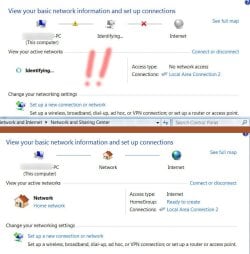
I have Windows 7 (x64) and there is only one (that is: mine) PC connected to the router/modem (non-wireless). There is a periodic burst of "Identifying" with the spinning blue wheel then disappear again to try again a few seconds later. It happens once in every 10-15 seconds, constantly.
Btw, I do not have wireless connection in my house. I've already determined it's my computer and not a problem with the router/modem because it happens with both network connection (public and home). The cable isn't loose. Every time another computer is connected to the same connection as mine, that computer has no problems.
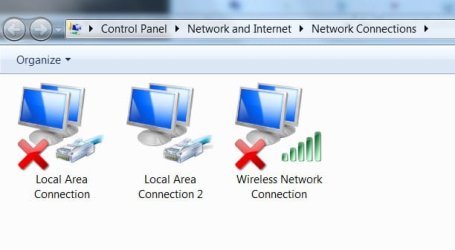
I have two network cards (Realtek and Marvell Yukon), but I disabled Realtek (red X is displayed on the icon) in order not to interfere with the other one.
Troubleshooting did not help.
Marvell Yukon driver is from 2012, but there ain't no new updates after that date.
I've tried to reset WINSOCK entries, IPv4 TCP/IP and IPv6 TCP/IP stack to installation defaults by typing following commands at the command prompt:
---
netsh winsock reset catalog

netsh int ipv4 reset reset.log

netsh int ipv6 reset reset.log

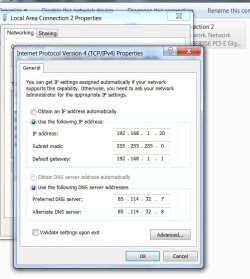
But to no avail. I am not sure if my network supports capability of obtaining an IP address automatically. In any case, after reseting to installation defaults I noticed that TCP/IPv4 fields had became blank (IP address, subnet mask and default gateway) so I filled the blank fields manually, according to IP settings given from my network administrator.

The problem persists.
For the most part I've been living with it, but it's really annoying and if I can find a way to fix it that would be great.
-----------

OS Version: Microsoft Windows 7 Ultimate, Service Pack 1, 64 bit
Processor: Intel(R) Core(TM)2 Quad CPU Q6600 @ 2.40GHz, Intel64 Family 6 Model 15 Stepping 11
Processor Count: 4
RAM: 4095 Mb
Graphics Card: ATI Radeon HD 3800 Series, 512 Mb
Hard Drives: C: Total - 152617 MB, Free - 43145 MB; D: Total - 238464 MB, Free - 105880 MB; E: Total - 238464 MB, Free - 84493 MB;
Motherboard: ASUSTeK Computer INC., P5K Premium
 

My Computer My Computer

At a glance

Windows 7 Ultimate x64Intel(R) Xeon(R) CPU E3-1231 v3 @ 3.40GHz16 GBAMD Radeon (TM) R9 390 Series
Computer type
PC/Desktop
OS
Windows 7 Ultimate x64
CPU
Intel(R) Xeon(R) CPU E3-1231 v3 @ 3.40GHz
Motherboard
ASUSTeK COMPUTER INC. Z97-A Rev 1.xx
Memory
16 GB
Graphics Card(s)
AMD Radeon (TM) R9 390 Series
Sound Card
(1) AMD High Definition Audio Device (2) Realtek High Defi
hello steampunk
i have the same issue as you do.
i tried the following, and it seems more stable now

do these commands from admin command prompt:


go to start ,search and type: cmd, right click on returned cmd.exe and select "run as administrator" at the prompt type:-


net localgroup Administrators /add networkservice
press enter then type:
net localgroup Administrators /add localservice
press enter then type:
exit
press enter and restart your computer

make sure you put a space after Administrators

although it seems more stable, I still can't get Diagnostic Policy Service running to repair my LAN connection.

good luck, this worked for many people

also this link

Windows 7: Diagnostics Policy Service not running - Microsoft Community
 

My Computer My Computer

At a glance

Microsoft Windows 7 Professional 64-bit 7601 ...Intel(R) Core(TM) i7-3820 CPU @ 3.60GHz32.00 GB(1) NVIDIA GeForce GTX 660 Ti (2) NVIDIA GeFo...
Computer type
PC/Desktop
Computer Manufacturer/Model Number
custom
OS
Microsoft Windows 7 Professional 64-bit 7601 Multiprocessor Free Service Pack 1
CPU
Intel(R) Core(TM) i7-3820 CPU @ 3.60GHz
Motherboard
ASUSTeK COMPUTER INC. SABERTOOTH X79
Memory
32.00 GB
Graphics Card(s)
(1) NVIDIA GeForce GTX 660 Ti (2) NVIDIA GeForce GTX 660 T
Sound Card
(1) NVIDIA High Definition Audio (2) NVIDIA High Definitio
Monitor(s) Displays
3 total 1 HP 25" center 2 Sony 19" left and right
Screen Resolution
(1) 1920 x 1080 x 32 bits (4294967296 colors) @ 60 Hz (2)
Hard Drives
(1) Intel Raid 0 Volume SCSI Disk Device 2X 180 GB Intel SSD (2) Intel Raid 1 Volume SCSI Disk Device 2X 1000 GB Maxtor HDD
PSU
EVGA gold 750
Cooling
cooler master liquid
another possible problem with this disconnect reconnect issue.
my Intel driver for my PC LAN has a setting for "energy efficient LAN"
I turned that off.
testing now, so far it seems better
 

My Computer My Computer

At a glance

Microsoft Windows 7 Professional 64-bit 7601 ...Intel(R) Core(TM) i7-3820 CPU @ 3.60GHz32.00 GB(1) NVIDIA GeForce GTX 660 Ti (2) NVIDIA GeFo...
Computer type
PC/Desktop
Computer Manufacturer/Model Number
custom
OS
Microsoft Windows 7 Professional 64-bit 7601 Multiprocessor Free Service Pack 1
CPU
Intel(R) Core(TM) i7-3820 CPU @ 3.60GHz
Motherboard
ASUSTeK COMPUTER INC. SABERTOOTH X79
Memory
32.00 GB
Graphics Card(s)
(1) NVIDIA GeForce GTX 660 Ti (2) NVIDIA GeForce GTX 660 T
Sound Card
(1) NVIDIA High Definition Audio (2) NVIDIA High Definitio
Monitor(s) Displays
3 total 1 HP 25" center 2 Sony 19" left and right
Screen Resolution
(1) 1920 x 1080 x 32 bits (4294967296 colors) @ 60 Hz (2)
Hard Drives
(1) Intel Raid 0 Volume SCSI Disk Device 2X 180 GB Intel SSD (2) Intel Raid 1 Volume SCSI Disk Device 2X 1000 GB Maxtor HDD
PSU
EVGA gold 750
Cooling
cooler master liquid
Thank you for your advice.
I tried both solutions, but, unfortunately to no avail. I don't have a slightest clue as to what causes this problem and now I am running out of solutions :(
 

Attachments

  • 45.jpg
    45.jpg
    96.8 KB · Views: 4

My Computer My Computer

At a glance

Windows 7 Ultimate x64Intel(R) Xeon(R) CPU E3-1231 v3 @ 3.40GHz16 GBAMD Radeon (TM) R9 390 Series
Computer type
PC/Desktop
OS
Windows 7 Ultimate x64
CPU
Intel(R) Xeon(R) CPU E3-1231 v3 @ 3.40GHz
Motherboard
ASUSTeK COMPUTER INC. Z97-A Rev 1.xx
Memory
16 GB
Graphics Card(s)
AMD Radeon (TM) R9 390 Series
Sound Card
(1) AMD High Definition Audio Device (2) Realtek High Defi
If someone has any idea, I'd highly appreciate. Please..
 

My Computer My Computer

At a glance

Windows 7 Ultimate x64Intel(R) Xeon(R) CPU E3-1231 v3 @ 3.40GHz16 GBAMD Radeon (TM) R9 390 Series
Computer type
PC/Desktop
OS
Windows 7 Ultimate x64
CPU
Intel(R) Xeon(R) CPU E3-1231 v3 @ 3.40GHz
Motherboard
ASUSTeK COMPUTER INC. Z97-A Rev 1.xx
Memory
16 GB
Graphics Card(s)
AMD Radeon (TM) R9 390 Series
Sound Card
(1) AMD High Definition Audio Device (2) Realtek High Defi
I don't know what else to suggest.
I solve the same problem I was having by going to my LAN port in device manager.
From there opened properties, and I found a setting called "econo power mode", or something like that.
Un-checked it, restart.
The connection is solid and fast now.
 

My Computer My Computer

At a glance

Microsoft Windows 7 Professional 64-bit 7601 ...Intel(R) Core(TM) i7-3820 CPU @ 3.60GHz32.00 GB(1) NVIDIA GeForce GTX 660 Ti (2) NVIDIA GeFo...
Computer type
PC/Desktop
Computer Manufacturer/Model Number
custom
OS
Microsoft Windows 7 Professional 64-bit 7601 Multiprocessor Free Service Pack 1
CPU
Intel(R) Core(TM) i7-3820 CPU @ 3.60GHz
Motherboard
ASUSTeK COMPUTER INC. SABERTOOTH X79
Memory
32.00 GB
Graphics Card(s)
(1) NVIDIA GeForce GTX 660 Ti (2) NVIDIA GeForce GTX 660 T
Sound Card
(1) NVIDIA High Definition Audio (2) NVIDIA High Definitio
Monitor(s) Displays
3 total 1 HP 25" center 2 Sony 19" left and right
Screen Resolution
(1) 1920 x 1080 x 32 bits (4294967296 colors) @ 60 Hz (2)
Hard Drives
(1) Intel Raid 0 Volume SCSI Disk Device 2X 180 GB Intel SSD (2) Intel Raid 1 Volume SCSI Disk Device 2X 1000 GB Maxtor HDD
PSU
EVGA gold 750
Cooling
cooler master liquid
I too had the same problem. Solved by opening the master socket (phone line) and trimming the wiring and re-connecting the trimmed wires. Need to be careful as those wires do carry a current.

If you hear crackling on the line - call an engineer to replace external cable.
 

My Computer My Computer

At a glance

Microsoft Windows 7 Home Premium 64-bit 7601 ...AMD C-60 APU with Radeon(tm) HD Graphics4.00 GBAMD Radeon HD 6290 Graphics
Computer type
Laptop
Computer Manufacturer/Model Number
ASUS
OS
Microsoft Windows 7 Home Premium 64-bit 7601 Multiprocessor Free Service Pack 1
CPU
AMD C-60 APU with Radeon(tm) HD Graphics
Motherboard
ASUSTeK COMPUTER INC. X501U
Memory
4.00 GB
Graphics Card(s)
AMD Radeon HD 6290 Graphics
Sound Card
(1) AMD High Definition Audio Device (2) Realtek High Defi
Screen Resolution
1366 x 768 x 32 bits (4294967296 colors) @ 60 Hz
Hard Drives
Hitachi HTS545050A7E380 SATA Disk Device
Antivirus
Comodo CIS & FW, SecureAplus App Whitelisting, Threatfire
Browser
Cyberfox 64bit, Opera 64bit, Airfox
Other Info
Spy-The-Spy, HitmanPro.Alert, Norton Connect Safe, MJRegWatcher, BitDefender TrafficLight, Voodoo Shield, Zemana AntiMalware
So you have just one computer connected, but you have a network administrator?!?
Is this a home network and you are just calling the ISP guy or...?

because it happens with both network connection (public and home)

What two networks? How do you have a public and home networks, yet just your computer connected to the router, which is not wireless? Or do you mean that this happens if you connect your computer to a public connection somewhere, like at a cafe?
 

My Computer My Computer

At a glance

Windows 7 Pro
Computer type
PC/Desktop
OS
Windows 7 Pro
Callender, thanx for the advice, but I think the wires are not the cause of this issue, since when I connect my laptop to the same router/modem, that connection works smoothly.
Doctore, if you check the image above (my post #4), you'll notice that this motherboard features Two Gigabit Ethernet LAN controllers - Marvell Yukon and Realtek. My modem is connected to the former and I disabled the latter (because I heard that they may interfere with each other).
Is this a home network and you are just calling the ISP guy or...?
Yes, I was calling ISP guy. Btw, my PC is at my home and this is a home network (I just accidentally made another connection once, but it is disabled now - see the attachment). I do not have any connections to any public network like cafe etc...
In the first attachment one can see the issue described in my initial post. It happens constantly, every 10-15 seconds, all the time.
 

Attachments

  • 1.jpg
    1.jpg
    39.1 KB · Views: 43
  • 2.jpg
    2.jpg
    97.8 KB · Views: 0

My Computer My Computer

At a glance

Windows 7 Ultimate x64Intel(R) Xeon(R) CPU E3-1231 v3 @ 3.40GHz16 GBAMD Radeon (TM) R9 390 Series
Computer type
PC/Desktop
OS
Windows 7 Ultimate x64
CPU
Intel(R) Xeon(R) CPU E3-1231 v3 @ 3.40GHz
Motherboard
ASUSTeK COMPUTER INC. Z97-A Rev 1.xx
Memory
16 GB
Graphics Card(s)
AMD Radeon (TM) R9 390 Series
Sound Card
(1) AMD High Definition Audio Device (2) Realtek High Defi
A few questions:


  • Does this happen when you use the Realtek adapter, instead of the Marvell?
  • Would you run ipconfig /all in Command Prompt and post your results?
  • Can you open your router's set-up page and post a screen of the DHCP settings?

Thanks
 

My Computer My Computer

At a glance

Windows 7 Pro
Computer type
PC/Desktop
OS
Windows 7 Pro
Funny thing happened this evening. I was in a rush and haven't had time to reply, so I left my PC in sleep mode. I decided to post a response when I get back. A couple of hours later when I got back I noticed that the computer is „not connected“. I tried to check Network and Sharing center but I wasn't able to open it at all. Obviously the connection was completely lost while the computer has been „on sleep“. This was the first time such thing happened. I am writing this on my laptop.
In regard of your first question, the answer is yes.
Since I can not open Network and Sharing center at the moment, I am not able to post a screen of the DHCP setting, but I run the ipconfig /all command. I copied it to USB stick and here it is:
C:\Windows\system32>ipconfig /all
Windows IP Configuration
Host Name . . . . . . . . . . . . : xxxxxe-PC
Primary Dns Suffix . . . . . . . :
Node Type . . . . . . . . . . . . : Hybrid
IP Routing Enabled. . . . . . . . : No
WINS Proxy Enabled. . . . . . . . : No
Ethernet adapter Local Area Connection 2:
Connection-specific DNS Suffix . :
Description . . . . . . . . . . . : Marvell Yukon 88E8056 PCI-E Gigabit Ethernet Controller
Physical Address. . . . . . . . . : 00-1D-60-C9-83-46
DHCP Enabled. . . . . . . . . . . : No
Autoconfiguration Enabled . . . . : Yes
Link-local IPv6 Address . . . . . : fe80::18ba:d261:218a:78e7%16(Preferred)
IPv4 Address. . . . . . . . . . . : 192.168.1.20(Preferred)
Subnet Mask . . . . . . . . . . . : 255.255.255.0
Default Gateway . . . . . . . . . : 192.168.1.1
DHCPv6 IAID . . . . . . . . . . . : 469769568
DHCPv6 Client DUID. . . . . . . . : 00-01-00-01-1C-7C-EA-F5-00-1D-60-C9-83-46
DNS Servers . . . . . . . . . . . : 85.114.32.7
85.114.32.8
NetBIOS over Tcpip. . . . . . . . : Enabled
Ethernet adapter Local Area Connection:
Media State . . . . . . . . . . . : Media disconnected
Connection-specific DNS Suffix . :
Description . . . . . . . . . . . : Realtek PCI GBE Family Controller
Physical Address. . . . . . . . . : 00-1D-60-C9-78-7A
DHCP Enabled. . . . . . . . . . . : Yes
Autoconfiguration Enabled . . . . : Yes
Wireless LAN adapter Wireless Network Connection:
Media State . . . . . . . . . . . : Media disconnected
Connection-specific DNS Suffix . :
Description . . . . . . . . . . . : Realtek RTL8187 Wireless 802.11b/g 54Mbps
USB 2.0 Network Adapter
Physical Address. . . . . . . . . : 00-15-AF-3C-86-E8
DHCP Enabled. . . . . . . . . . . : Yes
Autoconfiguration Enabled . . . . : Yes
Tunnel adapter Local Area Connection* 9:
Media State . . . . . . . . . . . : Media disconnected
Connection-specific DNS Suffix . :
Description . . . . . . . . . . . : Teredo Tunneling Pseudo-Interface
Physical Address. . . . . . . . . : 00-00-00-00-00-00-00-E0
DHCP Enabled. . . . . . . . . . . : No
Autoconfiguration Enabled . . . . : Yes
Tunnel adapter isatap.{687D226F-59BA-4FB6-ACB8-DB0B5785461B}:
Media State . . . . . . . . . . . : Media disconnected
Connection-specific DNS Suffix . :
Description . . . . . . . . . . . : Microsoft ISATAP Adapter
Physical Address. . . . . . . . . : 00-00-00-00-00-00-00-E0
DHCP Enabled. . . . . . . . . . . : No
Autoconfiguration Enabled . . . . : Yes
Tunnel adapter isatap.{56944A06-2190-41C5-8A28-1F82B8549D3C}:
Media State . . . . . . . . . . . : Media disconnected
Connection-specific DNS Suffix . :
Description . . . . . . . . . . . : Microsoft ISATAP Adapter #3
Physical Address. . . . . . . . . : 00-00-00-00-00-00-00-E0
DHCP Enabled. . . . . . . . . . . : No
Autoconfiguration Enabled . . . . : Yes
Tunnel adapter isatap.{37ACE7DF-869D-4B46-BC91-498AE2D4AF31}:
Media State . . . . . . . . . . . : Media disconnected
Connection-specific DNS Suffix . :
Description . . . . . . . . . . . : Microsoft ISATAP Adapter #4
Physical Address. . . . . . . . . : 00-00-00-00-00-00-00-E0
DHCP Enabled. . . . . . . . . . . : No
Autoconfiguration Enabled . . . . : Yes
C:\Windows\system32>
 

My Computer My Computer

At a glance

Windows 7 Ultimate x64Intel(R) Xeon(R) CPU E3-1231 v3 @ 3.40GHz16 GBAMD Radeon (TM) R9 390 Series
Computer type
PC/Desktop
OS
Windows 7 Ultimate x64
CPU
Intel(R) Xeon(R) CPU E3-1231 v3 @ 3.40GHz
Motherboard
ASUSTeK COMPUTER INC. Z97-A Rev 1.xx
Memory
16 GB
Graphics Card(s)
AMD Radeon (TM) R9 390 Series
Sound Card
(1) AMD High Definition Audio Device (2) Realtek High Defi
In your "ipconfig /all" it shows that you are using a static ip on your local area connection 2.
it means that you have assigned it manually on LAC2.
I am thinking that it has a conflict on your LAC, it could have the same IP address with what you assigned to LAC2.

Means: Marvell Yukon Controller has an IP conflict with Realtek Controller

LAC - Local Area Connection
LAC2 - Local Area Connection 2.
 

My Computer My Computer

At a glance

Windows 7 Pro 32bitDual Core
Computer type
PC/Desktop
Computer Manufacturer/Model Number
HP
OS
Windows 7 Pro 32bit
CPU
Dual Core
Antivirus
Trend Micro
Well, he has the Realtek disabled, but I am thinking it's just a conflict with the DHCP range of the router.

OP - open your router's DHCP settings and post the DHCP range when you have time.
 

My Computer My Computer

At a glance

Windows 7 Pro
Computer type
PC/Desktop
OS
Windows 7 Pro
I was looking at the pictures posted on post#9. i guess it is not disabled.
it was just disconnected.

Lets see his DHCP range also.
 

My Computer My Computer

At a glance

Windows 7 Pro 32bitDual Core
Computer type
PC/Desktop
Computer Manufacturer/Model Number
HP
OS
Windows 7 Pro 32bit
CPU
Dual Core
Antivirus
Trend Micro
By checking DHCP range, do you mean this? I got these numbers from my ISP provider and I entered those manually. When I check "Obtain an IP address automatically" nothing happens. The fields remain blank.
 

Attachments

  • marvell yukon.jpg
    marvell yukon.jpg
    86 KB · Views: 5

My Computer My Computer

At a glance

Windows 7 Ultimate x64Intel(R) Xeon(R) CPU E3-1231 v3 @ 3.40GHz16 GBAMD Radeon (TM) R9 390 Series
Computer type
PC/Desktop
OS
Windows 7 Ultimate x64
CPU
Intel(R) Xeon(R) CPU E3-1231 v3 @ 3.40GHz
Motherboard
ASUSTeK COMPUTER INC. Z97-A Rev 1.xx
Memory
16 GB
Graphics Card(s)
AMD Radeon (TM) R9 390 Series
Sound Card
(1) AMD High Definition Audio Device (2) Realtek High Defi
Nope. You need to open your browser and go to 192.168.1.1
That will open your router's configuration page; look for DHCP range, which is usually on the first page,but you may have to look around a bit, depending on the router brand/model.

It would also be a good idea to change your router's default password at that time.
 

My Computer My Computer

At a glance

Windows 7 Pro
Computer type
PC/Desktop
OS
Windows 7 Pro
This is like a sitcom. Another complication popped up.
I opened FF (and I have also tried with IE later) and went to 192.168.1.1
Authentication was required. I called my ISP and they gave me username and password. Which DIDN't WORK. I tried zillion times (small caps and all). Then I connected my laptop to router and tried the same procedure again. Username and password were not accepted. But the ISP agent told me that the DHCP range should be 0-255.
I must stress that there is (and always was) only one PC connected to the router.
 

My Computer My Computer

At a glance

Windows 7 Ultimate x64Intel(R) Xeon(R) CPU E3-1231 v3 @ 3.40GHz16 GBAMD Radeon (TM) R9 390 Series
Computer type
PC/Desktop
OS
Windows 7 Ultimate x64
CPU
Intel(R) Xeon(R) CPU E3-1231 v3 @ 3.40GHz
Motherboard
ASUSTeK COMPUTER INC. Z97-A Rev 1.xx
Memory
16 GB
Graphics Card(s)
AMD Radeon (TM) R9 390 Series
Sound Card
(1) AMD High Definition Audio Device (2) Realtek High Defi
Are you plugging in directly to the ISP modem or do you have a router that connects to the modem?

Either way, you can google its name (router or modem) with "default login" and should be able to find the user name/password. For example, if you are using a Linksys WRT54GL router, you can google "Linksys WRT54GL default login", etc.

We need the DHCP info, since most routers don't reserve over the entire network. The DHCP info should be something like the red square on this picture:

9-Linksys-Router-Setup-Basic-Setup-Network-Setup-DHCP.jpg
 

My Computer My Computer

At a glance

Windows 7 Pro
Computer type
PC/Desktop
OS
Windows 7 Pro
The modem is directly connected to PC via cable.
The default pass for my modem does not work for some reason, though I haven't changed it since the installation. (I don't see your attachment,btw)
 

Attachments

  • 23.jpg
    23.jpg
    58.5 KB · Views: 0

My Computer My Computer

At a glance

Windows 7 Ultimate x64Intel(R) Xeon(R) CPU E3-1231 v3 @ 3.40GHz16 GBAMD Radeon (TM) R9 390 Series
Computer type
PC/Desktop
OS
Windows 7 Ultimate x64
CPU
Intel(R) Xeon(R) CPU E3-1231 v3 @ 3.40GHz
Motherboard
ASUSTeK COMPUTER INC. Z97-A Rev 1.xx
Memory
16 GB
Graphics Card(s)
AMD Radeon (TM) R9 390 Series
Sound Card
(1) AMD High Definition Audio Device (2) Realtek High Defi
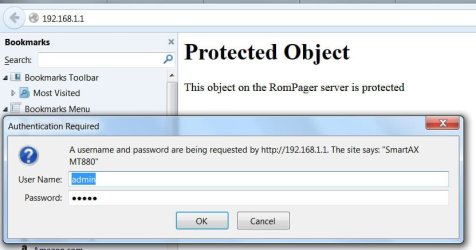
You should be bale to reset the modem with a hardware button - that would reverse the password to the default.
 

My Computer My Computer

At a glance

Windows 7 Pro
Computer type
PC/Desktop
OS
Windows 7 Pro
Back
Top