Solved LAN keeps disconnecting and connecting constantly

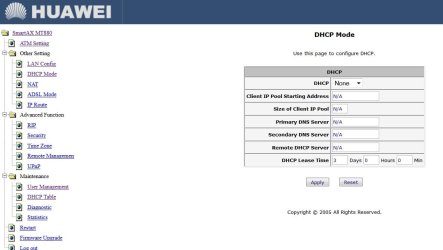
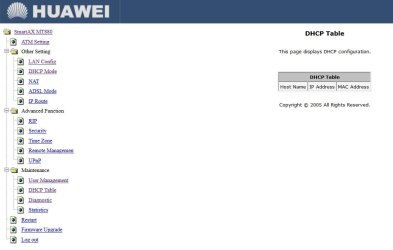
Thanx, it worked. However, I don't see where exactly I should see DHCP range.
 

Attachments

  • h.jpg
    h.jpg
    75.9 KB · Views: 1
  • h3.jpg
    h3.jpg
    58.9 KB · Views: 1

My Computer My Computer

At a glance

Windows 7 Ultimate x64Intel(R) Xeon(R) CPU E3-1231 v3 @ 3.40GHz16 GBAMD Radeon (TM) R9 390 Series
Computer type
PC/Desktop
OS
Windows 7 Ultimate x64
CPU
Intel(R) Xeon(R) CPU E3-1231 v3 @ 3.40GHz
Motherboard
ASUSTeK COMPUTER INC. Z97-A Rev 1.xx
Memory
16 GB
Graphics Card(s)
AMD Radeon (TM) R9 390 Series
Sound Card
(1) AMD High Definition Audio Device (2) Realtek High Defi
Well, that's that about dhcp conflict...

Let's enable the DHCP and see if it would fix your problem.


  • On your modem's DHCP Mode, enable the DHCP from the drop-down menu.
  • On Client IP Pool Starting Address use: 192.168.1.100
  • On Size of Client Pool enter: 50
  • Primary DNS Server: 85.114.32.7
  • Secondary DNS Server: 85.114.32.8
  • Change DHCP Lease Time to 7 days.
  • Apply the settings
Open you network adapter properties and under IPv4 change to " Obtain an IP address automatically" and "Obtain DNS server address automatically", OK everything and test the internet.


Let us know how it works.

P.S. Now that I think about it, resetting the modem could've reset the DHCP to a default disabled state, so a dhcp conflict might have been a possibility. I guess we'll never know :)
 

My Computer My Computer

At a glance

Windows 7 Pro
Computer type
PC/Desktop
OS
Windows 7 Pro
Btw, after resetting the modem with a hardware button I was able to access modem settings, BUT it caused other complications with modem (the connection was completely lost).
So, I called my ISP and this very agent (unlike the previous eight with whom I talked over the past couple of weeks) solved the problem in one minute. I just had to fill out some blank fields in WAN Configuration, that's all. And now the connection works. I very seldom get disconnects. I'd like to check DHCP range, just in case, but I don't know how.
 

My Computer My Computer

At a glance

Windows 7 Ultimate x64Intel(R) Xeon(R) CPU E3-1231 v3 @ 3.40GHz16 GBAMD Radeon (TM) R9 390 Series
Computer type
PC/Desktop
OS
Windows 7 Ultimate x64
CPU
Intel(R) Xeon(R) CPU E3-1231 v3 @ 3.40GHz
Motherboard
ASUSTeK COMPUTER INC. Z97-A Rev 1.xx
Memory
16 GB
Graphics Card(s)
AMD Radeon (TM) R9 390 Series
Sound Card
(1) AMD High Definition Audio Device (2) Realtek High Defi
Doctore, we uploaded posts at the same time.
I am grateful for your assistance. However, now that the connection is practically normal I am a bit reluctant about changing settings out of fear that that horrible "No internet access" icon starts to appear again... (Is the action you recommend undoable?)
 

My Computer My Computer

At a glance

Windows 7 Ultimate x64Intel(R) Xeon(R) CPU E3-1231 v3 @ 3.40GHz16 GBAMD Radeon (TM) R9 390 Series
Computer type
PC/Desktop
OS
Windows 7 Ultimate x64
CPU
Intel(R) Xeon(R) CPU E3-1231 v3 @ 3.40GHz
Motherboard
ASUSTeK COMPUTER INC. Z97-A Rev 1.xx
Memory
16 GB
Graphics Card(s)
AMD Radeon (TM) R9 390 Series
Sound Card
(1) AMD High Definition Audio Device (2) Realtek High Defi
Doctore, we uploaded posts at the same time.
Now, that the connection is practically normal I am a bit reluctant about changing settings out of fear that that horrible "No internet access" icon starts to appear again... (Is that action undoable?)

You can turn off the DHCP anytime you wish, don't worry about it.
You should have no disconnects whatsoever, so I recommend you follow the above post and turn on the DHCP, change your adapter settings and see if you keep on getting disconnected - you can always go back to the DHCP Mode and select Disable from the drop-down menu, which would shut off the DHCP server on the modem, then enter the old IPv4 information in your adapter settings options.

Of course, if the connection is normal - no need to bother with DHCP.
 

My Computer My Computer

At a glance

Windows 7 Pro
Computer type
PC/Desktop
OS
Windows 7 Pro
Thank you all, folks.
Doctore, I'll copypaste your advice regarding the DHCP server, in case a need arise.
Best regards :)
 

My Computer My Computer

At a glance

Windows 7 Ultimate x64Intel(R) Xeon(R) CPU E3-1231 v3 @ 3.40GHz16 GBAMD Radeon (TM) R9 390 Series
Computer type
PC/Desktop
OS
Windows 7 Ultimate x64
CPU
Intel(R) Xeon(R) CPU E3-1231 v3 @ 3.40GHz
Motherboard
ASUSTeK COMPUTER INC. Z97-A Rev 1.xx
Memory
16 GB
Graphics Card(s)
AMD Radeon (TM) R9 390 Series
Sound Card
(1) AMD High Definition Audio Device (2) Realtek High Defi
Back
Top