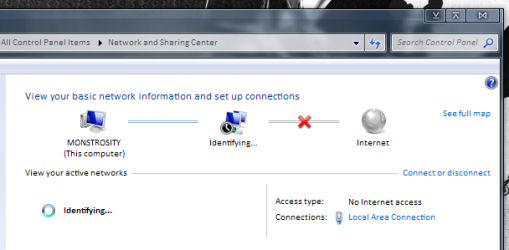
Hi all, I have a very interesting issue with my Win7 Ultimate x64 machine. I've been reading through a bunch of posts both here and over at the MS TechNet forums, but none of them are quite the same as my issue... I'm hoping somebody else might have a few ideas I haven't tried?
To outline my problem; if I start up my computer with the network adapter enabled, I cannot connect to any network whether auto-assign IP or not. I have tried ipconfig /flushdns, followed by ipconfig /release and ipconfig /renew without any success. This is where it gets interesting though, to connect here at work I first need to disable my Marvell Yukon adapter, restart my computer, enable the adapter, and then run the Network Diagnostics before it will connect. I tested it just now to confirm, I left it trying to connect on it's own for about 15 minutes and got nothing.. I ran the Network Diagnostics, and it suddenly connects and tells me it can't find a problem.
I have tried all this with the IPv6 protocol bot enabled and disabled, and it seems to give me less trouble with IPv6 disabled, but the problem persists both ways.
Anybody got a few ideas on what I can check regarding this....? I'm out of ideas now.
To outline my problem; if I start up my computer with the network adapter enabled, I cannot connect to any network whether auto-assign IP or not. I have tried ipconfig /flushdns, followed by ipconfig /release and ipconfig /renew without any success. This is where it gets interesting though, to connect here at work I first need to disable my Marvell Yukon adapter, restart my computer, enable the adapter, and then run the Network Diagnostics before it will connect. I tested it just now to confirm, I left it trying to connect on it's own for about 15 minutes and got nothing.. I ran the Network Diagnostics, and it suddenly connects and tells me it can't find a problem.
I have tried all this with the IPv6 protocol bot enabled and disabled, and it seems to give me less trouble with IPv6 disabled, but the problem persists both ways.
Anybody got a few ideas on what I can check regarding this....? I'm out of ideas now.
My Computer
- Computer type
- PC/Desktop
- OS
- Win 10 x64 Pro x64 / Ubuntu 15.10 x64
- CPU
- Intel i7-4960X
- Motherboard
- Asus Rampage IV Black Edition
- Memory
- 4x8GB Corsair Dominator Platinum @2400MHz 10-12-12-31
- Graphics Card(s)
- 2x MSI GTX780Ti 3GB (SLI)
- Sound Card
- Onboard SupremeFX (Cirrus Logic CS4398)
- Monitor(s) Displays
- 3x LG Cinema 27" IPS LED (27MP65)
- Screen Resolution
- [1920x1080]x3
- Hard Drives
- Crucial M500 120GB, Crucial M500 480GB, Toshiba DT01ACA200 2TB
- PSU
- CoolerMaster V1000
- Case
- Corsair Obsidian 750D
- Cooling
- ThermalTake Water 3.0 Extreme, 4xSP120, 3xAF120
- Keyboard
- Moshi Luna
- Mouse
- Logitech G700s / Roccat Tyon
- Internet Speed
- 4Mb uncapped ADSL (Afrihost)
- Antivirus
- MS Security Essentials
- Browser
- Chrome... Duh. (:

 Lol.
Lol.