LAN problem

Chick1 TeO

New member
Local time
1:07 AM
Messages
13
Hey all,i new member :)

I come here because i have problem with my LAN connection.I have modem and i have 2 computer,Desktop and laptop and everything was ok,just one moment i lose good connection,my connection is slowed hard.I dont know why?!

I checked for malwers but there is no problem with that.
If i have problem with both comps,i guess is problem with modem,DSN service or IP adress.

I did diagnostic,and i got : ''Connection beetween access point,router or modem is broken'' or ''DSN server is appears but not ransponding :(

Pls,u are profesionals and if u dont know what is with my internet,no one know..
 

My Computer

Computer Manufacturer/Model Number
1
OS
Windows 7 Home Premium 64 bit
CPU
1
Motherboard
11
Memory
1
Graphics Card(s)
1
Sound Card
1
Monitor(s) Displays
111
Hard Drives
1
PSU
1
Case
1
Cooling
1
How are you connected to the router? Is it via Wireless, or an Ethernet cable?

You can try any of the following as a simply first step before diving into anything a bit more complicated.
1. Turn off the router, wait 10 seconds and then power back on again. Give it a few minutes, then connect and test speeds.

2. Go to start > type "cmd" into the search bar. Right click and run as Administrator. > type: ipconfig /release > after pressing enter, type: ipconfig /renew > After pressing enter again, type: ipconfig /flushdns .
Test for any speed difference.
 

My Computer

OS
Windows 7 Professional x64
I did that now,and i did this before,nothing.
On Ethernet cable.In device menager i have few yellow window but that driver i cant download if u understand me.

I did and hard reset with turning off router and waiting but nothnig..
 

My Computer

Computer Manufacturer/Model Number
1
OS
Windows 7 Home Premium 64 bit
CPU
1
Motherboard
11
Memory
1
Graphics Card(s)
1
Sound Card
1
Monitor(s) Displays
111
Hard Drives
1
PSU
1
Case
1
Cooling
1
Anyone for help ?
 

My Computer

Computer Manufacturer/Model Number
1
OS
Windows 7 Home Premium 64 bit
CPU
1
Motherboard
11
Memory
1
Graphics Card(s)
1
Sound Card
1
Monitor(s) Displays
111
Hard Drives
1
PSU
1
Case
1
Cooling
1
From what I understand, one of the drivers listed in your device manager has a Yellow exclamation mark next to it. If this is the case, the fault lies with your driver. Try to update it, or uninstall (Right click > uninstall) the driver and restart the computer. This will force a reinstall of the driver.
Originally you said the issue occors on both computers, this would point to it being a different problem.

If you could point out what exactly is happening, I could assist further.
Are you able to connect to the internet at all?
If your router is the problem, call your ISP that provided it to you (presuming you haven't changed it) and they should talk you through the steps or at least check for you to see if the problem lies at their end.
 

My Computer

OS
Windows 7 Professional x64
Execly,this sure isnt problem because both comp have problem,but i dont know ...

It's hard to call provider because i dont know swedish :D

I have signal but it's so slow.
 

My Computer

Computer Manufacturer/Model Number
1
OS
Windows 7 Home Premium 64 bit
CPU
1
Motherboard
11
Memory
1
Graphics Card(s)
1
Sound Card
1
Monitor(s) Displays
111
Hard Drives
1
PSU
1
Case
1
Cooling
1
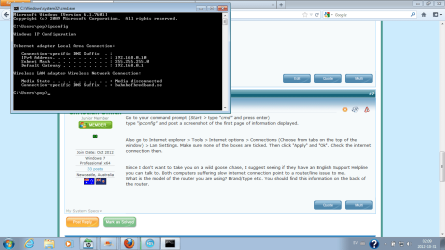
Go to your command prompt (Start > type "cmd" and press enter)
type "ipconfig" and post a screenshot of the first page of information displayed.


Also go to Internet explorer > Tools > Internet options > Connections (Choose from tabs on the top of the window) > Lan Settings. Make sure none of the boxes are ticked. Then click "Apply" and "Ok". Check the internet connection then.


Since I don't want to take you on a wild goose chase, I suggest seeing if they have an English Support Helpline you can talk to. Both computers suffering slow internet connection point to a router/line issue to me.
What is the model of the router you are using? Brand/type etc. You should find this information on the back of the router.
 

My Computer

OS
Windows 7 Professional x64
Ok,last thing is talk with English stuff of company because my English isnt perfekt and this thing needs perfekt dialog..
save.png

I did in Internet Explorer this,i unchecked first words.Nothing..
Cisko modem EPC 2425 i using.
 

My Computer

Computer Manufacturer/Model Number
1
OS
Windows 7 Home Premium 64 bit
CPU
1
Motherboard
11
Memory
1
Graphics Card(s)
1
Sound Card
1
Monitor(s) Displays
111
Hard Drives
1
PSU
1
Case
1
Cooling
1
I've been reading about a number of problems people are having with that exact Router and the same issues you are describing.
They have been provided with a replacement router and the problem has fixed itself. Unfortunately, my guess is your router having its final days.

When you look at the router, what lights are displayed? Are they flashing a lot or a steady green?
 

My Computer

OS
Windows 7 Professional x64
Power,US,DS,online,Ethernet (flashing some times only ) Tel1,Tel2.

When i open some pages,i dont have problem,thats go well.But when i opet you tube or download something i dont have speed.
 

My Computer

Computer Manufacturer/Model Number
1
OS
Windows 7 Home Premium 64 bit
CPU
1
Motherboard
11
Memory
1
Graphics Card(s)
1
Sound Card
1
Monitor(s) Displays
111
Hard Drives
1
PSU
1
Case
1
Cooling
1
I dont know why is one post deleted but tnx for advice,nothing..
i did diagnostic again and i get: Your computer appears to be correctly configurated but the device or resource (DSN server)is not responding.
 

My Computer

Computer Manufacturer/Model Number
1
OS
Windows 7 Home Premium 64 bit
CPU
1
Motherboard
11
Memory
1
Graphics Card(s)
1
Sound Card
1
Monitor(s) Displays
111
Hard Drives
1
PSU
1
Case
1
Cooling
1
Are sure you have not exceeded your monthly data allowence? Many providers then slow the internet speed right down after you have used up your bandwidth, allowing access to standard web pages but making it extremely slow for downloads/streaming video or any other graphicly intensive web-pages.
This can cause communication problems with the router sometimes.
 

My Computer

OS
Windows 7 Professional x64
hm.. interesting..this solution doenst exist in serbia,so i dont thougt about it.I live in some apartman isnt my apartmant and my internet.I think the internet is paid but..interesting..
 

My Computer

Computer Manufacturer/Model Number
1
OS
Windows 7 Home Premium 64 bit
CPU
1
Motherboard
11
Memory
1
Graphics Card(s)
1
Sound Card
1
Monitor(s) Displays
111
Hard Drives
1
PSU
1
Case
1
Cooling
1
your problem seems not to be a no-connection problem as i see .
you have connection but it is slow is it ?
ok ... tell us your speed of net in the contract b/w you and ISP .
then keep one device connected to router(wiredly) and diconnect the remaing devices and go to your router's webpage and check the speed from there ...
then Speedtest.net - The Global Broadband Speed Test go here and check the speed .... list the three speeds
do not forget to run anti-virus before you start the process .
brows the net .... and if no changes come again ..
 

My Computer

OS
windows 7 64 bit home premium
CPU
inter(R) core(TM) i5 CPU M430 @2.27GHZ
Memory
3 GB
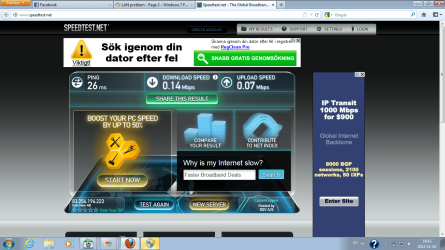
http://www.speedtest.net/result/2279356306.png

I dont know how to check the speed from router's webpage..

I dont have contract because i this is not my apartmant and my internet but i check on speed net my connection when everything was alright, i had 22mbits,now is i think 0.14..

I have connection,u see,and i dont have problem with open pages,open facebook,listen radio..Only with you tube clips,and downloading.
 

My Computer

Computer Manufacturer/Model Number
1
OS
Windows 7 Home Premium 64 bit
CPU
1
Motherboard
11
Memory
1
Graphics Card(s)
1
Sound Card
1
Monitor(s) Displays
111
Hard Drives
1
PSU
1
Case
1
Cooling
1
see , is that speed your origional one or something affected it and made it slower than before .
to determine this , i should know your connection speed .... it seems that the appartment is not urs and u do not know the contract speed .

Speedtest.net - The Global Broadband Speed Test
sorry for my mistake and take the new link then click begin test
after , take a print screen shot and post .

if you were enjoying fast net before , and you download movies/videos , then it might be that you crossed the limit and they ( ISP) deducted from ur speed .
read about fair usage policy in ISPs .
 

My Computer

OS
windows 7 64 bit home premium
CPU
inter(R) core(TM) i5 CPU M430 @2.27GHZ
Memory
3 GB
This speed is not original,because i remember my old speed,i downloaded film with 2mb per sekund,now is 14.5kbs. Untitled.png
 

My Computer

Computer Manufacturer/Model Number
1
OS
Windows 7 Home Premium 64 bit
CPU
1
Motherboard
11
Memory
1
Graphics Card(s)
1
Sound Card
1
Monitor(s) Displays
111
Hard Drives
1
PSU
1
Case
1
Cooling
1
if you were enjoying fast net before , and you download movies/videos , then it might be that you crossed the limit and they ( ISP) deducted from ur speed .
read about fair usage policy in ISPs .
 

My Computer

OS
windows 7 64 bit home premium
CPU
inter(R) core(TM) i5 CPU M430 @2.27GHZ
Memory
3 GB
I read about that,and what is solution if u think is that problem. ?
 

My Computer

Computer Manufacturer/Model Number
1
OS
Windows 7 Home Premium 64 bit
CPU
1
Motherboard
11
Memory
1
Graphics Card(s)
1
Sound Card
1
Monitor(s) Displays
111
Hard Drives
1
PSU
1
Case
1
Cooling
1
Back
Top