
Language Pack question

Paradise

New member
Local time
4:08 PM
Messages
8
Hi,

how do the LPs work? I know there are some LPs that needs to be incluted in the Windows installation CD.

But now i saw a LP (for build 7229) that is a 2GB iso.
Is that something that i have to install after Windows (no integration)?
 

My Computer

OS
Windows 7 x64, Vista Ultimate x64, XP Pro
They are an additional install that has to change over EVERY word from x language to the y language installed. I don't know if you can switch back and forth or not, but it is a large file.

You have to install it as an update. I have not done this, so I don't know how it works after that.

~Lordbob
 

My Computer

Computer Manufacturer/Model Number
Hera
OS
Windows 7 Ultimate x64, Mint 9
CPU
Intel i5-2500k
Motherboard
ASUS P8P67 Pro
Memory
2x 4Gb Corsair VENGEANCE DDR3-1600
Graphics Card(s)
NVidia GeForce N260GTX Twin Frozr
Sound Card
Realtek HD OnBoard Audio
Monitor(s) Displays
ASUS 24" Monitor
Screen Resolution
1920x1080
Hard Drives
G.SKILL Phoenix Series 60GB SATA II MLC Internal Solid State Drive (SSD)
SAMSUNG Spinpoint F3R 1TB 7200 RPM 32MB Cache SATA II
PSU
Cooler Master Real Power Pro 750W
Case
Cooler Master Haf 932
Cooling
Fans
Keyboard
Razer Tarantula
Mouse
Razer Lachesis
Internet Speed
not fast enough
Hi,

how do the LPs work? I know there are some LPs that needs to be incluted in the Windows installation CD.

But now i saw a LP (for build 7229) that is a 2GB iso.
Is that something that i have to install after Windows (no integration)?

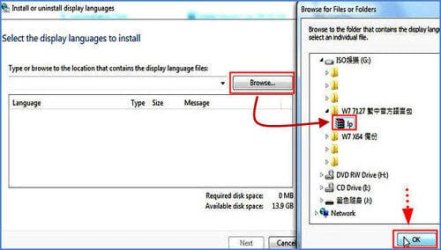
Yes, LP for manay languages is 2GB. But, to an individual language, take the tradition Chinese as an example, is only 130MB.

From the Control Panel>>>Region and Language>>>Keyboards and Languages>>>Display language, we can install another languages other than the default language (English).

For example, this image is the way we install the traditional Chinese LP:

1.jpg


And, yes, we can switch the display language from English to Chinese easily.

For your curiosity. :)
 

My Computer

OS
Server 2008 R2 SP1, Win7 x64 Pro SP1
CPU
Intel Core 2 Duo E6700 @3.3GHz
Motherboard
ASUS P5W DH DELUXE
Memory
Transcend DDRII 800 4GB (2 x 2GB )
Graphics Card(s)
GeForce 7950GX2
Sound Card
Realtek ALC882M Integrated on board
Monitor(s) Displays
ACER AL2723 27" LCD
Screen Resolution
1920x1200
Hard Drives
WD 6401 AALS 640G x 1
Seagate 160 GB (Barracuda 7200.7) x 2
PSU
Zippy PSL-6720P(G1)720W
Case
Thermaltake Kandalf VA9000SWA
Cooling
Zalman CNPS9500
Keyboard
Standard
Mouse
Standard
Internet Speed
10M, Cable
Other Info
Above is one of my desktops.
Yes, LP for manay languages is 2GB. But, to an individual language, take the tradition Chinese as an example, is only 130MB.

From the Control Panel>>>Region and Language>>>Keyboards and Languages>>>Display language, we can install another languages other than the default language (English).

For example, this image is the way we install the traditional Chinese LP:

View attachment 14133


And, yes, we can switch the display language from English to Chinese easily.

For your curiosity. :)
Thanks woolswell. I didn't know that. +1 for you!

~Lordbob
 

My Computer

Computer Manufacturer/Model Number
Hera
OS
Windows 7 Ultimate x64, Mint 9
CPU
Intel i5-2500k
Motherboard
ASUS P8P67 Pro
Memory
2x 4Gb Corsair VENGEANCE DDR3-1600
Graphics Card(s)
NVidia GeForce N260GTX Twin Frozr
Sound Card
Realtek HD OnBoard Audio
Monitor(s) Displays
ASUS 24" Monitor
Screen Resolution
1920x1080
Hard Drives
G.SKILL Phoenix Series 60GB SATA II MLC Internal Solid State Drive (SSD)
SAMSUNG Spinpoint F3R 1TB 7200 RPM 32MB Cache SATA II
PSU
Cooler Master Real Power Pro 750W
Case
Cooler Master Haf 932
Cooling
Fans
Keyboard
Razer Tarantula
Mouse
Razer Lachesis
Internet Speed
not fast enough
Hm, so i wonder why i saw threads where say always say that the LPs have to go into the Windows installation DVD.
 

My Computer

OS
Windows 7 x64, Vista Ultimate x64, XP Pro
I am sorry but I am having a trouble here .. I am using windows 7 Ultimate .. everything is Ok .. but when I design a logo , I need to write a slogan or smthng in the program in my language which is Arabic .. I find a weird language instead .. although I can write Arabic in texts and word documents and msn and everything .. except in programs like logo creator or Mind mapper .. dunno whats the problem ..could anyone help me ?
 

My Computer

OS
dont know
Back
Top