Solved Language Settings

BauerBird

New member
Local time
2:03 AM
Messages
2
Ok this is going to sound so stupid but how the hell do you change the language settings for office 2010, specifically Word. I have moved from the UK to the US and I need to have my spell checker in American sadly. I have tried changing the default to US and it changes instantly back to the UK. The help suggests I have to change the keyboard language - this is patently a ridiculous suggestion/solution. I already have the problem that although my keyboard language is set to UK some of the keys register in the American format (ie several keys are swtiched around and I just have to remember them). Only an idiot would link the keyboard language to the default language in the software so there must be another solution. Suggestions welcome.
 

My Computer

OS
Windows 7 home premium
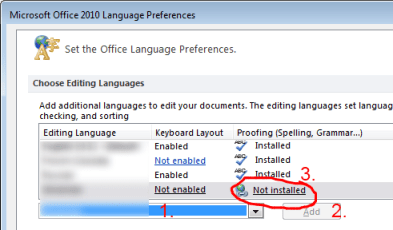
You might want to play with settings in this window:
Start- All programs - Microsoft Office 2010 - Microsoft Office 2010 Tools - Microsoft Office 2010 language preferences.

Picture attached is from a different thread and is for illustration purposes only.
 

Attachments

  • 155791d1306033163-problems-office-2010-mini-translator-language.png
    155791d1306033163-problems-office-2010-mini-translator-language.png
    14.8 KB · Views: 14

My Computer

Computer type
PC/Desktop
OS
Windows 8.1 ; Windows 7 x86 (Dec2008-Jan2013)
Other Info
"The scale icon at the top right of a post or tutorial is how you can give rep to the member."
Hi Neutron 16,

as with many things in life, turning it off and turning it on again solved the problem. Well actually turning it off and again three times, as I transported it various places seemed to do the trick. This afternoon when I turned it on again it suddenly decided it would be American, although I have had to remind it with one document. On the plus side I'm now learning to spell American-like.

Thanks for your help though! If I have any more problems I'll definitely give it a go!
 

My Computer

OS
Windows 7 home premium
Back
Top