Laptop automatically starts-up, even though I don't want it to

ricksis

New member
Member
Local time
2:01 AM
Messages
84
Location
Leeuwarden, Netherlands
Hello!

For the last month or so, I had a problem with my laptop. Every time I hibernate my laptop (a Sony VAIO EB3S1E) in the evening, it automatically starts-up at about 11:30 - 11:40 (AM) in the morning. I often hibernate rather than shutting down, because, being an original VAIO laptop, it has many start-up programs and services that increase the start-up time.

I looked for solutions, but neither of those helped:
- disabled Windows automatic updates (checked, because they were already disabled)
- disabled clock synchronization
- disabled AVG Anti-Virus automatic scan
- checked BIOS settings (there isn't any Power Management setting)
- checked router settings

Is there any advice you can give me to solve the problem?
 

My Computer My Computer

At a glance

Microsoft Windows 7 Ultimate 64-bitIntel(R) Core(TM) i5 CPU 3230M @ 2.53GHz8,00 GB DDR3@1600MhznVidia GT730M
Computer type
Laptop
Computer Manufacturer/Model Number
Acer
OS
Microsoft Windows 7 Ultimate 64-bit
CPU
Intel(R) Core(TM) i5 CPU 3230M @ 2.53GHz
Motherboard
Sony Corporation Base Board VAIO
Memory
8,00 GB DDR3@1600Mhz
Graphics Card(s)
nVidia GT730M
Screen Resolution
1920 x 1080
Go to Control Panel > System > "Device Manager" tab
Find your network adapter(s), right click and select "Properties". In the "Power Management" tab, uncheck "Allow this device to bring the computer out of standby".
 

My Computer My Computer

At a glance

Windows 7 Home Premium x64, Windows 8 Proi5-2430M8 GbnVidia GeForce 610M
Computer type
Laptop
Computer Manufacturer/Model Number
Acer Aspire 5750G
OS
Windows 7 Home Premium x64, Windows 8 Pro
CPU
i5-2430M
Motherboard
Acer JE50_HR
Memory
8 Gb
Graphics Card(s)
nVidia GeForce 610M
Sound Card
Realtek High Definition Audio
Antivirus
Avast
Browser
Chrome
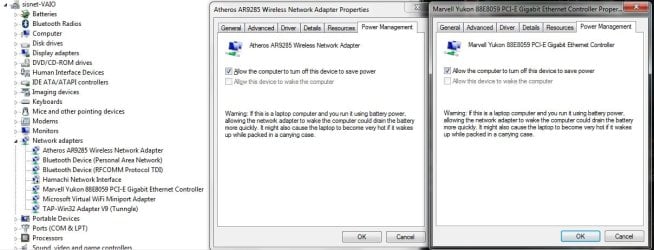
I already tried that, I forgot to mention. Here are the network adapters. Is Hamachi or Tunngle have anything to do with the problem?
 

Attachments

  • device manager.jpg
    device manager.jpg
    76.9 KB · Views: 7

My Computer My Computer

At a glance

Microsoft Windows 7 Ultimate 64-bitIntel(R) Core(TM) i5 CPU 3230M @ 2.53GHz8,00 GB DDR3@1600MhznVidia GT730M
Computer type
Laptop
Computer Manufacturer/Model Number
Acer
OS
Microsoft Windows 7 Ultimate 64-bit
CPU
Intel(R) Core(TM) i5 CPU 3230M @ 2.53GHz
Motherboard
Sony Corporation Base Board VAIO
Memory
8,00 GB DDR3@1600Mhz
Graphics Card(s)
nVidia GT730M
Screen Resolution
1920 x 1080

My Computer My Computer

At a glance

Windows 7 Home Premium x64, Windows 8 Proi5-2430M8 GbnVidia GeForce 610M
Computer type
Laptop
Computer Manufacturer/Model Number
Acer Aspire 5750G
OS
Windows 7 Home Premium x64, Windows 8 Pro
CPU
i5-2430M
Motherboard
Acer JE50_HR
Memory
8 Gb
Graphics Card(s)
nVidia GeForce 610M
Sound Card
Realtek High Definition Audio
Antivirus
Avast
Browser
Chrome
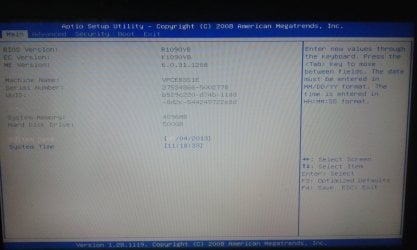
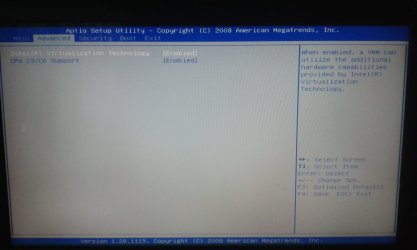
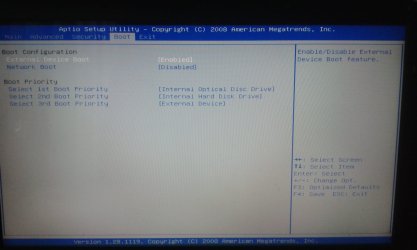
I've looked for the Wake-on-LAN feature in BIOS, but I couldn't find it... Any other advice?
 

Attachments

  • 20130504_111826.jpg
    20130504_111826.jpg
    231.1 KB · Views: 9
  • 20130504_111835.jpg
    20130504_111835.jpg
    178.6 KB · Views: 8
  • 20130504_111842.jpg
    20130504_111842.jpg
    182.7 KB · Views: 9
  • 20130504_111848.jpg
    20130504_111848.jpg
    201.3 KB · Views: 8
  • 20130504_111855.jpg
    20130504_111855.jpg
    163.9 KB · Views: 8

My Computer My Computer

At a glance

Microsoft Windows 7 Ultimate 64-bitIntel(R) Core(TM) i5 CPU 3230M @ 2.53GHz8,00 GB DDR3@1600MhznVidia GT730M
Computer type
Laptop
Computer Manufacturer/Model Number
Acer
OS
Microsoft Windows 7 Ultimate 64-bit
CPU
Intel(R) Core(TM) i5 CPU 3230M @ 2.53GHz
Motherboard
Sony Corporation Base Board VAIO
Memory
8,00 GB DDR3@1600Mhz
Graphics Card(s)
nVidia GT730M
Screen Resolution
1920 x 1080
ricksis, it will be buried under power management like it shows in the link mach04 provided. Update your specs using the link in my sig, and we can help with looking at how your BIOS has it.
 

My Computer My Computer

At a glance

Windows 10 Pro X64Intel(R) Core(TM) i5-3570K CPU OC@ 4.5GHZ Turbo8.00 GB DDR3 1600MhzMSI Gaming X GTX 1070
Computer type
PC/Desktop
Computer Manufacturer/Model Number
Dude Build
OS
Windows 10 Pro X64
CPU
Intel(R) Core(TM) i5-3570K CPU OC@ 4.5GHZ Turbo
Motherboard
MSI Z77A-G45 Gaming
Memory
8.00 GB DDR3 1600Mhz
Graphics Card(s)
MSI Gaming X GTX 1070
Sound Card
Realtek High Definition
Monitor(s) Displays
Dell S23O9W, HP L1710
Screen Resolution
DELL-1920 x 1080 HP-1280 x1024
Hard Drives
Crucial m4 256 SSD, WD 7200RPM 500GB WD 1TB
PSU
Seasonic X650 GOLD
Case
Zalman Z12
Cooling
Antec Kuhler 920
Keyboard
Logitech
Mouse
MSI DS100 Interceptor
Internet Speed
50 down and 5 up
Antivirus
MSE
Browser
Chrome, IE 11
Other Info
Logitech X-620 Speakers
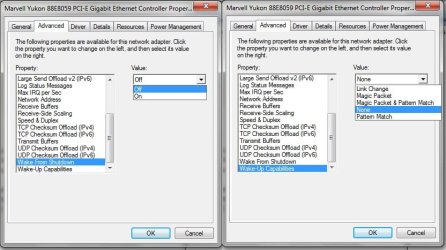
Can you find your device exactly as this picture is showing?
banner-01-01.png


If so do as its shown on the right side by disabling it from that drop down menu.
 

My Computer My Computer

At a glance

Windows 7 Home Premium x64, Windows 8 Proi5-2430M8 GbnVidia GeForce 610M
Computer type
Laptop
Computer Manufacturer/Model Number
Acer Aspire 5750G
OS
Windows 7 Home Premium x64, Windows 8 Pro
CPU
i5-2430M
Motherboard
Acer JE50_HR
Memory
8 Gb
Graphics Card(s)
nVidia GeForce 610M
Sound Card
Realtek High Definition Audio
Antivirus
Avast
Browser
Chrome
Sorry for responding so late.
There isn't any "Power" menu in the BIOS, I've double-checked that. For the other option, I've checked that as well and it was disabled, as it is shown in the screenshot.
 

Attachments

  • w7.jpg
    w7.jpg
    64 KB · Views: 13

My Computer My Computer

At a glance

Microsoft Windows 7 Ultimate 64-bitIntel(R) Core(TM) i5 CPU 3230M @ 2.53GHz8,00 GB DDR3@1600MhznVidia GT730M
Computer type
Laptop
Computer Manufacturer/Model Number
Acer
OS
Microsoft Windows 7 Ultimate 64-bit
CPU
Intel(R) Core(TM) i5 CPU 3230M @ 2.53GHz
Motherboard
Sony Corporation Base Board VAIO
Memory
8,00 GB DDR3@1600Mhz
Graphics Card(s)
nVidia GT730M
Screen Resolution
1920 x 1080
Have you scheduled any automatic tasks like defrag or disk cleaning?
 

My Computer My Computer

At a glance

Windows 7 Home Premium x64, Windows 8 Proi5-2430M8 GbnVidia GeForce 610M
Computer type
Laptop
Computer Manufacturer/Model Number
Acer Aspire 5750G
OS
Windows 7 Home Premium x64, Windows 8 Pro
CPU
i5-2430M
Motherboard
Acer JE50_HR
Memory
8 Gb
Graphics Card(s)
nVidia GeForce 610M
Sound Card
Realtek High Definition Audio
Antivirus
Avast
Browser
Chrome
The defrag was scheduled, but it was at 01:00 on Wednesdays, which I don't think has anything to do with the problem. The disk cleanup isn't scheduled. I've checked the Task Scheduler and the only thing scheduled at the approximate hour is User_Feed_Synchronization-{80001094-A5CF-4C3F-994A-DD777116A911}, at 11:20.
 

My Computer My Computer

At a glance

Microsoft Windows 7 Ultimate 64-bitIntel(R) Core(TM) i5 CPU 3230M @ 2.53GHz8,00 GB DDR3@1600MhznVidia GT730M
Computer type
Laptop
Computer Manufacturer/Model Number
Acer
OS
Microsoft Windows 7 Ultimate 64-bit
CPU
Intel(R) Core(TM) i5 CPU 3230M @ 2.53GHz
Motherboard
Sony Corporation Base Board VAIO
Memory
8,00 GB DDR3@1600Mhz
Graphics Card(s)
nVidia GT730M
Screen Resolution
1920 x 1080
Try to edit the time the User_Feed_Synchronization is set to a different time and see if your machine restarts. This seems to update your RSS feeds.
Does it go back to sleep after the task is finished?
 

My Computer My Computer

At a glance

Windows 7 Home Premium x64, Windows 8 Proi5-2430M8 GbnVidia GeForce 610M
Computer type
Laptop
Computer Manufacturer/Model Number
Acer Aspire 5750G
OS
Windows 7 Home Premium x64, Windows 8 Pro
CPU
i5-2430M
Motherboard
Acer JE50_HR
Memory
8 Gb
Graphics Card(s)
nVidia GeForce 610M
Sound Card
Realtek High Definition Audio
Antivirus
Avast
Browser
Chrome
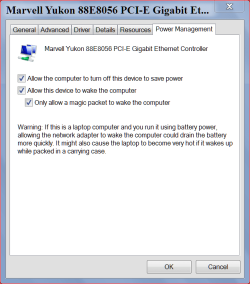
Going back to Post #8. (Picture) Can you select Power Management instead of Advance and see what is there.

5 12 2013.PNG
 

My Computer My Computer

At a glance

Windows 10 Pro. 64/ version 1709 Windows 7 Pr...Intel i7-6800K @ 4.3Corsair Platinum 16 gig @2400EVGA GTX 1070 OC
Computer type
PC/Desktop
Computer Manufacturer/Model Number
Home made Desktop
OS
Windows 10 Pro. 64/ version 1709 Windows 7 Pro/64
CPU
Intel i7-6800K @ 4.3
Motherboard
ASUS X-99 Deluxe II
Memory
Corsair Platinum 16 gig @2400
Graphics Card(s)
EVGA GTX 1070 OC
Monitor(s) Displays
Asus 27" LED LCD/VE278Q
Screen Resolution
1920-1080 or 1280-720 HDMI
Hard Drives
INTEL SSD 730-240 Gb Sata 3.0/
PSU
EVGA Platium 1200W
Case
Phanteks Luxe Tempered Glass 8 fans/ one radiator
Cooling
XSPC/ Water Cooled CPU
Keyboard
Das 4 Professional
Mouse
Logitech M705/MX Anywhere 2-S
Internet Speed
100 mbits
Antivirus
Microsoft Security Essentials/ Malwarebytes Premium 3.0/ SAS
Browser
I.E. 11 default/Firefox/ ISP Time Warner Cable/Spectrum
Other Info
LG BluRay Burner/
Sound system-KLipsch-THX/
Icy Dock ssd Hot Swap bays.
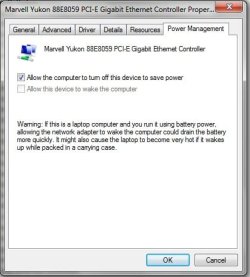
I've looked in Power Management before. I didn't say anything about it because I can't even check the "Allow this device to wake the computer" option, as you can see in the screenshot.
 

Attachments

  • w7 2.jpg
    w7 2.jpg
    26 KB · Views: 6

My Computer My Computer

At a glance

Microsoft Windows 7 Ultimate 64-bitIntel(R) Core(TM) i5 CPU 3230M @ 2.53GHz8,00 GB DDR3@1600MhznVidia GT730M
Computer type
Laptop
Computer Manufacturer/Model Number
Acer
OS
Microsoft Windows 7 Ultimate 64-bit
CPU
Intel(R) Core(TM) i5 CPU 3230M @ 2.53GHz
Motherboard
Sony Corporation Base Board VAIO
Memory
8,00 GB DDR3@1600Mhz
Graphics Card(s)
nVidia GT730M
Screen Resolution
1920 x 1080
Are you using a wireless mouse? If so look at its power management tab and see if that is the cause.
 

My Computer My Computer

At a glance

Windows 7 Home Premium x64, Windows 8 Proi5-2430M8 GbnVidia GeForce 610M
Computer type
Laptop
Computer Manufacturer/Model Number
Acer Aspire 5750G
OS
Windows 7 Home Premium x64, Windows 8 Pro
CPU
i5-2430M
Motherboard
Acer JE50_HR
Memory
8 Gb
Graphics Card(s)
nVidia GeForce 610M
Sound Card
Realtek High Definition Audio
Antivirus
Avast
Browser
Chrome
Yes, I am using one, but I power it off every time I turn the computer off. I found the option and unchecked it. Usually it only works when the laptop is in sleep mode. Sometimes I left it on and the computer didn't turn on. I don't think this will be a solution, but I'll see if it works...
 

My Computer My Computer

At a glance

Microsoft Windows 7 Ultimate 64-bitIntel(R) Core(TM) i5 CPU 3230M @ 2.53GHz8,00 GB DDR3@1600MhznVidia GT730M
Computer type
Laptop
Computer Manufacturer/Model Number
Acer
OS
Microsoft Windows 7 Ultimate 64-bit
CPU
Intel(R) Core(TM) i5 CPU 3230M @ 2.53GHz
Motherboard
Sony Corporation Base Board VAIO
Memory
8,00 GB DDR3@1600Mhz
Graphics Card(s)
nVidia GT730M
Screen Resolution
1920 x 1080
Pull the battery, unplug it from the wall, it`ll never start on it`s own again. :p
 

My Computer My Computer

At a glance

Windows 10 Pro x64Intel Core i7 6700KGSkill TridentZ RGB 16GB 3600 16-16-16-36EVGA GTX 980 Ti SC x2
Computer type
PC/Desktop
Computer Manufacturer/Model Number
Skylake Special #666
OS
Windows 10 Pro x64
CPU
Intel Core i7 6700K
Motherboard
Asus Sabertooth Z170 Mark 1
Memory
GSkill TridentZ RGB 16GB 3600 16-16-16-36
Graphics Card(s)
EVGA GTX 980 Ti SC x2
Sound Card
Realtek High Definition
Monitor(s) Displays
AOC G2460PG
Screen Resolution
1920 x 1080 144Hz
Hard Drives
Samsung 860 Pro 256GB, Seagate Barracuda 4TB x2
PSU
EVGA 1000 P2, EVGA White Custom Braided Cables
Case
Corsair Vengeance C70 Gunmetal Black
Cooling
Corsair H100i v2, Corsair ML120 x2, Thermal Grizzly Kryonaut
Keyboard
Logitech G910 Orion Spectrum
Mouse
Logitech G700s
Internet Speed
Verizon Fios Quantum Gateway 75/75
Antivirus
Windows Defender, Malwarebytes Free 3.8.3
Browser
Chrome
Other Info
Corsair SP120 x4, LG Blu-ray Drive, Durabrand HT-395 100 Watt Dolby Digital Amp, Corsair H2100 Wireless 7.1 Headset
Try this by first entering command prompt, press start button and in the search field type cmd, right click on it and run it as administrator, then type this:
Code:
powercfg -devicequery wake_armed
press Enter. This should gives a list of the devices that cause the pc to wake up. If it shows a device on the list then you need to go to Control panel -->Device manager, find that device and right click on it to open its properties, then go to the power management tab and uncheck Allow this device to wake the computer. Take a snapshot of it so we can see the result.

Do you log in to your pc as an administrator? If not use this artice to enable it. http://www.sevenforums.com/tutorials/507-built-administrator-account-enable-disable.html
 

My Computer My Computer

At a glance

Windows 7 Home Premium x64, Windows 8 Proi5-2430M8 GbnVidia GeForce 610M
Computer type
Laptop
Computer Manufacturer/Model Number
Acer Aspire 5750G
OS
Windows 7 Home Premium x64, Windows 8 Pro
CPU
i5-2430M
Motherboard
Acer JE50_HR
Memory
8 Gb
Graphics Card(s)
nVidia GeForce 610M
Sound Card
Realtek High Definition Audio
Antivirus
Avast
Browser
Chrome
Is this problem when pc is hibernated or in sleepmode?
 

My Computer My Computer

At a glance

Microsoft Windows 7 Home Premium 64-bits 7601...Intel(R) Core(TM) i3 CPU M 370 @ 2.40GHz4,00 GBATI Mobility Radeon HD 5400 Series
Computer type
Laptop
Computer Manufacturer/Model Number
ACER ASPIRE 5742G
OS
Microsoft Windows 7 Home Premium 64-bits 7601 Multiprocessor Free Service Pack 1
CPU
Intel(R) Core(TM) i3 CPU M 370 @ 2.40GHz
Motherboard
Acer Aspire 5742G
Memory
4,00 GB
Graphics Card(s)
ATI Mobility Radeon HD 5400 Series
Sound Card
(1) AMD High Definition Audio Device (2) Realtek High Defi
Screen Resolution
1366 x 768 x 32 bits (4294967296 colors) @ 60 Hz
Hard Drives
WDC WD5000BEVT-22ZAT0
Have you your phone linked to you computer in any way, like PC Monitor for example or Pocket Cloud?
Those programs are linked to the app on you phone to allowed you to wake pc, send to sleep, switch off, or watch activities and current users - all that kind of stuff. Anyway if you have something like that then it could be the reason why your laptop wakes up. I am sure I had a similar problem - not any more.
Hope it helps.
 

My Computer My Computer

At a glance

Windows 7 Ultimate x64
Computer type
PC/Desktop
OS
Windows 7 Ultimate x64
@mach04 : I've tried the command. It doesn't show any device.
@Kaktussoft : Only hibernate, I don't even leave the laptop in sleep mode over night.
@taraskyn : I don't have any device linked to the laptop besides a wireless mouse.
http://www.sevenforums.com/members/kaktussoft.html
 

My Computer My Computer

At a glance

Microsoft Windows 7 Ultimate 64-bitIntel(R) Core(TM) i5 CPU 3230M @ 2.53GHz8,00 GB DDR3@1600MhznVidia GT730M
Computer type
Laptop
Computer Manufacturer/Model Number
Acer
OS
Microsoft Windows 7 Ultimate 64-bit
CPU
Intel(R) Core(TM) i5 CPU 3230M @ 2.53GHz
Motherboard
Sony Corporation Base Board VAIO
Memory
8,00 GB DDR3@1600Mhz
Graphics Card(s)
nVidia GT730M
Screen Resolution
1920 x 1080
Back
Top