Laptop black bar

xXxRaz0r029xXx

New member
Local time
9:44 PM
Messages
2
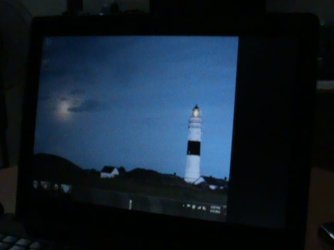
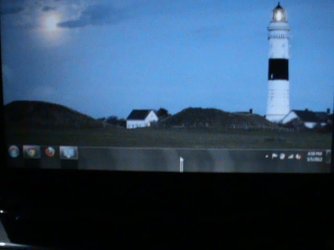
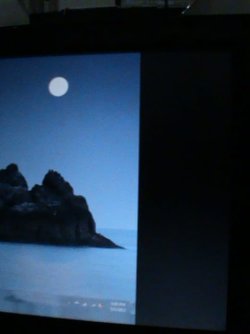
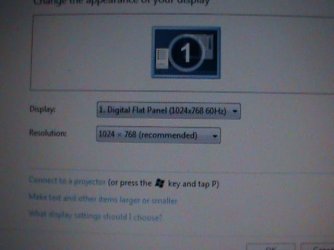
Hello everyone! I need someone to help me fix my laptop, it makes a 2 inches black bar on the right side of the LCD and a blurry bottom line underneath the taskbar. Supposedly, my laptop's native resolution is 1280x800 but now it's stuck at 1024x768. I try to put it back to it's native resolution but it only says "Digital Flat Panel (1024x768 60Hz)" so its kinda useless too. If anyone experience this problem, please help me ASAP and I'll post some screen shots so you can see the problem. :)
 

Attachments

  • DSC00003.JPG
    DSC00003.JPG
    26.1 KB · Views: 9
  • DSC00004.JPG
    DSC00004.JPG
    30.9 KB · Views: 8
  • DSC00005.JPG
    DSC00005.JPG
    40 KB · Views: 9
  • DSC00006.JPG
    DSC00006.JPG
    36.8 KB · Views: 11

My Computer

OS
Windows 7 Ultimate x64
go to for cataylst control panel or nvidia control panel
 

My Computer

Computer Manufacturer/Model Number
Advanced Micro Devices ASUS
OS
Windows 7 Ultimate SP1 64-bit
CPU
AMD FX-8120 Eight Core 3.1GHZ "Bulldozer"
Motherboard
ASUS Crosshair V Formula AM3+
Memory
Corsair Vengeance 16GB DDR3 1600MHZ Overclocked BE
Graphics Card(s)
AMD RADEON HD6850 1GB Overclocked Edition
Sound Card
Realtek HD AUDIO
Monitor(s) Displays
Dell S2330 MX 23" LED Backlit Monitor - Piano Black
Screen Resolution
1920x1080 HD
Hard Drives
Corsair Force GT 120GB (OS)
Seagate Barracuda 2TB (Backup and Files)
Western Digital Elements 2TB (Media)
PSU
Thermaltake TR2 TRX-650M 650W
Case
ANTEC TWO HUNDRED BLACK MID TOWER
Cooling
AMD STOCK COOLER
Keyboard
Microsoft wireless comfort 5000
Mouse
Microsoft Wireless Mouse 5000
Internet Speed
Unlimited
Other Info
Soon To Be Upgraded This

1. CPU: AMD FX-8320 Eight Core Processor 3.5GHZ

2. GPU: AMD RADEON HD7850 2GB 256-bit PCI-E 3.0

3. Power Supply: Corsair Professional Series Gold AX750

4. Case: Vengeance® C70 Mid-Tower Gaming Case — Military Green

5. Ram: CORSAIR Vengeance 16GB (4 x 4GB) 240-Pin DDR3 SDRAM DDR3 1866 Desktop Memory Model CMZ16GX3M4X1866C9R
Black Bar on screen

I had a 2 inch black bar on my screen too. Intel site said driver was a spepcial OEM driver. Went to Sony and downloaded updated OEM Intel Driver. End of problem. Other places said to download driver from microsoft. I DIDNOT try that.
 

My Computer

Computer type
Laptop
Computer Manufacturer/Model Number
Sony VPCS111FM
OS
64 bit Windows 7 Home Premium Versio 6.1.7601 Service Pack 1 Build 7601
CPU
Processor Intel(R) Core(TM) i5 CPU M 430 @ 2.27GHz, 2
Memory
4 Gb
Graphics Card(s)
Intel(R) HD Graphics (Core i5), Intel Corporati
Hard Drives
Model TOSHIBA MK5055GSX
Back
Top