Laptop: Broken screen (Windows 7)

nyjohn1

New member
Local time
9:51 PM
Messages
6
IMO Windows is huge pain when dealing with more than 2 screens. At work I have 3 screens and occasionally when I take out my laptop from docking station, it messes up the settings. Takes 5-10 minutes get it back to my original.

But that is not my question. At home I have a cracked laptop screen that no longer works. I have connect this laptop to my tv and am trying to use it as a htpc. My issue is I have not been able to find settings that disable the laptop screen, and for windows to ONLY use my tv as primary screen. The reason I need to disable the laptop screen is that when I have my laptop open (I need this to use the keyboard/mouse of the laptop), the tv screen is OFF (windows is thinking I'm using the laptop screen that is dead). Essentially I'm in a situation in which if I want to use laptop/keyboard, the default setting is the laptop screen. Right now I have to get the laptop lid closed, but barely open it for me to use the touchpad/keyboard.

What I'm looking for...

-Registry setting or permanently way of disabling the laptop screen.
-Permanent setting that always defaults the tv monitor instead of the laptop screen.
-I'm only going to use XBMC (windows to boot directly), and would prefer not to have setup the settings every time I turn it on.
-If above is not possible, anyway of setting Windows to think the lid is always closed?

Thanks,
John
 

My Computer

Computer type
PC/Desktop
Computer Manufacturer/Model Number
Acer
OS
64
There is a switch in the laptops bevel, short it to have always closed , check power options to see if that helps
 

My Computer

Computer type
PC/Desktop
Computer Manufacturer/Model Number
Dude Build
OS
Windows 10 Pro X64
CPU
Intel(R) Core(TM) i5-3570K CPU OC@ 4.5GHZ Turbo
Motherboard
MSI Z77A-G45 Gaming
Memory
8.00 GB DDR3 1600Mhz
Graphics Card(s)
MSI Gaming X GTX 1070
Sound Card
Realtek High Definition
Monitor(s) Displays
Dell S23O9W, HP L1710
Screen Resolution
DELL-1920 x 1080 HP-1280 x1024
Hard Drives
Crucial m4 256 SSD, WD 7200RPM 500GB WD 1TB
PSU
Seasonic X650 GOLD
Case
Zalman Z12
Cooling
Antec Kuhler 920
Keyboard
Logitech
Mouse
MSI DS100 Interceptor
Internet Speed
50 down and 5 up
Antivirus
MSE
Browser
Chrome, IE 11
Other Info
Logitech X-620 Speakers
Hi John, welcome to the Seven Forums.

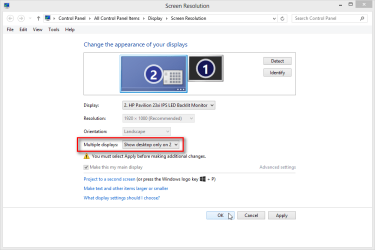
Are you saying that even if you select to use the secondary display only, the TV in your case, Windows does not keep that selection?

2013-05-20_214320.png

Kari
 

My Computer

Computer type
Laptop
Computer Manufacturer/Model Number
HP ENVY 17-1150eg
OS
Windows 10 Pro x64 EN-GB
CPU
1.6 GHz Intel Core i7-720QM Processor
Memory
6 GB
Graphics Card(s)
ATI Mobility Radeon HD 5850 Graphics
Sound Card
Beats sound system with integrated subwoofer
Monitor(s) Displays
17" laptop display, 22" LED and 32" Full HD TV through HDMI
Screen Resolution
1600*900 (1), 1920*1080 (2&3)
Hard Drives
Internal: 2 x 500 GB SATA Hard Disk Drive 7200 rpm
External: 2TB for backups, 3TB USB3 network drive for media
Cooling
As Envy runs a bit warm, I have it on a Cooler Master pad
Keyboard
Logitech diNovo Media Desktop Laser (bluetooth)
Mouse
Logitech Performance Mouse MX
Internet Speed
50/10 Mbps VDSL
Antivirus
Windows Defender 4.3.9431.0
Browser
Maxthon 3.5.2., IE11
Hi Kari - Thank you for the reply. I'm not in front of my computer right now, but I have tried that. Played many different combinations, and the settings never stick.

Dude - Are you referencing the always stay on option? I have set that up, so that when I close my lid, the computer does not sleep or shutdown.
 

My Computer

Computer type
PC/Desktop
Computer Manufacturer/Model Number
Acer
OS
64
a possibly tangential solution, but what about getting a USB keyboard and mouse and keeping the lid closed?

If you just intend to use it with XMBC (that if I understand correctly means it's basically a media center) I suggest to get your hands on one of these.

Another option is disassembling it a bit to detach the screen cable, so that it no more detects a screen. It's usually relatively easy to reach that spot.
 

My Computer

Computer type
PC/Desktop
Computer Manufacturer/Model Number
custom built
OS
Win 7 Pro 64-bit 7601
CPU
AMD Phenom 9650 QuadCore, revision DR-B3
Motherboard
ASUS M4A78
Memory
5 GB yes I run 2x 2GB and 1x 1GB, different brand, spank me.
Graphics Card(s)
NVIDIA GeForce 9800 GT 512 Mb, unknown manufacturer.
Sound Card
Crappy Realtek Integrated Audio
Monitor(s) Displays
Fujitsu Siemens P19-3P
Screen Resolution
1280 x 1024 x 32 bits @ 60 Hz Oh yeah, 4:3 rocks!
Hard Drives
(1) MAXTOR S TM3320613AS SATA Disk Device (2) STM35004 18AS SATA Disk Device (3) TOSHIBA USB 2.5"-HDD
PSU
whatever, around 450w
Case
Scavenged from old company PC, 10+ years old
Cooling
CPU fan, GPU fan, case fan, nothing fancy
Keyboard
Microsoft, PS/2, white.
Mouse
Optical, logitec.
Internet Speed
effective max speeds: 70-ish kB/s down 30-ish kB/s up
Antivirus
Avira, free edition.
Browser
Firefox with FXChrome to make it look like Google Chrome :P
Other Info
Was discarded by previous owner due to "horrible performance".
Was running Win Xp from a IDE drive. Yeah. Was a pain.
SATA II drive and Win7 and it zips away! Yay!
I suspect Windows 7 is detecting the screen on every boot and thus adding it, so yeah pop it open and remove the likely flex cable to the built-in monitor, may need to remove some screws to get at it under the keyboard.

Whatever your laptop model is, I would look the info up and hopefully find one with some pictures to go by.

Otherwise, FN + F3 or whatever the laptop uses to switch monitors is what you will probably have to do or the other option of having the laptop monitor replaced.

Disable on-board monitor is probably not a bios feature.
 

My Computer

Computer type
PC/Desktop
Computer Manufacturer/Model Number
Self Built Custom
OS
Windows 7 Ultimate Retail Box (64-bit installed) + Service Pack 1
CPU
AMD FX-8350 CPU v1.15 (or 1.0F) BIOS was required!
Motherboard
MSI 890FXA-GD70
Memory
8G CAS-7 G-Skill DDR3 @1333 (2 fours) [mobo nonOC max rec'd]
Graphics Card(s)
Radeon HD 7950 [3 gigs of GDDR5] MSI Twin Frozr model
Sound Card
Realtek High Definition Audio (onboard mobo, ALC-889 chip)
Monitor(s) Displays
2 WS LED Monitors: One LG One Viewsonic
Screen Resolution
1920 by 1080
Hard Drives
SSD for OS: Samsung 840 Pro
SSD for VM and utilities: Adata SX900
7200 RPM SATA HDs for the rest: Hitachi and Seagate
PSU
Corsair TX850 - 850W max, in service since August 2010.
Case
Thermaltake Armor A90
Cooling
Thermaltake Spin Q CPU Cooler, in service since August 2010
Keyboard
Logitech G11
Mouse
Logitech M310 Wireless
Internet Speed
100 Megabit broadband supposedly upgraded from 50 (Cable)
Antivirus
Bitdefender Internet Security 2014 suite
Browser
Pale Moon 64-bit main, also IceDragon, Opera, and Maxthon.
Other Info
CompTIA A+ certified (220-800 series) in July 2013.
Try this:
Open Device Manager > Expand Monitors > Find "Generic PnP Monitor" (that will be the laptop screen) > Right click on it > Disable.

Be sure the external monitor is working or you will have a very bad day.
 

My Computer

Computer type
PC/Desktop
Computer Manufacturer/Model Number
Home Built - Jan 2013
OS
Windows 7 64 Bit Home Premium SP1
CPU
i7-3820
Motherboard
Asus P9X79-PRO - Bios 4608
Memory
GSkill F3-14900CL9Q - 16GB
Graphics Card(s)
EVGA GeForce GTX660 - Driver 352.86
Sound Card
On board Realtek ALC898
Monitor(s) Displays
Acer S271HL
Screen Resolution
1920 x 1080
Hard Drives
#1- Samsung 840 Pro Series
#2- Western Digital WD1002FAEX Sata3 Black
#3- Western Digital WD1002FAEX Sata3 Black
PSU
Corsair CMPSU-850TX-V2 - 850 watt (by Seasonic)
Case
Corsair Obsidian 550D
Cooling
Standard 3 120mm case fans, Cooler Master Hyper 212 EVO
Keyboard
MS KC-0405
Mouse
Intellimouse 5-button
Internet Speed
56 Mbits/Sec (on a good day)
Antivirus
Avast & Malwarebytes
Browser
Firefox
Other Info
Asus DVD - DRW-24B1ST 24X
Back
Top