
Laptop CPU and GPU temperature question.

cryptoncore

Member
Member
VIP
Local time
12:24 AM
Messages
122
Location
england
Hello everyone, I got a HP Pavillion G6-2399sa laptop computer, it has 8gb DDR3 RAM and an AMD A10 4600M APU that is clocked at 2.3ghz but Turbo's to 3.2ghz.

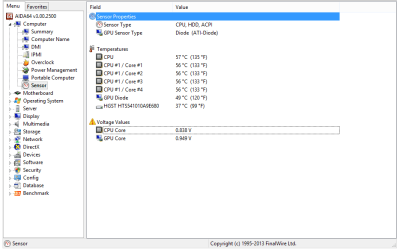
My question is what kind of temperatures should I be getting when the laptop is running? I mean I can play games like skyrim and Darksiders 2 easily but when i close the game and check temperatures after about 30-40 minutes game play my temperatures can be between 6-75 Celsius. There is a screenshot of AIDA after playing about 15 minutes of darksiders for the purpose of this post in the attachments. My question is what temperatures should I be getting, as I'm not used to using a laptop :o and could you please tell me what temperatures are really bad for the laptop? Thank you.


-EDIT- I should also mention that the laptop is currently running off of the mains no battery is inserted.
 

Attachments
  • LaptopTemps.png
    LaptopTemps.png
    44.2 KB · Views: 17
Last edited:

My Computer

Computer type
PC/Desktop
Computer Manufacturer/Model Number
Desktop - Zoostorm, Laptop - HP
OS
Windows 7 Ultimate x64, Windows 8.1 Pro x64 (on laptop)
CPU
AMD - A6-3670 Accelerated Processing unit W/Radeon HD6530D
Motherboard
MSI
Memory
8.00GB
Graphics Card(s)
AMD Radeon HD 6530D (APU)
Sound Card
Realtek HD
Monitor(s) Displays
single/one
Screen Resolution
1440x900
Hard Drives
1x2tb internal
1x1tb external
PSU
300W
Case
Zoostorm
Cooling
1 rear fan (12cm) 1 GPU cooler fan(8CM) 2 side fans (12cm)
Keyboard
Saitek C.Y.B.O.R.G V5
Mouse
Saitek R.A.T V3
Internet Speed
Download - 17-20 mbps. Upload - 07-1.3 mbps
Antivirus
Eset Smart Security 7.0.302.26
Browser
Google chrome, IE11, Firefox
Other Info
The laptop is a HP Pavillion G6 (AMD A10 APU @ 2.3 (turbo to 3.2) ghz)
Well if these are your temperatures while or after playing those games then this isn't very bad considering that you running off a laptop which doesn't have many cooling options but also try spraying some compressed air in the fan slots to remove any dust and see if this tutorial will help you How-To: Give Your Laptop a Cooling Overhaul | Maximum PC. As well as you can always get some sort of cooling mat or add on to help keep your CPU cooler if you feel its getting a little too hot
 

My Computer

Computer type
PC/Desktop
Computer Manufacturer/Model Number
Custom Build
OS
Microsoft Windows 7 Ultimate 64-bit 7601 Multiprocessor Free Service Pack 1
CPU
Intel(R) Core(TM) i5-2400 CPU @ 3.10GHz
Motherboard
ASUSTeK COMPUTER INC. P8H61-M LE/CSM
Memory
16.00 GB
Graphics Card(s)
NVIDIA GeForce GTX 660 Ti SC 3GB
Sound Card
(1) NVIDIA High Definition Audio (2) Realtek High Definiti
Monitor(s) Displays
21.5" HP
Screen Resolution
1600 x 900 x 32 bits (4294967296 colors) @ 60 Hz
Hard Drives
ST31000524AS ATA Device 7200
PSU
OCZ 650W Bronze Plus
Case
Zalman Z9 Plus
Mouse
Razer naga molten edition
Antivirus
Microsoft Security Essentials along with Malwarbytes
Browser
Chrome
Other Info
Love computers but wanting to learn more about troubleshooting and wanting to contribute to this community!
I don't think those temps are terribly out of line for the circumstances. Keep the vent clean with canned air. A cooling mat helps a lot, makes up to a 15-20C difference with my old Dell 1525.
 

My Computer

Computer type
PC/Desktop
Computer Manufacturer/Model Number
Custom, Dell and Lenono LT's
OS
Win8/8.1,Win7-U64, Vista U64, uncounted Linux distor's
CPU
AMD and Intell, 9590, 8350, i5 3570k
Motherboard
CFVFZ, GA990FXA, Z77e-itx
Memory
Corsair G Skill
Graphics Card(s)
Crossfired Sapphire HD 7950 Vapor-X, ASUS R9 280X TOP
Sound Card
Realtek ALC889
Monitor(s) Displays
ViewSonic VX2770SMH 27" / ViewSonic VX2433 LCD 24"
Screen Resolution
1080i HD
Hard Drives
Samsung SSD 840 Pro
OCZ Agility 3's
OCZ Vector's
WD's Blue, red, green, Velociraptors
Seagate USB3 & Hybrid's
ASUS Blu-Ray
ASUS DVD
PSU
Corsair AX1200i, Seasonice 850 Gold
Case
Cooler Master HAF 922 & HAF 932, Lian Li Train case.
Cooling
Air, Glacer 240L expanded, custom EK loop with duel D5's
Keyboard
Microsoft SideWinder X4 USB Keyboard / Logitech 250 PS2
Mouse
Logitech G500 / MS wireless 5000
Internet Speed
Best of 5ms / 75+ dn / 12+ up More or less.
Antivirus
MS esentials-MalwareBytes
Browser
Firefox Chromebook
I heard bad things about cooling mats blowing air back into the laptop computer, could you recommend me an affordable one that's good quality please?
 

My Computer

Computer type
PC/Desktop
Computer Manufacturer/Model Number
Desktop - Zoostorm, Laptop - HP
OS
Windows 7 Ultimate x64, Windows 8.1 Pro x64 (on laptop)
CPU
AMD - A6-3670 Accelerated Processing unit W/Radeon HD6530D
Motherboard
MSI
Memory
8.00GB
Graphics Card(s)
AMD Radeon HD 6530D (APU)
Sound Card
Realtek HD
Monitor(s) Displays
single/one
Screen Resolution
1440x900
Hard Drives
1x2tb internal
1x1tb external
PSU
300W
Case
Zoostorm
Cooling
1 rear fan (12cm) 1 GPU cooler fan(8CM) 2 side fans (12cm)
Keyboard
Saitek C.Y.B.O.R.G V5
Mouse
Saitek R.A.T V3
Internet Speed
Download - 17-20 mbps. Upload - 07-1.3 mbps
Antivirus
Eset Smart Security 7.0.302.26
Browser
Google chrome, IE11, Firefox
Other Info
The laptop is a HP Pavillion G6 (AMD A10 APU @ 2.3 (turbo to 3.2) ghz)
Every lap top well have different cooling vents, my Dell draws air in from the bottom and the fan pushes warm air out the left side. I use a dirt cheap, usb powered cooler. I was surprised just how thin the plastic is but it works very well on my desk. I don't think it would work at all if it was held in your lap, you would need something more solid, like the Thermaltake units. Those cost about 3-4X's as much.

For working off a solid surface these cheapies are fine.
 

My Computer

Computer type
PC/Desktop
Computer Manufacturer/Model Number
Custom, Dell and Lenono LT's
OS
Win8/8.1,Win7-U64, Vista U64, uncounted Linux distor's
CPU
AMD and Intell, 9590, 8350, i5 3570k
Motherboard
CFVFZ, GA990FXA, Z77e-itx
Memory
Corsair G Skill
Graphics Card(s)
Crossfired Sapphire HD 7950 Vapor-X, ASUS R9 280X TOP
Sound Card
Realtek ALC889
Monitor(s) Displays
ViewSonic VX2770SMH 27" / ViewSonic VX2433 LCD 24"
Screen Resolution
1080i HD
Hard Drives
Samsung SSD 840 Pro
OCZ Agility 3's
OCZ Vector's
WD's Blue, red, green, Velociraptors
Seagate USB3 & Hybrid's
ASUS Blu-Ray
ASUS DVD
PSU
Corsair AX1200i, Seasonice 850 Gold
Case
Cooler Master HAF 922 & HAF 932, Lian Li Train case.
Cooling
Air, Glacer 240L expanded, custom EK loop with duel D5's
Keyboard
Microsoft SideWinder X4 USB Keyboard / Logitech 250 PS2
Mouse
Logitech G500 / MS wireless 5000
Internet Speed
Best of 5ms / 75+ dn / 12+ up More or less.
Antivirus
MS esentials-MalwareBytes
Browser
Firefox Chromebook
Yea as madcrate said thermal take offers a selection of good cooling mats http://www.thermaltakeusa.com/cooler.aspx. But if you really Care about your laptop and are concerned about those temperatures then don't cheap out and buy a decent mat, but I have also seen small stand that mount on the bottom of the laptop with fans attached to them to and those are pretty cheap
 

My Computer

Computer type
PC/Desktop
Computer Manufacturer/Model Number
Custom Build
OS
Microsoft Windows 7 Ultimate 64-bit 7601 Multiprocessor Free Service Pack 1
CPU
Intel(R) Core(TM) i5-2400 CPU @ 3.10GHz
Motherboard
ASUSTeK COMPUTER INC. P8H61-M LE/CSM
Memory
16.00 GB
Graphics Card(s)
NVIDIA GeForce GTX 660 Ti SC 3GB
Sound Card
(1) NVIDIA High Definition Audio (2) Realtek High Definiti
Monitor(s) Displays
21.5" HP
Screen Resolution
1600 x 900 x 32 bits (4294967296 colors) @ 60 Hz
Hard Drives
ST31000524AS ATA Device 7200
PSU
OCZ 650W Bronze Plus
Case
Zalman Z9 Plus
Mouse
Razer naga molten edition
Antivirus
Microsoft Security Essentials along with Malwarbytes
Browser
Chrome
Other Info
Love computers but wanting to learn more about troubleshooting and wanting to contribute to this community!
Every lap top well have different cooling vents, my Dell draws air in from the bottom and the fan pushes warm air out the left side. I use a dirt cheap, usb powered cooler. I was surprised just how thin the plastic is but it works very well on my desk. I don't think it would work at all if it was held in your lap, you would need something more solid, like the Thermaltake units. Those cost about 3-4X's as much.

For working off a solid surface these cheapies are fine.


AMD Laps should have them on the side atleast when I had a E-450 they were you can go to walmart and grab one next to nothing I bought one with a giant fan in the middle and the blasted thing kept my lap cold too

those Temps aren't so bad considering it's a Laptop Desktop I would be a little worried but you seems to be on target with what most lappys temps are at intel of course would be much hotter then this as they reach mid 80's and High 90's underload even higher
 

My Computer

Computer type
PC/Desktop
Computer Manufacturer/Model Number
CoreI7-6700K MrFingerIII Special Builds
OS
Windows 10 Home Premium 64bit sp1
CPU
Intel I7-6700K @ 4.6 Ghz 1.344 volts everyday OC
Motherboard
Asrock Fatality K6 Z170 Socket 1151
Memory
32GB G-Skill TridentZ 3200mhz 16-18-18-38 DDR4
Graphics Card(s)
Sli Gigabyte Windforce GTX 980 G1
Sound Card
AC97 Creative Rage Tactic 3D Headphones Bluetooth
Monitor(s) Displays
27" Asus ROG Swift PG278Q G-Sync 48" Vizio Smart HD TV
Screen Resolution
2560x1440p 27"- 48" Currently Gaming at 2560x1440p Res 2K
Hard Drives
250GB Samsung Evo840SSD Seagate baracuda 500 GB WD Mybook 500Gb 1TB Seagate Barracuda
PSU
HX1050w Corsair Silver 80plus certified crosfire/sli
Case
Enthod Pro Full Tower
Cooling
Corsair H110i GT 280 mm High Performance WaterBlock
Keyboard
Logitech wireless keyboard
Mouse
Logitech wireless mouse
Internet Speed
Cox Cable 100+ mb
Antivirus
WebRoot Spysweeper with Antivirus
Browser
IE-10, Chrome, Opera
Other Info
My Other Rig is a AMD FX8320E @4.6Ghz 16GB Ballistic Sport Ram
Mobo Asrock Fatality 990FX 120GB OCZ SSD 1TB Seagate Barracuda Corsair H75 Cooling PSU Corsair CX750
GPU GTX Gigabyte 970G1
Back
Top