Laptop does not detect home wifi signal after a circuit breaker trip

sunsetlover

New member
Member
Local time
9:33 AM
Messages
54
Yesterday the main circuit breaker in the house tripped. I reset the breaker, but my laptop, which was connected to the home router wifi signal at the time, cannot identify the SSID of the router. My home wifi doesn't show up in my available connections basically. Right now I'm connected to the router via LAN cable, which obviously works.

The curious parts:
* Other devices do identify and connect to the wifi signal, including my phone and IPTV.
* The laptop wireless adapter identifies all the other wifi signals in the area, including my phone hotspot.

Steps I've taken already:
* Restart router by unplugging/plugging
* Restart laptop
* Turn laptop wifi switch off/on

Any suggestions? In 20 years of using wifi I've never seen anything like this.
 

My Computer My Computer

At a glance

Win 7 Ultimate 32-bit
Computer type
Laptop
OS
Win 7 Ultimate 32-bit

My Computer My Computer

At a glance

Win 10 x64, Linux Lite, Win 7 x64, BlackArch,...
Computer type
PC/Desktop
Computer Manufacturer/Model Number
HP Desktop & Compaq Laptop
OS
Win 10 x64, Linux Lite, Win 7 x64, BlackArch, & Kali
Hard Drives
Samsung 850 Pro 256Gb,
Hitachi HDD 1Tb,
Crucial MX SSD 250Gb
Segate 3Tb USB 3.0 Ext. Backup HDD
Internet Speed
150Mbps dn, 20Mbps up
Antivirus
Avast Free, Malwarebytes Anti-Exploit & Anti-Ransomware
Browser
Firefox, Chrome, Opera, & VPN
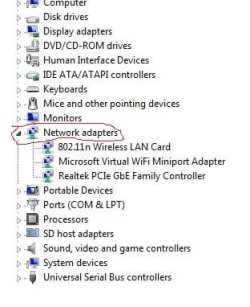
Yes, it does appear and it is working it seems, as it recognizes every other wifi signal, except the one that was connected to when the circuit breaker tripped, my home wifi.

Should I disable/enable the adapter?

What could have happened when power was lost? This is VERY strange.

Thank you for the follow up.


Hi sunsetlover,
Device Manager, under Network Adapters, does your card appear?

View attachment 411340

The info from here will help us too!

System Info - See Your System Specs - Windows 7 Help Forums


My Computer My Computer

At a glance

Win 7 Ultimate 32-bit
Computer type
Laptop
OS
Win 7 Ultimate 32-bit
Yes, it does appear and it is working it seems, as it recognizes every other wifi signal, except the one that was connected to when the circuit breaker tripped, my home wifi.

Should I disable/enable the adapter?

What could have happened when power was lost? This is VERY strange.

Everything points to the router being at fault. As your other devices can still see/connect, perhaps they see it on 5Ghz while the laptop is only using 2.4GHz (or the other way round). It's difficult to see how a power cut could have damaged the laptop as its battery would have kept it working.

The power cut may have corrupted or reset the router's WiFi settings. Sign in to its webadmin page and check the WiFi related settings are correct for both the 2.4GHz and 5GHz bands.
 
Last edited:

My Computers My Computers

  • At a glance

    Windows 7 Home Premium x64AMD V1204GB
    Computer type
    Laptop
    Computer Manufacturer/Model Number
    Toshiba satellite C650D
    OS
    Windows 7 Home Premium x64
    CPU
    AMD V120
    Memory
    4GB
    Internet Speed
    150 Mbps
    Antivirus
    MSE
    Browser
    IE11, Edge, Firefox
    Other Info
    I also have W7 Pro on my System Two, and several W7 Hyper-V VMs. My other machines run Windows 10/11. Their specs are in my Ten Forums & Eleven Forum profiles.
  • At a glance

    Windows 7 Pro x64Intel i5-3320M8 GB
    Computer type
    Laptop
    System Manufacturer/Model Number
    Lenovo Thinkpad T430
    OS
    Windows 7 Pro x64
    CPU
    Intel i5-3320M
    Memory
    8 GB
    Hard Drives
    250GB Samsung SSD 860 EVO
    Antivirus
    MSE
In addition to checking the WiFi settings in the router, and if that doesn't work, try a hard reset of the router and then reconfigure everything again in the router for the WiFi SSID, password, etc. If that still doesn't work download the latest firmware for your router and install it. You may need to do another hard reset after you upload the latest firmware for the router.

Question so we are clear:

Was the router powered off or the laptop when the breaker tripped?

Sometimes abrupt power outages can do damage to electronics like computers or a computer's power supply, etc. I have read this on may other tech forums where a lightning storm killed the power and one's PSU was fried. And I had this happen when the power went out and it took the power adapter out for my netbook.
 

My Computer My Computer

At a glance

Windows 7 Ultimate x64
Computer type
PC/Desktop
OS
Windows 7 Ultimate x64
sunsetlover
click :orb:
In searchbox type or copy/paste
Find and Fix Networking and connection problems
click on it to open troubleshooter
follow prompts
 

My Computer My Computer

At a glance

Win 10 x64, Linux Lite, Win 7 x64, BlackArch,...
Computer type
PC/Desktop
Computer Manufacturer/Model Number
HP Desktop & Compaq Laptop
OS
Win 10 x64, Linux Lite, Win 7 x64, BlackArch, & Kali
Hard Drives
Samsung 850 Pro 256Gb,
Hitachi HDD 1Tb,
Crucial MX SSD 250Gb
Segate 3Tb USB 3.0 Ext. Backup HDD
Internet Speed
150Mbps dn, 20Mbps up
Antivirus
Avast Free, Malwarebytes Anti-Exploit & Anti-Ransomware
Browser
Firefox, Chrome, Opera, & VPN
Comment from Bree:


>"Everything points to the router being at fault"


This does seem likely, given the evidence supplied.


I've had something similar with several lightning strikes just a second or so apart. In the end, re-loading the router configuration that I'd backed up way earlier when the network was stable did it.


I've only had experience with 3 or 4 routers, but all of them (Netgear, NetComm) did offer a config backup/restore function.
 

My Computer My Computer

At a glance

Windows 7 Pro x64Intel i5-8265U8gbIntel Iris Plus 655
Computer type
Laptop
Computer Manufacturer/Model Number
HP 250 G7
OS
Windows 7 Pro x64
CPU
Intel i5-8265U
Motherboard
Intel Coffee Lake
Memory
8gb
Graphics Card(s)
Intel Iris Plus 655
Sound Card
Realtek HDA
Monitor(s) Displays
Generic
Screen Resolution
1366 x 768
Hard Drives
Crucial P5 NVMe 1Tb internal
WD's 4Tb, 3Tb, 2 x 2Tb external
Mouse
Logi wireless
Internet Speed
45 Mbps
Antivirus
AVG
Browser
Firefox 88, Pale Moon 29, Brave 129
Other Info
Combination of i5-8265U with Crucial P5 achieves Crystal Bench scores > 5000

Iris Plus GPU (Whiskey Lake) driver from BioStar

HP 250 G7 is a budget machine
Thank you all so much.

I logged into the router's settings page and everything seems to be in order as before. I don't think there's an option for 5Ghz as this is an old router supplied by the ISP, at least 5-6 years.

As far as the laptop wireless adapter, I'm sure now that it's fine and it's not where the problem is, as I just tried a USB wireless dongle and that also doesn't detect my home wifi SSID. So that's a positive at least.

And yes, the router was powered on, connected via wifi (not LAN) to the laptop, when the breaker tripped.

So, yes, the only thing left to do is a hard reset of the router. I'll report after I do that.

The other positive out of this strange mess is that my phone is still detecting and connecting to the wifi signal as if nothing happened.


Everything points to the router being at fault. As your other devices can still see/connect, perhaps they see it on 5Ghz while the laptop is only using 2.4GHz (or the other way round). It's difficult to see how a power cut could have damaged the laptop as its battery would have kept it working.

The power cut may have corrupted or reset the router's WiFi settings. Sign in to its webadmin page and check the WiFi related settings are correct for both the 2.4GHz and 5GHz bands.

In addition to checking the WiFi settings in the router, and if that doesn't work, try a hard reset of the router and then reconfigure everything again in the router for the WiFi SSID, password, etc. If that still doesn't work download the latest firmware for your router and install it. You may need to do another hard reset after you upload the latest firmware for the router.

Question so we are clear:

Was the router powered off or the laptop when the breaker tripped?

Sometimes abrupt power outages can do damage to electronics like computers or a computer's power supply, etc. I have read this on may other tech forums where a lightning storm killed the power and one's PSU was fried. And I had this happen when the power went out and it took the power adapter out for my netbook.
 

My Computer My Computer

At a glance

Win 7 Ultimate 32-bit
Computer type
Laptop
OS
Win 7 Ultimate 32-bit
sunsetlover

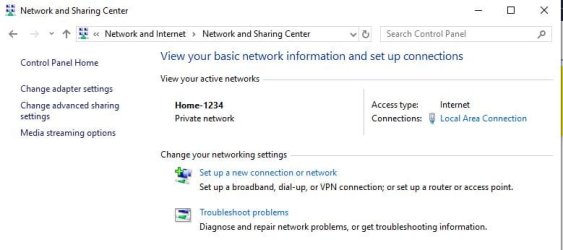
Have you run the network troubleshooter?

Capture.JPG
 

My Computer My Computer

At a glance

Win 10 x64, Linux Lite, Win 7 x64, BlackArch,...
Computer type
PC/Desktop
Computer Manufacturer/Model Number
HP Desktop & Compaq Laptop
OS
Win 10 x64, Linux Lite, Win 7 x64, BlackArch, & Kali
Hard Drives
Samsung 850 Pro 256Gb,
Hitachi HDD 1Tb,
Crucial MX SSD 250Gb
Segate 3Tb USB 3.0 Ext. Backup HDD
Internet Speed
150Mbps dn, 20Mbps up
Antivirus
Avast Free, Malwarebytes Anti-Exploit & Anti-Ransomware
Browser
Firefox, Chrome, Opera, & VPN
Post what you get after a hard reset of the router/modem. I'm now wondering if it's a MAC address mess up of some sort in the router/modem for your laptop.
 

My Computer My Computer

At a glance

Windows 7 Ultimate x64
Computer type
PC/Desktop
OS
Windows 7 Ultimate x64
Back
Top