Laptop extremely slow to wake up from sleep mode, 5+ minutes to wake

sunshyne

New member
Local time
3:37 PM
Messages
6
Hi,

I am new here. Hoping someone can help me out with this issue. I work in IT so am not a complete computer bonehead and am at my wits end with this.

My laptop is about 4 years old, it's a toshiba. For whatever reason, it started taking 5+ minutes to wake up from sleeping. If it sleeps for an hour, it's OK.. but if you leave it sleep all night and try to wake it up in the morning, it's quite cranky. After the 5+ minute wake up, it performs as normal. It was running Windows 7 Home 32 bit.

Troubleshooting steps that I have taken are as follows.

Reinstalled windows. Issue was resolved! but after about 2-3 weeks, issue came back. I thought maybe it was some type of windows update, so I reinstalled windows again and paid closer attention to the updates. Issue presented itself again after 2-3 weeks, and there were no updates immediately done prior to it starting.

I started to think maybe it was something related to my hard drive, so i performed laptop surgery and swapped out my original hard drive with a solid slate drive, and installed windows 7 Ultimate 64 bit (this laptop can support 64 bit so I figured why not upgrade.).

issue again was resolved for a few weeks, and now it's back to taking 5+ minutes to wake up again.

If you're turning the laptop on from scratch, it takes 10-15 seconds tops. if you're restarting, it's 10-15 seconds tops (man, I love SSD...)... if you're waking itup within the hour, its 1-2 seconds. But anything longer then that, 5+ minutes.

It barely has any software installed.. all I use this laptop for is the internet and office type stuff.

I've checked event viewer to see if it's having driver issues or this or that and haven't been able to pinpoint this.

One of my coworkers suggested defragging the registry, but that hasn't sped it up either.

Any thoughts? My current work around is just to always power down the laptop. :D
 

My Computer My Computer

At a glance

Windows 7 Ultimate x64intel i5 3570k8
Computer type
PC/Desktop
Computer Manufacturer/Model Number
custom build
OS
Windows 7 Ultimate x64
CPU
intel i5 3570k
Motherboard
gigabyte z77
Memory
8
Monitor(s) Displays
24"
Hard Drives
kingston ssd
Hi there, have you ran any malware/anti virus scans?
 

My Computer My Computer

At a glance

Windows 7 Home Premium 64BitAMD A6-3420M 1.5GHZ OC - 2.0GHZ4GB DDR3 1600MHZAMD RADEON 6520G+AMD RADEON HD7470M 1GB DDR3
Computer type
Laptop
Computer Manufacturer/Model Number
Packard Bell
OS
Windows 7 Home Premium 64Bit
CPU
AMD A6-3420M 1.5GHZ OC - 2.0GHZ
Memory
4GB DDR3 1600MHZ
Graphics Card(s)
AMD RADEON 6520G+AMD RADEON HD7470M 1GB DDR3
Screen Resolution
1366x768
Hard Drives
500GB SATA
Internet Speed
18Mb Unlimited
Antivirus
AVAST!
Browser
MOZILLA FIREFOX
Yes multiple. The same thing happened on two hard drives with two different verision of windows installs. It's just so weird to me that it's alright for two weeks, then poof.

it basically wakes up to a black screen for about a minute, then presents the log in box, its very slow while it takes the password (up to a minute for the text to even appear) then you are back in windows, and everything is frozen or extremely slow and unusable for another 2-3 minutes. Then it's perfectly fine and flies.
 

My Computer My Computer

At a glance

Windows 7 Ultimate x64intel i5 3570k8
Computer type
PC/Desktop
Computer Manufacturer/Model Number
custom build
OS
Windows 7 Ultimate x64
CPU
intel i5 3570k
Motherboard
gigabyte z77
Memory
8
Monitor(s) Displays
24"
Hard Drives
kingston ssd
Rarely turning off your laptop and just putting it Into sleep mode is never good for it if it's always connected to a power source over night eg. Constantly charging and not draining the battery, which programs did/have you run ?
 

My Computer My Computer

At a glance

Windows 7 Home Premium 64BitAMD A6-3420M 1.5GHZ OC - 2.0GHZ4GB DDR3 1600MHZAMD RADEON 6520G+AMD RADEON HD7470M 1GB DDR3
Computer type
Laptop
Computer Manufacturer/Model Number
Packard Bell
OS
Windows 7 Home Premium 64Bit
CPU
AMD A6-3420M 1.5GHZ OC - 2.0GHZ
Memory
4GB DDR3 1600MHZ
Graphics Card(s)
AMD RADEON 6520G+AMD RADEON HD7470M 1GB DDR3
Screen Resolution
1366x768
Hard Drives
500GB SATA
Internet Speed
18Mb Unlimited
Antivirus
AVAST!
Browser
MOZILLA FIREFOX
I do restart it on a regular basis, but i usually do put it to sleep at night time.

I actually just replaced the battery as it broke. It wouldn't charge past 4%. Funny thing is, prior to that it was still getting about 5.5-6 usage hours use per charge... which isn't as good as the 8-9 usage hrs per charge i got when it was new, but still pretty darn good. then poof, over night it wouldn't charge past 4. It occasionally did that in the past but removing battery and putting it back in resolved it. This last time, it was broken for good. New battery works fine.

Its not constantly charging - it runs on battery during the day/evening, then at night time i plug it back in and it recharges/sleeps when I do (lol). I do put it to sleep and wake it up a few times throughout the day. It has no issue with this. That's how I know it behaves when i wake it up within the hour.

the laptop is pretty much empty - the only software on it is google talk, firefox, and office 2013 (plus of course java, adobe reader, things like that). virus program is ms security essentials. i usually use spybot or advanced system care to clean things up and check for spyware/adware/etc but have never had any. it has no bloatware from the manufacturer since i did the fresh windows install independent of theirs.

It is set for hybrid sleep.. not sure if that could have any type of impact on this. It's just so weird to me that it has no problem waking up if it's been asleep for an hour. I tried increasing virtual memory and that really didn't help either.

I used the same iso to install windows 7 ultimate on my desktop that I built and that computer has no issues what so ever... and it has identical software to this PC. of course, that one has a better processor and more RAM well and well, isn't a laptop. I can't remember if i have that one set to sleep or hibernate.
 
Last edited:

My Computer My Computer

At a glance

Windows 7 Ultimate x64intel i5 3570k8
Computer type
PC/Desktop
Computer Manufacturer/Model Number
custom build
OS
Windows 7 Ultimate x64
CPU
intel i5 3570k
Motherboard
gigabyte z77
Memory
8
Monitor(s) Displays
24"
Hard Drives
kingston ssd
Sounds like the problem is hardware based if it occurs across Windows versions and reinstalls. The first thing to try would be to check if there's a BIOS update for your specific model from the Toshiba support site.
 

My Computer My Computer

At a glance

Windows 7 Pro-x64i7-2600 3.4GHz - 3.8GHz Turbo8Gb - 2x4GB, Muskin 991770 PC3-1333Integrated Intel HD 2000
Computer type
PC/Desktop
Computer Manufacturer/Model Number
Built 2/11/2011
OS
Windows 7 Pro-x64
CPU
i7-2600 3.4GHz - 3.8GHz Turbo
Motherboard
Intel DH67BL-B3
Memory
8Gb - 2x4GB, Muskin 991770 PC3-1333
Graphics Card(s)
Integrated Intel HD 2000
Sound Card
Integrated Intel 10.1 HD, RealTek ALC892
Monitor(s) Displays
Asus LCD VH222H, Haier HL24XSL2a
Screen Resolution
1920x1080, 1920x1080
Hard Drives
Crucial SSD C300-128Gb,
Western Digital WD5002AALX - 500Gb,
Western Digital WD7501AALS - 750Gb
PSU
Seasonic 650W 80+ Gold Modular
Case
Rosewill Defender
Cooling
Stock CPU, Four 120mm case fans, PCH fan added
Keyboard
Logitech EX100 Y-RBH94 Wireless
Mouse
Logitech EX100 M-RCE95 Wireless
Internet Speed
3.0/1.5 Mbs
Antivirus
Microsoft Security Essentials
Browser
Microsoft Internet Explorer 11
Other Info
Antec Veris Premier-Multimedia IR Station,
Cyber Accoustics-3602 Speakers,
AFT XM-5U Card Reader,
Hauppauge TV-HVR-2250,
Sony LX300 USB Turntable
Hi, thanks for your reply. I checked when it started happening again and it is up to date. Just double checked and still up to date. They haven't issued an update since 2010. One of our desktop engineers from work offered to take a look at it next time I'm in the office. I'm hoping he can find something but I think I've been pretty diligent in my efforts.

It definitely seems like hardware, since it keeps reoccuring.. it's just so bizzare to me that it works for a few weeks after a fresh install of windows... my mind is telling me that something in windows is possibly corrupting after that time period... though I don't know why or what.
 

My Computer My Computer

At a glance

Windows 7 Ultimate x64intel i5 3570k8
Computer type
PC/Desktop
Computer Manufacturer/Model Number
custom build
OS
Windows 7 Ultimate x64
CPU
intel i5 3570k
Motherboard
gigabyte z77
Memory
8
Monitor(s) Displays
24"
Hard Drives
kingston ssd
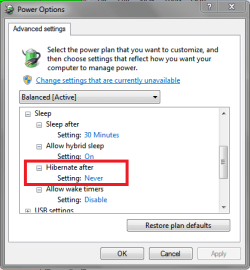
Are you sure it's Waking up from Sleep, and not Resuming from Hibernate when it takes 5 minutes?
Resume from Hibernate is much slower than Wake from Sleep in Win 7.
Check in your Power Options to see if you have it set to Hibernate.
Also, with Hybrid sleep, if the power goes out it will Resume from Hibernate.

SLPSP02.PNG
 

My Computer My Computer

At a glance

Multi-Boot W7_Pro_x64 W8.1_Pro_x64 W10_Pro_x6...AMD Athlon II x4 6206GB GSkill DDR2 800AMD 4670 GPU + AMD 4200 IGP
Computer type
PC/Desktop
Computer Manufacturer/Model Number
home built
OS
Multi-Boot W7_Pro_x64 W8.1_Pro_x64 W10_Pro_x64 +Linux_VMs +Chromium_VM
CPU
AMD Athlon II x4 620
Motherboard
Gigabyte GA-MA785G-UD3H
Memory
6GB GSkill DDR2 800
Graphics Card(s)
AMD 4670 GPU + AMD 4200 IGP
Sound Card
on board Realtek ALC889A
Monitor(s) Displays
RCA 40" LCD TV, Insignia 32" LCD TV, HP 15" LCD monitor
Screen Resolution
1680 x 1050
Hard Drives
OCZ Vertex 3 120GB,
Samsung F3 1TB (3),
Several others - WD, Seagate, Hitachi, ...
PSU
Corsair 500 W
Case
Rosewill mid tower
Cooling
CM 90mm rifle
Keyboard
Gyration wireless, Logitech wireless, Dell USB wired
Mouse
Gyration wireless, Logitech wireless, V7 USB wired
Internet Speed
Spectrum - 100Mbps D / 10Mbps U
Antivirus
Avast, MBAM3, EMET, WinPatrol
Browser
Pale Moon, Firefox, IE
Other Info
2 multi-boot PC's
Mainly HTPC/Office/Gen purpose (no gaming).
Trendnet USB KVM.
LG DVD burner/Blue Ray Player.
Tray system for removable SATA backup drives.

Not currently OCd, under-volted.
I use Hybrid sleep, rarely re-boot or shutdown.

Hauppauge HD-PVR, Avermedia PCIe TV Tuner, Hauppauge PCI TV Tuner.
Hi there,

mine is set up the same way as your screen shot, except the options are listed twice for while charging and when on battery.

for both Sleep after is 30, allow hybrid sleep is on, Hibernate is never.
 

My Computer My Computer

At a glance

Windows 7 Ultimate x64intel i5 3570k8
Computer type
PC/Desktop
Computer Manufacturer/Model Number
custom build
OS
Windows 7 Ultimate x64
CPU
intel i5 3570k
Motherboard
gigabyte z77
Memory
8
Monitor(s) Displays
24"
Hard Drives
kingston ssd
OK, then as long as power is maintained to the RAM it should Wake from sleep.
If it is Resuming from hibernate, you should see it display "Resuming" ...
 

My Computer My Computer

At a glance

Multi-Boot W7_Pro_x64 W8.1_Pro_x64 W10_Pro_x6...AMD Athlon II x4 6206GB GSkill DDR2 800AMD 4670 GPU + AMD 4200 IGP
Computer type
PC/Desktop
Computer Manufacturer/Model Number
home built
OS
Multi-Boot W7_Pro_x64 W8.1_Pro_x64 W10_Pro_x64 +Linux_VMs +Chromium_VM
CPU
AMD Athlon II x4 620
Motherboard
Gigabyte GA-MA785G-UD3H
Memory
6GB GSkill DDR2 800
Graphics Card(s)
AMD 4670 GPU + AMD 4200 IGP
Sound Card
on board Realtek ALC889A
Monitor(s) Displays
RCA 40" LCD TV, Insignia 32" LCD TV, HP 15" LCD monitor
Screen Resolution
1680 x 1050
Hard Drives
OCZ Vertex 3 120GB,
Samsung F3 1TB (3),
Several others - WD, Seagate, Hitachi, ...
PSU
Corsair 500 W
Case
Rosewill mid tower
Cooling
CM 90mm rifle
Keyboard
Gyration wireless, Logitech wireless, Dell USB wired
Mouse
Gyration wireless, Logitech wireless, V7 USB wired
Internet Speed
Spectrum - 100Mbps D / 10Mbps U
Antivirus
Avast, MBAM3, EMET, WinPatrol
Browser
Pale Moon, Firefox, IE
Other Info
2 multi-boot PC's
Mainly HTPC/Office/Gen purpose (no gaming).
Trendnet USB KVM.
LG DVD burner/Blue Ray Player.
Tray system for removable SATA backup drives.

Not currently OCd, under-volted.
I use Hybrid sleep, rarely re-boot or shutdown.

Hauppauge HD-PVR, Avermedia PCIe TV Tuner, Hauppauge PCI TV Tuner.
sorry for the thread necromancy but this doesn't seem to be resolved and I have further information which wasn't mentioned. I have the same problem and it's directly, and ONLY, dependent on me having a large number of images involved in my revolving desktop wallpaper. The more images, and the shorter it takes to cycle through them, the longer it takes for the computer to act normally. When I set it to a static image, it's no problem. I believe it's attempting to run through the RNG algorithm for each change that would have happened over the time that the computer was asleep. Try setting a static background image and see if it happens again.

I'd also like to know if there's a fix for this.
 

My Computer My Computer

At a glance

Windows 7 home premium 64 bitAMD Phenom 2.1GHz16gb DDR3 Corsair VengeanceATI Mobility Radeon HD 5650
Computer type
PC/Desktop
Computer Manufacturer/Model Number
Acer Aspire notebook
OS
Windows 7 home premium 64 bit
CPU
AMD Phenom 2.1GHz
Memory
16gb DDR3 Corsair Vengeance
Graphics Card(s)
ATI Mobility Radeon HD 5650
Hard Drives
256GB Samsung SSD, 750GB Seagate SSD Hybrid
Browser
Chrome
I too had these exact symptoms and here's how I've rectified the situation:

1.) Bring up Control Panel\Hardware and Sound\Power Options
2.) Under Select Power Plans, select Change plan settings next to the plan that you have selected. (I have Balanced selected)
3.) Click Change advanced power settings
4.) Expand the Sleep node
5.) Expand the Hibernate after node
6.) Set the minutes to a ridiculously high interval (both on battery and plugged in) - I set mine at 2000

Problem solved. It seems that what really was taking so long EVERY morning after bringing my laptop out of sleep mode was actually the computer returning from hibernation. Now my computer sleeps happy day and night less hibernation.

Keep in mind that if your computer sleeps for over the Hibernation interval that it WILL hibernate again.

Hope this helps
 

My Computer My Computer

At a glance

Windows 7 Pro x64
Computer type
Laptop
Computer Manufacturer/Model Number
Dell Latitude E6510
OS
Windows 7 Pro x64
Keep in mind that if your computer sleeps for over the Hibernation interval that it WILL hibernate again.

Hello ahanusa and welcome to Seven Forums,

You can set the Hibernation interval to Never.
Set it to 0 minutes for Never.

hth,
David
 

My Computer My Computer

At a glance

Multi-Boot W7_Pro_x64 W8.1_Pro_x64 W10_Pro_x6...AMD Athlon II x4 6206GB GSkill DDR2 800AMD 4670 GPU + AMD 4200 IGP
Computer type
PC/Desktop
Computer Manufacturer/Model Number
home built
OS
Multi-Boot W7_Pro_x64 W8.1_Pro_x64 W10_Pro_x64 +Linux_VMs +Chromium_VM
CPU
AMD Athlon II x4 620
Motherboard
Gigabyte GA-MA785G-UD3H
Memory
6GB GSkill DDR2 800
Graphics Card(s)
AMD 4670 GPU + AMD 4200 IGP
Sound Card
on board Realtek ALC889A
Monitor(s) Displays
RCA 40" LCD TV, Insignia 32" LCD TV, HP 15" LCD monitor
Screen Resolution
1680 x 1050
Hard Drives
OCZ Vertex 3 120GB,
Samsung F3 1TB (3),
Several others - WD, Seagate, Hitachi, ...
PSU
Corsair 500 W
Case
Rosewill mid tower
Cooling
CM 90mm rifle
Keyboard
Gyration wireless, Logitech wireless, Dell USB wired
Mouse
Gyration wireless, Logitech wireless, V7 USB wired
Internet Speed
Spectrum - 100Mbps D / 10Mbps U
Antivirus
Avast, MBAM3, EMET, WinPatrol
Browser
Pale Moon, Firefox, IE
Other Info
2 multi-boot PC's
Mainly HTPC/Office/Gen purpose (no gaming).
Trendnet USB KVM.
LG DVD burner/Blue Ray Player.
Tray system for removable SATA backup drives.

Not currently OCd, under-volted.
I use Hybrid sleep, rarely re-boot or shutdown.

Hauppauge HD-PVR, Avermedia PCIe TV Tuner, Hauppauge PCI TV Tuner.
I have hibernation turned completely off, set the desktop wallpaper to a static image (no slide show) and it still took several minutes to wake from sleep today.

Must be another factor to this.
 

My Computer My Computer

At a glance

Windows 7 home premium 64 bitAMD Phenom 2.1GHz16gb DDR3 Corsair VengeanceATI Mobility Radeon HD 5650
Computer type
PC/Desktop
Computer Manufacturer/Model Number
Acer Aspire notebook
OS
Windows 7 home premium 64 bit
CPU
AMD Phenom 2.1GHz
Memory
16gb DDR3 Corsair Vengeance
Graphics Card(s)
ATI Mobility Radeon HD 5650
Hard Drives
256GB Samsung SSD, 750GB Seagate SSD Hybrid
Browser
Chrome
My laptop is also having this problem. I have a Lenovo Think-pad x131e, and it is extremely slow. I have another laptop, an acer. And it is not having this problem. The lenovo is a 64-bit and the acer is a 32-bit. Both are core i3.
 

My Computer My Computer

At a glance

Windows 7 professional 64 bit
Computer type
Laptop
Computer Manufacturer/Model Number
Lenovo
OS
Windows 7 professional 64 bit
Antivirus
Panda
Browser
Chrome
Back
Top