Laptop fan loud continuously loud, crashes later on

volcomslice

New member
Local time
5:44 PM
Messages
4
Hi

Last night my device was perfectly fine, however when I woke up and turned it on this morning the fan was really loud and kept staying loud for long periods of time.

Now it sometimes stays on for around 15 minutes but then "clicks" off. After that, I am not able to boot up for around 5-10 minutes. One thing that I did notice was that the fan temperature (on the left of the device) wasn't warm however the speed of the fan was extremely fast, and loud.

(Windows 7)
Dell Latitude e6230
64bit

This is the first time that this has happened to me and I am really confused.

Any suggestions on what I should do?

Thanks for your help in advanced.
 

My Computer My Computer

At a glance

Windows 7 64bit, Windows 10 64 Bit
Computer type
Laptop
OS
Windows 7 64bit, Windows 10 64 Bit
Sounds like you have an overheating problem. When it begins to overheat, the fan blows and blows to try to cool it down, but it doesn't succeed. Then, when the computer gets to a certain temperature (too hot), the computer shuts down so that it won't get damaged from all the heat.

I'll bet the computer is several years old, since it has Windows 7 on it. So my guess is that there is a lot of dust in it, which is the cause of all of the heat staying in the computer and building up.

Look in the side vents to see if you can see dust. Feel the bottom of the computer -- is it hot? Feel the air coming out of the side -- is it cool? When things are working correctly, there should be hot air coming out of the side of the computer, and the bottom of the computer should not be too hot to touch.

Do you use the computer on a flat, hard surface, or does it sit on something soft, like a blanket? It needs to sit on a flat, hard surface, to allow it to ventilate on the bottom. A computer stand with a built in fan, or with vents, is a good thing to have, to help keep the computer cool.

If dust in the computer is causing it to overheat, then you'll need to disassemble the computer and blow the dust out with a can of compressed air. Dell should have good information about how to disassemble the computer.
 

My Computer My Computer

At a glance

Linux Mint 18.2 xfce 64-bit (VMWare host) / W...Haswell4 GB
Computer type
PC/Desktop
Computer Manufacturer/Model Number
Dell
OS
Linux Mint 18.2 xfce 64-bit (VMWare host) / Windows 8.1 Pro 32-bit (VMWare guest)
CPU
Haswell
Memory
4 GB
Monitor(s) Displays
Acer 23"
Screen Resolution
1920 x 1080
Hard Drives
Two hard drives, 1TB each: One for Linux, one for my data.
Keyboard
IBM Model M
Antivirus
Sophos (Linux), Trend Micro (Windows)
Browser
Firefox, Opera
Other Info
I use Samba to share my data drive with the other computers at my house and with my guest session in VMWare Workstation Player.
Here are some things to be aware of when you disassemble a laptop:
  • Have a flat, solid table handy to use as a workbench and as a place you can put the screws and parts you remove from the laptop.
  • Have another computer handy which can get on the internet, so that you can look up help if you need it. (You will, trust me!)
  • Watch some YouTube videos on how to disassemble/assemble your laptop.
  • Print out a set of instructions for how to do it.
  • Get a piece of posterboard and a pen. Whenever you remove any part from the laptop (screw, etc), put it on the posterboard, and draw a rectangle around it. And put "1", "2", etc. in the rectangle, corresponding to the step number that the part(s) was removed from the computer. (e.g. Step 1: Remove all screws from the bottom of the laptop. -- all of those screws should go in rectangle #1 on the posterboard.) And put "1", "2", etc. on the printed instructions, so you will know which step you removed those parts.
  • Get a new CMOS battery, a can of compressed air, an anti-static wrist strap, some good thermal compound such as Arctic Silver 5, some good-quality rubbing alcohol, and some q-tips. While you have the laptop disassembled, you should replace the CMOS battery, and you should reseat the CPU's heat sink with some good quality thermal compound - this will reduce the operating temperature of the computer. The alcohol and q-tips are to clean the surfaces of the CPU and the heat sink. Once the laptop is disassembled, you will blow out all dust with the can of compressed air. You should wear the anti-static wrist strap at all times when you are working on the laptop.
  • Take your time! Go slow and careful all the way through the process. And be very careful that you don't break off any tiny fragile parts.
 

My Computer My Computer

At a glance

Linux Mint 18.2 xfce 64-bit (VMWare host) / W...Haswell4 GB
Computer type
PC/Desktop
Computer Manufacturer/Model Number
Dell
OS
Linux Mint 18.2 xfce 64-bit (VMWare host) / Windows 8.1 Pro 32-bit (VMWare guest)
CPU
Haswell
Memory
4 GB
Monitor(s) Displays
Acer 23"
Screen Resolution
1920 x 1080
Hard Drives
Two hard drives, 1TB each: One for Linux, one for my data.
Keyboard
IBM Model M
Antivirus
Sophos (Linux), Trend Micro (Windows)
Browser
Firefox, Opera
Other Info
I use Samba to share my data drive with the other computers at my house and with my guest session in VMWare Workstation Player.
Sounds like you have an overheating problem. When it begins to overheat, the fan blows and blows to try to cool it down, but it doesn't succeed. Then, when the computer gets to a certain temperature (too hot), the computer shuts down so that it won't get damaged from all the heat.

I'll bet the computer is several years old, since it has Windows 7 on it. So my guess is that there is a lot of dust in it, which is the cause of all of the heat staying in the computer and building up.

Look in the side vents to see if you can see dust. Feel the bottom of the computer -- is it hot? Feel the air coming out of the side -- is it cool? When things are working correctly, there should be hot air coming out of the side of the computer, and the bottom of the computer should not be too hot to touch.

Do you use the computer on a flat, hard surface, or does it sit on something soft, like a blanket? It needs to sit on a flat, hard surface, to allow it to ventilate on the bottom. A computer stand with a built in fan, or with vents, is a good thing to have, to help keep the computer cool.

If dust in the computer is causing it to overheat, then you'll need to disassemble the computer and blow the dust out with a can of compressed air. Dell should have good information about how to disassemble the computer.

It isn't hot from where the air comes out on the side and isn't hot under the device. I always use my laptop on a desk, sometimes If I am using it for longer periods of time or I'm using a lot of programs on it, I would put it on 4 milk lids so that there is more air flow.

I will see If I am able to try to do what you suggested in your second post.
 

My Computer My Computer

At a glance

Windows 7 64bit, Windows 10 64 Bit
Computer type
Laptop
OS
Windows 7 64bit, Windows 10 64 Bit
Small update >>>
After 54 minutes of the device being on, it turned off as per normal however I took the cover off under the laptop, the fan nor the bronze colour like thing wasn't hot... the fans were going "full speed" the entire time, however, the device wasn't even warm at all once it auto shutdown.
 

My Computer My Computer

At a glance

Windows 7 64bit, Windows 10 64 Bit
Computer type
Laptop
OS
Windows 7 64bit, Windows 10 64 Bit
If your computer isn't hot, then don't trouble yourself with disassembling it in order to clean it out and change the thermal compound. It's too easy to break tiny fragile parts, that's why I don't recommend that you disassemble it unless it is running hot.

However, if taking the back cover off gives you access to get the dust out, change the CMOS battery, etc., then it would be a good idea to do that stuff. Be sure to do a complete shutdown of Windows (not sleep or hibernate, but shut down), and then remove the battery and the A/C adapter, and then let it sit for a couple of minutes (so all power will completely dissipate) before changing the CMOS battery or doing anything else.
 

My Computer My Computer

At a glance

Linux Mint 18.2 xfce 64-bit (VMWare host) / W...Haswell4 GB
Computer type
PC/Desktop
Computer Manufacturer/Model Number
Dell
OS
Linux Mint 18.2 xfce 64-bit (VMWare host) / Windows 8.1 Pro 32-bit (VMWare guest)
CPU
Haswell
Memory
4 GB
Monitor(s) Displays
Acer 23"
Screen Resolution
1920 x 1080
Hard Drives
Two hard drives, 1TB each: One for Linux, one for my data.
Keyboard
IBM Model M
Antivirus
Sophos (Linux), Trend Micro (Windows)
Browser
Firefox, Opera
Other Info
I use Samba to share my data drive with the other computers at my house and with my guest session in VMWare Workstation Player.
Small update >>>
After 54 minutes of the device being on, it turned off as per normal however I took the cover off under the laptop, the fan nor the bronze colour like thing wasn't hot... the fans were going "full speed" the entire time, however, the device wasn't even warm at all once it auto shutdown.

If the fan's running full speed yet the heatsink (bronze thing) isn't hot, I think maybe the paste bond is broken or damaged.
 

My Computer My Computer

At a glance

(3 comps)Win7-1 ea. Home Premium 32,Home Prem...
Computer type
PC/Desktop
Computer Manufacturer/Model Number
Dell
OS
(3 comps)Win7-1 ea. Home Premium 32,Home Premium 64,Pro 64
Antivirus
MSE
Browser
IE 11
If your computer isn't hot, then don't trouble yourself with disassembling it in order to clean it out and change the thermal compound. It's too easy to break tiny fragile parts, that's why I don't recommend that you disassemble it unless it is running hot.

However, if taking the back cover off gives you access to get the dust out, change the CMOS battery, etc., then it would be a good idea to do that stuff. Be sure to do a complete shutdown of Windows (not sleep or hibernate, but shut down), and then remove the battery and the A/C adapter, and then let it sit for a couple of minutes (so all power will completely dissipate) before changing the CMOS battery or doing anything else.


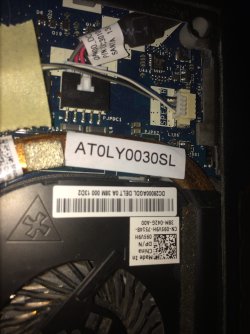
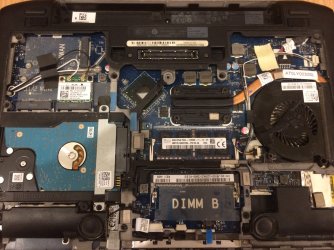
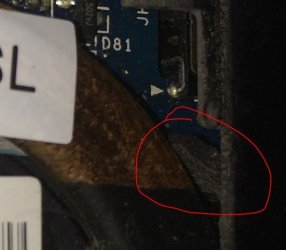
Not sure how to change those parts however I've taken a photo of under the laptop and of what appears to be some fluf next to the fan and heat sink.


The zoomed in one with the red circle round it shows the "fluf"
If you need any other photos just let me know!
Any suggestions on what to do?
 

Attachments

  • IMG_0950.JPG
    IMG_0950.JPG
    528 KB · Views: 4
  • IMG_0951.JPG
    IMG_0951.JPG
    696.2 KB · Views: 3
  • IMG_0952.JPG
    IMG_0952.JPG
    32.3 KB · Views: 21

My Computer My Computer

At a glance

Windows 7 64bit, Windows 10 64 Bit
Computer type
Laptop
OS
Windows 7 64bit, Windows 10 64 Bit
If you feel up to it, it shouldn't be hard to change the thermal compound which affixes the heat sink to the CPU. The heat sink includes the brass piece which circles around the top of the fan. Therefore, you will
* Remove the four screws holding the heat sink down in the middle of the computer, as well as the screws holding down the fan.
* Very carefully and very slowly remove the heat sink and the fan. The heat sink will probably be stuck somewhat to the CPU, so you will very carefully and very slowly move the heat sink back and forth until it comes loose from the CPU.
* Blow out all dust and gunk with a can of compressed air.
* Clean the surfaces of the heat sink and the CPU with alcohol, let them dry, apply a thin layer of good thermal compound to the entire surface of the CPU.
* Carefully reattach the heat sink.
* Reinstall all screws.

I don't see the CMOS battery. You should change it while the computer is open.
 

My Computer My Computer

At a glance

Linux Mint 18.2 xfce 64-bit (VMWare host) / W...Haswell4 GB
Computer type
PC/Desktop
Computer Manufacturer/Model Number
Dell
OS
Linux Mint 18.2 xfce 64-bit (VMWare host) / Windows 8.1 Pro 32-bit (VMWare guest)
CPU
Haswell
Memory
4 GB
Monitor(s) Displays
Acer 23"
Screen Resolution
1920 x 1080
Hard Drives
Two hard drives, 1TB each: One for Linux, one for my data.
Keyboard
IBM Model M
Antivirus
Sophos (Linux), Trend Micro (Windows)
Browser
Firefox, Opera
Other Info
I use Samba to share my data drive with the other computers at my house and with my guest session in VMWare Workstation Player.
I don't agree with Mrjimp. Thermal paste don't need to be replaced.
Try this fist:
- With a paper clip, block the fan so it doesn't be allowed to spin and with a vacuum cleaner, put it on the fan intake. It will remove the dust from the heat sink.
- If you have compressed air, block the fan so it doesn't be allowed to spin, blow the air from the heat sink outlet (side of laptop).

I agree that, if you don't have to disassemble all parts, replace the CMOS battery.

Try to find a service manual for your laptop.
 

My Computers My Computers

  • At a glance

    Windows 7 HP 64i5 6600K - 800MHz to 4200MHz4+4G GSkill DDR4 3000IG - Intel 530
    Computer type
    PC/Desktop
    Computer Manufacturer/Model Number
    custom build
    OS
    Windows 7 HP 64
    CPU
    i5 6600K - 800MHz to 4200MHz
    Motherboard
    GA-Z170-HD3P
    Memory
    4+4G GSkill DDR4 3000
    Graphics Card(s)
    IG - Intel 530
    Monitor(s) Displays
    Samsung 226BW
    Screen Resolution
    1680x1050
    Hard Drives
    (1) -1 SM951 – 128GB M.2 AHCI PCIe SSD drive for Windows 7 and Lubuntu
    (2) -1 WD SATA 3 - 1T for Data
    (3) -1 WD SATA 3 - 1T for backup
    PSU
    Thermaltake 450W TR2 gold
    Keyboard
    Old and good Chicony mechanical keyboard
    Mouse
    Logitech mX performance - 9 buttons (had to disable some)
    Internet Speed
    500Mb/s
    Browser
    Firefox 64
    Other Info
    TinyWall firewall
  • At a glance

    Windows 7 Proi7-4500U 800MHz to 3.0GHz(4+4)G DDR3 1600IG intel 4400 + NVIDIA GeForce GT 745M
    Computer type
    Laptop
    System Manufacturer/Model Number
    Asus Q550LF
    OS
    Windows 7 Pro
    CPU
    i7-4500U 800MHz to 3.0GHz
    Motherboard
    Asus Q550LF
    Memory
    (4+4)G DDR3 1600
    Graphics Card(s)
    IG intel 4400 + NVIDIA GeForce GT 745M
    Sound Card
    Realtek
    Monitor(s) Displays
    LG Display LP156WF4-SPH1
    Screen Resolution
    1920 x 1080
    Hard Drives
    BX500 120G SSD for Windows and programs +
    1T HDD for data
    Internet Speed
    500 Mb/s
    Browser
    Firefox
    Other Info
    TinyWall firewall
There are two reasons I have recommended that you change the thermal compound:
1. Often the thermal compound that is used in the original manufacturing process is not the best, so you can achieve better cooling by replacing it with good quality thermal compound.
2. You have the cover off, and the heat sink is right there in front of you, easy to remove and replace. That is the time to replace the thermal compound, if you have decided to. Since it is possible that you have an overheating problem, I recommend that you do it, since it will be very easy to do.
 

My Computer My Computer

At a glance

Linux Mint 18.2 xfce 64-bit (VMWare host) / W...Haswell4 GB
Computer type
PC/Desktop
Computer Manufacturer/Model Number
Dell
OS
Linux Mint 18.2 xfce 64-bit (VMWare host) / Windows 8.1 Pro 32-bit (VMWare guest)
CPU
Haswell
Memory
4 GB
Monitor(s) Displays
Acer 23"
Screen Resolution
1920 x 1080
Hard Drives
Two hard drives, 1TB each: One for Linux, one for my data.
Keyboard
IBM Model M
Antivirus
Sophos (Linux), Trend Micro (Windows)
Browser
Firefox, Opera
Other Info
I use Samba to share my data drive with the other computers at my house and with my guest session in VMWare Workstation Player.
My W7 computer is working fine. Sometimes the blower starts suddenly making a lot of noise without a reason. Sometimes this happens even at boot up. Yesterday finishing the Dutch tax payers website it started blowing loud and shut down the PC almost instantly. The PC booted up again without my intervention and worked fine as it should do. There was no heavy work going on, just some walking the website.
Studied the INTERNET and found several more issues nobody can explain. More or less the same problem: the PC stops and/or the blower goes crazy. Read about a C state in the BIOS that should be set to C0 and IPv6 being disabled. All to avoid Speed stepping used by Windows. Especially W10. I also have to say that at startup sometimes my W7 does not recognize the router. Running a checkup solves it. Luckily most of the time all is working fine.
AND
For some reason and until now I never see this happening when I run Linux Mint v18 on this multi boot PC............
 

My Computer My Computer

At a glance

w7 ult
Computer type
PC/Desktop
OS
w7 ult
It isn't hot from where the air comes out on the side.

It should be hot where the air comes out. I would be concerned if it isn't hot.
 

My Computer My Computer

At a glance

Linux Mint 18.2 xfce 64-bit (VMWare host) / W...Haswell4 GB
Computer type
PC/Desktop
Computer Manufacturer/Model Number
Dell
OS
Linux Mint 18.2 xfce 64-bit (VMWare host) / Windows 8.1 Pro 32-bit (VMWare guest)
CPU
Haswell
Memory
4 GB
Monitor(s) Displays
Acer 23"
Screen Resolution
1920 x 1080
Hard Drives
Two hard drives, 1TB each: One for Linux, one for my data.
Keyboard
IBM Model M
Antivirus
Sophos (Linux), Trend Micro (Windows)
Browser
Firefox, Opera
Other Info
I use Samba to share my data drive with the other computers at my house and with my guest session in VMWare Workstation Player.
I don't agree with Mrjimp. Thermal paste don't need to be replaced.

If he has disassembled it this much, so that the heat sink is right there in front of him, he should take the opportunity to replace the thermal paste with high quality paste.

If cool air is coming out of the exhaust vent, then there is a problem somewhere; it could be that not very much heat is being drawn out of the CPU. Running Speedfan or another similar program should tell him if that is the case. But in any case, he has disassembled his laptop, and it would be a very easy thing for him to replace the thermal paste, so he should go ahead and do so.
 

My Computer My Computer

At a glance

Linux Mint 18.2 xfce 64-bit (VMWare host) / W...Haswell4 GB
Computer type
PC/Desktop
Computer Manufacturer/Model Number
Dell
OS
Linux Mint 18.2 xfce 64-bit (VMWare host) / Windows 8.1 Pro 32-bit (VMWare guest)
CPU
Haswell
Memory
4 GB
Monitor(s) Displays
Acer 23"
Screen Resolution
1920 x 1080
Hard Drives
Two hard drives, 1TB each: One for Linux, one for my data.
Keyboard
IBM Model M
Antivirus
Sophos (Linux), Trend Micro (Windows)
Browser
Firefox, Opera
Other Info
I use Samba to share my data drive with the other computers at my house and with my guest session in VMWare Workstation Player.
Back
Top