
Solved Laptop Fan Loud while doing NOTHING

hArLtRoN

New member
Power User
Local time
12:21 AM
Messages
188
Location
Denver, Colorado
I am working on my friends laptop and I cannot figure out how to make the fan stop running all the time! Well at least I think its the fan. It is constantly humming unless its sleeping or turned off.

EDIT: The humming keeps coming and going now that I've posted.

Here's what I've tried so far:

I've gone into the Power Settings via the Control Panel and changed the "System Cooling Policy" under "Advanced Power Options."
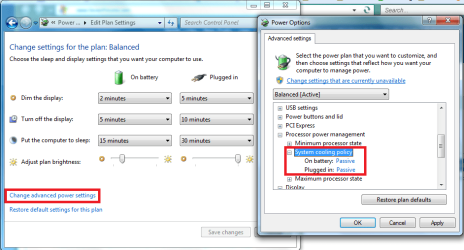
System Cooling Policy.png

It still won't quit running.

I've even gone into the BIOS menu and disabled the option that says "Fan Always On."

I also tried Speed Fan, but there are no options to control the speed of the fans.

It is a laptop.
Specs:
Compaq Presario CQ50
Windows 7 Ultimate x86
Intel Pentium Dual CPU T3200 @ 2.00GHz
3 GB of RAM
320 GB HDD

The PC came installed with Vista but was upgraded to Windows 7. Compaq has the drivers for Windows 7 on their website so 7 IS SUPPORTED by the PC.

Any help is greatly appreciated!! :)


P.S. I have a Compaq Presario V6000 (also laptop) that was designed for XP, running Windows 7 that is WAY COOLER (temp wise) than my friends is that was designed for Vista.
 

My Computer

Computer type
PC/Desktop
Computer Manufacturer/Model Number
Custom Built
OS
Windows 7 Ultimate x64
CPU
AMD Phenom 9850 x4 2.50GHz
Motherboard
ASUS M4A785-M
Memory
4GB DDR2
Graphics Card(s)
nVidia GeFore 210
Sound Card
Onboard
Monitor(s) Displays
Samsung SyncMaster BX2031 20" LED
Screen Resolution
1600x900
Hard Drives
Western Digital Caviar Blue 500 GB SATA III 7200 RPM
PSU
450 Watt
Case
Raygo R12-40835 ATX Mid-Tower Case
Cooling
Air
Antivirus
Microsoft Security Essentials
Browser
Google Chrome
Other Info
Laptop:
Intel Core Duo T2450 @ 2.00GHz
2GB RAM
Windows 7 Ultimate x86
Hello, it could be the age of the laptop. Have you tried using canned air to attempt blowing out the dust and crap that may have clogged up the fan. Just a thought.
 

My Computer

Computer Manufacturer/Model Number
HP Pavilion a4302f
OS
Win 7 Pro x64, VM Win XP, Win7 Pro Sandbox, Kubuntu 11
CPU
AMD Athlon(tm) II X4 640 @ 3.0 Gbz
Memory
12GB 1066MHz DDR3 SDRAM - 2x4GB, 2x2GB
Graphics Card(s)
ATI Radeon HD 4350 HD Graphics/Audio with 512MB
Sound Card
Realtek High Definition Audio
Monitor(s) Displays
1. Dell 23" SP2307, 2. Mitsublishi 40" HDTV, Hannspree 25"
Screen Resolution
1. 2048x1152, 2. 1920-1080, 3. 1920x1200
Hard Drives
Int: 1 120 Gig SSD i
1 - 2.5" 500 USB External HDD
1 -1 Tb USB External HDD
Case
Mid Tower
Cooling
Standard Fans - 5 fans (very quiet)
Keyboard
Microsoft Wireless 2000
Mouse
Microsoft Wireless Mouse 5000
Internet Speed
10 Mbit (realistically 500 Kbit - 1.2 Mbit)
Other Info
Speakers - Bose Desktop (Excellent Sound)
1 external CD|DVD\Blue-ray Recorders/Players (Sony)
Hello, it could be the age of the laptop. Have you tried using canned air to attempt blowing out the dust and crap that may have clogged up the fan. Just a thought.

I have not tried blowing it out yet, will try and post back.
 

My Computer

Computer type
PC/Desktop
Computer Manufacturer/Model Number
Custom Built
OS
Windows 7 Ultimate x64
CPU
AMD Phenom 9850 x4 2.50GHz
Motherboard
ASUS M4A785-M
Memory
4GB DDR2
Graphics Card(s)
nVidia GeFore 210
Sound Card
Onboard
Monitor(s) Displays
Samsung SyncMaster BX2031 20" LED
Screen Resolution
1600x900
Hard Drives
Western Digital Caviar Blue 500 GB SATA III 7200 RPM
PSU
450 Watt
Case
Raygo R12-40835 ATX Mid-Tower Case
Cooling
Air
Antivirus
Microsoft Security Essentials
Browser
Google Chrome
Other Info
Laptop:
Intel Core Duo T2450 @ 2.00GHz
2GB RAM
Windows 7 Ultimate x86
Hello, it could be the age of the laptop. Have you tried using canned air to attempt blowing out the dust and crap that may have clogged up the fan. Just a thought.

I have not tried blowing it out yet, will try and post back.
Good Luck . . .:)
 

My Computer

Computer Manufacturer/Model Number
HP Pavilion a4302f
OS
Win 7 Pro x64, VM Win XP, Win7 Pro Sandbox, Kubuntu 11
CPU
AMD Athlon(tm) II X4 640 @ 3.0 Gbz
Memory
12GB 1066MHz DDR3 SDRAM - 2x4GB, 2x2GB
Graphics Card(s)
ATI Radeon HD 4350 HD Graphics/Audio with 512MB
Sound Card
Realtek High Definition Audio
Monitor(s) Displays
1. Dell 23" SP2307, 2. Mitsublishi 40" HDTV, Hannspree 25"
Screen Resolution
1. 2048x1152, 2. 1920-1080, 3. 1920x1200
Hard Drives
Int: 1 120 Gig SSD i
1 - 2.5" 500 USB External HDD
1 -1 Tb USB External HDD
Case
Mid Tower
Cooling
Standard Fans - 5 fans (very quiet)
Keyboard
Microsoft Wireless 2000
Mouse
Microsoft Wireless Mouse 5000
Internet Speed
10 Mbit (realistically 500 Kbit - 1.2 Mbit)
Other Info
Speakers - Bose Desktop (Excellent Sound)
1 external CD|DVD\Blue-ray Recorders/Players (Sony)
That did not help, sadly.

I tried taking the hard drive out to see if it was still rattling, it still was. It is the fan, I just don't know how to stop the rattling.
 

My Computer

Computer type
PC/Desktop
Computer Manufacturer/Model Number
Custom Built
OS
Windows 7 Ultimate x64
CPU
AMD Phenom 9850 x4 2.50GHz
Motherboard
ASUS M4A785-M
Memory
4GB DDR2
Graphics Card(s)
nVidia GeFore 210
Sound Card
Onboard
Monitor(s) Displays
Samsung SyncMaster BX2031 20" LED
Screen Resolution
1600x900
Hard Drives
Western Digital Caviar Blue 500 GB SATA III 7200 RPM
PSU
450 Watt
Case
Raygo R12-40835 ATX Mid-Tower Case
Cooling
Air
Antivirus
Microsoft Security Essentials
Browser
Google Chrome
Other Info
Laptop:
Intel Core Duo T2450 @ 2.00GHz
2GB RAM
Windows 7 Ultimate x86
So I took the entire laptop apart and blew some of the components out and the rattling has stopped for now. I think there was just something loose inside that was rattling when the fan would kick on. So far so good.
 

My Computer

Computer type
PC/Desktop
Computer Manufacturer/Model Number
Custom Built
OS
Windows 7 Ultimate x64
CPU
AMD Phenom 9850 x4 2.50GHz
Motherboard
ASUS M4A785-M
Memory
4GB DDR2
Graphics Card(s)
nVidia GeFore 210
Sound Card
Onboard
Monitor(s) Displays
Samsung SyncMaster BX2031 20" LED
Screen Resolution
1600x900
Hard Drives
Western Digital Caviar Blue 500 GB SATA III 7200 RPM
PSU
450 Watt
Case
Raygo R12-40835 ATX Mid-Tower Case
Cooling
Air
Antivirus
Microsoft Security Essentials
Browser
Google Chrome
Other Info
Laptop:
Intel Core Duo T2450 @ 2.00GHz
2GB RAM
Windows 7 Ultimate x86
The fan running is a good thing. They usually run most of the time, except that they're inherently quiet so you don't notice... until something makes them noisy. Often it's a layer of dust on the blades that makes it wobble, enough to create noise. So a good cleaning is always a good idea. If it's a really old laptop and the noise comes back to stay, it's worthwhile to replace it. They're very cheap... the only tedious thing is swapping (especially on those laptops that are complicated to disassemble).
 

My Computer

Computer type
Laptop
Computer Manufacturer/Model Number
HP Pavillion dv6 (dv6-6165dx)
OS
Windows 7 Home Premium x64
CPU
AMD Vision A8-3500M 4 Core
Motherboard
AMD
Memory
8Gb
Graphics Card(s)
AMD Radeon HD 6620G
Screen Resolution
1366x768
Hard Drives
Hitachi Travelstar 500Gb
Internet Speed
Realtek RTL8188CE 802.11b/g/n
The fan running is a good thing. They usually run most of the time, except that they're inherently quiet so you don't notice... until something makes them noisy. Often it's a layer of dust on the blades that makes it wobble, enough to create noise. So a good cleaning is always a good idea. If it's a really old laptop and the noise comes back to stay, it's worthwhile to replace it. They're very cheap... the only tedious thing is swapping (especially on those laptops that are complicated to disassemble).

There was a significant amount of dust on the blades so I think that is what was causing the horrible hum noise.

I really hope I don't have to replace the fan EVER for my friend. This laptop is especially tedious to disassemble. I had to take the keyboard, screen, WiFi card, hard drive, front panel w/ touchpad, and DVD drive out just so I could get to were the fan was. I hope to not have to do that again for a while. The only plus side to doing it, other than getting the hum to stop, is that I can show my friend pictures of his laptop COMPLETELY disassembled, lol. :)
 

My Computer

Computer type
PC/Desktop
Computer Manufacturer/Model Number
Custom Built
OS
Windows 7 Ultimate x64
CPU
AMD Phenom 9850 x4 2.50GHz
Motherboard
ASUS M4A785-M
Memory
4GB DDR2
Graphics Card(s)
nVidia GeFore 210
Sound Card
Onboard
Monitor(s) Displays
Samsung SyncMaster BX2031 20" LED
Screen Resolution
1600x900
Hard Drives
Western Digital Caviar Blue 500 GB SATA III 7200 RPM
PSU
450 Watt
Case
Raygo R12-40835 ATX Mid-Tower Case
Cooling
Air
Antivirus
Microsoft Security Essentials
Browser
Google Chrome
Other Info
Laptop:
Intel Core Duo T2450 @ 2.00GHz
2GB RAM
Windows 7 Ultimate x86
The rattling has started up again so I think the fan should probably be replaced like cytherian suggested.

http://www.sevenforums.com/member.php?u=220754 Does anyone know where I could find a heatsink assembly for less than $60 from HP's website?

Heatsink assembly p/n: 486636-001
 

My Computer

Computer type
PC/Desktop
Computer Manufacturer/Model Number
Custom Built
OS
Windows 7 Ultimate x64
CPU
AMD Phenom 9850 x4 2.50GHz
Motherboard
ASUS M4A785-M
Memory
4GB DDR2
Graphics Card(s)
nVidia GeFore 210
Sound Card
Onboard
Monitor(s) Displays
Samsung SyncMaster BX2031 20" LED
Screen Resolution
1600x900
Hard Drives
Western Digital Caviar Blue 500 GB SATA III 7200 RPM
PSU
450 Watt
Case
Raygo R12-40835 ATX Mid-Tower Case
Cooling
Air
Antivirus
Microsoft Security Essentials
Browser
Google Chrome
Other Info
Laptop:
Intel Core Duo T2450 @ 2.00GHz
2GB RAM
Windows 7 Ultimate x86

My Computer

Computer type
PC/Desktop
Computer Manufacturer/Model Number
Home made Desktop
OS
Windows 10 Pro. 64/ version 1709 Windows 7 Pro/64
CPU
Intel i7-6800K @ 4.3
Motherboard
ASUS X-99 Deluxe II
Memory
Corsair Platinum 16 gig @2400
Graphics Card(s)
EVGA GTX 1070 OC
Monitor(s) Displays
Asus 27" LED LCD/VE278Q
Screen Resolution
1920-1080 or 1280-720 HDMI
Hard Drives
INTEL SSD 730-240 Gb Sata 3.0/
PSU
EVGA Platium 1200W
Case
Phanteks Luxe Tempered Glass 8 fans/ one radiator
Cooling
XSPC/ Water Cooled CPU
Keyboard
Das 4 Professional
Mouse
Logitech M705/MX Anywhere 2-S
Internet Speed
100 mbits
Antivirus
Microsoft Security Essentials/ Malwarebytes Premium 3.0/ SAS
Browser
I.E. 11 default/Firefox/ ISP Time Warner Cable/Spectrum
Other Info
LG BluRay Burner/
Sound system-KLipsch-THX/
Icy Dock ssd Hot Swap bays.

My Computer

Computer type
PC/Desktop
Computer Manufacturer/Model Number
Custom Built
OS
Windows 7 Ultimate x64
CPU
AMD Phenom 9850 x4 2.50GHz
Motherboard
ASUS M4A785-M
Memory
4GB DDR2
Graphics Card(s)
nVidia GeFore 210
Sound Card
Onboard
Monitor(s) Displays
Samsung SyncMaster BX2031 20" LED
Screen Resolution
1600x900
Hard Drives
Western Digital Caviar Blue 500 GB SATA III 7200 RPM
PSU
450 Watt
Case
Raygo R12-40835 ATX Mid-Tower Case
Cooling
Air
Antivirus
Microsoft Security Essentials
Browser
Google Chrome
Other Info
Laptop:
Intel Core Duo T2450 @ 2.00GHz
2GB RAM
Windows 7 Ultimate x86
Back
Top