Solved laptop FN key function partially working. suspected msconfig/services

k01

New member
Local time
7:44 PM
Messages
3
Hi,

long story short - this morning i decided to pretend to know what i'm doing and tried to cut down on processes running on my lappy. Now i went into good ol' msconfig and messed around in the services tab. I turned stuff off that seemed rather useless. Afterwards rebootedand noticed that my FN keys work only partially. meaning that sound and touchpad controls still work, but brightness, wireless, fan mode and quick settings don't. + it used to display a nice little overlay detailing the level of sound or brightness and now it doesn't

gear:
Samsung NB 550P7C
W7 home premium 64bit that came together with the laptop pre-instaled

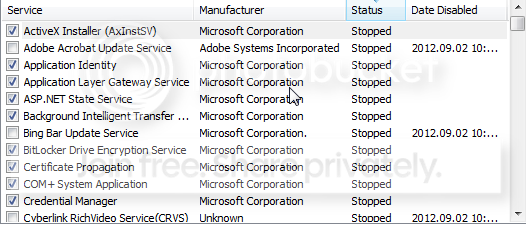
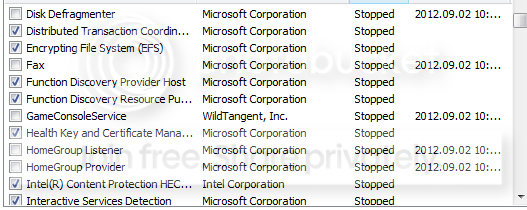
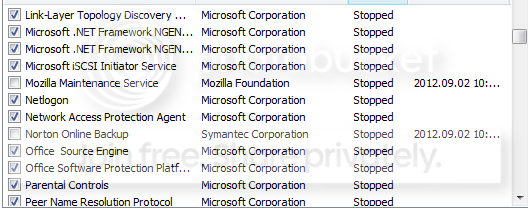
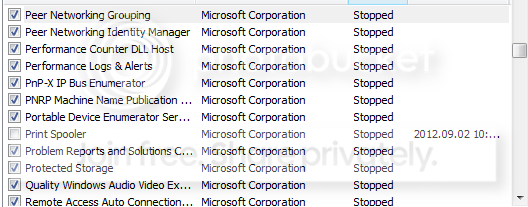
i'm attaching the photo of stopped services below
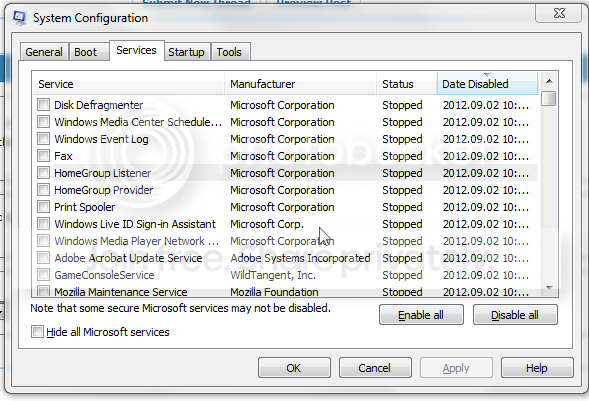
ScreenShot003.png

(there are a few others but they are honestly non essential like cyberlink video manager and bing bar updater....)


while writting this thread i noticed something else. the extra keyboard language i had enabled is still here but the notifier icon on the bottom right on the taskbar is gone.

AAAAAND the program that i use for screen shots (gadwin printscreen pro) seems to "forget"what key i set it to every 1 min or so. (F'x'' keys) but when i change them in the settings it works for a brief time.


so did i cause this by removing the services or maby it's from windows updates? (fresh pc - plenty of that stuff)

if you need any aditional info please do ask
 
Last edited:

My Computer My Computer

OS
w7 home premium 64
k01,
Welcome to SevenForums.

Microsoft looks out for you. Unbeknownst to you , MS created some system restore points.

Use one from before you shot yourself in the foot.

Now you see why I'm not one of those people who advocates disabling non-microsoft services.

RESTORE TO A PREVIOUS SYSTEM RESTORE POINT
1) WIN | type SYSTEM RESTORE | ENTER | NEXT
| Choose a different restore point radio button | NEXT
2) Show more restore pointscheckbox (lower left)
3) Highlight the desired restore point
4) Scan for affected programs(lower right)make a note of affected programs
5) CLOSE | NEXT | FINISH


WIN = key with the wavy Microsoft flag on top.
 

My Computer My Computer

Computer Manufacturer/Model Number
Toshiba Satellite S875D-S7239 laptop
OS
MS Windows 7 Ultimate SP1 64-bit
CPU
AMD A10-4600M
Motherboard
AMD Pumori (Socket FT1)
Memory
6.00 GB Dual-Channel DDR3 @ 798MHz (11-11-12-28)
Graphics Card(s)
AMD Radeon HD 7660G
Sound Card
High Definition Audio Device
Monitor(s) Displays
Generic PnP Monitor (1600x900@60Hz)
Screen Resolution
1600x900@60Hz
Hard Drives
SSD 119GB Corsair CSSD-V128GB2 ATA Device
Keyboard
Standard PS/2 Keyboard
Mouse
HP Wireless Optical Mobile Mouse Model FHA-3410
Internet Speed
What the local pub, local coffee shop offers.
Other Info
Optical Drive:MATSHITA BD-CMB UJ160B ATA Device


Also have an Asus ha1002xp netbook with Win 7 Ultimate installed.
Are you sure you didn't uncheck some Samsung software in msconfig>Startup? There isn't anything in the Services list there that I see.

It will most likely have Samsung in its name, easily verified to be the culprit by googling if it's cryptic. This is how to know what each listing does.

Normally nothing is needed in either list (after hiding MS Services) except AV, gadgets, stickies, Skydrive. But those function buttons on some laptops require a software package which comes with the driver and needs to start and run with Windows.
 
Last edited:
k01,
Welcome to SevenForums.

Microsoft looks out for you. Unbeknownst to you , MS created some system restore points.

Use one from before you shot yourself in the foot.

WIN = key with the wavy Microsoft flag on top.

that's the first thing i tried. sadly there are no restore points on my system

and there's only one samsung service which is running


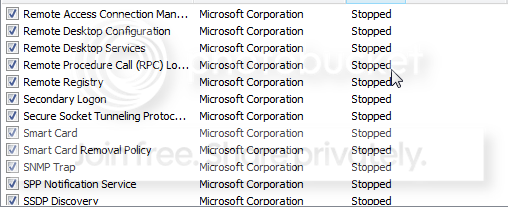
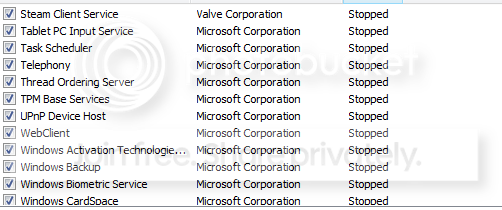
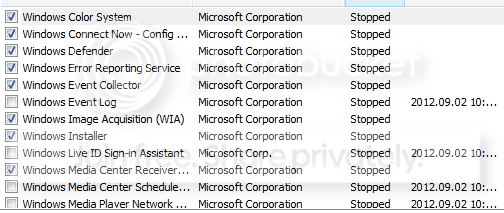
i'm adding a full list of stopped services on my laptop. maby you can make something out of it.


ScreenShot004.png

ScreenShot005.png

ScreenShot006.png

ScreenShot007.png

ScreenShot008.png

ScreenShot009.png

ScreenShot010.png

ScreenShot011.png
 
Last edited:

My Computer My Computer

OS
w7 home premium 64
By what piece of inifinte wisdom did you eliminate your restore points?

The elimination of restore points is NOT a feature of Win 7.

Attach the file the script generates:
# **********************INSTRUCTIONS**************************
# STEP 1 ** RUN POWERSHELL AS ADMINISTRATOR ******************
# ************************************************************
#
# WIN key | type POWERSHELL | do NOT hit ENTER |
# in the PROGRAMS list, right-click on WINDOWS POWERSHELL |
# choose "Run as administrator" |
# Click on the YES button (if such appears)
#
# WIN key = key with Microsoft log on top
#
# for the guru:
# WIN | type POWERSHELL | CTRL+SHIFT+ENTER key combo | ALT+Y keycombo
# ************************************************************
# STEP 2 ** COPY AND PASTE ***********************************
# ************************************************************
#
# COPY the script using CTRL+C,
# COPY every line of script down thru both EXIT statements
#
# PASTE into Powershell
#----Right-Click at the PowerShell Prompt
#----(Ctrl+V does not work)
#
# Start copying with first script line without a # at start of the line
# Note: Actually, you can paste the entire file if you rather
#-------Lines starting with a # are ignored by PowerShell
# ************************************************************
# STEP 3 ** SCRIPT OUTPUT & SCRIPT PURPOSE *******************
# ************************************************************
# --The script output and purpose is given at the very front of the script
#
# --The script output and purpose is given at the very front of the script
#
# ************************************************************
# ***************** NOTE - POWERSHELL VERSION*****************
# if you receive this error msg:
#--The system can not find the path specified
# you may need to update your PowerShell
# you must be using Powershell 2.0 or later.
#
# To determine your Powershell version:
#---Run PowerShell
#---enter $host.version
#---you should see at least:
# Major Minor Build Revision
# ----- ----- ----- --------
# 2......0......-1.....-1
#
# If you do not see the above, update your Vista/Win 7.
# ************************************************************
# *************** NOTE - EXECUTION POLICY*********************
# If you haven't set the execution policy, you may need to:
#---Run PowerShell
#---enter SET-EXECUTIONPOLICY -EXECUTIONPOLICY REMOTESIGNED
# ************************************************************

PHP:
get-computerrestorepoint |sort -descending sequencenumber > $env:userprofile\desktop\RestorePoints.TXT
 

My Computer My Computer

Computer Manufacturer/Model Number
Toshiba Satellite S875D-S7239 laptop
OS
MS Windows 7 Ultimate SP1 64-bit
CPU
AMD A10-4600M
Motherboard
AMD Pumori (Socket FT1)
Memory
6.00 GB Dual-Channel DDR3 @ 798MHz (11-11-12-28)
Graphics Card(s)
AMD Radeon HD 7660G
Sound Card
High Definition Audio Device
Monitor(s) Displays
Generic PnP Monitor (1600x900@60Hz)
Screen Resolution
1600x900@60Hz
Hard Drives
SSD 119GB Corsair CSSD-V128GB2 ATA Device
Keyboard
Standard PS/2 Keyboard
Mouse
HP Wireless Optical Mobile Mouse Model FHA-3410
Internet Speed
What the local pub, local coffee shop offers.
Other Info
Optical Drive:MATSHITA BD-CMB UJ160B ATA Device


Also have an Asus ha1002xp netbook with Win 7 Ultimate installed.
You're due for a Clean Reinstall - Factory OEM Windows 7 anyway, since the Services are laced with the useless factory utilties and sponsored bloatware which corrupts Win7 from it's natural state.

You've also tampered with Windows Services like Event Log which can cause cascading failures.

It's really not worth trying to piece back together a corrupt install, unless you want to Clean Up Factory Bloatware correctly after re-enabling all msconfig>Startups and Services.
 
Next time just leave the services alone.

Services have dependencies and other services are dependent upon them.

This is not XP.

Services are not a problem. What can be a problem is the the program which installs and uses the service.

A program that is listed as "running" is generally not running in the sense that you think of running.

At any one time, you can very easily have more than 50 services running.

Just to give you an idea of which services and how many are running, I'm going to give you two short powershell scripts to run.

# STEP 1 ** RUN POWERSHELL AS ADMINISTRATOR
WIN key | type POWERSHELL | do NOT hit ENTER |
in the PROGRAMS list, right-click on WINDOWS POWERSHELL |
choose "Run as administrator" |
Click on the YES button (if such appears)

# STEP 2 ** COPY AND PASTE
COPY the script using CTRL+C,
PASTE into Powershell
---Right-Click at the PowerShell Prompt
---(Ctrl+V does not work)

WIN key = key with Microsoft logo on top
=====================================
This first script will show you what services are currently running:
PHP:
gsv | ? {$_.status -eq "Running"}

This next script simply gives you a count of running scripts:

PHP:
gsv | ? {$_.status -eq "Running"} | measure
 

My Computer My Computer

Computer Manufacturer/Model Number
Toshiba Satellite S875D-S7239 laptop
OS
MS Windows 7 Ultimate SP1 64-bit
CPU
AMD A10-4600M
Motherboard
AMD Pumori (Socket FT1)
Memory
6.00 GB Dual-Channel DDR3 @ 798MHz (11-11-12-28)
Graphics Card(s)
AMD Radeon HD 7660G
Sound Card
High Definition Audio Device
Monitor(s) Displays
Generic PnP Monitor (1600x900@60Hz)
Screen Resolution
1600x900@60Hz
Hard Drives
SSD 119GB Corsair CSSD-V128GB2 ATA Device
Keyboard
Standard PS/2 Keyboard
Mouse
HP Wireless Optical Mobile Mouse Model FHA-3410
Internet Speed
What the local pub, local coffee shop offers.
Other Info
Optical Drive:MATSHITA BD-CMB UJ160B ATA Device


Also have an Asus ha1002xp netbook with Win 7 Ultimate installed.
to hell with it.


i just reinstaled the windows. then spent another hour or so trying to find the drivers to the hw. in the end i instaled everything and the thing is back and running. that nice overlay thingy apperantly is "samsung easy settings" without it half the FN+F(x) keys are useless. just for future reference if anyone would need it....

and thank you for sharing your precious time with this wannabe :)
 

My Computer My Computer

OS
w7 home premium 64
k01,
Thanks for sharing your solution.

I had a similar experience on a new Toshiba. I've found that the updates available thru Microsoft, for one reason or the other, are not keeping up with the newer systems.

When Win 7 first came out, then Win 7 included any drivers you would need and all would work fine. this is no longer true. The manufacturers stick drivers into what one would think is simply a utility program.
 

My Computer My Computer

Computer Manufacturer/Model Number
Toshiba Satellite S875D-S7239 laptop
OS
MS Windows 7 Ultimate SP1 64-bit
CPU
AMD A10-4600M
Motherboard
AMD Pumori (Socket FT1)
Memory
6.00 GB Dual-Channel DDR3 @ 798MHz (11-11-12-28)
Graphics Card(s)
AMD Radeon HD 7660G
Sound Card
High Definition Audio Device
Monitor(s) Displays
Generic PnP Monitor (1600x900@60Hz)
Screen Resolution
1600x900@60Hz
Hard Drives
SSD 119GB Corsair CSSD-V128GB2 ATA Device
Keyboard
Standard PS/2 Keyboard
Mouse
HP Wireless Optical Mobile Mouse Model FHA-3410
Internet Speed
What the local pub, local coffee shop offers.
Other Info
Optical Drive:MATSHITA BD-CMB UJ160B ATA Device


Also have an Asus ha1002xp netbook with Win 7 Ultimate installed.
What drivers were not provided by the installer or optional Windows Updates after all updates were completed?

Was Samsung Easy Settings a driver or software package, or both? Was any part of it delivered by Updates?

Hopefully you read the tutorial on getting a perfect OEM reinstall as drivers are handled differently by Win7. If you will expound on what you received, or didn't, then needed to import for Easy Settings, I will add it to the tutorial along with other notes at bottom.
 
greg,
Hate to disappoint you, but that one shoe does not fit all, although the shoe fits many.
karl
 

My Computer My Computer

Computer Manufacturer/Model Number
Toshiba Satellite S875D-S7239 laptop
OS
MS Windows 7 Ultimate SP1 64-bit
CPU
AMD A10-4600M
Motherboard
AMD Pumori (Socket FT1)
Memory
6.00 GB Dual-Channel DDR3 @ 798MHz (11-11-12-28)
Graphics Card(s)
AMD Radeon HD 7660G
Sound Card
High Definition Audio Device
Monitor(s) Displays
Generic PnP Monitor (1600x900@60Hz)
Screen Resolution
1600x900@60Hz
Hard Drives
SSD 119GB Corsair CSSD-V128GB2 ATA Device
Keyboard
Standard PS/2 Keyboard
Mouse
HP Wireless Optical Mobile Mouse Model FHA-3410
Internet Speed
What the local pub, local coffee shop offers.
Other Info
Optical Drive:MATSHITA BD-CMB UJ160B ATA Device


Also have an Asus ha1002xp netbook with Win 7 Ultimate installed.
Thats why I was specifically asking how OP sequenced restoring the FN key functions so I could add it to the tutorial for other Samsung users. I keep a close eye on Samsung and Sony clean reinstalls exactly because they have proprietary software that requires special attention and install sequencing after a Clean Reinstall.
 
Greg,
Sorry to hear that you have that kind of reaction to the truth.
karl
 

My Computer My Computer

Computer Manufacturer/Model Number
Toshiba Satellite S875D-S7239 laptop
OS
MS Windows 7 Ultimate SP1 64-bit
CPU
AMD A10-4600M
Motherboard
AMD Pumori (Socket FT1)
Memory
6.00 GB Dual-Channel DDR3 @ 798MHz (11-11-12-28)
Graphics Card(s)
AMD Radeon HD 7660G
Sound Card
High Definition Audio Device
Monitor(s) Displays
Generic PnP Monitor (1600x900@60Hz)
Screen Resolution
1600x900@60Hz
Hard Drives
SSD 119GB Corsair CSSD-V128GB2 ATA Device
Keyboard
Standard PS/2 Keyboard
Mouse
HP Wireless Optical Mobile Mouse Model FHA-3410
Internet Speed
What the local pub, local coffee shop offers.
Other Info
Optical Drive:MATSHITA BD-CMB UJ160B ATA Device


Also have an Asus ha1002xp netbook with Win 7 Ultimate installed.
Back
Top