laptop freezes up

Richard58

New member
Member
Local time
5:46 AM
Messages
78
Hello, here's the problem. My laptop will freeze up while in use. My external mouse and the touchpad mouse will be frozen, push any buttons and nothing happens. I turn off the laptop, then start it and it works ok. ALSO, too many times I've gone to start it in the morning, I will get the black screen with the windows logo and it will go no further. I have to turn it off, and back on. I have done the system repair several times but it has not found any problems. At one startup I did, I went into the startup utility and ran the check disc and memory program and it showed no problems. It's been happening for several months, I've just been putting up with it. If I need to buy a new hard drive, no problem, or erase out the existing one and reload, ok by me.

My laptop: given to me approx. 2 years ago with a bad hard drive, I bought an aftermarket hard drive, and the discs from HP and loaded the system. HP laptop G62, 64 bit, Windows 7 Home Premium, Malewarebytes free, Microsoft Security Essentials, Processor: Intel Core i5 CPU, [email protected], RAM: 4 GB, "C" disc of 284 GB is about half full.

Me: older generation, not real good on these things.

Any thoughts, thank you.
 

My Computer

Computer type
Laptop
Computer Manufacturer/Model Number
HP G-62
OS
Windows 7 Home 64 Bit
Hello Richard mmm surprising no replies mate so why not try these for starters
http://www.sevenforums.com/tutorials/1538-sfc-scannow-command-system-file-checker.html
http://www.sevenforums.com/tutorials/433-disk-check.html < if necessary include the /f and /r in the command line as per Option2
- in safe mode ;)
If you can keep it going long enough then these
http://www.superantispyware.com/
http://www.malwarebytes.org/products/malwarebytes_free/
http://www.bleepingcomputer.com/download/adwcleaner/
ADW download from bleeping computer delete any rubbish found with the malware scans
(NB If one is running Kaspersky security it may rant about ADW - just ignore it or disable Kaspersky while the ADW is being used)


If push comes to shove and you need to replace the hard drive then if you don't have to have a lot of space for what you use it for a SSD is great and also I would opt for an OEM edition - I would not be bothering with the HP stuff as almost invariably it will be loaded with stuff you do not need. If the SSD is say a 120GB then it will be ok for minimal use and a 250GB plenty any extra data can be stored on an external spinner but the choice is yours.
 

My Computer

Computer type
PC/Desktop
Computer Manufacturer/Model Number
Own build (new) Desk1 / Asus ROG Win 7 / Desk2 1st build
OS
Desk1 7 Home Prem / Desk2 10 Pro / Main lap Asus ROG 10 Pro 2 laptop Toshiba 7 Pro Asus P2520 7 & 10
CPU
Desk1 i5 3750K / Laptop i7 GTX 860M / Desk2 i5 2500
Motherboard
Desk1 Asus P877-V / Desk2 Gigabyte H67 UD3H / Laptop ?
Memory
Desk1 8GB (1866) / Desk2 16GB (1333) / Laptop 8Gb DDR3
Graphics Card(s)
Desk 1& 2NVidia GTX 650 & Laptops on board Intel
Sound Card
Desk 1 & 2 -XONAR DG Realtek High Def audio Laptop
Monitor(s) Displays
Desk 1 Benq HD 2450 / Desk2 Philips 24" / Laptop 17.5"
Screen Resolution
1920x1080 D1 & D2 & Laptop 1
Hard Drives
Desk1 Samsung 120GB 830 SSD
Asus ROG 256GB 850 Pro SSD
Desk2 Samsung 840 256 SSD
Toshiba 120GB EVO
PSU
Desk 1 Corsair HX 1050/ Laptop ? / Desk 2 Corsair HX 650
Case
Desk 1 Cooler HAF XM ? Toshiba laptop / Desk2 Coolermaster
Cooling
Fans on all Desk1 -2 Desk2 - all Coolermasters 5 Laptop ?
Keyboard
Desk 1 MS Sidewinder X6 Desk 2 MS Sidewinder X 4
Mouse
Desk 1&2 - Gigabyte MS 900 gamer - laptop - Logitec wireless
Internet Speed
ADSL2+
Other Info
One other Desktop (tester) and spare Toshba laptop both with SSD's
Running Kaspersky 2016 ISS on all machines config'd identically
Logitec audio stereo systems on each machine (x3)
Canon MG5250MFC
Router/modem TP-Link running WPA2SK
Safe Mode and Safe Mode with Network operations also a similar problem? Reason for asking: trying to rule in or rule out Windows per se being the problem. Giving more ammo pointing to hardware if even Safe Modes suddenly freeze & force a power off.
 

My Computer

Computer type
PC/Desktop
Computer Manufacturer/Model Number
Antec desktop; Acer Aspire laptops
OS
Windows 7 Professional 64-bit
CPU
Desktop i5; Acers i5 & i7
Memory
desktop 16GB; 1 Acer 8GB & 1 Acer 16GB
Hard Drives
1TB split into 2 equal partitions [OS and data] usable by RJS
Internet Speed
AT&T DSL
Browser
FF, GChrome, msIE
Other Info
Windows 7 Firewall, Emsisoft AM/AV, MSE [scan-only], SpywareBlaster, Ruiware/BillP combine
Thanks for your help-- I did the Malwarebytes Free, the Superantispyware Free, the scannow, and the check disc -- all showed no problems. I guess I'll boot, and hit f8 and try safe mode for awhile -- but does safe mode affect the starting up and only getting the black start up screen?

I'm now in Safe with Networking, trying it out, so far so good

To clear up something I may not have made clear -- I can use the pc and the mouse for just a few minutes or other times for a few hours, then all of a sudden it will freeze up. It's doing it about every day now.
 
Last edited:

My Computer

Computer type
Laptop
Computer Manufacturer/Model Number
HP G-62
OS
Windows 7 Home 64 Bit
Well, if Safe Mode with Network works flawlessly, meaning no BSOD/no Freeze/no forced powerdown -- we can pretty much rule out hardware [pretty sure we can], and start aiming our Sherlock Holmes looking glass at software, Microsoft's OS and installed programs; Microsoft stuff and programs that kick in during nonSafe, Normal, boot and startup.
 

My Computer

Computer type
PC/Desktop
Computer Manufacturer/Model Number
Antec desktop; Acer Aspire laptops
OS
Windows 7 Professional 64-bit
CPU
Desktop i5; Acers i5 & i7
Memory
desktop 16GB; 1 Acer 8GB & 1 Acer 16GB
Hard Drives
1TB split into 2 equal partitions [OS and data] usable by RJS
Internet Speed
AT&T DSL
Browser
FF, GChrome, msIE
Other Info
Windows 7 Firewall, Emsisoft AM/AV, MSE [scan-only], SpywareBlaster, Ruiware/BillP combine
Ok mate I am with Roland on this and just for our info what is the model of laptop you have? Because I think we need to start looking at drivers etc
 

My Computer

Computer type
PC/Desktop
Computer Manufacturer/Model Number
Own build (new) Desk1 / Asus ROG Win 7 / Desk2 1st build
OS
Desk1 7 Home Prem / Desk2 10 Pro / Main lap Asus ROG 10 Pro 2 laptop Toshiba 7 Pro Asus P2520 7 & 10
CPU
Desk1 i5 3750K / Laptop i7 GTX 860M / Desk2 i5 2500
Motherboard
Desk1 Asus P877-V / Desk2 Gigabyte H67 UD3H / Laptop ?
Memory
Desk1 8GB (1866) / Desk2 16GB (1333) / Laptop 8Gb DDR3
Graphics Card(s)
Desk 1& 2NVidia GTX 650 & Laptops on board Intel
Sound Card
Desk 1 & 2 -XONAR DG Realtek High Def audio Laptop
Monitor(s) Displays
Desk 1 Benq HD 2450 / Desk2 Philips 24" / Laptop 17.5"
Screen Resolution
1920x1080 D1 & D2 & Laptop 1
Hard Drives
Desk1 Samsung 120GB 830 SSD
Asus ROG 256GB 850 Pro SSD
Desk2 Samsung 840 256 SSD
Toshiba 120GB EVO
PSU
Desk 1 Corsair HX 1050/ Laptop ? / Desk 2 Corsair HX 650
Case
Desk 1 Cooler HAF XM ? Toshiba laptop / Desk2 Coolermaster
Cooling
Fans on all Desk1 -2 Desk2 - all Coolermasters 5 Laptop ?
Keyboard
Desk 1 MS Sidewinder X6 Desk 2 MS Sidewinder X 4
Mouse
Desk 1&2 - Gigabyte MS 900 gamer - laptop - Logitec wireless
Internet Speed
ADSL2+
Other Info
One other Desktop (tester) and spare Toshba laptop both with SSD's
Running Kaspersky 2016 ISS on all machines config'd identically
Logitec audio stereo systems on each machine (x3)
Canon MG5250MFC
Router/modem TP-Link running WPA2SK
The laptop is a HP G62 -- I've now been using safe mode with networking and so far there have been no problems. I'll keep using it that way, we'll see what develops.
 

My Computer

Computer type
Laptop
Computer Manufacturer/Model Number
HP G-62
OS
Windows 7 Home 64 Bit
Richard mate are there any other identifying names or numbers on that machine? ie HP G62 Envy etc?

Have to go offline for a short time but will be back. Need those extra details to find the drivers etc.
 

My Computer

Computer type
PC/Desktop
Computer Manufacturer/Model Number
Own build (new) Desk1 / Asus ROG Win 7 / Desk2 1st build
OS
Desk1 7 Home Prem / Desk2 10 Pro / Main lap Asus ROG 10 Pro 2 laptop Toshiba 7 Pro Asus P2520 7 & 10
CPU
Desk1 i5 3750K / Laptop i7 GTX 860M / Desk2 i5 2500
Motherboard
Desk1 Asus P877-V / Desk2 Gigabyte H67 UD3H / Laptop ?
Memory
Desk1 8GB (1866) / Desk2 16GB (1333) / Laptop 8Gb DDR3
Graphics Card(s)
Desk 1& 2NVidia GTX 650 & Laptops on board Intel
Sound Card
Desk 1 & 2 -XONAR DG Realtek High Def audio Laptop
Monitor(s) Displays
Desk 1 Benq HD 2450 / Desk2 Philips 24" / Laptop 17.5"
Screen Resolution
1920x1080 D1 & D2 & Laptop 1
Hard Drives
Desk1 Samsung 120GB 830 SSD
Asus ROG 256GB 850 Pro SSD
Desk2 Samsung 840 256 SSD
Toshiba 120GB EVO
PSU
Desk 1 Corsair HX 1050/ Laptop ? / Desk 2 Corsair HX 650
Case
Desk 1 Cooler HAF XM ? Toshiba laptop / Desk2 Coolermaster
Cooling
Fans on all Desk1 -2 Desk2 - all Coolermasters 5 Laptop ?
Keyboard
Desk 1 MS Sidewinder X6 Desk 2 MS Sidewinder X 4
Mouse
Desk 1&2 - Gigabyte MS 900 gamer - laptop - Logitec wireless
Internet Speed
ADSL2+
Other Info
One other Desktop (tester) and spare Toshba laptop both with SSD's
Running Kaspersky 2016 ISS on all machines config'd identically
Logitec audio stereo systems on each machine (x3)
Canon MG5250MFC
Router/modem TP-Link running WPA2SK
No name like 'envy' or any other -- but looking on paperwork it appears to be a HP G62-149WM. And also looking at the previous owners paperwork, it shows Product # WQ434UA#ABA & Bios version F.07. I hope that helps -- and I've been in Safe Mode with Networking most of the day and have had no problems.
 

My Computer

Computer type
Laptop
Computer Manufacturer/Model Number
HP G-62
OS
Windows 7 Home 64 Bit

Attachments

  • HP.PNG
    HP.PNG
    22.7 KB · Views: 1

My Computer

Computer type
PC/Desktop
Computer Manufacturer/Model Number
Own build (new) Desk1 / Asus ROG Win 7 / Desk2 1st build
OS
Desk1 7 Home Prem / Desk2 10 Pro / Main lap Asus ROG 10 Pro 2 laptop Toshiba 7 Pro Asus P2520 7 & 10
CPU
Desk1 i5 3750K / Laptop i7 GTX 860M / Desk2 i5 2500
Motherboard
Desk1 Asus P877-V / Desk2 Gigabyte H67 UD3H / Laptop ?
Memory
Desk1 8GB (1866) / Desk2 16GB (1333) / Laptop 8Gb DDR3
Graphics Card(s)
Desk 1& 2NVidia GTX 650 & Laptops on board Intel
Sound Card
Desk 1 & 2 -XONAR DG Realtek High Def audio Laptop
Monitor(s) Displays
Desk 1 Benq HD 2450 / Desk2 Philips 24" / Laptop 17.5"
Screen Resolution
1920x1080 D1 & D2 & Laptop 1
Hard Drives
Desk1 Samsung 120GB 830 SSD
Asus ROG 256GB 850 Pro SSD
Desk2 Samsung 840 256 SSD
Toshiba 120GB EVO
PSU
Desk 1 Corsair HX 1050/ Laptop ? / Desk 2 Corsair HX 650
Case
Desk 1 Cooler HAF XM ? Toshiba laptop / Desk2 Coolermaster
Cooling
Fans on all Desk1 -2 Desk2 - all Coolermasters 5 Laptop ?
Keyboard
Desk 1 MS Sidewinder X6 Desk 2 MS Sidewinder X 4
Mouse
Desk 1&2 - Gigabyte MS 900 gamer - laptop - Logitec wireless
Internet Speed
ADSL2+
Other Info
One other Desktop (tester) and spare Toshba laptop both with SSD's
Running Kaspersky 2016 ISS on all machines config'd identically
Logitec audio stereo systems on each machine (x3)
Canon MG5250MFC
Router/modem TP-Link running WPA2SK
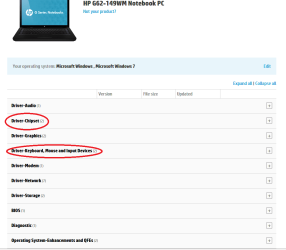
At both the circled items there were two downloads -- I have downloaded them all, everything seem to go well. So now I'll try the laptop on regular startup, and work it and we'll see what happens. Thanks, if everything is going well, it might be a couple of days before I get back -- if I still have problems, then like Arnold "I'll be back".
 

My Computer

Computer type
Laptop
Computer Manufacturer/Model Number
HP G-62
OS
Windows 7 Home 64 Bit
Ok mate good luck it just might be the answer if not then there are other things we can do.;)
 

My Computer

Computer type
PC/Desktop
Computer Manufacturer/Model Number
Own build (new) Desk1 / Asus ROG Win 7 / Desk2 1st build
OS
Desk1 7 Home Prem / Desk2 10 Pro / Main lap Asus ROG 10 Pro 2 laptop Toshiba 7 Pro Asus P2520 7 & 10
CPU
Desk1 i5 3750K / Laptop i7 GTX 860M / Desk2 i5 2500
Motherboard
Desk1 Asus P877-V / Desk2 Gigabyte H67 UD3H / Laptop ?
Memory
Desk1 8GB (1866) / Desk2 16GB (1333) / Laptop 8Gb DDR3
Graphics Card(s)
Desk 1& 2NVidia GTX 650 & Laptops on board Intel
Sound Card
Desk 1 & 2 -XONAR DG Realtek High Def audio Laptop
Monitor(s) Displays
Desk 1 Benq HD 2450 / Desk2 Philips 24" / Laptop 17.5"
Screen Resolution
1920x1080 D1 & D2 & Laptop 1
Hard Drives
Desk1 Samsung 120GB 830 SSD
Asus ROG 256GB 850 Pro SSD
Desk2 Samsung 840 256 SSD
Toshiba 120GB EVO
PSU
Desk 1 Corsair HX 1050/ Laptop ? / Desk 2 Corsair HX 650
Case
Desk 1 Cooler HAF XM ? Toshiba laptop / Desk2 Coolermaster
Cooling
Fans on all Desk1 -2 Desk2 - all Coolermasters 5 Laptop ?
Keyboard
Desk 1 MS Sidewinder X6 Desk 2 MS Sidewinder X 4
Mouse
Desk 1&2 - Gigabyte MS 900 gamer - laptop - Logitec wireless
Internet Speed
ADSL2+
Other Info
One other Desktop (tester) and spare Toshba laptop both with SSD's
Running Kaspersky 2016 ISS on all machines config'd identically
Logitec audio stereo systems on each machine (x3)
Canon MG5250MFC
Router/modem TP-Link running WPA2SK
Does the PC have the factory install? If so that is the worst possible install of Win7 one can have, larded with bloatware and duplicate utilities which interfere with better versions built into Win7. That's why most tech enthusiasts won't even run such an install but instead Clean Reinstall Windows 7.

Everything needed is in the blue link to get and keep a perfect install just like a million others have done without a single complaint.

Until then you can Clean Up Factory Bloatware.

Otherwise I'd test the hardware and then continue with the other Troubleshooting Steps for Windows 7. You may still have the built-in hardware diagnostics triggered by the ESC key at boot.
 
I had to buy a new hard drive when I got the laptop, and then called HP and got their reload discs from them. I still have those discs .

It has been starting fine and not freezing up -- but just now I came across another problem that has happened just a few times. I'll get a popup and it says "Internet Explorer has stopped working. A problem caused the program to stop working correctly. windows will close the program and notify you if a solution is available". No one has contacted me. Is it related, I don't know?
 

My Computer

Computer type
Laptop
Computer Manufacturer/Model Number
HP G-62
OS
Windows 7 Home 64 Bit

My Computer

Computer type
PC/Desktop
Computer Manufacturer/Model Number
Own build (new) Desk1 / Asus ROG Win 7 / Desk2 1st build
OS
Desk1 7 Home Prem / Desk2 10 Pro / Main lap Asus ROG 10 Pro 2 laptop Toshiba 7 Pro Asus P2520 7 & 10
CPU
Desk1 i5 3750K / Laptop i7 GTX 860M / Desk2 i5 2500
Motherboard
Desk1 Asus P877-V / Desk2 Gigabyte H67 UD3H / Laptop ?
Memory
Desk1 8GB (1866) / Desk2 16GB (1333) / Laptop 8Gb DDR3
Graphics Card(s)
Desk 1& 2NVidia GTX 650 & Laptops on board Intel
Sound Card
Desk 1 & 2 -XONAR DG Realtek High Def audio Laptop
Monitor(s) Displays
Desk 1 Benq HD 2450 / Desk2 Philips 24" / Laptop 17.5"
Screen Resolution
1920x1080 D1 & D2 & Laptop 1
Hard Drives
Desk1 Samsung 120GB 830 SSD
Asus ROG 256GB 850 Pro SSD
Desk2 Samsung 840 256 SSD
Toshiba 120GB EVO
PSU
Desk 1 Corsair HX 1050/ Laptop ? / Desk 2 Corsair HX 650
Case
Desk 1 Cooler HAF XM ? Toshiba laptop / Desk2 Coolermaster
Cooling
Fans on all Desk1 -2 Desk2 - all Coolermasters 5 Laptop ?
Keyboard
Desk 1 MS Sidewinder X6 Desk 2 MS Sidewinder X 4
Mouse
Desk 1&2 - Gigabyte MS 900 gamer - laptop - Logitec wireless
Internet Speed
ADSL2+
Other Info
One other Desktop (tester) and spare Toshba laptop both with SSD's
Running Kaspersky 2016 ISS on all machines config'd identically
Logitec audio stereo systems on each machine (x3)
Canon MG5250MFC
Router/modem TP-Link running WPA2SK
This morning when starting the laptop, it froze up on the black 'starting windows' screen. I had to turn it off, and back on.

ICIT2LOL -- I ran those previously and it showed no problems -- do you want me to run them again?
EDIT - I ran them again -- no problems
 
Last edited:

My Computer

Computer type
Laptop
Computer Manufacturer/Model Number
HP G-62
OS
Windows 7 Home 64 Bit
Yes, you buried me -- but actually I was trying other things first. Any idea why "windows explorer has stopped working". ?

Edit -- added about 50 minutes after this posted originally -- stepped out to work on vehicle, left the laptop on, came back to find it was frozen up. Had to turn it off, then on.
 
Last edited:

My Computer

Computer type
Laptop
Computer Manufacturer/Model Number
HP G-62
OS
Windows 7 Home 64 Bit
That's the kind of generalized corruption that needs a thorough going over, in particular the steps in Troubleshooting Windows 7

http://goo.gl/MJh82
for establishing a Clean Boot, running all infection scans including that of a newer lighter weight AV suggested if you have a bloatware AV, SFC again, resolving repeat errors, utilizing System Resources to find Solutions to Problems (which may already have queued the one you referred to earlier), and the other steps which almost always find the problem.
 
Back
Top