Laptop freezing frequently (most probably due to bad HDD)

soumyajitnayak

New member
Local time
2:31 AM
Messages
6
Location
Dubai
Hi,

My 3.5 years old HP laptop (Core i7 2670QM @2.2 GHz, 4GB RAM, 1GB AMD graphics, Windows 8.1 x64) has been freezing a lot since past few weeks. Initially it was always freezing while using Chrome with flash content. I had to always restart thru power button. Lately, it is freezing more frequently.
Last week, it started automatic start up repair with Disk checking stuck at 57% and rebooting to loop.

I reinstalled Windows 8.1 after formatting HDD. But now it is still freezing.

Task manager shows Disk around 100% most of the time (even when nothing is running).
Chkdsk says no error.

I guessed HDD problem, so ran Hitachi WinDriveFitnessTest. On ext test, ReadErrorCheck - Pass, SmartSelfTest - Fail - Read Element Failure.

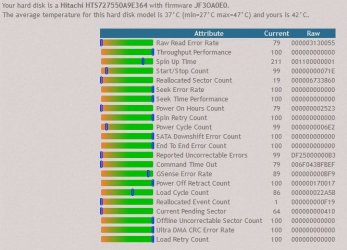
I ran Speed Fan SMART analysis. Below is the result:

--------------------------------------------------------------------------

attachment.php


Troubled attributes:
Attribute Airflow Temperature failed in the past. Its current value is 58, the worst value was 40 and the threshold is 45. According to the manufacturer, this is an advisory condition.

SERIOUS ISSUE : your hard disk has 14432 (it was 14368 30 mins. ago) reallocated sectors. Hard disks do have spare sectors (usually from 256 up to 2560) used to replace bad ones. This remapping operation is transparent to the end user. Anyway, this can lead to degraded performances (because remapped sectors are in different places of the disk than the original ones and the head needs additional moving). If reallocated sectors grow over time, you might encounter some serious troubles. A backup of the most important data is suggested anyway.

BLOCKING ISSUE : your hard disk has 1040 (it was 1024 30 mins. ago) pending sectors (this value is very large and your hard disk should be replaced). Those are sectors that couldn't be properly read and that the hard disk logic is waiting for a write operation to try to remap to a spare sector (if available). According to the Reallocated Sector Count attribute, your hard disk seems to have available spare sectors. A simple disk surface scan won't be enough to force the remap operation. You need a read/write surface scan to remap the sector. The best option should be a tool that knows about what should be read from that sector so that it has some option to apply the best fix to the missing data.

NOTE : your hard disk Power On Hours Count attribute current value (79) is below the normal range (81 - 100) reported for your specific hard disk model. Basically your hard disk was powered on for more than the maximum time the average user did. This means that either all of the reports collected are from hard disks that were not powered on for too long (this is realistic for recent models) or that your hard disk is becoming old. Usually this is not considered as a pre-failure advisory, but you should check whether you want to replace the hardware or keep an eye on its performances over time.

The overall fitness for this drive is 0%.
The overall performance for this drive is 45%.

--------------------------------------------------------------------------------------------


Please can anyone advise me if this is genuine hard drive problem. Do I have to replace the HDD? I am really losing a lot of time (and patience too) because of this freezing and infinite system restart lately, which is affecting my studies. :cry::cry:

Any kind of help will be highly appreciated. Thanks in advance. :):):)
 

Attachments

  • Capture.JPG
    Capture.JPG
    57.7 KB · Views: 13

My Computer My Computer

At a glance

Windows 8.1 64 bitIntel Core i7-2670QM 2.2 GHz4 GB RAMAMD Radeon HD 7400M
Computer type
Laptop
Computer Manufacturer/Model Number
HP
OS
Windows 8.1 64 bit
CPU
Intel Core i7-2670QM 2.2 GHz
Memory
4 GB RAM
Graphics Card(s)
AMD Radeon HD 7400M
Monitor(s) Displays
Laptop Display 15.6"
Screen Resolution
1366 * 768
Hard Drives
Hitachi HTS727550A9E364 - 500 GB
Mouse
Microsoft wireless
Internet Speed
16 mbps
Antivirus
Norton Internet Security
Browser
Chrome, Firefox
"your hard disk has 14432 (it was 14368 30 mins. ago) reallocated sectors" - means the drive is dead if correct. Though, no idea why SMART shows only 19.
 

My Computer My Computer

At a glance

Windows 7 Ultimate x64 SP1AMD Phenom 2 1090T2x8GB Kingston HyperX Fury Black 1600Mhz Unga...MSI GTX 970 Gaming 4G
Computer type
PC/Desktop
Computer Manufacturer/Model Number
Custom Build
OS
Windows 7 Ultimate x64 SP1
CPU
AMD Phenom 2 1090T
Motherboard
Gigabyte GA-890FXA-UD5
Memory
2x8GB Kingston HyperX Fury Black 1600Mhz Unganged
Graphics Card(s)
MSI GTX 970 Gaming 4G
Sound Card
Realtek On-Board HD 7.1 Audio / Logitech G35
Monitor(s) Displays
3xAcer GD245HQ
Screen Resolution
1920x1080
Hard Drives
Samsung 850 Pro 512GB SSD - OS /
WD Caviar Black SATA 3 - 1 TBx2 - Dynamic RAID 0 /
WD Caviar Green SATA 2 - 640GBx2 - Dynamic RAID 0 /
WD Caviar Green SATA 2 - 640GB - Internal Backup /
Seagate Barracude SATA 3 - 3TB - External Backup/ Sync
PSU
HighPower 1000W
Case
Cooler Master HAF 932
Cooling
Noctua NH-D14
Keyboard
Logitech G19
Mouse
Logitech G500
Internet Speed
100/4 Mbit Cable (100GB quota)
Antivirus
ZoneAlarm Extreme Security / MBAM Pro / MBAE Free / SAS Free
Browser
IE 11 - Firefox - Chrome
Other Info
Logitech F710/ G27/ G940/ Z5500 // TrackIR 5 // Nvidia 3D Surround Vision
Thanks GokAy. So it's time to back up everything. I will take this to some service center tomorrow to change HDD. Just I am curious to know, is it possible to replace this HDD with a SSD (may be around 80-160 GB)? Is it worth?
 

My Computer My Computer

At a glance

Windows 8.1 64 bitIntel Core i7-2670QM 2.2 GHz4 GB RAMAMD Radeon HD 7400M
Computer type
Laptop
Computer Manufacturer/Model Number
HP
OS
Windows 8.1 64 bit
CPU
Intel Core i7-2670QM 2.2 GHz
Memory
4 GB RAM
Graphics Card(s)
AMD Radeon HD 7400M
Monitor(s) Displays
Laptop Display 15.6"
Screen Resolution
1366 * 768
Hard Drives
Hitachi HTS727550A9E364 - 500 GB
Mouse
Microsoft wireless
Internet Speed
16 mbps
Antivirus
Norton Internet Security
Browser
Chrome, Firefox
You will benefit most with an SSD upgrade. Best thing you can do really.

I guess you can only find 120 or 256GB in that range(?).

It should be easy for you to change yourself, perhaps some screws in the way. No need to pay for that. Up to you of course.

Run AS SSD benchmark if you go with an SSD and post here, lets see how good is it with your laptop. :)
 

My Computer My Computer

At a glance

Windows 7 Ultimate x64 SP1AMD Phenom 2 1090T2x8GB Kingston HyperX Fury Black 1600Mhz Unga...MSI GTX 970 Gaming 4G
Computer type
PC/Desktop
Computer Manufacturer/Model Number
Custom Build
OS
Windows 7 Ultimate x64 SP1
CPU
AMD Phenom 2 1090T
Motherboard
Gigabyte GA-890FXA-UD5
Memory
2x8GB Kingston HyperX Fury Black 1600Mhz Unganged
Graphics Card(s)
MSI GTX 970 Gaming 4G
Sound Card
Realtek On-Board HD 7.1 Audio / Logitech G35
Monitor(s) Displays
3xAcer GD245HQ
Screen Resolution
1920x1080
Hard Drives
Samsung 850 Pro 512GB SSD - OS /
WD Caviar Black SATA 3 - 1 TBx2 - Dynamic RAID 0 /
WD Caviar Green SATA 2 - 640GBx2 - Dynamic RAID 0 /
WD Caviar Green SATA 2 - 640GB - Internal Backup /
Seagate Barracude SATA 3 - 3TB - External Backup/ Sync
PSU
HighPower 1000W
Case
Cooler Master HAF 932
Cooling
Noctua NH-D14
Keyboard
Logitech G19
Mouse
Logitech G500
Internet Speed
100/4 Mbit Cable (100GB quota)
Antivirus
ZoneAlarm Extreme Security / MBAM Pro / MBAE Free / SAS Free
Browser
IE 11 - Firefox - Chrome
Other Info
Logitech F710/ G27/ G940/ Z5500 // TrackIR 5 // Nvidia 3D Surround Vision
Thanks GokAy. Ordered Samsung 850 Pro SSD 256GB from Amazon. Will run benchmark after I install it and will post it here. :)
 

My Computer My Computer

At a glance

Windows 8.1 64 bitIntel Core i7-2670QM 2.2 GHz4 GB RAMAMD Radeon HD 7400M
Computer type
Laptop
Computer Manufacturer/Model Number
HP
OS
Windows 8.1 64 bit
CPU
Intel Core i7-2670QM 2.2 GHz
Memory
4 GB RAM
Graphics Card(s)
AMD Radeon HD 7400M
Monitor(s) Displays
Laptop Display 15.6"
Screen Resolution
1366 * 768
Hard Drives
Hitachi HTS727550A9E364 - 500 GB
Mouse
Microsoft wireless
Internet Speed
16 mbps
Antivirus
Norton Internet Security
Browser
Chrome, Firefox

My Computer My Computer

At a glance

Microsoft Windows 10 Pro Insider Preview 64-bitIntel(R) Core(TM) i3-4130 CPU @ 3.40GHzCorsair Vengence 4GB x2 (8.00GB Dual-Channel ...2047MB GeForce GTS 450 (ZOTAC International)
Computer type
PC/Desktop
Computer Manufacturer/Model Number
Self Assembled
OS
Microsoft Windows 10 Pro Insider Preview 64-bit
CPU
Intel(R) Core(TM) i3-4130 CPU @ 3.40GHz
Motherboard
Gigabyte Technology Co., Ltd. B85M-D3H
Memory
Corsair Vengence 4GB x2 (8.00GB Dual-Channel DDR3 @ 798MHz)
Graphics Card(s)
2047MB GeForce GTS 450 (ZOTAC International)
Sound Card
Onboard (Realtek High Definition Audio)
Monitor(s) Displays
LG Flatron E2040T
Screen Resolution
1600x900
Hard Drives
Western Digital 1 TB
Seagate 500 GB
PSU
Corsair VS550
Case
Cooler Master K380
Cooling
Cooler Master Seidon 120V Plus
Keyboard
Logitech MK260r
Mouse
Logitech MK260r
Internet Speed
PMPL Broadband
Antivirus
Windows Defender + MBAM
Browser
Firefox
Other Info
Dell Studio 15" Laptop
Thanks Arc. I will try disabling the hardware acceleration, once my PC is up (Thanks for this suggestion. This has bugged me since a long time). Since yesterday, it is booting up to repair the disk errors automatically and it is stuck there forever. Guess I have to prepare for the disk's funeral.

Another weird thing I noticed lately that one/two of my installed softwares are not executing. (For ex., I double-click on CCleaner and nothing happens. Ever!! Not even ccleaner.exe pops up in the task manager). I wonder, is it because the OS not able to read the sectors in HDD where CCleaner is stored?
 

My Computer My Computer

At a glance

Windows 8.1 64 bitIntel Core i7-2670QM 2.2 GHz4 GB RAMAMD Radeon HD 7400M
Computer type
Laptop
Computer Manufacturer/Model Number
HP
OS
Windows 8.1 64 bit
CPU
Intel Core i7-2670QM 2.2 GHz
Memory
4 GB RAM
Graphics Card(s)
AMD Radeon HD 7400M
Monitor(s) Displays
Laptop Display 15.6"
Screen Resolution
1366 * 768
Hard Drives
Hitachi HTS727550A9E364 - 500 GB
Mouse
Microsoft wireless
Internet Speed
16 mbps
Antivirus
Norton Internet Security
Browser
Chrome, Firefox

My Computer My Computer

At a glance

Microsoft Windows 10 Pro Insider Preview 64-bitIntel(R) Core(TM) i3-4130 CPU @ 3.40GHzCorsair Vengence 4GB x2 (8.00GB Dual-Channel ...2047MB GeForce GTS 450 (ZOTAC International)
Computer type
PC/Desktop
Computer Manufacturer/Model Number
Self Assembled
OS
Microsoft Windows 10 Pro Insider Preview 64-bit
CPU
Intel(R) Core(TM) i3-4130 CPU @ 3.40GHz
Motherboard
Gigabyte Technology Co., Ltd. B85M-D3H
Memory
Corsair Vengence 4GB x2 (8.00GB Dual-Channel DDR3 @ 798MHz)
Graphics Card(s)
2047MB GeForce GTS 450 (ZOTAC International)
Sound Card
Onboard (Realtek High Definition Audio)
Monitor(s) Displays
LG Flatron E2040T
Screen Resolution
1600x900
Hard Drives
Western Digital 1 TB
Seagate 500 GB
PSU
Corsair VS550
Case
Cooler Master K380
Cooling
Cooler Master Seidon 120V Plus
Keyboard
Logitech MK260r
Mouse
Logitech MK260r
Internet Speed
PMPL Broadband
Antivirus
Windows Defender + MBAM
Browser
Firefox
Other Info
Dell Studio 15" Laptop
Thanks Arc. Already ordered Samsung 850 Pro SSD 256GB from Amazon yesterday after GokAy suggested to get an SSD (also I wanted to get an SSD since long time :P). Will install Win 8.1 for now, but will jump to Win 10 once it gets released.
 

My Computer My Computer

At a glance

Windows 8.1 64 bitIntel Core i7-2670QM 2.2 GHz4 GB RAMAMD Radeon HD 7400M
Computer type
Laptop
Computer Manufacturer/Model Number
HP
OS
Windows 8.1 64 bit
CPU
Intel Core i7-2670QM 2.2 GHz
Memory
4 GB RAM
Graphics Card(s)
AMD Radeon HD 7400M
Monitor(s) Displays
Laptop Display 15.6"
Screen Resolution
1366 * 768
Hard Drives
Hitachi HTS727550A9E364 - 500 GB
Mouse
Microsoft wireless
Internet Speed
16 mbps
Antivirus
Norton Internet Security
Browser
Chrome, Firefox

My Computer My Computer

At a glance

Microsoft Windows 10 Pro Insider Preview 64-bitIntel(R) Core(TM) i3-4130 CPU @ 3.40GHzCorsair Vengence 4GB x2 (8.00GB Dual-Channel ...2047MB GeForce GTS 450 (ZOTAC International)
Computer type
PC/Desktop
Computer Manufacturer/Model Number
Self Assembled
OS
Microsoft Windows 10 Pro Insider Preview 64-bit
CPU
Intel(R) Core(TM) i3-4130 CPU @ 3.40GHz
Motherboard
Gigabyte Technology Co., Ltd. B85M-D3H
Memory
Corsair Vengence 4GB x2 (8.00GB Dual-Channel DDR3 @ 798MHz)
Graphics Card(s)
2047MB GeForce GTS 450 (ZOTAC International)
Sound Card
Onboard (Realtek High Definition Audio)
Monitor(s) Displays
LG Flatron E2040T
Screen Resolution
1600x900
Hard Drives
Western Digital 1 TB
Seagate 500 GB
PSU
Corsair VS550
Case
Cooler Master K380
Cooling
Cooler Master Seidon 120V Plus
Keyboard
Logitech MK260r
Mouse
Logitech MK260r
Internet Speed
PMPL Broadband
Antivirus
Windows Defender + MBAM
Browser
Firefox
Other Info
Dell Studio 15" Laptop
Thanks for the info. I will install Win 10 then. Actually I had installed Win 10 insider preview few weeks back and used for 3-4 days before all this HDD issues started popping up. My first reaction was to go back to Win 8.1 as I thought these freezing issues are related to Win 10 being in beta stage.

Also one more thing. Can I make bootable Win 10 64bit tech preview using Rufus tool from a 32bit system? I think we can't do that using WUDT (not sure whether copying the bootsect file method works well). My other system is 32bit.
 

My Computer My Computer

At a glance

Windows 8.1 64 bitIntel Core i7-2670QM 2.2 GHz4 GB RAMAMD Radeon HD 7400M
Computer type
Laptop
Computer Manufacturer/Model Number
HP
OS
Windows 8.1 64 bit
CPU
Intel Core i7-2670QM 2.2 GHz
Memory
4 GB RAM
Graphics Card(s)
AMD Radeon HD 7400M
Monitor(s) Displays
Laptop Display 15.6"
Screen Resolution
1366 * 768
Hard Drives
Hitachi HTS727550A9E364 - 500 GB
Mouse
Microsoft wireless
Internet Speed
16 mbps
Antivirus
Norton Internet Security
Browser
Chrome, Firefox

My Computer My Computer

At a glance

Microsoft Windows 10 Pro Insider Preview 64-bitIntel(R) Core(TM) i3-4130 CPU @ 3.40GHzCorsair Vengence 4GB x2 (8.00GB Dual-Channel ...2047MB GeForce GTS 450 (ZOTAC International)
Computer type
PC/Desktop
Computer Manufacturer/Model Number
Self Assembled
OS
Microsoft Windows 10 Pro Insider Preview 64-bit
CPU
Intel(R) Core(TM) i3-4130 CPU @ 3.40GHz
Motherboard
Gigabyte Technology Co., Ltd. B85M-D3H
Memory
Corsair Vengence 4GB x2 (8.00GB Dual-Channel DDR3 @ 798MHz)
Graphics Card(s)
2047MB GeForce GTS 450 (ZOTAC International)
Sound Card
Onboard (Realtek High Definition Audio)
Monitor(s) Displays
LG Flatron E2040T
Screen Resolution
1600x900
Hard Drives
Western Digital 1 TB
Seagate 500 GB
PSU
Corsair VS550
Case
Cooler Master K380
Cooling
Cooler Master Seidon 120V Plus
Keyboard
Logitech MK260r
Mouse
Logitech MK260r
Internet Speed
PMPL Broadband
Antivirus
Windows Defender + MBAM
Browser
Firefox
Other Info
Dell Studio 15" Laptop
Back
Top