Laptop hangs briefly but periodically while gaming

you disable one by one components while the DPC program is running. You'll have to get it to spike however you do it to see if the spikes go away. If running the game does it then run it, and then ALT+TAB out to the desktop to access device manager and the DPC program.
 

My Computer My Computer

At a glance

Windows 7 Pro 64 bit SP1Intel Core i7 950 Quad OC'ed to 3.2 GHZ12GB DDR 3Radeon HD 5870 1GB
Computer type
PC/Desktop
OS
Windows 7 Pro 64 bit SP1
CPU
Intel Core i7 950 Quad OC'ed to 3.2 GHZ
Motherboard
ASRock X58
Memory
12GB DDR 3
Graphics Card(s)
Radeon HD 5870 1GB
Sound Card
Onboard
Monitor(s) Displays
23" Acer HD
Screen Resolution
1920x1080
Hard Drives
128GB SSD
PSU
700W
Case
Coolermaster
Antivirus
Avast Free
Browser
Firefox
Well that was very quick..

Antheros AR5B97 Wireless Network Adapter

Is what's giving the issue..turned it off waited a few mins, it was perfect no spike..turned it back on..SPIKED.

So, what should I do next? (RocketsFan, you're having the samething, since we're both the same laptops lol)
 

My Computer My Computer

At a glance

Win7 Ult x64
OS
Win7 Ult x64
Uninstall and reinstall driver with latest driver. If that doesn't work, I'd look for other versions of the same driver and maybe find the one that works good. Also check your power options and see if anything is limiting your wireless network card.
 

My Computer My Computer

At a glance

Windows 7 Pro 64 bit SP1Intel Core i7 950 Quad OC'ed to 3.2 GHZ12GB DDR 3Radeon HD 5870 1GB
Computer type
PC/Desktop
OS
Windows 7 Pro 64 bit SP1
CPU
Intel Core i7 950 Quad OC'ed to 3.2 GHZ
Motherboard
ASRock X58
Memory
12GB DDR 3
Graphics Card(s)
Radeon HD 5870 1GB
Sound Card
Onboard
Monitor(s) Displays
23" Acer HD
Screen Resolution
1920x1080
Hard Drives
128GB SSD
PSU
700W
Case
Coolermaster
Antivirus
Avast Free
Browser
Firefox

My Computer My Computer

At a glance

Windows 7 Pro 64 bit SP1Intel Core i7 950 Quad OC'ed to 3.2 GHZ12GB DDR 3Radeon HD 5870 1GB
Computer type
PC/Desktop
OS
Windows 7 Pro 64 bit SP1
CPU
Intel Core i7 950 Quad OC'ed to 3.2 GHZ
Motherboard
ASRock X58
Memory
12GB DDR 3
Graphics Card(s)
Radeon HD 5870 1GB
Sound Card
Onboard
Monitor(s) Displays
23" Acer HD
Screen Resolution
1920x1080
Hard Drives
128GB SSD
PSU
700W
Case
Coolermaster
Antivirus
Avast Free
Browser
Firefox
Testing the modded out now..thanks again
 

My Computer My Computer

At a glance

Win7 Ult x64
OS
Win7 Ult x64
Still getting spikes :(..
 

My Computer My Computer

At a glance

Win7 Ult x64
OS
Win7 Ult x64
you may not be able to completely do away with the spikes but it may be less now. That is what I read when I found that driver. Maybe you can see if the normal things you do will hang the computer or not.
 

My Computer My Computer

At a glance

Windows 7 Pro 64 bit SP1Intel Core i7 950 Quad OC'ed to 3.2 GHZ12GB DDR 3Radeon HD 5870 1GB
Computer type
PC/Desktop
OS
Windows 7 Pro 64 bit SP1
CPU
Intel Core i7 950 Quad OC'ed to 3.2 GHZ
Motherboard
ASRock X58
Memory
12GB DDR 3
Graphics Card(s)
Radeon HD 5870 1GB
Sound Card
Onboard
Monitor(s) Displays
23" Acer HD
Screen Resolution
1920x1080
Hard Drives
128GB SSD
PSU
700W
Case
Coolermaster
Antivirus
Avast Free
Browser
Firefox
Ah ha!

I just fixed ;).

Went onto the Acer site:

Download


Looked up my laptop..grabbed the Antheros W-Lan drivers..removed the modded (since I had installed those) just installed the new one..did my usual playing around and NO SPIKES! :)
 

My Computer My Computer

At a glance

Win7 Ult x64
OS
Win7 Ult x64
nice!! They may have updated them since.. those were some older drivers for it. Very nice I hope the fix sticks.
 

My Computer My Computer

At a glance

Windows 7 Pro 64 bit SP1Intel Core i7 950 Quad OC'ed to 3.2 GHZ12GB DDR 3Radeon HD 5870 1GB
Computer type
PC/Desktop
OS
Windows 7 Pro 64 bit SP1
CPU
Intel Core i7 950 Quad OC'ed to 3.2 GHZ
Motherboard
ASRock X58
Memory
12GB DDR 3
Graphics Card(s)
Radeon HD 5870 1GB
Sound Card
Onboard
Monitor(s) Displays
23" Acer HD
Screen Resolution
1920x1080
Hard Drives
128GB SSD
PSU
700W
Case
Coolermaster
Antivirus
Avast Free
Browser
Firefox
Yeah I hope soo too. I'll keep running DPC for the rest of the night and see if it works.

Thanks for the help!

RocketsFan, just do what I did! It'll work ;)
 

My Computer My Computer

At a glance

Win7 Ult x64
OS
Win7 Ult x64
Now I just gotta figure out how to apply Artic Silver on these laptops..stupid processor is blocked by this huge black plastic pc..-.-

Can't find the service manual either
 

My Computer My Computer

At a glance

Win7 Ult x64
OS
Win7 Ult x64
This is awesome guys! I am away for the weekend but when I get back sunday I will try all the recommended fixes as well as post all my screens.

Thanks to all for their responses!
 

My Computer My Computer

At a glance

Windows 7 Home Premium x64Core i5Switchable
Computer Manufacturer/Model Number
Acer 7750G
OS
Windows 7 Home Premium x64
CPU
Core i5
Graphics Card(s)
Switchable
So I skipped ahead some but noticed I already have that W-LAN driver installed. Atheros Version 9.2.0.439?
 

My Computer My Computer

At a glance

Windows 7 Home Premium x64Core i5Switchable
Computer Manufacturer/Model Number
Acer 7750G
OS
Windows 7 Home Premium x64
CPU
Core i5
Graphics Card(s)
Switchable
Try uninstalling it, and reinstall the driver..

If that doesn't work, then try the modded driver.

If not, you gotta run Lat. DPC and disable each driver one by one to see whats wrong..

I've ran it for 2 days so far, and no problems.
 

My Computer My Computer

At a glance

Win7 Ult x64
OS
Win7 Ult x64
ok i'll try it out. thanks!
 

My Computer My Computer

At a glance

Windows 7 Home Premium x64Core i5Switchable
Computer Manufacturer/Model Number
Acer 7750G
OS
Windows 7 Home Premium x64
CPU
Core i5
Graphics Card(s)
Switchable
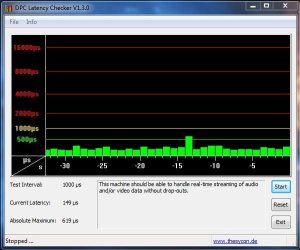
Alright guys I downloaded the dpclat program and ran it while I was playing a single player Warcraft III match. Still got the spikes... DPC Lat says my computer is fine...

Any other ideas?

I'm betting it's the switchable graphics thing not recognizing my dedicated card... Might have to try that modded BIOS....

dpslatcapture.JPG

EDIT: Should I still try disabling and enabling drivers even though it says my computer should run fine?
 

My Computer My Computer

At a glance

Windows 7 Home Premium x64Core i5Switchable
Computer Manufacturer/Model Number
Acer 7750G
OS
Windows 7 Home Premium x64
CPU
Core i5
Graphics Card(s)
Switchable
Could be internet issues..

Try a defrag on your HD
 

My Computer My Computer

At a glance

Win7 Ult x64
OS
Win7 Ult x64

My Computer My Computer

At a glance

Windows 7 Home Premium x64Core i5Switchable
Computer Manufacturer/Model Number
Acer 7750G
OS
Windows 7 Home Premium x64
CPU
Core i5
Graphics Card(s)
Switchable
Oh..well..

Try to see if your drivers are all updated.
 

My Computer My Computer

At a glance

Win7 Ult x64
OS
Win7 Ult x64
rockets are you running the Latency check program while you are playing the game? If you don't then obviously it won't register any lag spikes. But a defrag using Puran defrag is a good idea, it's better than windows defrag. Also check your power options to see if anything is holding back CPU or graphics in any way.
 

My Computer My Computer

At a glance

Windows 7 Pro 64 bit SP1Intel Core i7 950 Quad OC'ed to 3.2 GHZ12GB DDR 3Radeon HD 5870 1GB
Computer type
PC/Desktop
OS
Windows 7 Pro 64 bit SP1
CPU
Intel Core i7 950 Quad OC'ed to 3.2 GHZ
Motherboard
ASRock X58
Memory
12GB DDR 3
Graphics Card(s)
Radeon HD 5870 1GB
Sound Card
Onboard
Monitor(s) Displays
23" Acer HD
Screen Resolution
1920x1080
Hard Drives
128GB SSD
PSU
700W
Case
Coolermaster
Antivirus
Avast Free
Browser
Firefox
Back
Top