Laptop harrddrive problem

jch02140

New member
Local time
7:51 AM
Messages
16
I have a HP laptop. Earlier today when I was using my Hp laptop there are some sudden error boxes pops up and my windows freezed. I have to force restart by pressing the power button. Upon restart I run a test with the Seagate test tool. It failed the Long generic test but SMART and short tests.

I further tried to run the chkdsk tool in the windows system, It seemingly much slower than before and halt at certain places while hearing clicking sound from the hdd. I am unable to complete the check procedure so I stopped it. I am trying to backup everything I can now.

This laptop has been used for more than 6 years, so I guess the drive is failing. However, is there a certain way to pin point which part of hdd is failing?
 

My Computer

OS
Windows 7 Home Premium (x64) SP1
Not really mate as there are so many internal moving parts in a spinner which I am assuming this drive is. For example there is a spinning platter/s, the read / write arms the bearings these sit on, the surface of the platters, and the electronic circuits that control the drive. There is also no way of taking it apart and repairing it yourself because you need a totally particulate free environment to do anything in that manner. In any case the cost of a new drive would be the tiniest fraction of the cost of getting a lab to do it for you.

I would suggest before it fails completely you clone it to a new drive - preferably an SSD if you can afford one using say Macrium free (what I use) if the drive is really bad then I use a Ubuntu OS boot up system to retrieve the important data one needs.
See this

BOOTABLE UBUNTU

Make a bootable Ubuntu disk http://www.ubuntu.com/download

Set the BIOS to boot from the optical when themachine boots it will show you a screen with TRY or INSTALL >select TRY not INSTALL

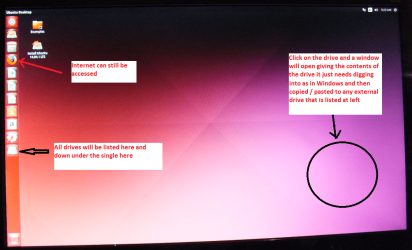
When it is finished - it takes very little time youwill get a screen like in the pic .

Open the drive you want > User and dig downuntil you get to the data / settings you may be able to copy / paste thematerial you want to an external source or other installed drive doing this.

I am not sure if it will but I have recovered tonsof data etc using this method both on "dead" or just plain drivesthat you cannot get data from using Windows.

You may even need to use another machine to do this with the adaptor I have attached a pic for

Now this of course means that if the drive fails you have lost the OS you have installed if that original drive does fail and you will need to reinstall on a new drive from an OEM or use this tutorial and the ei.cfg removal tool that is in it
http://www.sevenforums.com/tutorials/219487-clean-reinstall-factory-oem-windows-7-a.html it is fiddly but doable using borrowed Windows media DVD
 

Attachments

  • UBUNTU SCREEN X2.PNG
    UBUNTU SCREEN X2.PNG
    272.7 KB · Views: 1
  • USBSATA.PNG
    USBSATA.PNG
    26.6 KB · Views: 1

My Computer

Computer type
PC/Desktop
Computer Manufacturer/Model Number
Own build (new) Desk1 / Asus ROG Win 7 / Desk2 1st build
OS
Desk1 7 Home Prem / Desk2 10 Pro / Main lap Asus ROG 10 Pro 2 laptop Toshiba 7 Pro Asus P2520 7 & 10
CPU
Desk1 i5 3750K / Laptop i7 GTX 860M / Desk2 i5 2500
Motherboard
Desk1 Asus P877-V / Desk2 Gigabyte H67 UD3H / Laptop ?
Memory
Desk1 8GB (1866) / Desk2 16GB (1333) / Laptop 8Gb DDR3
Graphics Card(s)
Desk 1& 2NVidia GTX 650 & Laptops on board Intel
Sound Card
Desk 1 & 2 -XONAR DG Realtek High Def audio Laptop
Monitor(s) Displays
Desk 1 Benq HD 2450 / Desk2 Philips 24" / Laptop 17.5"
Screen Resolution
1920x1080 D1 & D2 & Laptop 1
Hard Drives
Desk1 Samsung 120GB 830 SSD
Asus ROG 256GB 850 Pro SSD
Desk2 Samsung 840 256 SSD
Toshiba 120GB EVO
PSU
Desk 1 Corsair HX 1050/ Laptop ? / Desk 2 Corsair HX 650
Case
Desk 1 Cooler HAF XM ? Toshiba laptop / Desk2 Coolermaster
Cooling
Fans on all Desk1 -2 Desk2 - all Coolermasters 5 Laptop ?
Keyboard
Desk 1 MS Sidewinder X6 Desk 2 MS Sidewinder X 4
Mouse
Desk 1&2 - Gigabyte MS 900 gamer - laptop - Logitec wireless
Internet Speed
ADSL2+
Other Info
One other Desktop (tester) and spare Toshba laptop both with SSD's
Running Kaspersky 2016 ISS on all machines config'd identically
Logitec audio stereo systems on each machine (x3)
Canon MG5250MFC
Router/modem TP-Link running WPA2SK
Hard drive clicking is often caused by failing or damaged read write heads. The problem with damaged heads is that this frequently causes damage to the disk platers where the data is stored. In that case it is very important that you make a backup of your data ASAP. Any software that scans the disk for diagnostic or attempted repair procedures is likely to make the problem worse and compromise your ability to recover your data. In some cases repeated data recovery attempts resulted in so much damage that even professional data recovery was impossible.

Of course the best time to backup data is before problems develop. Waiting until you have problems may be too late as many drives fail with no warning or apparent cause. All files of any importance should have at least one backup copy while files of particular importance need 2 or more backup copies. Backups do fail and likely as not this will not be noticed until they are needed.
 

My Computer

Computer type
PC/Desktop
Computer Manufacturer/Model Number
HP
OS
Windows 7 Pro 64 bit
CPU
Xeon W3520
Memory
8 GB
Graphics Card(s)
Nvidia Geforce 210
Yep LMiller has just reiterated basically what I was saying. Back up ASAP an image would be the best if not then data to sticks / drives.

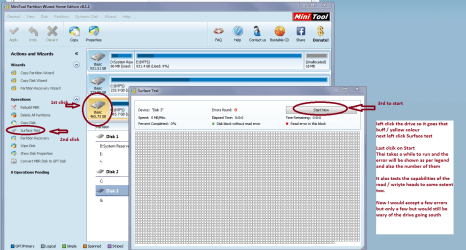
Once you have done that to look for any damage to the platters for example use this Best Free Partition Manager for Windows | MiniTool Partition Free and surface test the drive see my pic - takes a while but will pick up platter damage
 

Attachments

  • MINI TOOL SURFACE 2.PNG
    MINI TOOL SURFACE 2.PNG
    62.3 KB · Views: 1

My Computer

Computer type
PC/Desktop
Computer Manufacturer/Model Number
Own build (new) Desk1 / Asus ROG Win 7 / Desk2 1st build
OS
Desk1 7 Home Prem / Desk2 10 Pro / Main lap Asus ROG 10 Pro 2 laptop Toshiba 7 Pro Asus P2520 7 & 10
CPU
Desk1 i5 3750K / Laptop i7 GTX 860M / Desk2 i5 2500
Motherboard
Desk1 Asus P877-V / Desk2 Gigabyte H67 UD3H / Laptop ?
Memory
Desk1 8GB (1866) / Desk2 16GB (1333) / Laptop 8Gb DDR3
Graphics Card(s)
Desk 1& 2NVidia GTX 650 & Laptops on board Intel
Sound Card
Desk 1 & 2 -XONAR DG Realtek High Def audio Laptop
Monitor(s) Displays
Desk 1 Benq HD 2450 / Desk2 Philips 24" / Laptop 17.5"
Screen Resolution
1920x1080 D1 & D2 & Laptop 1
Hard Drives
Desk1 Samsung 120GB 830 SSD
Asus ROG 256GB 850 Pro SSD
Desk2 Samsung 840 256 SSD
Toshiba 120GB EVO
PSU
Desk 1 Corsair HX 1050/ Laptop ? / Desk 2 Corsair HX 650
Case
Desk 1 Cooler HAF XM ? Toshiba laptop / Desk2 Coolermaster
Cooling
Fans on all Desk1 -2 Desk2 - all Coolermasters 5 Laptop ?
Keyboard
Desk 1 MS Sidewinder X6 Desk 2 MS Sidewinder X 4
Mouse
Desk 1&2 - Gigabyte MS 900 gamer - laptop - Logitec wireless
Internet Speed
ADSL2+
Other Info
One other Desktop (tester) and spare Toshba laptop both with SSD's
Running Kaspersky 2016 ISS on all machines config'd identically
Logitec audio stereo systems on each machine (x3)
Canon MG5250MFC
Router/modem TP-Link running WPA2SK
Thank you for the responds and helpful tips. :)

I will try out the tools suggested. Thanks again.
 

My Computer

OS
Windows 7 Home Premium (x64) SP1
Ok will await with baited breath and don't forget the Ubuntu if the drive does go south in the meantime - I have recovered data form "dead" drives that is as long as they are spinning and not smoking. ;)
 

My Computer

Computer type
PC/Desktop
Computer Manufacturer/Model Number
Own build (new) Desk1 / Asus ROG Win 7 / Desk2 1st build
OS
Desk1 7 Home Prem / Desk2 10 Pro / Main lap Asus ROG 10 Pro 2 laptop Toshiba 7 Pro Asus P2520 7 & 10
CPU
Desk1 i5 3750K / Laptop i7 GTX 860M / Desk2 i5 2500
Motherboard
Desk1 Asus P877-V / Desk2 Gigabyte H67 UD3H / Laptop ?
Memory
Desk1 8GB (1866) / Desk2 16GB (1333) / Laptop 8Gb DDR3
Graphics Card(s)
Desk 1& 2NVidia GTX 650 & Laptops on board Intel
Sound Card
Desk 1 & 2 -XONAR DG Realtek High Def audio Laptop
Monitor(s) Displays
Desk 1 Benq HD 2450 / Desk2 Philips 24" / Laptop 17.5"
Screen Resolution
1920x1080 D1 & D2 & Laptop 1
Hard Drives
Desk1 Samsung 120GB 830 SSD
Asus ROG 256GB 850 Pro SSD
Desk2 Samsung 840 256 SSD
Toshiba 120GB EVO
PSU
Desk 1 Corsair HX 1050/ Laptop ? / Desk 2 Corsair HX 650
Case
Desk 1 Cooler HAF XM ? Toshiba laptop / Desk2 Coolermaster
Cooling
Fans on all Desk1 -2 Desk2 - all Coolermasters 5 Laptop ?
Keyboard
Desk 1 MS Sidewinder X6 Desk 2 MS Sidewinder X 4
Mouse
Desk 1&2 - Gigabyte MS 900 gamer - laptop - Logitec wireless
Internet Speed
ADSL2+
Other Info
One other Desktop (tester) and spare Toshba laptop both with SSD's
Running Kaspersky 2016 ISS on all machines config'd identically
Logitec audio stereo systems on each machine (x3)
Canon MG5250MFC
Router/modem TP-Link running WPA2SK
Back
Top