
laptop has been locked by scamer

peacezone51

New member
Local time
1:40 AM
Messages
3
hello guys,

I got a call from a guy without colour id said himself as a vendor of Microsoft corporation, saying there was some kinda error in my computer and it was needed to be updated. He also called me in my home phone and was chatting with me via word pad, he asked me to open eventmgr and somehow he tracked my computer and locked. Then he asked me to buy his software, he asked my bank details then I knew he was bullshitting on me. I denied, ended up call and chat l with him but now my computer has been locked.

I've attached mine screen which asks password. to start up.

Did this ever happened to anyone else, how can I now unlock my computer?
 

Attachments
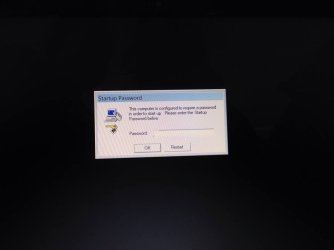
  • 10449770_771510436234844_967324087_n.jpg
    10449770_771510436234844_967324087_n.jpg
    17.8 KB · Views: 2

My Computer My Computer

At a glance

windows 7 home premium 32bit
Computer type
Laptop
Computer Manufacturer/Model Number
toshiba
OS
windows 7 home premium 32bit

My Computer My Computer

At a glance

64-bit Windows 8.1 ProCore(TM) i5 CPU 4330 Haswell @ 3.20GHz12.00 GBIntel(R) HD Graphics
Computer type
PC/Desktop
Computer Manufacturer/Model Number
LENOVO K450 @3.0GHZ
OS
64-bit Windows 8.1 Pro
CPU
Core(TM) i5 CPU 4330 Haswell @ 3.20GHz
Motherboard
LENOVO
Memory
12.00 GB
Graphics Card(s)
Intel(R) HD Graphics
Sound Card
Intel HD integtrated
Monitor(s) Displays
HP 25' ISP Monitor
Screen Resolution
1900/1020
Hard Drives
(1) ST1000DM003-1CH162 (2) Generic STORAGE DEVICE USB Device (3) Generic STORAGE DEVICE USB Device
Internet Speed
100mb down/10mb up
its already locked mate
 

My Computer My Computer

At a glance

windows 7 home premium 32bit
Computer type
Laptop
Computer Manufacturer/Model Number
toshiba
OS
windows 7 home premium 32bit
Hi

The password screen you are seeing is for "SYSKEY" encryption. Read the below guide to know what is "SYSKEY" encryption and what is it's purpose.

Blogs - Steve Lamb's Blog - Site Home - TechNet Blogs

In simple words, "SYSKEY" encryption will encrypt the "SAM" registry hive using a password the user provides. The solution is to restore SAM and other registry hives from a backup copy which is not encrypted. Please follow the below steps.

1. Obtain a Windows installation disc or system repair disc. If you don't have one, either create a "System Repair Disc" from a freind's machine or borrow his/her installation disc.

How to create a "System Repair Disc" : http://www.sevenforums.com/tutorials/2083-system-repair-disc-create.html

Another alternative is to download the "Windows 7 Enterprise Evaluation" ( 64 bit ) from official Microsoft site.

Previous Versions

2. Boot from either "System Repair CD" or install DVD/USB and restore Registry hives from the backup copy using the command line. Usually there will be a backup copy inside "C:\Windows\System32\Config\Regback" folder. This will be a little difficult if you are unfamiliar with command line. But fortunately there is a detailed tutorial which covers step by step instructions which can be read from the below link ( ignore the title ).

http://www.sevenforums.com/tutorials/139576-startup-repair-infinite-loop-recovery.html
 

My Computer My Computer

At a glance

Windows 7 Ultimate x64
Computer type
PC/Desktop
OS
Windows 7 Ultimate x64
This type of SCAM has become quite common in recent years and many are fooled. I have received many such calls. Microsoft and authorized representatives do not make cold calls such as this. Best to just hang up on these calls.
 

My Computer My Computer

At a glance

Windows 7 Pro 64 bitXeon W35208 GBNvidia Geforce 210
Computer type
PC/Desktop
Computer Manufacturer/Model Number
HP
OS
Windows 7 Pro 64 bit
CPU
Xeon W3520
Memory
8 GB
Graphics Card(s)
Nvidia Geforce 210
Follow Anshad's links carefully and ask back any questions you have.

System Restore might also work from the Recovery environment.

If you cannot create a Recovery Disk then you can burn a Win7 installation DVD or flash stick from Steps 1 and 2 of Clean Reinstall - Factory OEM Windows 7 to boot to access System Recovery Options.

This is reparable if you work with Anshad, but if not you can rescue your files from the Step 3 subpoint in Clean Reinstall tutorial then reinstall using those same steps which are the same for retail and will result in a perfect install.
 
Back
Top