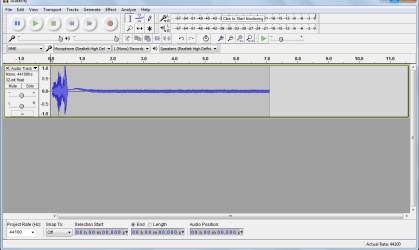
i havn't been using my microphone for a while now.Recently i opened the sound recorder for something and much to my surprise its not recording the sound.The strange thing is that it records sound at the beginning clearly and after a second doesnt catch sound.The mic is located at the top of the screen near the webcam.
The laptop is a FUJITSU LIFEBOOK A SERIES AH531 Windows 7x64 home basic.the audio driver is from REALTEK.I have updated the driver to the latest version but it doesnt seem to change anything.After one second , it doesnt record sound and only way to make it catch the sound is to go near to the mic and speak at full voice.
Attachments
snip_20161217175850.png
25.6 KB
· Views: 6
My Computer
At a glance
Windows 7 home basics x64intel core i5 2430M @2.40GHz4gb samsung/hynixintel integrated hd graphics 3000
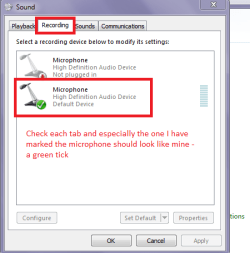
Hello and welcome Nihal mate go to the Control Panel > Sound and check out each of the tabs as in my pic see if there are any not working or other faulty errors marked up. Any device attached should have a green tick against it.
Attachments
SOUND.PNG
12 KB
· Views: 9
My Computer
At a glance
Desk1 7 Home Prem / Desk2 10 Pro / Main lap A...Desk1 i5 3750K / Laptop i7 GTX 860M / Desk2 i...Desk1 8GB (1866) / Desk2 16GB (1333) / Laptop...Desk 1& 2NVidia GTX 650 & Laptops on board Intel
Computer type
PC/Desktop
Computer Manufacturer/Model Number
Own build (new) Desk1 / Asus ROG Win 7 / Desk2 1st build
OS
Desk1 7 Home Prem / Desk2 10 Pro / Main lap Asus ROG 10 Pro 2 laptop Toshiba 7 Pro Asus P2520 7 & 10
One other Desktop (tester) and spare Toshba laptop both with SSD's
Running Kaspersky 2016 ISS on all machines config'd identically
Logitec audio stereo systems on each machine (x3)
Canon MG5250MFC
Router/modem TP-Link running WPA2SK
Nihal mate just how old is the machine mate? I am thinking maybe the actual physical microphone is at fault somehow. That could be either the device itself or other components it connects to ie a dry joint or dud cap will do that.
My Computer
At a glance
Desk1 7 Home Prem / Desk2 10 Pro / Main lap A...Desk1 i5 3750K / Laptop i7 GTX 860M / Desk2 i...Desk1 8GB (1866) / Desk2 16GB (1333) / Laptop...Desk 1& 2NVidia GTX 650 & Laptops on board Intel
Computer type
PC/Desktop
Computer Manufacturer/Model Number
Own build (new) Desk1 / Asus ROG Win 7 / Desk2 1st build
OS
Desk1 7 Home Prem / Desk2 10 Pro / Main lap Asus ROG 10 Pro 2 laptop Toshiba 7 Pro Asus P2520 7 & 10
One other Desktop (tester) and spare Toshba laptop both with SSD's
Running Kaspersky 2016 ISS on all machines config'd identically
Logitec audio stereo systems on each machine (x3)
Canon MG5250MFC
Router/modem TP-Link running WPA2SK
Its around 4 years old.what wonders me is that if it was a hardware problem the mic wouldnt function at all.am i right?.but its working for 1 second everytime i activate the recording option and after that goes out
Also when i switch the tabs between playback and recording devices also its showing that green bar for soumd levels for a second.after that dies out. I think i should visit a repair shop
My Computer
At a glance
Windows 7 home basics x64intel core i5 2430M @2.40GHz4gb samsung/hynixintel integrated hd graphics 3000
Its around 4 years old.what wonders me is that if it was a hardware problem the mic wouldnt function at all.am i right?.but its working for 1 second everytime i activate the recording option and after that goes out
Also when i switch the tabs between playback and recording devices also its showing that green bar for soumd levels for a second.after that dies out. I think i should visit a repair shop
Well in a nutshell yes and no the mic might be ok but the connections may be out of whack that is what I meant by a dry joint or some other dud component that prevents it working properly. Now it also depends on what the mic is constructed from too for example is i a mving coil type or one of the piezo material types?
You can see from this article how many different types there are Microphone - Wikipedia The two types I mentioned work very differently and the older moving coil type relies on just that a moving coil attached to a diaphragm and just for example if the diaphragm is damaged or clogged with crud then no it is not going to work well at all because it relies on that movement to produce an electrical impulse - a loud speaker works in the opposite manner to give you an idea. Now the piezo type is a ceramic based device that relies on the crystal becoming excited by sound waves to produce the signal that is then amplified by the audio system. Look this is all as I said very simplistic and there are many ways that the sound that you produce is not relayed as an electrical signal in the machine. Hence I would be pulling it apart and looking myself but if you are not confident in doing that then yes get someone to have a look at the machine - it could turn out to be something entirely different I am just surmising here.
Now again it is your choice of course and maybe a repair store might be the thing to do if you can afford it and don't have the time to sort it out yourself.
My Computer
At a glance
Desk1 7 Home Prem / Desk2 10 Pro / Main lap A...Desk1 i5 3750K / Laptop i7 GTX 860M / Desk2 i...Desk1 8GB (1866) / Desk2 16GB (1333) / Laptop...Desk 1& 2NVidia GTX 650 & Laptops on board Intel
Computer type
PC/Desktop
Computer Manufacturer/Model Number
Own build (new) Desk1 / Asus ROG Win 7 / Desk2 1st build
OS
Desk1 7 Home Prem / Desk2 10 Pro / Main lap Asus ROG 10 Pro 2 laptop Toshiba 7 Pro Asus P2520 7 & 10
One other Desktop (tester) and spare Toshba laptop both with SSD's
Running Kaspersky 2016 ISS on all machines config'd identically
Logitec audio stereo systems on each machine (x3)
Canon MG5250MFC
Router/modem TP-Link running WPA2SK