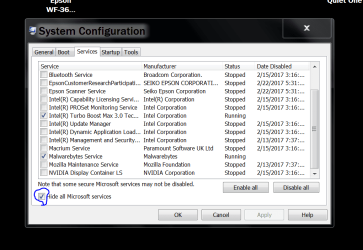
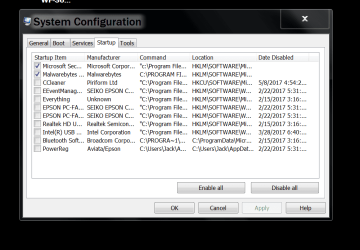
Laptop is having lagging trouble.

ericnh

New member
Local time
8:44 AM
Messages
3
Hey!
I have 2 laptops, an old Lenovo and one new Asus with win 10 x64 installed. Old Lenovo is preinstalled OEM windows vista. Both the laptops have some very important files and to improve the cyber security of the systems, I have installed antivirus and antimalware softwares installed. In Asus I have Kaspersky Total Security 2017 as AntiVirus and MalwareBytes installed where as in vista laptop I have AVG free and MalwareBytes installed for protection from possible malware and virus. Both the laptops have similar applications installed, nothing too graphic or memory heavy. I use both of them in almost similarly, and connects to same WiFI network.
I have no issues with my Asus laptop, but Lenovo laptop is lagging too much than it’s normal performance. You can say it may be because of it’s age. But it worked perfectly fine until a couple of weeks back. What do you the problem can be, some sort of virus or malware issue or do you think some hardware trouble is on it’s way? With my little knowledge, I can’t identify any hardware issues. If it’s malware/virus trouble, does that mean AVG free is not doing it’s job?
 

My Computer

Computer type
Laptop
Computer Manufacturer/Model Number
Lenovo
OS
Windows 7 ultimate x64
CPU
Intel
Memory
4Gb
Graphics Card(s)
Nvidia
Hard Drives
500GB
Antivirus
Kaspersky
Browser
Chrome, Internet explorer, Firefox
Could you post again with the information about the computer you are having problems with. Intermingling information with other computers that you have is just confusing.

Jack
 

My Computer

Computer type
PC/Desktop
Computer Manufacturer/Model Number
Home made Desktop
OS
Windows 10 Pro. 64/ version 1709 Windows 7 Pro/64
CPU
Intel i7-6800K @ 4.3
Motherboard
ASUS X-99 Deluxe II
Memory
Corsair Platinum 16 gig @2400
Graphics Card(s)
EVGA GTX 1070 OC
Monitor(s) Displays
Asus 27" LED LCD/VE278Q
Screen Resolution
1920-1080 or 1280-720 HDMI
Hard Drives
INTEL SSD 730-240 Gb Sata 3.0/
PSU
EVGA Platium 1200W
Case
Phanteks Luxe Tempered Glass 8 fans/ one radiator
Cooling
XSPC/ Water Cooled CPU
Keyboard
Das 4 Professional
Mouse
Logitech M705/MX Anywhere 2-S
Internet Speed
100 mbits
Antivirus
Microsoft Security Essentials/ Malwarebytes Premium 3.0/ SAS
Browser
I.E. 11 default/Firefox/ ISP Time Warner Cable/Spectrum
Other Info
LG BluRay Burner/
Sound system-KLipsch-THX/
Icy Dock ssd Hot Swap bays.
Sorry for making it a bit confusing.
I will tell the details of the problematic laptop only:
Lenovo Y550
OEM Vista x64 Installed - which I am looking to upgrade into Win7 x64.
AV - AVG Free AM- MalwareBytes
4GB DDR3 Intel Core 2 Duo
Use a laptop cooler as well.

Use:
Movies, Music, Browsing, Blog Writing, HTML coding, Occasional Photo editing(only Jpeg) in lightroom, Occasional gaming (old games like Age of Empires and Rise of Nations) and other small things.

Lenovo though old, worked perfectly, until a few weeks back. Never showed any BSOD or overheating shutdown problem.
Now with this lag, I am concerned if it is a malware/virus trouble or worse, signs of deteriorating hardware. I want to confirm before making a Win 7 upgrade.

Thanks!
 

My Computer

Computer type
Laptop
Computer Manufacturer/Model Number
Lenovo
OS
Windows 7 ultimate x64
CPU
Intel
Memory
4Gb
Graphics Card(s)
Nvidia
Hard Drives
500GB
Antivirus
Kaspersky
Browser
Chrome, Internet explorer, Firefox

My Computer

Computer type
PC/Desktop
Computer Manufacturer/Model Number
Home made Desktop
OS
Windows 10 Pro. 64/ version 1709 Windows 7 Pro/64
CPU
Intel i7-6800K @ 4.3
Motherboard
ASUS X-99 Deluxe II
Memory
Corsair Platinum 16 gig @2400
Graphics Card(s)
EVGA GTX 1070 OC
Monitor(s) Displays
Asus 27" LED LCD/VE278Q
Screen Resolution
1920-1080 or 1280-720 HDMI
Hard Drives
INTEL SSD 730-240 Gb Sata 3.0/
PSU
EVGA Platium 1200W
Case
Phanteks Luxe Tempered Glass 8 fans/ one radiator
Cooling
XSPC/ Water Cooled CPU
Keyboard
Das 4 Professional
Mouse
Logitech M705/MX Anywhere 2-S
Internet Speed
100 mbits
Antivirus
Microsoft Security Essentials/ Malwarebytes Premium 3.0/ SAS
Browser
I.E. 11 default/Firefox/ ISP Time Warner Cable/Spectrum
Other Info
LG BluRay Burner/
Sound system-KLipsch-THX/
Icy Dock ssd Hot Swap bays.
I'm going to have to do a little "Guessing" since You didn't post a few things. First off would be on the CPU/RAM. Looking at this Review http://www.notebookreview.com/notebookreview/lenovo-ideapad-y550-review/ You could be running a Core 2 Duo with 800 RAM or possibly a later Model https://www.newegg.com/Product/Product.aspx?Item=N82E16834146612 with a P7459 with 1066 RAM ?? Giving Specs like those goes a long way.

If AVG and Malwarebytes don't show it's infected with Malware, You could stress test both the RAM and CPU. IF You're still running the Stock original Hard Drive I'd be inclined to think that might be the problem and suggest You check it first. Laptop 5400 RPM drives are really slow and an upgrade to a small SSD could possibly breathe new life into it provided the other components are good.
 

My Computer

Computer type
PC/Desktop
OS
8.1 home x64
Back
Top