laptop mouse pad issue

dblank

New member
Local time
6:29 AM
Messages
5
So I hate that when I tap the mouse pad on my laptop while i'm typing that it clicks. I only use my wireless mouse anyway. Where can I turn this feature off? or turn the mouse pad off all together?
 

My Computer My Computer

Computer Manufacturer/Model Number
Sony Vaio SZ240P
OS
Windows 7 Ultimate
CPU
Intel T2400 @1.83GHz
Memory
2.50 GB
Graphics Card(s)
nVida
Hard Drives
100 GB
touchpad

So I hate that when I tap the mouse pad on my laptop while i'm typing that it clicks. I only use my wireless mouse anyway. Where can I turn this feature off? or turn the mouse pad off all together?

You can have the touchpad disabled in cpanel>mouse> disabled when usb pointing device is... or disabled all the time.

hope this helps

Ken
 
Last edited:

My Computer My Computer

Computer Manufacturer/Model Number
HP Pavillion dv-7 1005 Tx
OS
Win 8 Release candidate 8400
CPU
[email protected]
Memory
4 gigs
Graphics Card(s)
Nvidia 9600M
Sound Card
HD built-in
Monitor(s) Displays
17" Wxga
Screen Resolution
1440x900
Cooling
none
Internet Speed
45Mb down 5Mb up
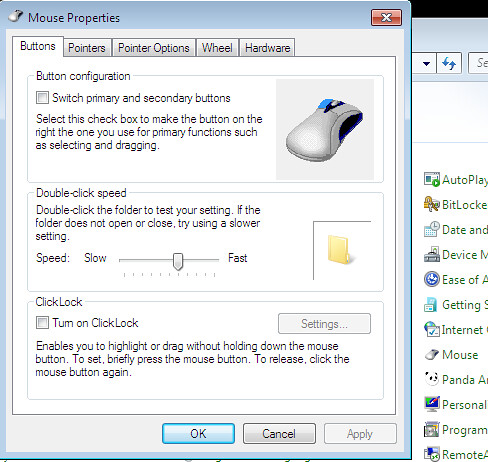
when I click on mouse in the control panel that's not the properties window I get.
Mine looks like this:
3702669369_dcece70e35.jpg
 

My Computer My Computer

Computer Manufacturer/Model Number
Sony Vaio SZ240P
OS
Windows 7 Ultimate
CPU
Intel T2400 @1.83GHz
Memory
2.50 GB
Graphics Card(s)
nVida
Hard Drives
100 GB
There might be a setting in the BIOS to disable it.
 

My Computer My Computer

Computer Manufacturer/Model Number
HP Compaq Presario/SR5113WM
OS
Windows 7 Ultimate x64/ Windows Vista Ultimate x64
CPU
AMD Athlon 64 X2 3600+ 1.9Ghz
Motherboard
Asus M2N68-LA
Memory
PNY Optima Memory DDR2 2GB 2x1 kit
Graphics Card(s)
PNY Nvidia 8400 GS 256MB
Sound Card
On board RealTek
Monitor(s) Displays
Acer X163W LCD
Screen Resolution
1366x768
Hard Drives
Western Digital 160 GB SATA 3G (3.0Gb/sec)
7200 rpm
Western Digital 160 GB IDE
PSU
Dynex 400w
Case
Nothin Special
Cooling
Stock
Keyboard
Standard 102 key with volume and sleep buttons
Mouse
Wireless Logitech LX7
Internet Speed
Comcrap 10mb cable
Other Info
Insignia 2.1 speakers, wireless Xbox 360 controller w/plug n play charger, Belkin wireless G + mimo usb network adapter.
@ ken: By the looks of his picture, he has the default drivers included in Windows for his touchpad (more than likely a Synaptics Touchpad).

@OP Install the drivers from your computer manufacture...it will give you additional options for touchpad (those seen in Ken's pic). Just disable it there
 

My Computer My Computer

Computer Manufacturer/Model Number
Compal JFT02 (Custom Build Laptop)
OS
Windows 7 Home Premium x64 - Mac OS X 10.6.4 x64
CPU
Intel Core 2 Duo T9300 2.5 GHz
Motherboard
JFT02
Memory
4GB Kingston DDR2-800
Graphics Card(s)
NVIDIA Geforce 8600M GT (512MB Model)
Sound Card
Realtek HD Audio
Monitor(s) Displays
WUXGA Standard Laptop Display
Screen Resolution
1680*1050
Hard Drives
Toshiba 320GB 5400RPM Laptop HD
PSU
Standard Laptop Power Supply
Case
Standard Laptop Case
Cooling
Standard Laptop Cooling
Keyboard
Standard Laptop 105 Key-Keyboard
Mouse
Synaptics Touchpad
Internet Speed
Verizion Online DSL 3360/864 kbs (dl/up)
Is there a way to adjust double tap sensitivity without the Synaptic driver? When I install it it acts really funny, very twitchy and completely unusable. I prefer the default drivers because at least the cursor works fine, but double tap is far too sensitive.
 

My Computer My Computer

OS
Windows 7 Home Premium x64
CPU
Intel E4300 C2D 1.8ghz
Motherboard
Gigabyte GA-P35-DS3L Rev 2.0
Memory
4gb Adata DDR2800
Graphics Card(s)
Evga 8800GT 512mb PCI-E
Sound Card
Sb Audigy 2 Value (yes, Im cheap)
Monitor(s) Displays
Sceptre X20WC
Screen Resolution
1680x1050
Hard Drives
WD 640gb Black SATA
PSU
Seasonic 380w
Case
Coolermaster Elite330
Cooling
2x Panaflo 120mm, other wise stock every where else
Keyboard
Dell
Mouse
MS Explorer 3.0
Internet Speed
12mbps when it wants to be.
How to turn off my mouse touchpad?

My mouse properties looks like dblank's.

There wasn't a setting in bios to disable it.

My computer manufacturer does not have drivers for windows 7. I tried installing older drivers from vista and that didn't work.

My touch pad is a ALPS Touchpad Pointing Device.

Please help me disable this.

Jeremy
 

My Computer My Computer

Computer Manufacturer/Model Number
HP Pavilion dv2988nr
OS
Windows 7 Ultimate X64
CPU
AMD Turion X2 64
Memory
4096 MB
Graphics Card(s)
NVIDIA GeForce Go 7150M
Sound Card
none
Monitor(s) Displays
14.1" WXGA High-Definition BrightView Widescreen Display (12
Hard Drives
250 GB (5400 rpm) Internal
PSU
* 65 W AC Adapter * 6-cell Lithium-Ion (Li-Ion)
Case
13.15" (L) x 9.33" (W) x 1.02" (min H)/1.54" (max H)
Cooling
Fan

My Computer My Computer

Computer Manufacturer/Model Number
HP Pavilion dv2988nr
OS
Windows 7 Ultimate X64
CPU
AMD Turion X2 64
Memory
4096 MB
Graphics Card(s)
NVIDIA GeForce Go 7150M
Sound Card
none
Monitor(s) Displays
14.1" WXGA High-Definition BrightView Widescreen Display (12
Hard Drives
250 GB (5400 rpm) Internal
PSU
* 65 W AC Adapter * 6-cell Lithium-Ion (Li-Ion)
Case
13.15" (L) x 9.33" (W) x 1.02" (min H)/1.54" (max H)
Cooling
Fan
DISABLING LAPTOP MOUSE PAD on WINDOWS 7


for Windows 7 , go to Control Panel > Hardware and Sound , then under Devices and Printer click MOUSE.

a WINDOW for MOUSE PROPERTIES will appear then click the "Finger Sensing Pad" tab .. Then click " Configure"

On "Configure Item" on the left corner click the "enable/Disable Pad" and under this you go to "USB MOUSE DETECTION" and check the box "Disable pad while external USB is plugged in"
:)
 

My Computer My Computer

OS
windows 7
After I installing win 7 ultimate x64, my gateway m-6823 mouse pad has gone crazy. Also I noticed control panel / hardware and sound / devices and printers/ mouse pad properties is not present for alter the setting. Any help is highly appreciated.
 

My Computer My Computer

Computer Manufacturer/Model Number
gateway m6823
OS
windows 7 ultimate x64
CPU
core2 duo 1.5
Back
Top