Solved Laptop NBA 2k11 running slow when it was fine a few days ago

writhziden

Closed by request.
Local time
4:40 PM
Messages
11,269
Location
Colorado
First, my laptop is not my main computer for gaming, but I use it occasionally when my girlfriend needs my desktop and I want to play NBA 2K11. The game began running very sluggishly when playing (menus are fine), and the fps dropped from 40 fps to 15 fps. It was fine when I played on the 13th of November, but it is now unplayable. I have not changed any of the video settings in the game, so I know that is not the issue.

In the time since it worked, I have installed some video capturing software to work with my Hauppauge HD PVR. Arcsoft TotalMedia Extreme, and Hauppauge WinTV, which includes BlastCfg, Scheduler, and TitanTV Remote Scheduler. I have tried doing a clean disk, check disk, and defrag. Clean disk cleaned up 208 files freeing up ~4GB of space. Check disk found no errors. My files were 1% fragmented, but are now at 0%.

One issue I did find is that my driver is one year out of date, and I cannot find a suitable driver through NVIDIA to fix it. The one that is supposed to go with my graphics card says it cannot find suitable hardware when it scans for the graphics card (yes I ran as administrator).

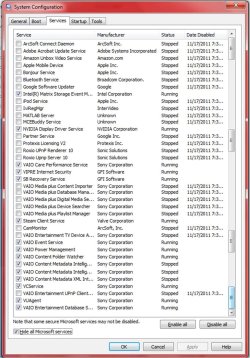
I have also turned off all non Microsoft services and processes associated with the new software as well as adobe, apple, etc. to no avail. I also changed system startup to not launch any unnecessary programs. I will provide the startup and services images as well.

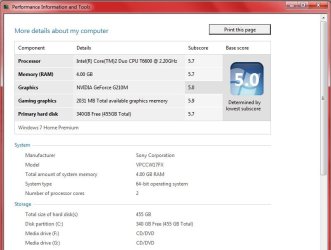
My system specs are provided in the image attachment.

Anyone who can help, I really appreciate it.
 

Attachments
  • System1.jpg
    System1.jpg
    45.2 KB · Views: 94
  • System2.jpg
    System2.jpg
    65.6 KB · Views: 55
  • startup.jpg
    startup.jpg
    109 KB · Views: 45
  • Services.jpg
    Services.jpg
    184.8 KB · Views: 33

My Computer My Computer

At a glance

Windows 7 Home Premium 64 BitIntel(R) Core(TM)2 Quad CPU Q9550 @ 2.83GHz6.00 GB Hundai HMT125U6BFR8C-H9ATI Radeon HD 4850
Computer Manufacturer/Model Number
HP Pavilion e9110t
OS
Windows 7 Home Premium 64 Bit
CPU
Intel(R) Core(TM)2 Quad CPU Q9550 @ 2.83GHz
Motherboard
Pegatron IPIEL-LA3
Memory
6.00 GB Hundai HMT125U6BFR8C-H9
Graphics Card(s)
ATI Radeon HD 4850
Sound Card
Realtek High Definition Audio/ATI High Definition Audio
Monitor(s) Displays
Acer AL2216W
Screen Resolution
1680x1050
Hard Drives
Hitachi HDP725050GLA360 ATA Device 500 GB
PSU
Unknown/installed by HP
Case
HP generic case
Cooling
Intel Stock Cooling
Keyboard
HP Keyboard
Mouse
HP Mouse
Internet Speed
Download: 19.15 Mbps Upload: 1.67 Mbps
Other Info
Network Adapter Realtek RTL8168D/8111D Family PCI-E Gigabit Ethernet NIC (NDIS 6.20)
Network Adapter 802.11n Wireless PCI Express Card LAN Adapter
Do you have an up-to-date antivirus and have you checked for them (viruses)?

Here is a good link that may help get your computer speed up to par, following it will get you a whole bunch of different fixes for speed: Optimize Windows 7

I wouldn't go as far as to disable services, but to clear your startup folder of all programs (unless you use one or two right away) is a good idea. I would only use system configuration for troubleshooting, but it is your call.

In disk cleanup, there are lists that actually make your computer a tad faster (windows files) so I'd only get rid of stuff like offline files, etc.

In control panel, you don't have programs installed that you don't want or aren't aware of do you? (Avoid uninstalling drivers, etc.)

You have all the most recent and correct drivers installed on your computer? What nvidia product do you have that needs a driver? Are your system specs on this website up to date so I can let you know where to go from here?
 

My Computer My Computer

At a glance

Microsoft Windows 8.1 Pro 64-bitIntel(R) Core(TM) i3-4130 CPU @ 3.40GHz8.00 GBNone
Computer type
PC/Desktop
Computer Manufacturer/Model Number
Custom Asus Build
OS
Microsoft Windows 8.1 Pro 64-bit
CPU
Intel(R) Core(TM) i3-4130 CPU @ 3.40GHz
Motherboard
B85M-E
Memory
8.00 GB
Graphics Card(s)
None
Sound Card
Realtek High Definition Audio
Monitor(s) Displays
Asus 23.6" Monitor
Screen Resolution
1920 x 1080 x 32 bits (4294967296 colors) @ 60 Hz
Hard Drives
INTEL SSDSC2BW180A4
Samsung SSD 840 PRO Series
PSU
Seasonic S12II-380Bronze
Case
Lian Li
Cooling
Fan, Passive
Keyboard
Logitech K120
Mouse
Microsoft Touch Mouse
Internet Speed
4ms Ping, 19.0 Mbps Download, 19.0 Mbps Upload
Antivirus
Eset Endpoint
Browser
Internet Explorer, Chrome
Do you have an up-to-date antivirus and have you checked for them (viruses)?

Here is a good link that may help get your computer speed up to par, following it will get you a whole bunch of different fixes for speed: Optimize Windows 7

I wouldn't go as far as to disable services, but to clear your startup folder of all programs (unless you use one or two right away) is a good idea. I would only use system configuration for troubleshooting, but it is your call.

In disk cleanup, there are lists that actually make your computer a tad faster (windows files) so I'd only get rid of stuff like offline files, etc.

In control panel, you don't have programs installed that you don't want or aren't aware of do you? (Avoid uninstalling drivers, etc.)

You have all the most recent and correct drivers installed on your computer? What nvidia product do you have that needs a driver? Are your system specs on this website up to date so I can let you know where to go from here?

My antivirus is up to date, and there are no viruses, just the usual cookies that are marked as low risk.

I will look into optimization, thanks.

The services I disabled were for test purposes. I will start them once I have identified my problem. I do not believe any of the remaining startup programs are the problem since they were installed and starting up before I ran into this problem.

In disk cleanup, I do not remove any of the Microsoft related files needed for the system to run, even if they are for rolling back the system in case the system needs those to return to a restore point.

I am aware of all my installed programs, so I do not believe that to be an issue.

My profile system specs are for my desktop computer. My laptop specs are in the image in my original post. The NVIDIA driver I need is for my graphics card. I downloaded and tried to install the appropriate driver from the website, the driver for the G210M, and was given a message stating something to the effect that it was unable to find the appropriate hardware supported by the driver. I received my only graphics driver update through Windows update, so I am not sure what the issue is with that.

I do have the rest of my drivers as up to date as possible. I go to the sites for the company that sells the product to get most updates. My sound, network, and BIOS are all up to date.

For more information: my laptop is a Sony VAIO VPCCW17FX, and I have checked the support for this model on their site. The only graphics driver on there is for the original driver from July 2009.

Thanks for the help.
 

My Computer My Computer

At a glance

Windows 7 Home Premium 64 BitIntel(R) Core(TM)2 Quad CPU Q9550 @ 2.83GHz6.00 GB Hundai HMT125U6BFR8C-H9ATI Radeon HD 4850
Computer Manufacturer/Model Number
HP Pavilion e9110t
OS
Windows 7 Home Premium 64 Bit
CPU
Intel(R) Core(TM)2 Quad CPU Q9550 @ 2.83GHz
Motherboard
Pegatron IPIEL-LA3
Memory
6.00 GB Hundai HMT125U6BFR8C-H9
Graphics Card(s)
ATI Radeon HD 4850
Sound Card
Realtek High Definition Audio/ATI High Definition Audio
Monitor(s) Displays
Acer AL2216W
Screen Resolution
1680x1050
Hard Drives
Hitachi HDP725050GLA360 ATA Device 500 GB
PSU
Unknown/installed by HP
Case
HP generic case
Cooling
Intel Stock Cooling
Keyboard
HP Keyboard
Mouse
HP Mouse
Internet Speed
Download: 19.15 Mbps Upload: 1.67 Mbps
Other Info
Network Adapter Realtek RTL8168D/8111D Family PCI-E Gigabit Ethernet NIC (NDIS 6.20)
Network Adapter 802.11n Wireless PCI Express Card LAN Adapter

My Computer My Computer

At a glance

Windows 7 Home Premium 64 BitIntel(R) Core(TM)2 Quad CPU Q9550 @ 2.83GHz6.00 GB Hundai HMT125U6BFR8C-H9ATI Radeon HD 4850
Computer Manufacturer/Model Number
HP Pavilion e9110t
OS
Windows 7 Home Premium 64 Bit
CPU
Intel(R) Core(TM)2 Quad CPU Q9550 @ 2.83GHz
Motherboard
Pegatron IPIEL-LA3
Memory
6.00 GB Hundai HMT125U6BFR8C-H9
Graphics Card(s)
ATI Radeon HD 4850
Sound Card
Realtek High Definition Audio/ATI High Definition Audio
Monitor(s) Displays
Acer AL2216W
Screen Resolution
1680x1050
Hard Drives
Hitachi HDP725050GLA360 ATA Device 500 GB
PSU
Unknown/installed by HP
Case
HP generic case
Cooling
Intel Stock Cooling
Keyboard
HP Keyboard
Mouse
HP Mouse
Internet Speed
Download: 19.15 Mbps Upload: 1.67 Mbps
Other Info
Network Adapter Realtek RTL8168D/8111D Family PCI-E Gigabit Ethernet NIC (NDIS 6.20)
Network Adapter 802.11n Wireless PCI Express Card LAN Adapter
Another update: I found the updated driver on Sony's site, but it is the one I currently have on my computer from September 2010. When I check NVIDIA's site through their hardware scanner to find the right driver, I get the following message:

NVIDIA GeForce G210M 259.57 The Manufacturer of this system requires that you download the driver for your GPU from their support site.

The GeForce M series and GeForce Go series notebook GPUs use drivers that have been customized by the notebook manufacturers to support hot key functions, power management functions, lid close and suspend/resume behavior. NVIDIA has worked with some notebook manufacturers to provide notebook specific driver updates, however, most notebook driver updates must come from the notebook manufacturer. Additionally, the desktop GeForce graphics drivers will not install on GeForce M series and Quadro M series notebook GPUs.
 
Last edited:

My Computer My Computer

At a glance

Windows 7 Home Premium 64 BitIntel(R) Core(TM)2 Quad CPU Q9550 @ 2.83GHz6.00 GB Hundai HMT125U6BFR8C-H9ATI Radeon HD 4850
Computer Manufacturer/Model Number
HP Pavilion e9110t
OS
Windows 7 Home Premium 64 Bit
CPU
Intel(R) Core(TM)2 Quad CPU Q9550 @ 2.83GHz
Motherboard
Pegatron IPIEL-LA3
Memory
6.00 GB Hundai HMT125U6BFR8C-H9
Graphics Card(s)
ATI Radeon HD 4850
Sound Card
Realtek High Definition Audio/ATI High Definition Audio
Monitor(s) Displays
Acer AL2216W
Screen Resolution
1680x1050
Hard Drives
Hitachi HDP725050GLA360 ATA Device 500 GB
PSU
Unknown/installed by HP
Case
HP generic case
Cooling
Intel Stock Cooling
Keyboard
HP Keyboard
Mouse
HP Mouse
Internet Speed
Download: 19.15 Mbps Upload: 1.67 Mbps
Other Info
Network Adapter Realtek RTL8168D/8111D Family PCI-E Gigabit Ethernet NIC (NDIS 6.20)
Network Adapter 802.11n Wireless PCI Express Card LAN Adapter
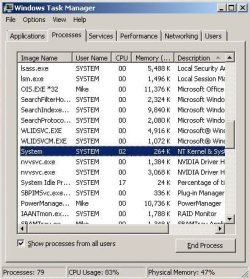
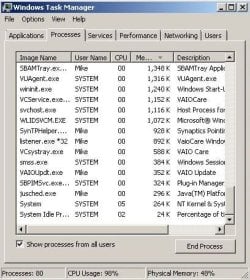
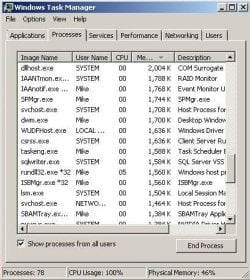
upload a picture of your cpu usage in task manager (try and get it when the computer is acting slow). Check show processes from all users, and if you can't get it all, scroll down and get another picture.

Nvidia has drivers from its website for notbooks, and I've never heard of manufacturers customizing gpus to the point where an nvidia driver won't work on them. you could always try it and if it doesn't work, roll back the driver.

your computer is getting plenty of airflow and not overheating right?

I'm not sure what else to add if you went through all the optimize windows 7 tutorials...

You can download malwarebytes to work closely with your antivirus that can further scan your system for bugs. What antivirus do you have (please don't say macAfee or avg...)?

Do you have all important updates from windows update installed? those are... important. that malicious software removal tool might com in handy as well.

Also, follow this tutorial: http://www.sevenforums.com/tutorials/1538-sfc-scannow-command-system-file-checker.html
 

My Computer My Computer

At a glance

Microsoft Windows 8.1 Pro 64-bitIntel(R) Core(TM) i3-4130 CPU @ 3.40GHz8.00 GBNone
Computer type
PC/Desktop
Computer Manufacturer/Model Number
Custom Asus Build
OS
Microsoft Windows 8.1 Pro 64-bit
CPU
Intel(R) Core(TM) i3-4130 CPU @ 3.40GHz
Motherboard
B85M-E
Memory
8.00 GB
Graphics Card(s)
None
Sound Card
Realtek High Definition Audio
Monitor(s) Displays
Asus 23.6" Monitor
Screen Resolution
1920 x 1080 x 32 bits (4294967296 colors) @ 60 Hz
Hard Drives
INTEL SSDSC2BW180A4
Samsung SSD 840 PRO Series
PSU
Seasonic S12II-380Bronze
Case
Lian Li
Cooling
Fan, Passive
Keyboard
Logitech K120
Mouse
Microsoft Touch Mouse
Internet Speed
4ms Ping, 19.0 Mbps Download, 19.0 Mbps Upload
Antivirus
Eset Endpoint
Browser
Internet Explorer, Chrome
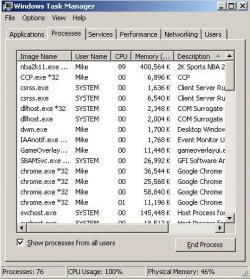
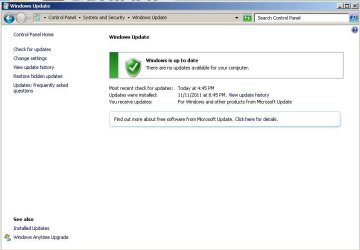
Alright, here are my task manager shots, as well as where my windows update is at. I ran sfc /scannow earlier today, and it found no corrupt files. I am in the process of running Malwarebytes' full scan. I will update you as to its output when it finishes.

Edit: And I run Vipre Internet Security 2012 for my antivirus.

Edit 2: The computer does not seem to be overheating. It has been a while since I blew the dust out, though. Perhaps that will be my next step.
 

Attachments

  • TaskManager04.jpg
    TaskManager04.jpg
    43.1 KB · Views: 10
  • TaskManager03.jpg
    TaskManager03.jpg
    45 KB · Views: 13
  • TaskManager02.jpg
    TaskManager02.jpg
    46.8 KB · Views: 10
  • TaskManager01.jpg
    TaskManager01.jpg
    44.3 KB · Views: 13
  • TaskManager00.jpg
    TaskManager00.jpg
    45.3 KB · Views: 15
  • WindowsUpdate.jpg
    WindowsUpdate.jpg
    39.5 KB · Views: 15

My Computer My Computer

At a glance

Windows 7 Home Premium 64 BitIntel(R) Core(TM)2 Quad CPU Q9550 @ 2.83GHz6.00 GB Hundai HMT125U6BFR8C-H9ATI Radeon HD 4850
Computer Manufacturer/Model Number
HP Pavilion e9110t
OS
Windows 7 Home Premium 64 Bit
CPU
Intel(R) Core(TM)2 Quad CPU Q9550 @ 2.83GHz
Motherboard
Pegatron IPIEL-LA3
Memory
6.00 GB Hundai HMT125U6BFR8C-H9
Graphics Card(s)
ATI Radeon HD 4850
Sound Card
Realtek High Definition Audio/ATI High Definition Audio
Monitor(s) Displays
Acer AL2216W
Screen Resolution
1680x1050
Hard Drives
Hitachi HDP725050GLA360 ATA Device 500 GB
PSU
Unknown/installed by HP
Case
HP generic case
Cooling
Intel Stock Cooling
Keyboard
HP Keyboard
Mouse
HP Mouse
Internet Speed
Download: 19.15 Mbps Upload: 1.67 Mbps
Other Info
Network Adapter Realtek RTL8168D/8111D Family PCI-E Gigabit Ethernet NIC (NDIS 6.20)
Network Adapter 802.11n Wireless PCI Express Card LAN Adapter
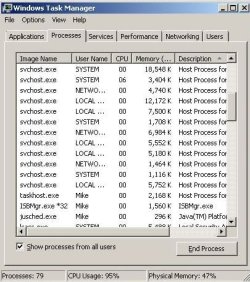
Maybe it is that new video editing program that is slowing it down after all.

look in your startup folder and see if there are any programs you don't exactly need to startup with windows, and delete them. It might help to restart your computer a bit more often (unless you already shut it down often). You can end some processes (BE SAFE ABOUT THIS, YOU MIGHT END SOMETHING IMPORTANT) in the task manager that you know are programs that don't need to be running in the background, that way give you a slight boost in speed.

Perhaps your game was just borderline working on your computer but not as well now. Could you lower the graphics options in the game's control panel? In nvidia control panel, could you check every option to 'let the application decide' so as to be more compatible with the game (and not force things it might not do very well).

Aside from all this, I am afraid I have run out of ideas. :(
 

My Computer My Computer

At a glance

Microsoft Windows 8.1 Pro 64-bitIntel(R) Core(TM) i3-4130 CPU @ 3.40GHz8.00 GBNone
Computer type
PC/Desktop
Computer Manufacturer/Model Number
Custom Asus Build
OS
Microsoft Windows 8.1 Pro 64-bit
CPU
Intel(R) Core(TM) i3-4130 CPU @ 3.40GHz
Motherboard
B85M-E
Memory
8.00 GB
Graphics Card(s)
None
Sound Card
Realtek High Definition Audio
Monitor(s) Displays
Asus 23.6" Monitor
Screen Resolution
1920 x 1080 x 32 bits (4294967296 colors) @ 60 Hz
Hard Drives
INTEL SSDSC2BW180A4
Samsung SSD 840 PRO Series
PSU
Seasonic S12II-380Bronze
Case
Lian Li
Cooling
Fan, Passive
Keyboard
Logitech K120
Mouse
Microsoft Touch Mouse
Internet Speed
4ms Ping, 19.0 Mbps Download, 19.0 Mbps Upload
Antivirus
Eset Endpoint
Browser
Internet Explorer, Chrome
I would rather get it working as it was. And lowering the graphics only results in 30 fps (and yes, I paused the scan by Malwarebytes). This is lower than the 40 fps I had with the higher settings, so I still think there is something more going on. It may be that the computer is getting too hot due to dust slowing the fans down, but I still wouldn't expect this much of a drop in performance if that were the case. I will still try blowing it out with my can of air when I am finished with the Malwarebytes' scan.

I do have all of the video capture programs stopped, and I have tried ending other processes run purely by my user Mike. Nada. I am also at a loss as to what is going on. :( I am fairly knowledgable about Windows, and can usually fix any hangups that occur.
 

My Computer My Computer

At a glance

Windows 7 Home Premium 64 BitIntel(R) Core(TM)2 Quad CPU Q9550 @ 2.83GHz6.00 GB Hundai HMT125U6BFR8C-H9ATI Radeon HD 4850
Computer Manufacturer/Model Number
HP Pavilion e9110t
OS
Windows 7 Home Premium 64 Bit
CPU
Intel(R) Core(TM)2 Quad CPU Q9550 @ 2.83GHz
Motherboard
Pegatron IPIEL-LA3
Memory
6.00 GB Hundai HMT125U6BFR8C-H9
Graphics Card(s)
ATI Radeon HD 4850
Sound Card
Realtek High Definition Audio/ATI High Definition Audio
Monitor(s) Displays
Acer AL2216W
Screen Resolution
1680x1050
Hard Drives
Hitachi HDP725050GLA360 ATA Device 500 GB
PSU
Unknown/installed by HP
Case
HP generic case
Cooling
Intel Stock Cooling
Keyboard
HP Keyboard
Mouse
HP Mouse
Internet Speed
Download: 19.15 Mbps Upload: 1.67 Mbps
Other Info
Network Adapter Realtek RTL8168D/8111D Family PCI-E Gigabit Ethernet NIC (NDIS 6.20)
Network Adapter 802.11n Wireless PCI Express Card LAN Adapter
Here is my log from Malwarebytes. No infections found.
 

Attachments

My Computer My Computer

At a glance

Windows 7 Home Premium 64 BitIntel(R) Core(TM)2 Quad CPU Q9550 @ 2.83GHz6.00 GB Hundai HMT125U6BFR8C-H9ATI Radeon HD 4850
Computer Manufacturer/Model Number
HP Pavilion e9110t
OS
Windows 7 Home Premium 64 Bit
CPU
Intel(R) Core(TM)2 Quad CPU Q9550 @ 2.83GHz
Motherboard
Pegatron IPIEL-LA3
Memory
6.00 GB Hundai HMT125U6BFR8C-H9
Graphics Card(s)
ATI Radeon HD 4850
Sound Card
Realtek High Definition Audio/ATI High Definition Audio
Monitor(s) Displays
Acer AL2216W
Screen Resolution
1680x1050
Hard Drives
Hitachi HDP725050GLA360 ATA Device 500 GB
PSU
Unknown/installed by HP
Case
HP generic case
Cooling
Intel Stock Cooling
Keyboard
HP Keyboard
Mouse
HP Mouse
Internet Speed
Download: 19.15 Mbps Upload: 1.67 Mbps
Other Info
Network Adapter Realtek RTL8168D/8111D Family PCI-E Gigabit Ethernet NIC (NDIS 6.20)
Network Adapter 802.11n Wireless PCI Express Card LAN Adapter
Alright, I solved my problem, though I'm not entirely sure which scenario did it. I turned off the computer, disconnected the AC Adapter, disconnected the battery, and used an air can to blow out a bit of dust. One of two things happened:

1. The computer was so full of dust that the fans were slowing down and needed to be purged.
2. The video capture hardware I used caused a glitch in my laptop's hardware which was reset by removing all power from it and resetting the hardware in some way.

Thanks Dusty for your input. I have a boost in my fps now from 40 fps to 50 fps at higher graphics settings primarily (I believe) from the Windows 7 optimization.

The reason why 2. is a possibility is I know that doing a cold shutdown and removal of power performs some hardware reset. I have used this to fix many laptops which were performing abnormally (not starting windows, showing only a black screen on startup, etc.) I still am not sure how this hardware reset occurs, and would love to find out from someone more knowledgeable please.
 

My Computer My Computer

At a glance

Windows 7 Home Premium 64 BitIntel(R) Core(TM)2 Quad CPU Q9550 @ 2.83GHz6.00 GB Hundai HMT125U6BFR8C-H9ATI Radeon HD 4850
Computer Manufacturer/Model Number
HP Pavilion e9110t
OS
Windows 7 Home Premium 64 Bit
CPU
Intel(R) Core(TM)2 Quad CPU Q9550 @ 2.83GHz
Motherboard
Pegatron IPIEL-LA3
Memory
6.00 GB Hundai HMT125U6BFR8C-H9
Graphics Card(s)
ATI Radeon HD 4850
Sound Card
Realtek High Definition Audio/ATI High Definition Audio
Monitor(s) Displays
Acer AL2216W
Screen Resolution
1680x1050
Hard Drives
Hitachi HDP725050GLA360 ATA Device 500 GB
PSU
Unknown/installed by HP
Case
HP generic case
Cooling
Intel Stock Cooling
Keyboard
HP Keyboard
Mouse
HP Mouse
Internet Speed
Download: 19.15 Mbps Upload: 1.67 Mbps
Other Info
Network Adapter Realtek RTL8168D/8111D Family PCI-E Gigabit Ethernet NIC (NDIS 6.20)
Network Adapter 802.11n Wireless PCI Express Card LAN Adapter
don't know much about a hardware reset, but i do know windows clears up a lot of things after a reboot. It is always recommended to reboot every once in a while, every week if not sooner, because it clears out the RAM and frees up space (which could also have slowed down your computer). How long has it been since your last boot? o.0 lol

I suppose it is a bit harder with a laptop, seeing as it is so much easier just to close the lid

I do believe I've asked both of these questions already:
your computer is getting plenty of airflow and not overheating right
Maybe it is that new video editing program that is slowing it down after all.
could have saved us both a lot of time and trouble if you had checked earlier ;)
But no harm done, glad you got it covered
 
Last edited:

My Computer My Computer

At a glance

Microsoft Windows 8.1 Pro 64-bitIntel(R) Core(TM) i3-4130 CPU @ 3.40GHz8.00 GBNone
Computer type
PC/Desktop
Computer Manufacturer/Model Number
Custom Asus Build
OS
Microsoft Windows 8.1 Pro 64-bit
CPU
Intel(R) Core(TM) i3-4130 CPU @ 3.40GHz
Motherboard
B85M-E
Memory
8.00 GB
Graphics Card(s)
None
Sound Card
Realtek High Definition Audio
Monitor(s) Displays
Asus 23.6" Monitor
Screen Resolution
1920 x 1080 x 32 bits (4294967296 colors) @ 60 Hz
Hard Drives
INTEL SSDSC2BW180A4
Samsung SSD 840 PRO Series
PSU
Seasonic S12II-380Bronze
Case
Lian Li
Cooling
Fan, Passive
Keyboard
Logitech K120
Mouse
Microsoft Touch Mouse
Internet Speed
4ms Ping, 19.0 Mbps Download, 19.0 Mbps Upload
Antivirus
Eset Endpoint
Browser
Internet Explorer, Chrome
I rebooted eight times while this problem was occurring including a full shut down the night previous after running defragMyComputer.bat (a file I created that defrags the computer 10 times and does a boot defrag before shutting down the computer). Rebooting definitely was not the issue. And I was following your other suggestions you gave before you suggested checking the airflow problem. I think it was either that, or the hardware problem I mentioned in my last post. If it was the hardware reset that fixed the problem, it was not related to the software I installed for the capture device, it was related to the device itself.

Just to be clear, you were annoyed with ej3 for not following directions, and you seem annoyed with me for following directions. You never mentioned blowing the dust out of the computer; that was my idea to increase airflow. I find it a little rude to be told that I could have saved us time by doing something that was never actually suggested.
 
Last edited:

My Computer My Computer

At a glance

Windows 7 Home Premium 64 BitIntel(R) Core(TM)2 Quad CPU Q9550 @ 2.83GHz6.00 GB Hundai HMT125U6BFR8C-H9ATI Radeon HD 4850
Computer Manufacturer/Model Number
HP Pavilion e9110t
OS
Windows 7 Home Premium 64 Bit
CPU
Intel(R) Core(TM)2 Quad CPU Q9550 @ 2.83GHz
Motherboard
Pegatron IPIEL-LA3
Memory
6.00 GB Hundai HMT125U6BFR8C-H9
Graphics Card(s)
ATI Radeon HD 4850
Sound Card
Realtek High Definition Audio/ATI High Definition Audio
Monitor(s) Displays
Acer AL2216W
Screen Resolution
1680x1050
Hard Drives
Hitachi HDP725050GLA360 ATA Device 500 GB
PSU
Unknown/installed by HP
Case
HP generic case
Cooling
Intel Stock Cooling
Keyboard
HP Keyboard
Mouse
HP Mouse
Internet Speed
Download: 19.15 Mbps Upload: 1.67 Mbps
Other Info
Network Adapter Realtek RTL8168D/8111D Family PCI-E Gigabit Ethernet NIC (NDIS 6.20)
Network Adapter 802.11n Wireless PCI Express Card LAN Adapter
I rebooted eight times while this problem was occurring including a full shut down the night previous after running defragMyComputer.bat (a file I created that defrags the computer 10 times and does a boot defrag before shutting down the computer). Rebooting definitely was not the issue. And I was following your other suggestions you gave before you suggested checking the airflow problem. I think it was either that, or the hardware problem I mentioned in my last post. If it was the hardware reset that fixed the problem, it was not related to the software I installed for the capture device, it was related to the device itself.

Just to be clear, you were annoyed with ej3 for not following directions, and you seem annoyed with me for following directions. You never mentioned blowing the dust out of the computer; that was my idea to increase airflow. I find it a little rude to be told that I could have saved us time by doing something that was never actually suggested.
First off I would like to offer an appology for any post of mine that seemed rude, I did not intend it in the least bit. I even put a smily face there to offset the post so as not to sound harsh.

I do admit that ej3 was getting to me a little bit as he wouldn't follow any directions, and again I appologize if that seeped over into this thread.

You did seem to be following directions, and the only reason I quoted myself and told you that you could have saved us time and trouble is because you told me that the solutions were found by you, when I had previously listed them. It just made me think that perhaps you weren't following directions. Now I guess I may have jumped the gun on that one, and I regret it. I am once again glad you got it working out however. congrates :D :party:

Also, I still am not sure that any sort of hardware reset would have taken place as you mentioned you had shut down the computer multiple times. I am fairly certain that the airflow and the fans being able to operate to their full capacity (with the dust gone) is what made your computer get back to normal. Hardware will limit itself if it feels that it is getting too hot (so as to keep cool). If your fans were not moving as fast as they could, that would be a hindrance on your system.

I will have to remember to tell future threads to check for dust clogging their computer up. Maybe I should write all this down, I am getting old ;)

Also, after reading back a ways, I think I will take your advice and try to make my posts sound a little more friendly so as not to sound like a robot with suggestions.

happy gaming!
 

My Computer My Computer

At a glance

Microsoft Windows 8.1 Pro 64-bitIntel(R) Core(TM) i3-4130 CPU @ 3.40GHz8.00 GBNone
Computer type
PC/Desktop
Computer Manufacturer/Model Number
Custom Asus Build
OS
Microsoft Windows 8.1 Pro 64-bit
CPU
Intel(R) Core(TM) i3-4130 CPU @ 3.40GHz
Motherboard
B85M-E
Memory
8.00 GB
Graphics Card(s)
None
Sound Card
Realtek High Definition Audio
Monitor(s) Displays
Asus 23.6" Monitor
Screen Resolution
1920 x 1080 x 32 bits (4294967296 colors) @ 60 Hz
Hard Drives
INTEL SSDSC2BW180A4
Samsung SSD 840 PRO Series
PSU
Seasonic S12II-380Bronze
Case
Lian Li
Cooling
Fan, Passive
Keyboard
Logitech K120
Mouse
Microsoft Touch Mouse
Internet Speed
4ms Ping, 19.0 Mbps Download, 19.0 Mbps Upload
Antivirus
Eset Endpoint
Browser
Internet Explorer, Chrome
I rebooted eight times while this problem was occurring including a full shut down the night previous after running defragMyComputer.bat (a file I created that defrags the computer 10 times and does a boot defrag before shutting down the computer). Rebooting definitely was not the issue. And I was following your other suggestions you gave before you suggested checking the airflow problem. I think it was either that, or the hardware problem I mentioned in my last post. If it was the hardware reset that fixed the problem, it was not related to the software I installed for the capture device, it was related to the device itself.

Just to be clear, you were annoyed with ej3 for not following directions, and you seem annoyed with me for following directions. You never mentioned blowing the dust out of the computer; that was my idea to increase airflow. I find it a little rude to be told that I could have saved us time by doing something that was never actually suggested.
First off I would like to offer an appology for any post of mine that seemed rude, I did not intend it in the least bit. I even put a smily face there to offset the post so as not to sound harsh.

I do admit that ej3 was getting to me a little bit as he wouldn't follow any directions, and again I appologize if that seeped over into this thread.

You did seem to be following directions, and the only reason I quoted myself and told you that you could have saved us time and trouble is because you told me that the solutions were found by you, when I had previously listed them. It just made me think that perhaps you weren't following directions. Now I guess I may have jumped the gun on that one, and I regret it. I am once again glad you got it working out however. congrates :D :party:

Also, I still am not sure that any sort of hardware reset would have taken place as you mentioned you had shut down the computer multiple times. I am fairly certain that the airflow and the fans being able to operate to their full capacity (with the dust gone) is what made your computer get back to normal. Hardware will limit itself if it feels that it is getting too hot (so as to keep cool). If your fans were not moving as fast as they could, that would be a hindrance on your system.

I will have to remember to tell future threads to check for dust clogging their computer up. Maybe I should write all this down, I am getting old ;)

Also, after reading back a ways, I think I will take your advice and try to make my posts sound a little more friendly so as not to sound like a robot with suggestions.

happy gaming!


Very good to hear. I want you to know that I do appreciate the help you gave me. I just wanted you to understand that as users on here, some of us are here to learn and help, and some may not be as knowledgeable about their computers. I think I fall in the first category, but regardless of which category users are in, patience and understanding can often help users find a solution faster. You are not the only person on here I have seen get frustrated trying to help someone, and I know for some people, that frustration makes them have to stop getting help or at least take a break, which to me, hinders what experienced troubleshooters are trying to accomplish.
 
Last edited:

My Computer My Computer

At a glance

Windows 7 Home Premium 64 BitIntel(R) Core(TM)2 Quad CPU Q9550 @ 2.83GHz6.00 GB Hundai HMT125U6BFR8C-H9ATI Radeon HD 4850
Computer Manufacturer/Model Number
HP Pavilion e9110t
OS
Windows 7 Home Premium 64 Bit
CPU
Intel(R) Core(TM)2 Quad CPU Q9550 @ 2.83GHz
Motherboard
Pegatron IPIEL-LA3
Memory
6.00 GB Hundai HMT125U6BFR8C-H9
Graphics Card(s)
ATI Radeon HD 4850
Sound Card
Realtek High Definition Audio/ATI High Definition Audio
Monitor(s) Displays
Acer AL2216W
Screen Resolution
1680x1050
Hard Drives
Hitachi HDP725050GLA360 ATA Device 500 GB
PSU
Unknown/installed by HP
Case
HP generic case
Cooling
Intel Stock Cooling
Keyboard
HP Keyboard
Mouse
HP Mouse
Internet Speed
Download: 19.15 Mbps Upload: 1.67 Mbps
Other Info
Network Adapter Realtek RTL8168D/8111D Family PCI-E Gigabit Ethernet NIC (NDIS 6.20)
Network Adapter 802.11n Wireless PCI Express Card LAN Adapter
Back
Top