laptop not responding

ohhelpme

New member
Local time
5:43 AM
Messages
1
i really don't know what to classify this under, so i put it here. i'm having trouble with my toshiba satellite L455. windows 7. it's been working fine until last night. when i check the connectivity it says that i have internet but when i open my browsers i can't go anywhere. we have internet connection and it works. i'm sure of this because every computer in the house can surf the net except for mine. i tried troubleshooting on internet explrer and it said that it couldn't find the problem. when i tried troubleshooting the connection on it's own, it's said that there's something wrong with the server. again, this isn't true because all the computers work. and for some reason the best buy software installer stopped working. whenever i turn my laptop on, that thing pops up. but for the first time, it just says "Best Buy Software Installer has stopped working." i tried scanning it so many times and there are no viruses. i just uninstalled avira a few times because it wouldn't work. maybe that's what caused the problem. i'm not sure. but even if that's the case, i still don't know how to fix this. help me please.
 

My Computer

OS
Windows 7
First and foremost, you always try to ping an outside site, or check your connection settings to see if you have an IP address from your router. I'm not familiar with Best Buy software, but that would be yanked off my computer in a heartbeat.
 

My Computer

OS
Windows 7 Ultimate x64 SP1
CPU
Intel Core i7-2600
Motherboard
Gigabyte GA-P67A-UD3P-B3
Memory
12 GB Patriot Extreme DDR3-1333
Graphics Card(s)
Nvidia GTX 470
Monitor(s) Displays
Dell UltraSharp 2209WA
Hard Drives
OCZ Agility3 240 GB, WD5001AALS, WD7501AALS
PSU
OCZ ModStream 700W
Case
CoolerMaster HAF 912 Advanced
Cooling
CoolerMaster Hyper 212 Plus
Check the avira site for a REMOVAL TOOL. Many antivirus softwares must be removed, not just uninstalled.
 

My Computer

Computer type
PC/Desktop
Computer Manufacturer/Model Number
Homebuilt
OS
windows 7 32
CPU
Intel i7 4770K
Motherboard
Asus Z97-A
Memory
Corsair Vengeance 8gb DDR3 2133(PC3 17000)
Graphics Card(s)
nVidia GTX 660 2gb
Sound Card
Asus Xonar D1
Monitor(s) Displays
Dell Ultrasharp UM2913WM
Screen Resolution
2560x1080 32
Hard Drives
PNY 240gb SSD
Seagate 500gb SSD
PSU
Corsair CXM 600
Case
Fractal Design Define R4
Cooling
Arctic Freezer Xtreme rev 2
Keyboard
Logitech K800 Wireless Illuminated
Mouse
MicroSoft 5000
Internet Speed
Cable
Antivirus
MSE
Browser
IE 11 and Chrome
Other Info
Samsung DVD-RW
Cambridge 4.1 speakers
Hauppauge HVR-950 USB Tuner
Asus Optimized Overclock to 4.4ghz
Hi and Welcome to seven forums.
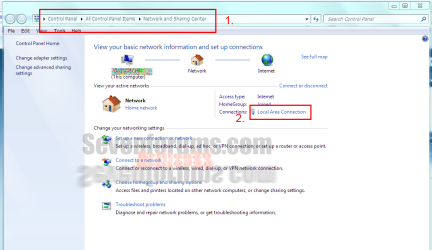
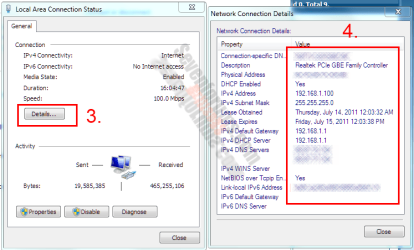
Look at the snips below and follow the numbers. 1 is where to naviagte to. when you get to 4 there should be a lot of numbers there. I have blurred mine out, but your should have some there. If not, you aren'r connected. Click the troubleshoot and see if it helps.
Network.PNG

NIC.PNG
 

My Computer

Computer type
PC/Desktop
Computer Manufacturer/Model Number
Home Built Desktop By DataTech
OS
Windows 7 Ultimate X64 SP1
CPU
Intel i5-2550K, Differing ~4.4-4.8GHz No built in GPU
Motherboard
ASUS P8Z68-V PRO/GEN3
Memory
16GB G.Skill Sniper 1866MHz @ 2133MHz 2x8GB
Graphics Card(s)
ASUS GTX650TIB-DC2OC-2GD5, (650TI Boost)
Sound Card
Onboard Realtek 5-1
Monitor(s) Displays
Samsung P2570HD
Screen Resolution
1920x1080
Hard Drives
Samsung 840 Pro 256GB SSD for OS, 500GB Seagate Constellation (Enterprise drive) for Data
PSU
Corsair HX650W
Case
Inwin Dragon Rider
Cooling
Hyper 212 EVO w/two Noctua fans, push-pull, @1300 RPM
Keyboard
E-Z Eyes, bright yellow keys with large characters
Mouse
steelseries SENSEI Laser Pro Gaming
Internet Speed
48-51Mbs Mbs down, 11 Mbs up Xfinity Cable
Antivirus
Norton Internet Security 2013
Browser
IE 10, Opera, Pale Moon if needed
Other Info
4 case fans, LG BluRay-RE, ASUS DVD-RW, Mr. Fusion power supply, 1.21 gigawatts.
Do you have a lot of factory preinstalled bloatware besides the Best Buy crapware? I'd work on cleaning that up and then run the connection troubleshooter by rightclicking the icon in System Tray.

Clean up factory bloatware

In particular one of the preinstalled factory utilities is often a Wireless manager which isn't needed and causes problems. I'd uninstall that and default to Win7 wireless manager in System Tray.
 
Last edited:

My Computer

Computer type
PC/Desktop
Computer Manufacturer/Model Number
Home Built Desktop By DataTech
OS
Windows 7 Ultimate X64 SP1
CPU
Intel i5-2550K, Differing ~4.4-4.8GHz No built in GPU
Motherboard
ASUS P8Z68-V PRO/GEN3
Memory
16GB G.Skill Sniper 1866MHz @ 2133MHz 2x8GB
Graphics Card(s)
ASUS GTX650TIB-DC2OC-2GD5, (650TI Boost)
Sound Card
Onboard Realtek 5-1
Monitor(s) Displays
Samsung P2570HD
Screen Resolution
1920x1080
Hard Drives
Samsung 840 Pro 256GB SSD for OS, 500GB Seagate Constellation (Enterprise drive) for Data
PSU
Corsair HX650W
Case
Inwin Dragon Rider
Cooling
Hyper 212 EVO w/two Noctua fans, push-pull, @1300 RPM
Keyboard
E-Z Eyes, bright yellow keys with large characters
Mouse
steelseries SENSEI Laser Pro Gaming
Internet Speed
48-51Mbs Mbs down, 11 Mbs up Xfinity Cable
Antivirus
Norton Internet Security 2013
Browser
IE 10, Opera, Pale Moon if needed
Other Info
4 case fans, LG BluRay-RE, ASUS DVD-RW, Mr. Fusion power supply, 1.21 gigawatts.
Back
Top