Laptop running extremely slow after format C: and reinstall windows 7

handreas86

New member
Local time
9:25 AM
Messages
3
Hi

I formated C: and reinstalled a win 7 x64 bit. It works good after installing, but after some time when doing windows update, avast AV, installing ms office, adobe, deamon tools, drivers, google chrome etc it slows down.

sometimes it wont even restart or boot up. It gives me bluescreen in the startup process and memory dumps.

Its a Sony Vaio VPCEA2S1E

ill attach the zip file from DM Log Collector tool
 

Attachments

My Computer My Computer

At a glance

WIN7 x64
Computer type
Laptop
Computer Manufacturer/Model Number
Sony Vaio VPCEA2S1E
OS
WIN7 x64
Hello and welcome Andreas now mate when you say you formatted the drive I am wondering if the format process has really got rid of everything on it . A better way of doing the install would have been - a factory reset which of course would leave you with a ton of their bloatware or doing a "clean" or "clean all" via the command prompt or even a Partition Wizard - wipe drive but you would have needed to do that on another machine.

You could send the BSOD files - use this http://www.sevenforums.com/tutorials/174459-dump-files-configure-windows-create-bsod.html this will help pinpoint errors.

But first up try these in safe mode
http://www.sevenforums.com/tutorials/1538-sfc-scannow-command-system-file-checker.html
http://www.sevenforums.com/tutorials/433-disk-check.html < if necessary include the /f and /r in the command line as per Option2
and see if the problem clears.

Another tutorial worth having a look at is this
http://www.sevenforums.com/tutorials/219533-troubleshooting-windows-7-failure-boot.html
 

My Computer My Computer

At a glance

Desk1 7 Home Prem / Desk2 10 Pro / Main lap A...Desk1 i5 3750K / Laptop i7 GTX 860M / Desk2 i...Desk1 8GB (1866) / Desk2 16GB (1333) / Laptop...Desk 1& 2NVidia GTX 650 & Laptops on board Intel
Computer type
PC/Desktop
Computer Manufacturer/Model Number
Own build (new) Desk1 / Asus ROG Win 7 / Desk2 1st build
OS
Desk1 7 Home Prem / Desk2 10 Pro / Main lap Asus ROG 10 Pro 2 laptop Toshiba 7 Pro Asus P2520 7 & 10
CPU
Desk1 i5 3750K / Laptop i7 GTX 860M / Desk2 i5 2500
Motherboard
Desk1 Asus P877-V / Desk2 Gigabyte H67 UD3H / Laptop ?
Memory
Desk1 8GB (1866) / Desk2 16GB (1333) / Laptop 8Gb DDR3
Graphics Card(s)
Desk 1& 2NVidia GTX 650 & Laptops on board Intel
Sound Card
Desk 1 & 2 -XONAR DG Realtek High Def audio Laptop
Monitor(s) Displays
Desk 1 Benq HD 2450 / Desk2 Philips 24" / Laptop 17.5"
Screen Resolution
1920x1080 D1 & D2 & Laptop 1
Hard Drives
Desk1 Samsung 120GB 830 SSD
Asus ROG 256GB 850 Pro SSD
Desk2 Samsung 840 256 SSD
Toshiba 120GB EVO
PSU
Desk 1 Corsair HX 1050/ Laptop ? / Desk 2 Corsair HX 650
Case
Desk 1 Cooler HAF XM ? Toshiba laptop / Desk2 Coolermaster
Cooling
Fans on all Desk1 -2 Desk2 - all Coolermasters 5 Laptop ?
Keyboard
Desk 1 MS Sidewinder X6 Desk 2 MS Sidewinder X 4
Mouse
Desk 1&2 - Gigabyte MS 900 gamer - laptop - Logitec wireless
Internet Speed
ADSL2+
Other Info
One other Desktop (tester) and spare Toshba laptop both with SSD's
Running Kaspersky 2016 ISS on all machines config'd identically
Logitec audio stereo systems on each machine (x3)
Canon MG5250MFC
Router/modem TP-Link running WPA2SK
Hi

Thanx for your reply. I have reformatted, and done the clean all part on the disk. Now windows seem to be working fine. I started to install windows updates and i successfully installed windows SP1. After that i installed ms office 2013. Windows still working fine. Then i checked for windows updates and i found 2200mb of windows and office updates. I downloaded and installed them. When the pc rebooted and did the configuration part of the updates of in total 212 files it stopped on 99% and did not succeed.

After some fault messages i managed to do a system restore successfully. However, i was wondering if there are some tips & tricks regarding the windows updates? I have never not succeeeded doing this on other machines, this one is a laptop tho.
 

My Computer My Computer

At a glance

WIN7 x64
Computer type
Laptop
Computer Manufacturer/Model Number
Sony Vaio VPCEA2S1E
OS
WIN7 x64
My method of installing Windows 7 updates when their are a lot of them is do a few at a time and then reboot whether is request a reboot or not.
This way if one or more updates don't work you can find out which ones are failing.
When you have 212 updates you probably didn't install Windows 7 SP-1. You probable installed Windows 7 without SP-1.
I also activate Windows 7 SP-1 as soon as possible after I install it. It seem that updates work better. I also keep I.E. as default browser.
I can't prove these methods work better but to me they do for what ever reason.
 

My Computer My Computer

At a glance

Windows 10 Pro. 64/ version 1709 Windows 7 Pr...Intel i7-6800K @ 4.3Corsair Platinum 16 gig @2400EVGA GTX 1070 OC
Computer type
PC/Desktop
Computer Manufacturer/Model Number
Home made Desktop
OS
Windows 10 Pro. 64/ version 1709 Windows 7 Pro/64
CPU
Intel i7-6800K @ 4.3
Motherboard
ASUS X-99 Deluxe II
Memory
Corsair Platinum 16 gig @2400
Graphics Card(s)
EVGA GTX 1070 OC
Monitor(s) Displays
Asus 27" LED LCD/VE278Q
Screen Resolution
1920-1080 or 1280-720 HDMI
Hard Drives
INTEL SSD 730-240 Gb Sata 3.0/
PSU
EVGA Platium 1200W
Case
Phanteks Luxe Tempered Glass 8 fans/ one radiator
Cooling
XSPC/ Water Cooled CPU
Keyboard
Das 4 Professional
Mouse
Logitech M705/MX Anywhere 2-S
Internet Speed
100 mbits
Antivirus
Microsoft Security Essentials/ Malwarebytes Premium 3.0/ SAS
Browser
I.E. 11 default/Firefox/ ISP Time Warner Cable/Spectrum
Other Info
LG BluRay Burner/
Sound system-KLipsch-THX/
Icy Dock ssd Hot Swap bays.
Yep I do as Layback Bear and it is a real pain we used to have access to an ISO that was kept up to date with updates but it has gone now - mores the pity.

Personally I wish there was some way of saving the updates onto a stick after a clean install in case that has to be done.

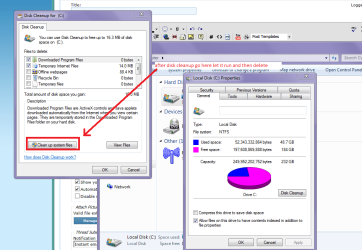
But I suppose the updates get updated themselves so we are stuck with it. With the updates I have found I keep the machine moving a bit better if I keep the unwanted updates cleared from the C: drive to do that
> Start > Computer > C: > right click Properties > Disk cleanup > after that is run go to the next window > Clean up system files > then you get a delete message and it will get rid of all the "updated" updates and other crap that clog the C: drive.

Mind you after a clean install this might not be needed for a while.
 

Attachments

  • CLEANUP.PNG
    CLEANUP.PNG
    50 KB · Views: 0

My Computer My Computer

At a glance

Desk1 7 Home Prem / Desk2 10 Pro / Main lap A...Desk1 i5 3750K / Laptop i7 GTX 860M / Desk2 i...Desk1 8GB (1866) / Desk2 16GB (1333) / Laptop...Desk 1& 2NVidia GTX 650 & Laptops on board Intel
Computer type
PC/Desktop
Computer Manufacturer/Model Number
Own build (new) Desk1 / Asus ROG Win 7 / Desk2 1st build
OS
Desk1 7 Home Prem / Desk2 10 Pro / Main lap Asus ROG 10 Pro 2 laptop Toshiba 7 Pro Asus P2520 7 & 10
CPU
Desk1 i5 3750K / Laptop i7 GTX 860M / Desk2 i5 2500
Motherboard
Desk1 Asus P877-V / Desk2 Gigabyte H67 UD3H / Laptop ?
Memory
Desk1 8GB (1866) / Desk2 16GB (1333) / Laptop 8Gb DDR3
Graphics Card(s)
Desk 1& 2NVidia GTX 650 & Laptops on board Intel
Sound Card
Desk 1 & 2 -XONAR DG Realtek High Def audio Laptop
Monitor(s) Displays
Desk 1 Benq HD 2450 / Desk2 Philips 24" / Laptop 17.5"
Screen Resolution
1920x1080 D1 & D2 & Laptop 1
Hard Drives
Desk1 Samsung 120GB 830 SSD
Asus ROG 256GB 850 Pro SSD
Desk2 Samsung 840 256 SSD
Toshiba 120GB EVO
PSU
Desk 1 Corsair HX 1050/ Laptop ? / Desk 2 Corsair HX 650
Case
Desk 1 Cooler HAF XM ? Toshiba laptop / Desk2 Coolermaster
Cooling
Fans on all Desk1 -2 Desk2 - all Coolermasters 5 Laptop ?
Keyboard
Desk 1 MS Sidewinder X6 Desk 2 MS Sidewinder X 4
Mouse
Desk 1&2 - Gigabyte MS 900 gamer - laptop - Logitec wireless
Internet Speed
ADSL2+
Other Info
One other Desktop (tester) and spare Toshba laptop both with SSD's
Running Kaspersky 2016 ISS on all machines config'd identically
Logitec audio stereo systems on each machine (x3)
Canon MG5250MFC
Router/modem TP-Link running WPA2SK
Have you installed the Sony Firmware Extension Parser ? it is usually shown as an unknown device in device manager I "think" the latest version is SFEP_Driver_Sony_8.0_09Q3_O_7_8.0.1.1 occasionally windows update itself will download and install it for you, I have seen things relating to this driver cause a few BSOD's once other updates start getting installed.

However I must say every Sony Laptop I have repaired and done a clean Windows install on (and that is a lot of them) I have found if you do not at least install the basic Sony drivers before you allow windows update to start downloading and install updates your going to run into problems down the line, it could be a day it could be a few weeks but things will start to go wrong... I know that is in conflict with the tutorials here, but concerning Sony its the only way I found that works correctly.
 

My Computer My Computer

At a glance

Windows 7 x64 SP1Intel4gbNvidia
Computer type
Laptop
Computer Manufacturer/Model Number
Sony
OS
Windows 7 x64 SP1
CPU
Intel
Motherboard
Sony
Memory
4gb
Graphics Card(s)
Nvidia
Hard Drives
WD
Internet Speed
Dial up wasn't as bad as this !
Antivirus
Avast
Browser
Firefox
Hi guys

Many thanks for good replies, i will try them and do as you said. i dont think i installed the SFEP driver and i have the unknown device in device manager. i will set the windows SP1 and install the sfep driver and try to do a few windows updates at a time. thank you.:)
 

My Computer My Computer

At a glance

WIN7 x64
Computer type
Laptop
Computer Manufacturer/Model Number
Sony Vaio VPCEA2S1E
OS
WIN7 x64
Hi guys

Many thanks for good replies, i will try them and do as you said. i dont think i installed the SFEP driver and i have the unknown device in device manager. i will set the windows SP1 and install the sfep driver and try to do a few windows updates at a time. thank you.:)

Good luck, I would be interested to hear how this turned out if you get chance when your finished updating :)
 

My Computer My Computer

At a glance

Windows 7 x64 SP1Intel4gbNvidia
Computer type
Laptop
Computer Manufacturer/Model Number
Sony
OS
Windows 7 x64 SP1
CPU
Intel
Motherboard
Sony
Memory
4gb
Graphics Card(s)
Nvidia
Hard Drives
WD
Internet Speed
Dial up wasn't as bad as this !
Antivirus
Avast
Browser
Firefox
Yep good luck and if the problems keep coming you know where to come eh?;)
 

My Computer My Computer

At a glance

Desk1 7 Home Prem / Desk2 10 Pro / Main lap A...Desk1 i5 3750K / Laptop i7 GTX 860M / Desk2 i...Desk1 8GB (1866) / Desk2 16GB (1333) / Laptop...Desk 1& 2NVidia GTX 650 & Laptops on board Intel
Computer type
PC/Desktop
Computer Manufacturer/Model Number
Own build (new) Desk1 / Asus ROG Win 7 / Desk2 1st build
OS
Desk1 7 Home Prem / Desk2 10 Pro / Main lap Asus ROG 10 Pro 2 laptop Toshiba 7 Pro Asus P2520 7 & 10
CPU
Desk1 i5 3750K / Laptop i7 GTX 860M / Desk2 i5 2500
Motherboard
Desk1 Asus P877-V / Desk2 Gigabyte H67 UD3H / Laptop ?
Memory
Desk1 8GB (1866) / Desk2 16GB (1333) / Laptop 8Gb DDR3
Graphics Card(s)
Desk 1& 2NVidia GTX 650 & Laptops on board Intel
Sound Card
Desk 1 & 2 -XONAR DG Realtek High Def audio Laptop
Monitor(s) Displays
Desk 1 Benq HD 2450 / Desk2 Philips 24" / Laptop 17.5"
Screen Resolution
1920x1080 D1 & D2 & Laptop 1
Hard Drives
Desk1 Samsung 120GB 830 SSD
Asus ROG 256GB 850 Pro SSD
Desk2 Samsung 840 256 SSD
Toshiba 120GB EVO
PSU
Desk 1 Corsair HX 1050/ Laptop ? / Desk 2 Corsair HX 650
Case
Desk 1 Cooler HAF XM ? Toshiba laptop / Desk2 Coolermaster
Cooling
Fans on all Desk1 -2 Desk2 - all Coolermasters 5 Laptop ?
Keyboard
Desk 1 MS Sidewinder X6 Desk 2 MS Sidewinder X 4
Mouse
Desk 1&2 - Gigabyte MS 900 gamer - laptop - Logitec wireless
Internet Speed
ADSL2+
Other Info
One other Desktop (tester) and spare Toshba laptop both with SSD's
Running Kaspersky 2016 ISS on all machines config'd identically
Logitec audio stereo systems on each machine (x3)
Canon MG5250MFC
Router/modem TP-Link running WPA2SK
Back
Top