steamtechie
New member
- Local time
- 2:43 AM
- Messages
- 2
Hi there,
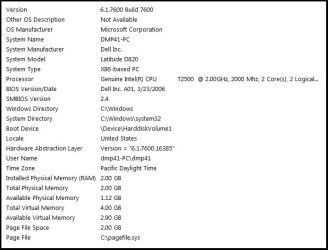
I have a Dell D820 with Windows 7 x32. Over the past couple of weeks it's developed a problem where if the laptop is used for a couple hours, or if it goes to sleep and I wake it back up, the CPU usage rate will go up quite a bit, often maxing out, and the computer will slow down. Often restarting the laptop will solve the problem for a little while, but sometimes it won't and it'll take a long time and several hard restarts to start back up.
I've scanned it with Malwarebytes and AVG, and neither found anything bad on the computer. According to the disk defragmenter the disk isn't too fragmented. I've looked at the process list in the task manager when the CPU is maxed out, and nothing too out of the ordinary appears, at least to my layman's eye. I was going to do a system restore, but the oldest restore point is a few days ago and the problem's been going on for several weeks, so I doubt that would help.
Thanks a lot in advance for your help.
-Dan
I have a Dell D820 with Windows 7 x32. Over the past couple of weeks it's developed a problem where if the laptop is used for a couple hours, or if it goes to sleep and I wake it back up, the CPU usage rate will go up quite a bit, often maxing out, and the computer will slow down. Often restarting the laptop will solve the problem for a little while, but sometimes it won't and it'll take a long time and several hard restarts to start back up.
I've scanned it with Malwarebytes and AVG, and neither found anything bad on the computer. According to the disk defragmenter the disk isn't too fragmented. I've looked at the process list in the task manager when the CPU is maxed out, and nothing too out of the ordinary appears, at least to my layman's eye. I was going to do a system restore, but the oldest restore point is a few days ago and the problem's been going on for several weeks, so I doubt that would help.
Thanks a lot in advance for your help.
-Dan
My Computer
At a glance
Windows 7 Ultimate x32
- OS
- Windows 7 Ultimate x32