Laptop Types C's and B's automatically

pookani222

New member
Local time
5:06 PM
Messages
47
How do I fix this? Everytime I move the wheel to adjust the volume of my laptop it automatically types the letter c or b or both. This is quite annoying and has been happening for quite a long time now. Does anybody know how to fix this?
 

My Computer

OS
Windows 7
Hi,

First thing to do would be to remove the keyboard and make sure that there's no dust/fragments inside. I know this sounds silly but it's very much worth trying.

If you need help on how to remove it then please give the make & model of the laptop & i'll give you a step-by-step guide :)


OS
 

My Computer

Computer Manufacturer/Model Number
Compaq Desktop
OS
Windows 7 Ultimate x64
CPU
AMD Sempron Dual Core
Memory
3GB
Graphics Card(s)
NVIDIA GeForce 6150SE nForce 430
Screen Resolution
1024x768
Hard Drives
150GB Sata
Hi,

First thing to do would be to remove the keyboard and make sure that there's no dust/fragments inside. I know this sounds silly but it's very much worth trying.

If you need help on how to remove it then please give the make & model of the laptop & i'll give you a step-by-step guide :)


OS

I have no idea how to clean the keyboard like that :o My laptop is a Satellite L300D model.
 

My Computer

OS
Windows 7
Hi,

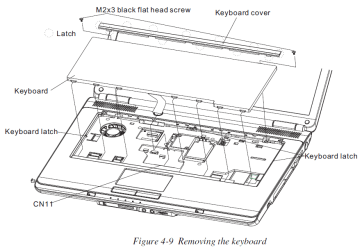
Removing Keyboard

Remove the Keyboard according to the following procedures and Figure 4-9.

1.Release the following 12 latches on the keyboard cover, in that order:
- One latch on each of the left and right sides
- Five bottom latches
- Five front latches

2.Remove the keyboard cover.

3.Remove two M2x3 black bind screws.

4.Release the keyboard lock latch.

5.Disconnect the keyboard cable from CN11 on the system board.

6.Remove the keyboard.

Satellite Keyboard.PNG

   Note
You will need a small flat-head screwdriver to pop the latches


Original documentation found Here. You will need to click the Equium l300d link which will open up an Adobe PDF manual.


OS
 

My Computer

Computer Manufacturer/Model Number
Compaq Desktop
OS
Windows 7 Ultimate x64
CPU
AMD Sempron Dual Core
Memory
3GB
Graphics Card(s)
NVIDIA GeForce 6150SE nForce 430
Screen Resolution
1024x768
Hard Drives
150GB Sata
Thanks, I successfully cleaned my keyboard but I am still getting this problem :(
 

My Computer

OS
Windows 7


Did it always do this?

When it started doing this what changed?

Do you have a backup from before the problem started?

Do you have a win 7 dvd?
 

My Computer

Computer Manufacturer/Model Number
HP Pavillion dv-7 1005 Tx
OS
Win 8 Release candidate 8400
CPU
[email protected]
Memory
4 gigs
Graphics Card(s)
Nvidia 9600M
Sound Card
HD built-in
Monitor(s) Displays
17" Wxga
Screen Resolution
1440x900
Cooling
none
Internet Speed
45Mb down 5Mb up


Did it always do this?

When it started doing this what changed?

Do you have a backup from before the problem started?

Do you have a win 7 dvd?

It never did this before. Nothing changed system-wise when this began happening. I don't have a backup because this has been happening for many months now. I thought the problem would go away on its own but it hasn't, and it is quite irritating now. I no longer have my win 7 dvd :(
 

My Computer

OS
Windows 7
You might have to replace the keyboard on your laptop to fix this.
 

My Computer

Computer Manufacturer/Model Number
Myself
OS
Windows 7 Enterprise 64bit
CPU
Core 2 Duo E8500 @ 3.0Ghz
Motherboard
Abit IP35 Pro; BIOS 14
Memory
2GB G.Skill DDR2-800
Graphics Card(s)
PNY Geforce GTS 250 1GB
Sound Card
SteelSeries 5HV2 USB
Monitor(s) Displays
19" ViewSonic P95f+ CRT
Hard Drives
WD Raptor 150GB 10K RPM 16MB Cache
PSU
Corsair HX520W
Case
CoolerMaster
Cooling
Stock
First, attach a USB keyboard to the laptop. Next, find the original CD/DVDs that came with the laptop and copy the multimedia keyboard software installer to your desktop (or download the same version from the support page). Finally, uninstall the multimedia software using add/remove programs followed by uninstalling (and deleting the driver) using device manager (via control pannel or right-click my computer -> properties -> device manager). Now reboot and re-install the original version of the multimedia software and keyboard driver.

The most likely thing that happened is that you (or it automatically did it due to settings) updated the software during a normal "keep my computer up-to-date" process and didn't notice the changes for a while.
 

My Computer

Computer type
PC/Desktop
OS
Windows 7 ultimate x64
Back
Top