
Laptop users (including Netbooks) upgrade to 7400 RPM HDD's

jimbo45

New member
Guru
Gold Member
VIP
Local time
7:35 PM
Messages
5,941
Location
Hafnarfjörður IS
Laptop users (including Netbooks) upgrade to 7200 RPM HDD's

Hi all
you can swap the normally small HDD installed in a laptop for a 320GB or 500 GB 7200 RPM drive really easily and cheaply.

Current cost is around 60 USD.

The speed performance improvement you will see in your laptop will amaze you -- 7400 RPM disks obviously not as fast as SSD's but are still SIGNIFICANTLY better than the standard 100/120/160 GB 5400 rpm hdd's installed in most laptops by default.

Changing a laptop HDD is actually normally EXTREMELY EASY-- although make sure you can restore your image to the new laptop disk --use your backups bootable media to restore an image from an external USB HDD --acronis is good here but any proper imaging / backup program should work providing you can boot the recovery software.

Incidentally it's also worth upping the RAM too if you can get at the RAM modules easily enough --2GB laptop RAM modules are also cheap now.


Cheers
jimbo
 
Last edited:

My Computer My Computer

At a glance

Linux CENTOS 7 / various Windows OS'es and se...Intel i7 Intel i58GB, 16GBOn Motherboard
Computer type
PC/Desktop
Computer Manufacturer/Model Number
Custom built, several laptops HP/ASUS
OS
Linux CENTOS 7 / various Windows OS'es and servers
CPU
Intel i7 Intel i5
Memory
8GB, 16GB
Graphics Card(s)
On Motherboard
Sound Card
Realtek HD audio
Monitor(s) Displays
Apple Cinema display, Samsung LCD
Screen Resolution
1920 X 1080
Hard Drives
4 X 1TB SATA
Mouse
Toshiba wireless laser
Internet Speed
> 20MB up
I recently swapped the HDD on a 2007 HP laptop for an Intel 80GB SSD. The speed gain is amazing although my main motivation was a heat problem - and that got fixed too. The laptop runs a lot cooler now.
My wife uses that system and she does not have a lot of data. So the 80GBs work out well.
 

My Computer My Computer

At a glance

Vista, Windows7, Mint Mate, Zorin, Windows 8from 1.6GHz Duo to i7
Computer Manufacturer/Model Number
HP, Dell, Gateway, Toshiba - 4 laptops and 2 desktops
OS
Vista, Windows7, Mint Mate, Zorin, Windows 8
CPU
from 1.6GHz Duo to i7
Monitor(s) Displays
2x HP w2207
Hard Drives
5x HDD, 7x SSD, 12x Externals
Keyboard
with trackball - no mices
Mouse
Trackball mice
Internet Speed
DSL 6000
It takes about one minute to replace a laptop HDD after a few years of practice. I've done it thousands of times. A cheap #1 Phillips screwdriver works for just about anything except a Mac, in which case you need tweezers, a magnifying glass, hands half the size of mine and a #0 Phillips.. but for everyone who has enough sense not to waste their money on a MacBook ..unless you have a laptop with thermal problems, upgrading to a new 7200 rpm HDD will cut the time it takes to start windows and load programs by as much as half, depending on the age and brand of the HDD being replaced, if the rest of the hardware is good. If you have a HP DV3, DV4, DV5 with discrete graphics, any 14 or 15" Toshiba satellite, any Dell studio or Inspiron with discrete graphics (17" excepted), or any other laptop with a bad thermal design, I do NOT recommend installing a 7200 rpm drive.
10000 rpm 2.5" HDDs are also available... and are significantly faster than 7200 rpm HDDs... but also significantly more expensive
 
I upgraded the stock SSD to a faster SSD in my netbook last year as well as upping it to 2GB.
Made a nice improvement.
 

My Computer My Computer

At a glance

Windows 7 Ultimate 64bitIntel i7 3770K16GB DDR3 1333 Corsair XMS3XFX HD6950 2GB EyeFinity
Computer Manufacturer/Model Number
HAL-9000
OS
Windows 7 Ultimate 64bit
CPU
Intel i7 3770K
Motherboard
Asus Sabertooth Z77
Memory
16GB DDR3 1333 Corsair XMS3
Graphics Card(s)
XFX HD6950 2GB EyeFinity
Sound Card
Logitech G35 & Sennheiser PC135 & VIA HD
Monitor(s) Displays
23" HP 2310e, 23" Samsung B2230, 21.5" Viewsonic
Screen Resolution
5760x1080
Hard Drives
16TB of Storage
128GB & 256GB Crucial M4 SSD's, 2X 1TB WD Black, 3x 2TB WD, 3x 2TB Samsung F4, 1.5TB Seagate, WD 500GB,
PSU
Antec True Power New 650watt
Case
Cooler Master HAF-932
Cooling
Corsair H60 Hydro Cooler, 3x 230mm Fans, 2x120mm Fan
Keyboard
Logitech G15 and G13
Mouse
Logitech G700 Gaming Mouse
Internet Speed
50/10 Mbit
Other Info
Speakers : Alesis M1 Active Mk2 Studio Monitors , APC RS 1200 UPS, HP 4500DN Color Laser, HP P1006 mono Laser, Kodak 8500 Dye-Sub, Epson 1280 inkjet, Epson Worforce 610 MFC
Yeah, I use a Dell Latitude E6400 laptop at work and these come with 7,200RPM Seagate 160GB drives....and my laptop performance has always been more than satisfactory. And the drive is essentially silent...which I really appreciate.
 

My Computer My Computer

At a glance

Windows 7 Ultimate x64Intel Q9550 2.83Ghz OC'd to 3.40Ghz8GB G.Skill PI DDR2-800, 4-4-4-12 timingsEVGA 1280MB Nvidia GeForce GTX570
Computer Manufacturer/Model Number
Self-Built in July 2009
OS
Windows 7 Ultimate x64
CPU
Intel Q9550 2.83Ghz OC'd to 3.40Ghz
Motherboard
Gigabyte GA-EP45-UD3R rev. 1.1, F12 BIOS
Memory
8GB G.Skill PI DDR2-800, 4-4-4-12 timings
Graphics Card(s)
EVGA 1280MB Nvidia GeForce GTX570
Sound Card
Realtek ALC899A 8 channel onboard audio
Monitor(s) Displays
23" Acer x233H
Screen Resolution
1920x1080
Hard Drives
Intel X25-M 80GB Gen 2 SSD
Western Digital 1TB Caviar Black, 32MB cache. WD1001FALS
PSU
Corsair 620HX modular
Case
Antec P182
Cooling
stock
Keyboard
ABS M1 Mechanical
Mouse
Logitech G9 Laser Mouse
Internet Speed
15/2 cable modem
Other Info
Windows and Linux enthusiast. Logitech G35 Headset.
Not to throw TOO much cold water on the idea but a 7200 or 10k RPM HD in a laptop DOES cause some issues.

It will shorten battery life, and it will increase heat output. It takes more energy to maintain those rates and ois the main reason why 5200 rpm (or slower) drives are used, to lengthen battery life and reduce heat build up.

Now an SSD will be 10x faster still, use 1/10th the power and puts out 1/10th the heat. So if your serious about giving your laptop a boost, and don't otherwise actually NEED 500gig of space with you at all times, ssd all the way :)
 

My Computer My Computer

At a glance

Windows 7 x64 Ultimatei7 96012 Gig Corsair DominatorNvidia 480
Computer Manufacturer/Model Number
Scratch built
OS
Windows 7 x64 Ultimate
CPU
i7 960
Motherboard
Asus P6X58D
Memory
12 Gig Corsair Dominator
Graphics Card(s)
Nvidia 480
Sound Card
Maudio Delta 44 + breakout box
Monitor(s) Displays
Dell UltraSharp U2410 24in and Samsung 21 dual monitors
Screen Resolution
1920x1200 and 1280x1024
Hard Drives
Primary: Intel X-25M G2 160G SSD
Secondary: Segate baracuda 1.0 TB
HDs in AHCI mode.
PSU
Corasair TX850
Case
Cooler Master HAF
Cooling
Corsair H50
Keyboard
Logitech G15 + N52 game pad
Mouse
Logitech MX518
Internet Speed
15kbs down 4.5kbps up
Other Info
WEI 7.6
CPU & RAM 7.6
Graphics 7.9
Hard disk 7.7
I think in theory the SSD saves lots of power and keeps your battery going...but I think in real life scenarios it doesn't actually make that much difference at all.

I know that my Dell lasts over 5 hours on battery...but then again....i have the 9 cell extended battery as well.
 

My Computer My Computer

At a glance

Windows 7 Ultimate x64Intel Q9550 2.83Ghz OC'd to 3.40Ghz8GB G.Skill PI DDR2-800, 4-4-4-12 timingsEVGA 1280MB Nvidia GeForce GTX570
Computer Manufacturer/Model Number
Self-Built in July 2009
OS
Windows 7 Ultimate x64
CPU
Intel Q9550 2.83Ghz OC'd to 3.40Ghz
Motherboard
Gigabyte GA-EP45-UD3R rev. 1.1, F12 BIOS
Memory
8GB G.Skill PI DDR2-800, 4-4-4-12 timings
Graphics Card(s)
EVGA 1280MB Nvidia GeForce GTX570
Sound Card
Realtek ALC899A 8 channel onboard audio
Monitor(s) Displays
23" Acer x233H
Screen Resolution
1920x1080
Hard Drives
Intel X25-M 80GB Gen 2 SSD
Western Digital 1TB Caviar Black, 32MB cache. WD1001FALS
PSU
Corsair 620HX modular
Case
Antec P182
Cooling
stock
Keyboard
ABS M1 Mechanical
Mouse
Logitech G9 Laser Mouse
Internet Speed
15/2 cable modem
Other Info
Windows and Linux enthusiast. Logitech G35 Headset.
Not to throw TOO much cold water on the idea but a 7200 or 10k RPM HD in a laptop DOES cause some issues.

It will shorten battery life, and it will increase heat output. It takes more energy to maintain those rates and ois the main reason why 5200 rpm (or slower) drives are used, to lengthen battery life and reduce heat build up.

Now an SSD will be 10x faster still, use 1/10th the power and puts out 1/10th the heat. So if your serious about giving your laptop a boost, and don't otherwise actually NEED 500gig of space with you at all times, ssd all the way :)


Hi there
Not Significantly -- especially if you don't run the laptop on battery all the time or don't have continous disk access while working

The Hitachi 7200 drives (I think I said 7400 in the post --typo) run at 5V 800ma
the standard 5400 rpm run at 5V 700 ma.

If you have a decent laptop battery the extra current consumption is not that significant compared with the improvement you get in performance.

Cheers
jimbo
 

My Computer My Computer

At a glance

Linux CENTOS 7 / various Windows OS'es and se...Intel i7 Intel i58GB, 16GBOn Motherboard
Computer type
PC/Desktop
Computer Manufacturer/Model Number
Custom built, several laptops HP/ASUS
OS
Linux CENTOS 7 / various Windows OS'es and servers
CPU
Intel i7 Intel i5
Memory
8GB, 16GB
Graphics Card(s)
On Motherboard
Sound Card
Realtek HD audio
Monitor(s) Displays
Apple Cinema display, Samsung LCD
Screen Resolution
1920 X 1080
Hard Drives
4 X 1TB SATA
Mouse
Toshiba wireless laser
Internet Speed
> 20MB up
I use 7200rpm WD scorpios.. 500ma during R/W, 90ma when idle. I get about 5 hours from a 6 cell battery in an ancient dell D620.. and BTW.. SSDs are fast, but they are NOT 10x faster than a 2.5" 7200 RPM HDD in anything other than a benchmark test. At best an OCZ Vertex is maybe twice as fast as the $45 HDD in the machine I'm using right now, and probably slower at multitasking. I know this because I've tried it, pulled the SSD out and went back to a spinning HDD
 
Not to throw TOO much cold water on the idea but a 7200 or 10k RPM HD in a laptop DOES cause some issues.

It will shorten battery life, and it will increase heat output. It takes more energy to maintain those rates and ois the main reason why 5200 rpm (or slower) drives are used, to lengthen battery life and reduce heat build up.

Now an SSD will be 10x faster still, use 1/10th the power and puts out 1/10th the heat. So if your serious about giving your laptop a boost, and don't otherwise actually NEED 500gig of space with you at all times, ssd all the way :)
That is my experience too. If you do not have masses of data, an 80GB SSD is the way to go.
 

My Computer My Computer

At a glance

Vista, Windows7, Mint Mate, Zorin, Windows 8from 1.6GHz Duo to i7
Computer Manufacturer/Model Number
HP, Dell, Gateway, Toshiba - 4 laptops and 2 desktops
OS
Vista, Windows7, Mint Mate, Zorin, Windows 8
CPU
from 1.6GHz Duo to i7
Monitor(s) Displays
2x HP w2207
Hard Drives
5x HDD, 7x SSD, 12x Externals
Keyboard
with trackball - no mices
Mouse
Trackball mice
Internet Speed
DSL 6000
Beware of 7200rpm drives if your Laptop tends to overheat as this will make the problem worse.
More revs = more heat.
 

My Computer My Computer

At a glance

Windows 10 Pro x64i7-4770K16Gig DDR3-2400Gigabyte GT740
Computer type
PC/Desktop
Computer Manufacturer/Model Number
Self Built Custom Computer.
OS
Windows 10 Pro x64
CPU
i7-4770K
Motherboard
Asus Z87 Sabertooth
Memory
16Gig DDR3-2400
Graphics Card(s)
Gigabyte GT740
Sound Card
Onboard
Monitor(s) Displays
Benq 27" - Dell 23' - Benq 22"
Screen Resolution
1680x1050
Hard Drives
Samsung 840 Pro 128g SSD
1xWestern Digital Caviar Green 1tb
2xWestern Digital Caviar Green 2 tb
PSU
Seasonic 760 watt Platinum
Case
Coolermaster Haf - X
Cooling
Noctua NH-C12P CPU Cooler
Keyboard
Logitech illuminated keyboard
Mouse
Logitech Perfomance MX
Internet Speed
Cable = speeds to 20Mbps downsteam and 512kbps upsteam
Antivirus
Avast Internet Security
Browser
Firefox
Hi there.

I'd love an 80 GB SSD but I do travel a lot so if I can get the data on to a 500GB driive --saves me carrying too much. 80 GB is just TOO small -- I do need 20 GB of disk space for a Virtual XP machine to run software / hardware not available on W7 and also to connect to some corporate applications (SAP CRM / APO etc.)

I can use an external larger screen at work but I really appreciate the speed and capacity of the 7200 HDD's even if the machine runs slightly hotter.

In any case the whole Laptop only cost me 212 GBP with 17.5% VAT which I am getting a refund for --Iceland is not (yet) a member of the EU although work and other residence requirements operate just like EU citizens throughout the EU. So if it burns out its still mega cheap to get another one.

TWO of these laptops / Netbooks (Acer Aspire LO521) even with the extra changes I've made are STILL cheaper than an IPAD. :cry: so I'm not really worried about shorter life due to possible heat problems.

A small Netbook plus a pocket size 1TB usb HDD for multi-media (copied DVD's / movies etc) is all I need on the road now. A few USB sticks are also OK when needed.

Weight and Volume is the name of the game now when travelling.

I used to go for BIG 17 inch screen (Alienware) laptops but beautiful as these are they are totally impractical for use as "Road warriors" given security hassles and baggage restrictions at Airports etc these days.

If Airport security was sorted out and I was about 15 years younger I'd get one of those large Alienware laptops -- brilliant for home use but TOTALLY impractical for someone like me who is on the road a lot.

Cheers
jimbo
 

My Computer My Computer

At a glance

Linux CENTOS 7 / various Windows OS'es and se...Intel i7 Intel i58GB, 16GBOn Motherboard
Computer type
PC/Desktop
Computer Manufacturer/Model Number
Custom built, several laptops HP/ASUS
OS
Linux CENTOS 7 / various Windows OS'es and servers
CPU
Intel i7 Intel i5
Memory
8GB, 16GB
Graphics Card(s)
On Motherboard
Sound Card
Realtek HD audio
Monitor(s) Displays
Apple Cinema display, Samsung LCD
Screen Resolution
1920 X 1080
Hard Drives
4 X 1TB SATA
Mouse
Toshiba wireless laser
Internet Speed
> 20MB up
Jimbo45, you certainly made a good choice for low cost. But I just cannot get too excited about those slowpoke netbooks. I would opt for a 13 or 14" laptop with a nice i5 or i7 processor and decent graphics and then an 80 or 120GB SSD. Especially when travelling, those PCs get thrown around a lot and I would be afraid of a head crash with a rotating disk. For extra capacity I carry a 500GB 2.5" USB attached disk. That I can keep in my carry-on where it is safe.
 

My Computer My Computer

At a glance

Vista, Windows7, Mint Mate, Zorin, Windows 8from 1.6GHz Duo to i7
Computer Manufacturer/Model Number
HP, Dell, Gateway, Toshiba - 4 laptops and 2 desktops
OS
Vista, Windows7, Mint Mate, Zorin, Windows 8
CPU
from 1.6GHz Duo to i7
Monitor(s) Displays
2x HP w2207
Hard Drives
5x HDD, 7x SSD, 12x Externals
Keyboard
with trackball - no mices
Mouse
Trackball mice
Internet Speed
DSL 6000
Just a note about my 10x as fast comment.

No the total write/read speeds are not 10x as fast but the /access time/ is. And that is what really makes the laptop (or desktop) so much faster. Expecially launching programs or booting the OS. When you have to access/seek to thousands of files and tens of thousands of sectors, having the 0.1ms acess time makes the machine seem an order of magnitude faster even if the actualtransfer rate is the same...
 

My Computer My Computer

At a glance

Windows 7 x64 Ultimatei7 96012 Gig Corsair DominatorNvidia 480
Computer Manufacturer/Model Number
Scratch built
OS
Windows 7 x64 Ultimate
CPU
i7 960
Motherboard
Asus P6X58D
Memory
12 Gig Corsair Dominator
Graphics Card(s)
Nvidia 480
Sound Card
Maudio Delta 44 + breakout box
Monitor(s) Displays
Dell UltraSharp U2410 24in and Samsung 21 dual monitors
Screen Resolution
1920x1200 and 1280x1024
Hard Drives
Primary: Intel X-25M G2 160G SSD
Secondary: Segate baracuda 1.0 TB
HDs in AHCI mode.
PSU
Corasair TX850
Case
Cooler Master HAF
Cooling
Corsair H50
Keyboard
Logitech G15 + N52 game pad
Mouse
Logitech MX518
Internet Speed
15kbs down 4.5kbps up
Other Info
WEI 7.6
CPU & RAM 7.6
Graphics 7.9
Hard disk 7.7
I would opt for a 13 or 14" laptop with a nice i5 or i7 processor
I find that funny considering that my desktop machine...which feels like a powerhouse to me, only has a Q9550 Quad Core in it. I don't think it really takes a nice i5 or i7 to be a speedy machine.
 

My Computer My Computer

At a glance

Windows 7 Ultimate x64Intel Q9550 2.83Ghz OC'd to 3.40Ghz8GB G.Skill PI DDR2-800, 4-4-4-12 timingsEVGA 1280MB Nvidia GeForce GTX570
Computer Manufacturer/Model Number
Self-Built in July 2009
OS
Windows 7 Ultimate x64
CPU
Intel Q9550 2.83Ghz OC'd to 3.40Ghz
Motherboard
Gigabyte GA-EP45-UD3R rev. 1.1, F12 BIOS
Memory
8GB G.Skill PI DDR2-800, 4-4-4-12 timings
Graphics Card(s)
EVGA 1280MB Nvidia GeForce GTX570
Sound Card
Realtek ALC899A 8 channel onboard audio
Monitor(s) Displays
23" Acer x233H
Screen Resolution
1920x1080
Hard Drives
Intel X25-M 80GB Gen 2 SSD
Western Digital 1TB Caviar Black, 32MB cache. WD1001FALS
PSU
Corsair 620HX modular
Case
Antec P182
Cooling
stock
Keyboard
ABS M1 Mechanical
Mouse
Logitech G9 Laser Mouse
Internet Speed
15/2 cable modem
Other Info
Windows and Linux enthusiast. Logitech G35 Headset.
I would opt for a 13 or 14" laptop with a nice i5 or i7 processor
I find that funny considering that my desktop machine...which feels like a powerhouse to me, only has a Q9550 Quad Core in it. I don't think it really takes a nice i5 or i7 to be a speedy machine.
I was just trying to compare to the Atom processors that are usually built into the netbooks. A desktop with a quad is certainly a powerhouse - although I was quite disappointed with my Dell desktop that has a Q6600. But I guess that is an antique quad and one should not expect too much of it.
A while ago I saw a neat Toshiba 14" with an i7 and a backlit keyboard. I would have bought it but my finance minister vetoed the transaction. :D
 

My Computer My Computer

At a glance

Vista, Windows7, Mint Mate, Zorin, Windows 8from 1.6GHz Duo to i7
Computer Manufacturer/Model Number
HP, Dell, Gateway, Toshiba - 4 laptops and 2 desktops
OS
Vista, Windows7, Mint Mate, Zorin, Windows 8
CPU
from 1.6GHz Duo to i7
Monitor(s) Displays
2x HP w2207
Hard Drives
5x HDD, 7x SSD, 12x Externals
Keyboard
with trackball - no mices
Mouse
Trackball mice
Internet Speed
DSL 6000
The problem with putting an i7 in a laptop 14" or smaller, especially a high end i7 with an nvidia gtx series or ATI/AMD HD4XXX+ series, no matter what you do, it's going to overheat. The wattage a laptop consumes results in every bit as much heat as a light bulb of the same wattage. With air cooling, the amount of air a fan can take in at any given velocity is roughly the square root of the volume that can be displaced by a single rotation. If you quadruple the power consumption of any machine without improving the thermal design it's pretty much guaranteed to die before the warranty expires, and most laptops that fit the above description require at least 1 hardware RMA in the first year. The average 7200 RPM HDD consumes 3-4 watts max, less than a .125 watts unless it's reading or write, so any additional heat is coming from other components, not the HDD.. at least not directly. If switching from a 5400 rpm to a 7200 rpm HDD produces any more heat, it's because the 5400 rpm HDD was throttling the system.
 
One more reason to opt for a SSD in such a configuration.
 

My Computer My Computer

At a glance

Vista, Windows7, Mint Mate, Zorin, Windows 8from 1.6GHz Duo to i7
Computer Manufacturer/Model Number
HP, Dell, Gateway, Toshiba - 4 laptops and 2 desktops
OS
Vista, Windows7, Mint Mate, Zorin, Windows 8
CPU
from 1.6GHz Duo to i7
Monitor(s) Displays
2x HP w2207
Hard Drives
5x HDD, 7x SSD, 12x Externals
Keyboard
with trackball - no mices
Mouse
Trackball mice
Internet Speed
DSL 6000
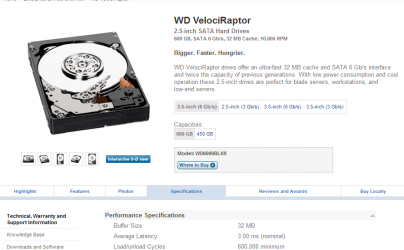
This is a bit faster than a latency of .1 seconds, but the best part is.... it's a lot cheaper than 2 512GB SSDs. You have to install your own controllers though.
velociraptor.png
3ms is .003 seconds, for those of you that don't do so well in math.
Again.. heat comes from wattage consumption. If a faster HDD makes a laptop overheat out of proportion to the increase in the HDDs wattage consumption, why would you want to accelerate the process? On the other hand, if you have never melted a CPU core, you haven't built a fast enough machine yet.
Average wattage consumption during R/W is 7 watts. If the machine you put it in has a good thermal design, the HDD won't overheat. I have two of them in a Dell inspiron 1720, but if someone offered me $500 to put one in a DV3, I'd have put it in the contract that the user is responsible for any damages to his own machine, and that the customer has to be the first person to boot it up. Otherwise I would pass on the job, even though it would take me less than an hour to set it up. SSD drives are faster in a bench mark, but there are spinning HDDs that are faster in overall performance
 
Last edited:
SSD drives are faster in a bench mark, but there are spinning HDDs that are faster in overall performance
Those I would like to see - as OS drives, not data drives where you move GBs of data. I think for the OS, the SSD cannot be beat because of its 0.1ms access time. And the OS typically only moves small bits of data.
 

My Computer My Computer

At a glance

Vista, Windows7, Mint Mate, Zorin, Windows 8from 1.6GHz Duo to i7
Computer Manufacturer/Model Number
HP, Dell, Gateway, Toshiba - 4 laptops and 2 desktops
OS
Vista, Windows7, Mint Mate, Zorin, Windows 8
CPU
from 1.6GHz Duo to i7
Monitor(s) Displays
2x HP w2207
Hard Drives
5x HDD, 7x SSD, 12x Externals
Keyboard
with trackball - no mices
Mouse
Trackball mice
Internet Speed
DSL 6000
Back
Top