JavaScript is disabled. For a better experience, please enable JavaScript in your browser before proceeding.
You are using an out of date browser. It may not display this or other websites correctly.
You should upgrade or use an
alternative browser .
Solved Laptop webcam driver
Otaku Pride
Guru
Gold Member
VIP
So i've been digging very deep for the past few days to find some drivers for my laptop webcam but i can't seem to find it! Samsung's website doesn't have anything, 3rd party sites doesn't have anything, no one has the drivers. Would really appreciate it if somebody found the drivers for me.
Computer type PC/Desktop Computer Manufacturer/Model Number me! OS Windows 10 Pro x64 CPU AMD Ryzen 5 1600 @ [email protected] Motherboard ASUS B350 PRIME-PLUS Memory G.Skill Flare X 16GB (2x8GB) DDR4-2400 @ 2666MHz Graphics Card(s) Sapphire Radeon Vega 56 NITRO+ Sound Card None Monitor(s) Displays ASUS VG248QZ Screen Resolution 1920x1080 Hard Drives Samsung 850 EVO 250GB*, 1TB Seagate Constellation ES, 2x Samsung 840 250GB in RAID0*
*Thanks ICIT2LOL for supplying me with all of these drives! PSU Corsair VS550 Case Corsair Crystal 460X Cooling AMD Wraith Spire Keyboard Ducky Shine 6 w/ MX Browns and PBT keycaps Mouse Xtrfy M1-Ice Internet Speed 100MBit/s down, 20MBit/s up Antivirus Bitdefender Browser Google Chrome
Jerry ☮ 1956-2019 R.I.P.
VIP
SF Team
Computer type Laptop Computer Manufacturer/Model Number Sager NP9170 OS Win 7 Pro x64 / Win 10 Pro CPU Intel(R) Core(TM) i7-3630QM CPU @ 2.40GHz Motherboard CLEVO P170EM Memory 12 GB Graphics Card(s) (1) Intel(R) HD Graphics 4000 (2) NVIDIA GeForce GTX 675M Sound Card (1) Realtek High Definition Audio (2) Intel(R) Display Aud Monitor(s) Displays 17.3 Screen Resolution 1920x1080 Hard Drives (1) Samsung 860 EVO 500GB(OS) (1) Samsung 860 EVO 500GB(Data) Keyboard Backlite Antivirus MSE, Malwarebytes Pro Browser Firefox Other Info DESKTOP: Custom-built.
OS: Win 10 Pro x64.
CASE: Rosewill R5.
CPU: Intel I5 4670K CPU @ 3.40GHz.
CPU COOLER: Cool Master Hyper 212 EVO.
MOTHERBOARD: Asus Z87-A.
MEMORY: Kingston HyperX 2x4 GB.
GPU: Nvidia Geforce 650 TI.
PSU: Corsair TX750.
DRIVES: (1) Samsung 840 120 GB SSD (2) Western Digital blue 500 GB 7200 RPM.
Otaku Pride
Guru
Gold Member
VIP
Thread Starter
I tried those but they were for a USB camera, not my laptop webcam :S
Computer type PC/Desktop Computer Manufacturer/Model Number me! OS Windows 10 Pro x64 CPU AMD Ryzen 5 1600 @ [email protected] Motherboard ASUS B350 PRIME-PLUS Memory G.Skill Flare X 16GB (2x8GB) DDR4-2400 @ 2666MHz Graphics Card(s) Sapphire Radeon Vega 56 NITRO+ Sound Card None Monitor(s) Displays ASUS VG248QZ Screen Resolution 1920x1080 Hard Drives Samsung 850 EVO 250GB*, 1TB Seagate Constellation ES, 2x Samsung 840 250GB in RAID0*
*Thanks ICIT2LOL for supplying me with all of these drives! PSU Corsair VS550 Case Corsair Crystal 460X Cooling AMD Wraith Spire Keyboard Ducky Shine 6 w/ MX Browns and PBT keycaps Mouse Xtrfy M1-Ice Internet Speed 100MBit/s down, 20MBit/s up Antivirus Bitdefender Browser Google Chrome
So i've been digging very deep for the past few days to find some drivers for my laptop webcam<snip>
I tried those but they were for a USB camera, not my laptop webcam :S
Laptop cameras are all USB cameras. They connect to the USB bus on the motherboard
Be more specific. What is the problem you're having with the webcam?
Do you see it in Device Manager? If yes, does it have a yellow icon or not? If you can't find it in device manager, you have a larger problem. It's not the cam driver
I downloaded the driver zip file and had a look inside. That latest "XP" driver also includes a Vista driver. What happens when you try to install it?
Last edited: Nov 25, 2015
Computer type PC/Desktop Computer Manufacturer/Model Number Dell Optiplex 360 and Optiplex 755 OS Desk 1: Win 7 Pro x32; Desk 2: Windows 10 x64 Hard Drives 500GB Crucial SSD in both Desktops Other Info Buffalo 6TB NAS, Raid 1
Well-known member
Guru
Gold Member
VIP
cyberlink
Hi Laith,
anything in/under your Cyberlink Youcam programs.
Found only a small comment on the web as its only an optional feature for your model.
Roy
Is there a problem device in device manager
Computer type PC/Desktop Computer Manufacturer/Model Number medionl/Aspire 6930G/acer x55a OS W7 home premium 32bit/W7HP 64bit/w10 tp insider ring CPU E5300 dual core Motherboard medion MS7366 Memory 3gb Graphics Card(s) Nvidia Geforce 7100 Nforce 630i Monitor(s) Displays avixc Internet Speed n (isp resticted to 72) Antivirus mse/pands Browser palemoon Other Info Belkin Fd7050 n USB using Railink RT2870 drivers, more upto date
Otaku Pride
Guru
Gold Member
VIP
Thread Starter
I don't see it in device manager no, it doesn't show up as a problem.
What happens it that it says "A USB could not be found"
Computer type PC/Desktop Computer Manufacturer/Model Number me! OS Windows 10 Pro x64 CPU AMD Ryzen 5 1600 @ [email protected] Motherboard ASUS B350 PRIME-PLUS Memory G.Skill Flare X 16GB (2x8GB) DDR4-2400 @ 2666MHz Graphics Card(s) Sapphire Radeon Vega 56 NITRO+ Sound Card None Monitor(s) Displays ASUS VG248QZ Screen Resolution 1920x1080 Hard Drives Samsung 850 EVO 250GB*, 1TB Seagate Constellation ES, 2x Samsung 840 250GB in RAID0*
*Thanks ICIT2LOL for supplying me with all of these drives! PSU Corsair VS550 Case Corsair Crystal 460X Cooling AMD Wraith Spire Keyboard Ducky Shine 6 w/ MX Browns and PBT keycaps Mouse Xtrfy M1-Ice Internet Speed 100MBit/s down, 20MBit/s up Antivirus Bitdefender Browser Google Chrome
Well-known member
Guru
Gold Member
VIP
Computer type PC/Desktop Computer Manufacturer/Model Number medionl/Aspire 6930G/acer x55a OS W7 home premium 32bit/W7HP 64bit/w10 tp insider ring CPU E5300 dual core Motherboard medion MS7366 Memory 3gb Graphics Card(s) Nvidia Geforce 7100 Nforce 630i Monitor(s) Displays avixc Internet Speed n (isp resticted to 72) Antivirus mse/pands Browser palemoon Other Info Belkin Fd7050 n USB using Railink RT2870 drivers, more upto date
Otaku Pride
Guru
Gold Member
VIP
Thread Starter
I'll try that and see if it works.
Computer type PC/Desktop Computer Manufacturer/Model Number me! OS Windows 10 Pro x64 CPU AMD Ryzen 5 1600 @ [email protected] Motherboard ASUS B350 PRIME-PLUS Memory G.Skill Flare X 16GB (2x8GB) DDR4-2400 @ 2666MHz Graphics Card(s) Sapphire Radeon Vega 56 NITRO+ Sound Card None Monitor(s) Displays ASUS VG248QZ Screen Resolution 1920x1080 Hard Drives Samsung 850 EVO 250GB*, 1TB Seagate Constellation ES, 2x Samsung 840 250GB in RAID0*
*Thanks ICIT2LOL for supplying me with all of these drives! PSU Corsair VS550 Case Corsair Crystal 460X Cooling AMD Wraith Spire Keyboard Ducky Shine 6 w/ MX Browns and PBT keycaps Mouse Xtrfy M1-Ice Internet Speed 100MBit/s down, 20MBit/s up Antivirus Bitdefender Browser Google Chrome
Windows doesn't need the device driver to
detect plug and play hardware. It only needs the driver before it can
use device functionality.
Windows can't detect your cam if
> Cam is turned off in BIOS (assuming cam has a BIOS option)
> Cam has been powered off (assuming it has an on/off switch or key press)
> Cam hardware has failed (unfortunately, have seen this happen too often)
That said, if cam hardware is detected, there should be some hint of it in Device Manager
Case 1: Something appears under "Other device" category. In this case h/w is detected but Windows can't find a suitable driver
Case 2: Cam is listed under Imaging devices. In this case h/w is detected and a driver has been installed
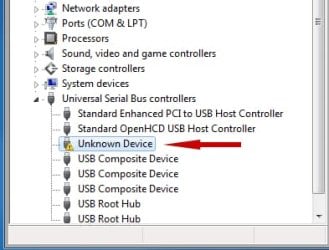
Case 3: Under USB category you see "Unknown Device" listed. This is the "USB Not Recognized" case. Hardware detected but Windows is unable to receive info that was burned into device firmware that identifies the device. Windows can't tell what the device is ("Device Unrecognized") see snapshot below
If there's no "hint" of your cam in Device Manager, you've checked BIOS and cam is powered on then cam h/w has very most likely failed
2015-11-26_211009.jpg
21.7 KB
· Views: 13
Computer type PC/Desktop Computer Manufacturer/Model Number Dell Optiplex 360 and Optiplex 755 OS Desk 1: Win 7 Pro x32; Desk 2: Windows 10 x64 Hard Drives 500GB Crucial SSD in both Desktops Other Info Buffalo 6TB NAS, Raid 1
Otaku Pride
Guru
Gold Member
VIP
Thread Starter
I don't understand, because it worked fine until i replaced my HDD.
Also uninstalling all my USB devices in device manager made me so i can't use any USB connections anymore. Help? I figured it out myself.
Last edited: Nov 27, 2015
Computer type PC/Desktop Computer Manufacturer/Model Number me! OS Windows 10 Pro x64 CPU AMD Ryzen 5 1600 @ [email protected] Motherboard ASUS B350 PRIME-PLUS Memory G.Skill Flare X 16GB (2x8GB) DDR4-2400 @ 2666MHz Graphics Card(s) Sapphire Radeon Vega 56 NITRO+ Sound Card None Monitor(s) Displays ASUS VG248QZ Screen Resolution 1920x1080 Hard Drives Samsung 850 EVO 250GB*, 1TB Seagate Constellation ES, 2x Samsung 840 250GB in RAID0*
*Thanks ICIT2LOL for supplying me with all of these drives! PSU Corsair VS550 Case Corsair Crystal 460X Cooling AMD Wraith Spire Keyboard Ducky Shine 6 w/ MX Browns and PBT keycaps Mouse Xtrfy M1-Ice Internet Speed 100MBit/s down, 20MBit/s up Antivirus Bitdefender Browser Google Chrome
Glad you got the controllers and USB connections working again. Anything entry show up in Device Manager that could possibly be your cam? (as per info in my prior post). Otherwise, i think your cam has most likely failed is why it no longer appears
Computer type PC/Desktop Computer Manufacturer/Model Number Dell Optiplex 360 and Optiplex 755 OS Desk 1: Win 7 Pro x32; Desk 2: Windows 10 x64 Hard Drives 500GB Crucial SSD in both Desktops Other Info Buffalo 6TB NAS, Raid 1
Otaku Pride
Guru
Gold Member
VIP
Thread Starter
Well, i'll just close the thread because i'm certain that the laptop cam is failing, that's very unfortunate
Computer type PC/Desktop Computer Manufacturer/Model Number me! OS Windows 10 Pro x64 CPU AMD Ryzen 5 1600 @ [email protected] Motherboard ASUS B350 PRIME-PLUS Memory G.Skill Flare X 16GB (2x8GB) DDR4-2400 @ 2666MHz Graphics Card(s) Sapphire Radeon Vega 56 NITRO+ Sound Card None Monitor(s) Displays ASUS VG248QZ Screen Resolution 1920x1080 Hard Drives Samsung 850 EVO 250GB*, 1TB Seagate Constellation ES, 2x Samsung 840 250GB in RAID0*
*Thanks ICIT2LOL for supplying me with all of these drives! PSU Corsair VS550 Case Corsair Crystal 460X Cooling AMD Wraith Spire Keyboard Ducky Shine 6 w/ MX Browns and PBT keycaps Mouse Xtrfy M1-Ice Internet Speed 100MBit/s down, 20MBit/s up Antivirus Bitdefender Browser Google Chrome