Can't find the Crystal Eye Webcam driver for Acer Aspire 5310

NourinE

New member
Local time
12:41 AM
Messages
28
Hello!
I bought a secondhand Acer Aspire 5310 and I reinstalled all the drivers except the driver of the webcam, I found three drivers of the webcam in Acer website I installed them all, but the webcam doesn't work. there's also an unknown device that I don't know what it it.
I'm running Windows 7 professional 32 bits
 

My Computer My Computer

At a glance

Windows 7 Starter 32 bitsAMD C-50 Processor (2 CPUs), 1.0GHz1.00 GBAMB Radeon HD 6250 Graphics
Computer type
Laptop
Computer Manufacturer/Model Number
Asus Eee PC Seashell series
OS
Windows 7 Starter 32 bits
CPU
AMD C-50 Processor (2 CPUs), 1.0GHz
Memory
1.00 GB
Graphics Card(s)
AMB Radeon HD 6250 Graphics
Sound Card
Realtek High Definition Audio
Monitor(s) Displays
Generic PnP Monitor
Screen Resolution
1024 X 600
Hard Drives
5OO GB - Hitachi HTS45050A7E380 ATA Device
Antivirus
Windows Defender
Browser
Google Chrome - Internet Explorer
Hi ... Have checked the Acer Website there are only Vista Drivers available for your Model ...

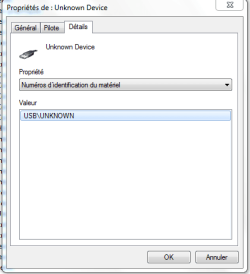
Select the unknown Device right click select Property's ...


Post any Information you see under the Details Tab please ...
 

My Computer My Computer

At a glance

windows 7 home 64bitINTEL-CORE I716GB
Computer Manufacturer/Model Number
W530-3630QM1
OS
windows 7 home 64bit
CPU
INTEL-CORE I7
Memory
16GB
Hard Drives
750GB
Browser
Chrome
that's all I have in the Details tab:

UNKNOWN DEVICE
USB/UNKNOWN
 

My Computer My Computer

At a glance

Windows 7 Starter 32 bitsAMD C-50 Processor (2 CPUs), 1.0GHz1.00 GBAMB Radeon HD 6250 Graphics
Computer type
Laptop
Computer Manufacturer/Model Number
Asus Eee PC Seashell series
OS
Windows 7 Starter 32 bits
CPU
AMD C-50 Processor (2 CPUs), 1.0GHz
Memory
1.00 GB
Graphics Card(s)
AMB Radeon HD 6250 Graphics
Sound Card
Realtek High Definition Audio
Monitor(s) Displays
Generic PnP Monitor
Screen Resolution
1024 X 600
Hard Drives
5OO GB - Hitachi HTS45050A7E380 ATA Device
Antivirus
Windows Defender
Browser
Google Chrome - Internet Explorer
when I installed Crystal Eye Webcam driver, it disappeared, and today morning when I turned on the laptop, the driver is gone and the unknown device is back again.
 

My Computer My Computer

At a glance

Windows 7 Starter 32 bitsAMD C-50 Processor (2 CPUs), 1.0GHz1.00 GBAMB Radeon HD 6250 Graphics
Computer type
Laptop
Computer Manufacturer/Model Number
Asus Eee PC Seashell series
OS
Windows 7 Starter 32 bits
CPU
AMD C-50 Processor (2 CPUs), 1.0GHz
Memory
1.00 GB
Graphics Card(s)
AMB Radeon HD 6250 Graphics
Sound Card
Realtek High Definition Audio
Monitor(s) Displays
Generic PnP Monitor
Screen Resolution
1024 X 600
Hard Drives
5OO GB - Hitachi HTS45050A7E380 ATA Device
Antivirus
Windows Defender
Browser
Google Chrome - Internet Explorer
Did you Install the Chipset Driver from the Acer Website ? ...
 

My Computer My Computer

At a glance

windows 7 home 64bitINTEL-CORE I716GB
Computer Manufacturer/Model Number
W530-3630QM1
OS
windows 7 home 64bit
CPU
INTEL-CORE I7
Memory
16GB
Hard Drives
750GB
Browser
Chrome
no, I didn't, I'll try now
 

My Computer My Computer

At a glance

Windows 7 Starter 32 bitsAMD C-50 Processor (2 CPUs), 1.0GHz1.00 GBAMB Radeon HD 6250 Graphics
Computer type
Laptop
Computer Manufacturer/Model Number
Asus Eee PC Seashell series
OS
Windows 7 Starter 32 bits
CPU
AMD C-50 Processor (2 CPUs), 1.0GHz
Memory
1.00 GB
Graphics Card(s)
AMB Radeon HD 6250 Graphics
Sound Card
Realtek High Definition Audio
Monitor(s) Displays
Generic PnP Monitor
Screen Resolution
1024 X 600
Hard Drives
5OO GB - Hitachi HTS45050A7E380 ATA Device
Antivirus
Windows Defender
Browser
Google Chrome - Internet Explorer

My Computer My Computer

At a glance

Windows 7 Starter 32 bitsAMD C-50 Processor (2 CPUs), 1.0GHz1.00 GBAMB Radeon HD 6250 Graphics
Computer type
Laptop
Computer Manufacturer/Model Number
Asus Eee PC Seashell series
OS
Windows 7 Starter 32 bits
CPU
AMD C-50 Processor (2 CPUs), 1.0GHz
Memory
1.00 GB
Graphics Card(s)
AMB Radeon HD 6250 Graphics
Sound Card
Realtek High Definition Audio
Monitor(s) Displays
Generic PnP Monitor
Screen Resolution
1024 X 600
Hard Drives
5OO GB - Hitachi HTS45050A7E380 ATA Device
Antivirus
Windows Defender
Browser
Google Chrome - Internet Explorer
Right click the Unknown USB device->Uninstall

This could be a long shot but give it a try:
Power down the laptop. Unplug from AC. Remove the battery. Let it sit over night. Then put battery back, plug in, boot up
> Is the web cam detected? Look in DevMgr under Imaging Devices
> Does Unknown USB reappear?
> Or any device entries with yellow icons?
 

My Computer My Computer

At a glance

Desk 1: Win 7 Pro x32; Desk 2: Windows 10 x64
Computer type
PC/Desktop
Computer Manufacturer/Model Number
Dell Optiplex 360 and Optiplex 755
OS
Desk 1: Win 7 Pro x32; Desk 2: Windows 10 x64
Hard Drives
500GB Crucial SSD in both Desktops
Other Info
Buffalo 6TB NAS, Raid 1
Right click the Unknown USB device->Uninstall

This could be a long shot but give it a try:
Power down the laptop. Unplug from AC. Remove the battery. Let it sit over night. Then put battery back, plug in, boot up
> Is the web cam detected? Look in DevMgr under Imaging Devices
> Does Unknown USB reappear?
> Or any device entries with yellow icons?


Ok, Thanks, I'll try it now.
 

My Computer My Computer

At a glance

Windows 7 Starter 32 bitsAMD C-50 Processor (2 CPUs), 1.0GHz1.00 GBAMB Radeon HD 6250 Graphics
Computer type
Laptop
Computer Manufacturer/Model Number
Asus Eee PC Seashell series
OS
Windows 7 Starter 32 bits
CPU
AMD C-50 Processor (2 CPUs), 1.0GHz
Memory
1.00 GB
Graphics Card(s)
AMB Radeon HD 6250 Graphics
Sound Card
Realtek High Definition Audio
Monitor(s) Displays
Generic PnP Monitor
Screen Resolution
1024 X 600
Hard Drives
5OO GB - Hitachi HTS45050A7E380 ATA Device
Antivirus
Windows Defender
Browser
Google Chrome - Internet Explorer
Acer uses four different suppliers and this can get very tricky. What drivers have you already tried?

Go to CP / Programs and Features, and uninstall anything to do with the webcam. Then go to Device Manager and unistall anything to do with the webcam ("imaging device"). Reboot. Go back to DM, right-click the imaging device and go to the Properties / Details tab. Select Hardware ID in the drop-down box and read what the "VEN_" spec is.
 

My Computer My Computer

At a glance

Linux Lite 3.2 x64; Windows 7, 8.1Core2Duo 2.46GB ddr2nVidia
Computer type
PC/Desktop
Computer Manufacturer/Model Number
dell precision t3400 tower
OS
Linux Lite 3.2 x64; Windows 7, 8.1
CPU
Core2Duo 2.4
Memory
6GB ddr2
Graphics Card(s)
nVidia
Hard Drives
120gb SSD, 1TB HD, 2TB HD; sata II
Internet Speed
12/2
Browser
Vivaldi, Slimjet (Chromium) x64
imaging device doesn't appear in the Device Manager at all!
 

My Computer My Computer

At a glance

Windows 7 Starter 32 bitsAMD C-50 Processor (2 CPUs), 1.0GHz1.00 GBAMB Radeon HD 6250 Graphics
Computer type
Laptop
Computer Manufacturer/Model Number
Asus Eee PC Seashell series
OS
Windows 7 Starter 32 bits
CPU
AMD C-50 Processor (2 CPUs), 1.0GHz
Memory
1.00 GB
Graphics Card(s)
AMB Radeon HD 6250 Graphics
Sound Card
Realtek High Definition Audio
Monitor(s) Displays
Generic PnP Monitor
Screen Resolution
1024 X 600
Hard Drives
5OO GB - Hitachi HTS45050A7E380 ATA Device
Antivirus
Windows Defender
Browser
Google Chrome - Internet Explorer
That's a problem. Sometimes the bios allows the cam to be disabled, and some ppl do that for privacy.
 

My Computer My Computer

At a glance

Linux Lite 3.2 x64; Windows 7, 8.1Core2Duo 2.46GB ddr2nVidia
Computer type
PC/Desktop
Computer Manufacturer/Model Number
dell precision t3400 tower
OS
Linux Lite 3.2 x64; Windows 7, 8.1
CPU
Core2Duo 2.4
Memory
6GB ddr2
Graphics Card(s)
nVidia
Hard Drives
120gb SSD, 1TB HD, 2TB HD; sata II
Internet Speed
12/2
Browser
Vivaldi, Slimjet (Chromium) x64
I didn't find anything related to the cam on the BIOS, I will check again and see
 

My Computer My Computer

At a glance

Windows 7 Starter 32 bitsAMD C-50 Processor (2 CPUs), 1.0GHz1.00 GBAMB Radeon HD 6250 Graphics
Computer type
Laptop
Computer Manufacturer/Model Number
Asus Eee PC Seashell series
OS
Windows 7 Starter 32 bits
CPU
AMD C-50 Processor (2 CPUs), 1.0GHz
Memory
1.00 GB
Graphics Card(s)
AMB Radeon HD 6250 Graphics
Sound Card
Realtek High Definition Audio
Monitor(s) Displays
Generic PnP Monitor
Screen Resolution
1024 X 600
Hard Drives
5OO GB - Hitachi HTS45050A7E380 ATA Device
Antivirus
Windows Defender
Browser
Google Chrome - Internet Explorer
Acer uses four different suppliers and this can get very tricky. What drivers have you already tried?

Go to CP / Programs and Features, and uninstall anything to do with the webcam. Then go to Device Manager and unistall anything to do with the webcam ("imaging device"). Reboot. Go back to DM, right-click the imaging device and go to the Properties / Details tab. Select Hardware ID in the drop-down box and read what the "VEN_" spec is.

by the way, Imaging Device appeared once when I installed a driver version which is for laptops newer than mine and the light next to the cam was on. but webcam doesn't work.
 

My Computer My Computer

At a glance

Windows 7 Starter 32 bitsAMD C-50 Processor (2 CPUs), 1.0GHz1.00 GBAMB Radeon HD 6250 Graphics
Computer type
Laptop
Computer Manufacturer/Model Number
Asus Eee PC Seashell series
OS
Windows 7 Starter 32 bits
CPU
AMD C-50 Processor (2 CPUs), 1.0GHz
Memory
1.00 GB
Graphics Card(s)
AMB Radeon HD 6250 Graphics
Sound Card
Realtek High Definition Audio
Monitor(s) Displays
Generic PnP Monitor
Screen Resolution
1024 X 600
Hard Drives
5OO GB - Hitachi HTS45050A7E380 ATA Device
Antivirus
Windows Defender
Browser
Google Chrome - Internet Explorer
In DM, "scan for new devices". Is there an "unknown device" icon now?
 

My Computer My Computer

At a glance

Linux Lite 3.2 x64; Windows 7, 8.1Core2Duo 2.46GB ddr2nVidia
Computer type
PC/Desktop
Computer Manufacturer/Model Number
dell precision t3400 tower
OS
Linux Lite 3.2 x64; Windows 7, 8.1
CPU
Core2Duo 2.4
Memory
6GB ddr2
Graphics Card(s)
nVidia
Hard Drives
120gb SSD, 1TB HD, 2TB HD; sata II
Internet Speed
12/2
Browser
Vivaldi, Slimjet (Chromium) x64
Yes, there is 'unknown device'. take a look at the picture.
 

Attachments

  • Capture.PNG
    Capture.PNG
    11.5 KB · Views: 9

My Computer My Computer

At a glance

Windows 7 Starter 32 bitsAMD C-50 Processor (2 CPUs), 1.0GHz1.00 GBAMB Radeon HD 6250 Graphics
Computer type
Laptop
Computer Manufacturer/Model Number
Asus Eee PC Seashell series
OS
Windows 7 Starter 32 bits
CPU
AMD C-50 Processor (2 CPUs), 1.0GHz
Memory
1.00 GB
Graphics Card(s)
AMB Radeon HD 6250 Graphics
Sound Card
Realtek High Definition Audio
Monitor(s) Displays
Generic PnP Monitor
Screen Resolution
1024 X 600
Hard Drives
5OO GB - Hitachi HTS45050A7E380 ATA Device
Antivirus
Windows Defender
Browser
Google Chrome - Internet Explorer
take a look at this too
 

Attachments

  • m.PNG
    m.PNG
    9.1 KB · Views: 9

My Computer My Computer

At a glance

Windows 7 Starter 32 bitsAMD C-50 Processor (2 CPUs), 1.0GHz1.00 GBAMB Radeon HD 6250 Graphics
Computer type
Laptop
Computer Manufacturer/Model Number
Asus Eee PC Seashell series
OS
Windows 7 Starter 32 bits
CPU
AMD C-50 Processor (2 CPUs), 1.0GHz
Memory
1.00 GB
Graphics Card(s)
AMB Radeon HD 6250 Graphics
Sound Card
Realtek High Definition Audio
Monitor(s) Displays
Generic PnP Monitor
Screen Resolution
1024 X 600
Hard Drives
5OO GB - Hitachi HTS45050A7E380 ATA Device
Antivirus
Windows Defender
Browser
Google Chrome - Internet Explorer
That's probably the cam. Go back to that tab and select the second item in the drop down. In English it's Hardware Ids.
 

My Computer My Computer

At a glance

Linux Lite 3.2 x64; Windows 7, 8.1Core2Duo 2.46GB ddr2nVidia
Computer type
PC/Desktop
Computer Manufacturer/Model Number
dell precision t3400 tower
OS
Linux Lite 3.2 x64; Windows 7, 8.1
CPU
Core2Duo 2.4
Memory
6GB ddr2
Graphics Card(s)
nVidia
Hard Drives
120gb SSD, 1TB HD, 2TB HD; sata II
Internet Speed
12/2
Browser
Vivaldi, Slimjet (Chromium) x64

My Computer My Computer

At a glance

Windows 7 Starter 32 bitsAMD C-50 Processor (2 CPUs), 1.0GHz1.00 GBAMB Radeon HD 6250 Graphics
Computer type
Laptop
Computer Manufacturer/Model Number
Asus Eee PC Seashell series
OS
Windows 7 Starter 32 bits
CPU
AMD C-50 Processor (2 CPUs), 1.0GHz
Memory
1.00 GB
Graphics Card(s)
AMB Radeon HD 6250 Graphics
Sound Card
Realtek High Definition Audio
Monitor(s) Displays
Generic PnP Monitor
Screen Resolution
1024 X 600
Hard Drives
5OO GB - Hitachi HTS45050A7E380 ATA Device
Antivirus
Windows Defender
Browser
Google Chrome - Internet Explorer
check the next selector, Compatible IDs. Also, which drivers have you already tried?
 

My Computer My Computer

At a glance

Linux Lite 3.2 x64; Windows 7, 8.1Core2Duo 2.46GB ddr2nVidia
Computer type
PC/Desktop
Computer Manufacturer/Model Number
dell precision t3400 tower
OS
Linux Lite 3.2 x64; Windows 7, 8.1
CPU
Core2Duo 2.4
Memory
6GB ddr2
Graphics Card(s)
nVidia
Hard Drives
120gb SSD, 1TB HD, 2TB HD; sata II
Internet Speed
12/2
Browser
Vivaldi, Slimjet (Chromium) x64
Back
Top