Laptop will not recognize USB Hard Drive

billberry12

New member
Member
VIP
Local time
6:19 AM
Messages
292
I have a Dell D430. I want to back up some files to a hard drive I have in an enclosure that hooks up by USB, My laptop does not see it in my computer. Ii have tried restarting and that does not help. What can I do to get it to recognize it?
Thanks, Bill
 

My Computer My Computer

At a glance

Windows 7 ProfessionalCore I58GB
Computer type
Laptop
Computer Manufacturer/Model Number
Dell Vostro 3750
OS
Windows 7 Professional
CPU
Core I5
Memory
8GB
Hard Drives
Seagate 600 240GB SSD
Antivirus
MSE
Browser
Chrome, IE, Firfox
Have a look in Disk Management and check whether it has a drive letter and is initialized and formatted.
 

My Computer My Computer

At a glance

Vista, Windows7, Mint Mate, Zorin, Windows 8from 1.6GHz Duo to i7
Computer Manufacturer/Model Number
HP, Dell, Gateway, Toshiba - 4 laptops and 2 desktops
OS
Vista, Windows7, Mint Mate, Zorin, Windows 8
CPU
from 1.6GHz Duo to i7
Monitor(s) Displays
2x HP w2207
Hard Drives
5x HDD, 7x SSD, 12x Externals
Keyboard
with trackball - no mices
Mouse
Trackball mice
Internet Speed
DSL 6000
How do I do that?
 

My Computer My Computer

At a glance

Windows 7 ProfessionalCore I58GB
Computer type
Laptop
Computer Manufacturer/Model Number
Dell Vostro 3750
OS
Windows 7 Professional
CPU
Core I5
Memory
8GB
Hard Drives
Seagate 600 240GB SSD
Antivirus
MSE
Browser
Chrome, IE, Firfox
Start > right click on Computer in the right pane > Manage > Disk Management. Tell me what it says about your drive.
 

My Computer My Computer

At a glance

Vista, Windows7, Mint Mate, Zorin, Windows 8from 1.6GHz Duo to i7
Computer Manufacturer/Model Number
HP, Dell, Gateway, Toshiba - 4 laptops and 2 desktops
OS
Vista, Windows7, Mint Mate, Zorin, Windows 8
CPU
from 1.6GHz Duo to i7
Monitor(s) Displays
2x HP w2207
Hard Drives
5x HDD, 7x SSD, 12x Externals
Keyboard
with trackball - no mices
Mouse
Trackball mice
Internet Speed
DSL 6000
What does all this mean?
 

Attachments

  • Capture.PNG
    Capture.PNG
    10 KB · Views: 79

My Computer My Computer

At a glance

Windows 7 ProfessionalCore I58GB
Computer type
Laptop
Computer Manufacturer/Model Number
Dell Vostro 3750
OS
Windows 7 Professional
CPU
Core I5
Memory
8GB
Hard Drives
Seagate 600 240GB SSD
Antivirus
MSE
Browser
Chrome, IE, Firfox
Whats on that hard drive and where did it come from ?
 

My Computer My Computer

At a glance

W7, Xp ProAMD Sempron 2600+1GBRadeon HD3650
Computer Manufacturer/Model Number
Self
OS
W7, Xp Pro
CPU
AMD Sempron 2600+
Motherboard
K8V-MX
Memory
1GB
Graphics Card(s)
Radeon HD3650
Sound Card
Soundmax
Monitor(s) Displays
17" HP CRT
Screen Resolution
1024x768
Hard Drives
1x WDC WD800BB
1x HDS728080
PSU
? 460W
Case
Coolermaster
Cooling
enough
Keyboard
M$S
Mouse
Optical
Internet Speed
1500kbs
Other Info
OLD!!! does the job i need.
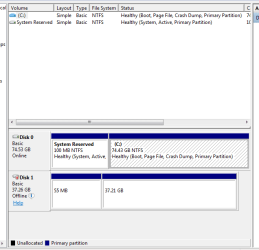
Well, for one they have no drive letter - so you cannot see them. Assign a drive letter to the 37GB partition. Then, what is this mini partition of 55MB, where did that come from?
 

My Computer My Computer

At a glance

Vista, Windows7, Mint Mate, Zorin, Windows 8from 1.6GHz Duo to i7
Computer Manufacturer/Model Number
HP, Dell, Gateway, Toshiba - 4 laptops and 2 desktops
OS
Vista, Windows7, Mint Mate, Zorin, Windows 8
CPU
from 1.6GHz Duo to i7
Monitor(s) Displays
2x HP w2207
Hard Drives
5x HDD, 7x SSD, 12x Externals
Keyboard
with trackball - no mices
Mouse
Trackball mice
Internet Speed
DSL 6000
It is a hard drive I had cloned an image of another hard drive on using Acronis. Sold that computer. I went into disk managment as you see, then formatted the larger portion after the sytem assined it as D: They was some kind of conflict I had to address. I don't know what the small partition is, but it would not let me format it if I remember correctly, and I did a Windows Easy tranfer of Files and settings to the D partition. I am reinstalling Windows 7 Pro clean on this computer, and that's what I was using this USB hard drive for. Got it done correctly I think. Never have ran into this "not recgognizing problem. I guess it's a Windows 7 thing huh?
 

My Computer My Computer

At a glance

Windows 7 ProfessionalCore I58GB
Computer type
Laptop
Computer Manufacturer/Model Number
Dell Vostro 3750
OS
Windows 7 Professional
CPU
Core I5
Memory
8GB
Hard Drives
Seagate 600 240GB SSD
Antivirus
MSE
Browser
Chrome, IE, Firfox
It is a hard drive I had cloned an image of another hard drive on using Acronis. Sold that computer. I went into disk managment as you see, then formatted the larger portion after the sytem assined it as D: They was some kind of conflict I had to address. I don't know what the small partition is, but it would not let me format it if I remember correctly, and I did a Windows Easy tranfer of Files and settings to the D partition. I am reinstalling Windows 7 Pro clean on this computer, and that's what I was using this USB hard drive for. Got it done correctly I think. Never have ran into this "not recgognizing problem. I guess it's a Windows 7 thing huh?


I don't think we can blame it on Windows7. Something is all screwed up. I do not quite undestand the cloning part. Are you saying that you cloned a win7 image to that drive? The small partition could be an image of the a system assigned partition from where you cloned the whole thing. Then you say that you transfered files. You need to unravel that whole story because I do not see the sequence of events.
 

My Computer My Computer

At a glance

Vista, Windows7, Mint Mate, Zorin, Windows 8from 1.6GHz Duo to i7
Computer Manufacturer/Model Number
HP, Dell, Gateway, Toshiba - 4 laptops and 2 desktops
OS
Vista, Windows7, Mint Mate, Zorin, Windows 8
CPU
from 1.6GHz Duo to i7
Monitor(s) Displays
2x HP w2207
Hard Drives
5x HDD, 7x SSD, 12x Externals
Keyboard
with trackball - no mices
Mouse
Trackball mice
Internet Speed
DSL 6000
I'll try to explain. I had used the USB hard drive as a cloned back up for another computer that I sold. I no longer need the clone. I decided to use this hard drive as an external drive to transfer my files and settings from this computer to it so I can do a clean install on this one, then put the files and settings back on here. I formatted the USB drive, then transferred my files and settings from this computer to it using Windows easy tranfer. I tranferred to the newly formatted D: partional on the USB. I do not know what the small partition is. Does this make better sense?

My original problem was that this computer would not recognize the USB hard drive initially. When I was told to go to disk management, I figured out how to assign it a letter and format it, therefore, problem is solved, unless you see something I missed.


Comments please?
 

My Computer My Computer

At a glance

Windows 7 ProfessionalCore I58GB
Computer type
Laptop
Computer Manufacturer/Model Number
Dell Vostro 3750
OS
Windows 7 Professional
CPU
Core I5
Memory
8GB
Hard Drives
Seagate 600 240GB SSD
Antivirus
MSE
Browser
Chrome, IE, Firfox
Delete the partition and extend the other one. First, boot Ubuntu as a live cd, and get all your data off onto another drive.
 

My Computer My Computer

At a glance

Windows 7 Ultimate x86-64[email protected] 1066MHz FSB6GB DDR3 1066MHz9300M GS 256MB Dedicated (Speed) + Intel4500M...
Computer Manufacturer/Model Number
Sony Vaio Z46GDU
OS
Windows 7 Ultimate x86-64
CPU
[email protected] 1066MHz FSB
Motherboard
Sony branded
Memory
6GB DDR3 1066MHz
Graphics Card(s)
9300M GS 256MB Dedicated (Speed) + Intel4500MHD (Stamina)
Sound Card
Realtek HD Audio
Monitor(s) Displays
13.1' WXGA
Screen Resolution
1600x900
Hard Drives
320GB 7200RPM w/ 16MB cache
Internet Speed
1MB/s
Sorry, I have no idea what you mean by "boot Ubuntu as a live cd, and get all your data off onto another drive. "

Can you explain?
 

My Computer My Computer

At a glance

Windows 7 ProfessionalCore I58GB
Computer type
Laptop
Computer Manufacturer/Model Number
Dell Vostro 3750
OS
Windows 7 Professional
CPU
Core I5
Memory
8GB
Hard Drives
Seagate 600 240GB SSD
Antivirus
MSE
Browser
Chrome, IE, Firfox
Sorry, I have no idea what you mean by "boot Ubuntu as a live cd, and get all your data off onto another drive. "

Can you explain?

Ubuntu is a very solid linux OS. All you do is the get the whole OS as a 699MB image. You then burn this image to disc and then reboot with the disc in the drive. Maybe you have to modify your BIOS, maybe not, to boot from CD, but when it loads you can copy your stuff off the drive. It doesn't touch your Windows install unless you decide to install it which for this purpose is not necessary:

Download Ubuntu | Ubuntu

I can walk you through the steps.

After the .iso image, get ImgBurn:

The Official ImgBurn Website

And we'll take it from there.
 

My Computer My Computer

At a glance

Windows 7 Ultimate x86-64[email protected] 1066MHz FSB6GB DDR3 1066MHz9300M GS 256MB Dedicated (Speed) + Intel4500M...
Computer Manufacturer/Model Number
Sony Vaio Z46GDU
OS
Windows 7 Ultimate x86-64
CPU
[email protected] 1066MHz FSB
Motherboard
Sony branded
Memory
6GB DDR3 1066MHz
Graphics Card(s)
9300M GS 256MB Dedicated (Speed) + Intel4500MHD (Stamina)
Sound Card
Realtek HD Audio
Monitor(s) Displays
13.1' WXGA
Screen Resolution
1600x900
Hard Drives
320GB 7200RPM w/ 16MB cache
Internet Speed
1MB/s
Very good. I now see what you have done initially. I am glad you were able to assign the drive letter. As I said, the little partition is probably a leftover of the cloning job. If it does not bother you, just leave it. Else you could use a live Ubuntu ot fedora to delete it. But since you would get the unallocated free space to the left of the big partition, there is little you could do with this space unless you restart revamping that whole drive.
 

My Computer My Computer

At a glance

Vista, Windows7, Mint Mate, Zorin, Windows 8from 1.6GHz Duo to i7
Computer Manufacturer/Model Number
HP, Dell, Gateway, Toshiba - 4 laptops and 2 desktops
OS
Vista, Windows7, Mint Mate, Zorin, Windows 8
CPU
from 1.6GHz Duo to i7
Monitor(s) Displays
2x HP w2207
Hard Drives
5x HDD, 7x SSD, 12x Externals
Keyboard
with trackball - no mices
Mouse
Trackball mice
Internet Speed
DSL 6000
Back
Top